
Published on November 12th, 2026
If you’ve ever looked at a support inbox on a Monday morning, you already know why AI tools for customer support went from a nice-to-have to a line item in almost every budget. The same questions arrive again and again. Where’s my order? How do I reset my password? Can I change my plan? Someone has to answer them, and that someone is usually a tired human who would rather be solving the hard problems.
Here’s the thing, though. “AI for customer support” isn’t one product. It’s at least four different jobs wearing the same label. Some tools talk to your customers directly and close tickets on their own. Others sit beside your agents and help them write better replies, faster. Some live inside a full helpdesk. Others are built for one niche, like online stores.
Pick the wrong kind of tool and you’ll pay for features you never use. Worse, you might get a bill that grows every time the AI does its job well. (Yes, that’s a real thing, and we’ll get to it.)
So this guide is organized by task, not by brand. For each job, you’ll see which tools fit, what they actually cost at time of writing, and what the vendors claim about results, clearly labeled as their claims. You’ll also find the numbers that matter from Salesforce, Zendesk, and Gartner research, a comparison table, a plain-English explanation of how AI support pricing works, and a checklist for choosing the right setup as you plan for 2027.
Let’s start with the short version.
Quick Answer: The Best AI Tools for Customer Support by Task
The best AI tools for customer support depend on the job. For an AI agent that answers customers on its own, look at Fin (formerly Intercom) or Tidio Lyro. For a full helpdesk with AI built in, choose Zendesk or Freshdesk. Online stores should consider Gorgias, and small teams can start cheaply with Help Scout.
Here’s that answer broken down a little further:
- Best AI agent for any helpdesk: Fin, at $0.99 per outcome. It works with Intercom or with the helpdesk you already use.
- Best for small businesses on a budget: Tidio Lyro. There’s a free plan, and the Lyro AI add-on starts at $39 a month.
- Best all-in-one helpdesk with AI: Zendesk. Seats start at $55 per agent, and AI agents come with every plan.
- Best value helpdesk with AI: Freshdesk. Plans start at $19 per agent, with 500 free AI sessions to start.
- Best for e-commerce and Shopify stores: Gorgias, at $0.90 to $1.00 per AI resolution.
- Best for small teams that want simple pricing: Help Scout. There’s a free plan for up to 5 users, and AI Answers costs $0.75 per resolution.
- Best if you already use HubSpot: HubSpot Customer Agent, at $0.50 per resolved conversation.
- Best way to help human agents: a copilot add-on, such as Zendesk Copilot or Freddy Copilot.
All prices are at time of writing. AI support pricing changed several times in 2026, so always check the vendor’s own page before you buy.
What AI Customer Support Tools Actually Do in 2027
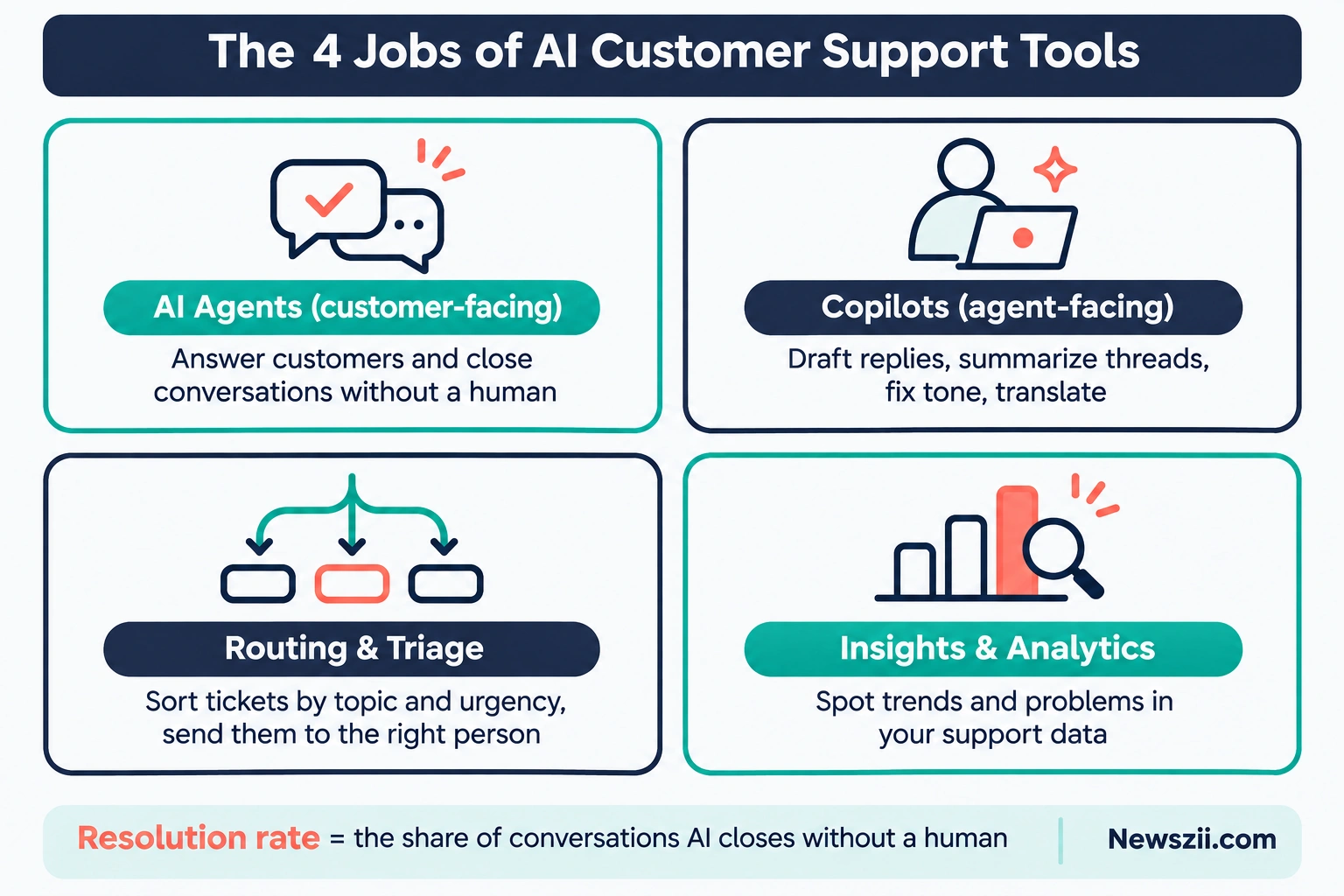
AI customer support tools do four main jobs. They answer customers directly, help human agents work faster, sort and route incoming tickets, and turn support data into insight. Most products handle more than one of these, but each tends to be strongest at one.
From Decision Trees to AI That Takes Action
The old idea of a support chatbot was a decision tree. Press 1 for billing, press 2 for shipping, and hope your question fits a box. Today’s tools are different. They read your help articles, past answers, and product information, then reply in plain language. The better ones can also take action, like checking an order status or starting a return, instead of just pointing to a help page.
The Four Jobs of AI Customer Support Tools
Here’s how the four jobs break down.
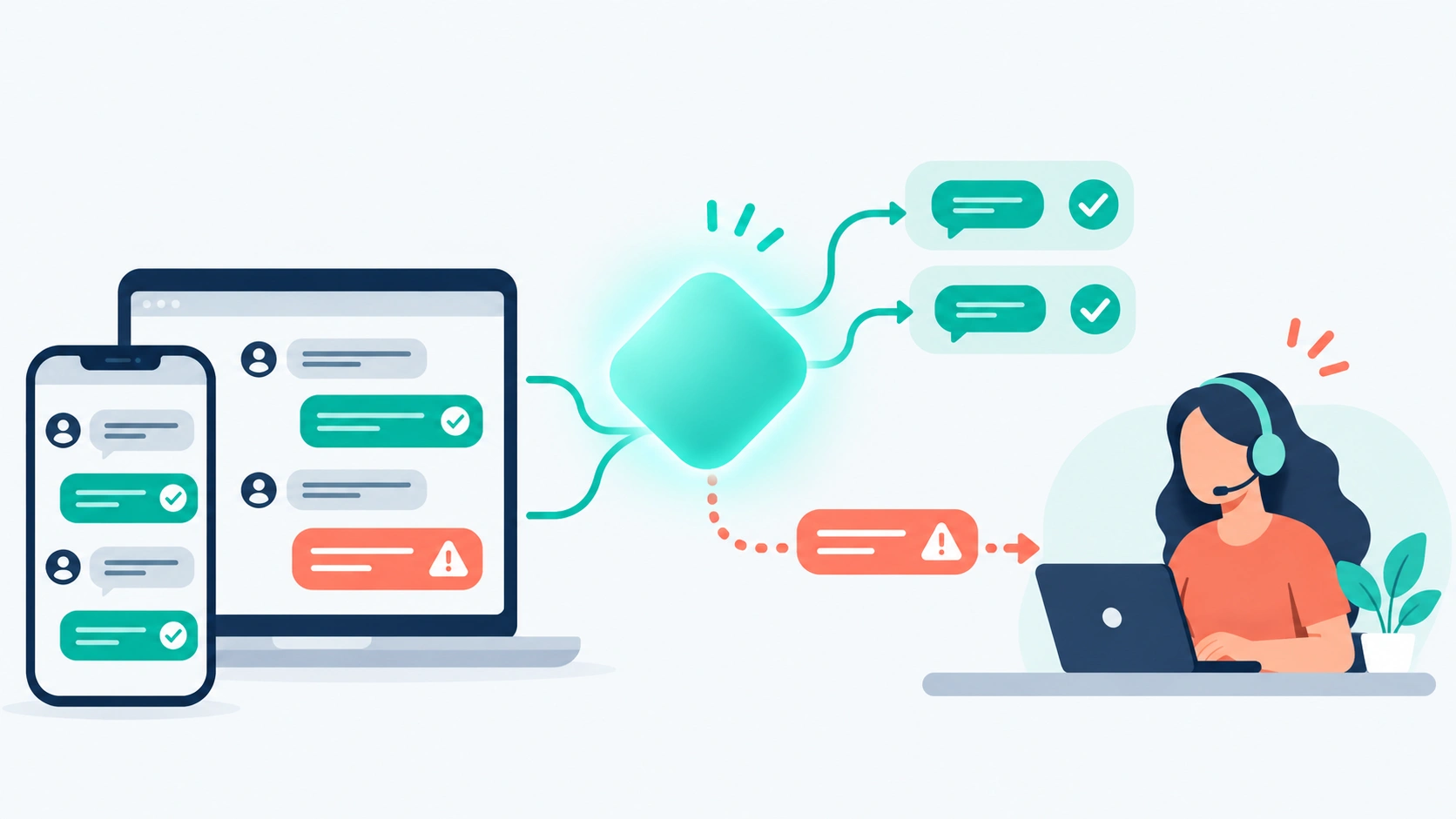
1. AI agents (customer-facing). These talk to customers in chat, email, or messaging apps. When they can answer the question, they close the conversation without a human. When they can’t, they hand it to a person. This is where most of the hype, and most of the spending, sits right now.
2. Copilots (agent-facing). These sit inside the helpdesk and help your human team. They suggest replies, summarize long threads, adjust tone, and translate messages. The customer never sees the copilot. They just get a faster, cleaner answer.
3. Routing and triage. AI reads incoming tickets, works out what they’re about and how urgent they are, and sends them to the right person or queue. This rarely gets headlines, but it saves real time once you have more than a handful of agents.
4. Insights and analytics. Some tools spot trends in your tickets, like a sudden rise in complaints about one product. Zendesk’s CX Trends 2026 report puts weight on this, describing analytics you can simply ask questions in plain language.
What Resolution Rate Means
One more term to know before we get into the tools: resolution rate. It’s the share of conversations the AI closes without a human stepping in. Vendors love to quote it, and you’ll see plenty of these figures below. Just remember that every resolution rate in this guide comes from the vendor itself. Your results will depend heavily on how good your help content is and what your customers typically ask.
Task 1: AI Agents That Answer Customers on Their Own
If your main goal is fewer tickets reaching your human team, start here. AI agents handle the first conversation with a customer and close it when they can. These four tools take different approaches, and their pricing differs more than you might expect.
Fin (formerly Intercom): best AI agent for any helpdesk
Fin has had a busy year. The company behind Intercom renamed itself Fin in May 2026, while Intercom remains the name of its helpdesk product. Then Salesforce completed its acquisition of Fin on September 10, 2026. Fin now operates inside Salesforce’s AI Labs and continues to serve its existing customers.
What makes Fin stand out is flexibility. You don’t have to move to Intercom to use it. Fin can run on top of the helpdesk you already have, whether that’s Zendesk, Salesforce, HubSpot, or Freshdesk. According to Salesforce’s announcement, Fin serves more than 30,000 companies and reports a 76% average resolution rate. That’s the vendor’s own number, so treat it as a ceiling to aim for, not a promise.
Pricing at time of writing:
- $0.99 per outcome. An outcome is usually a resolved conversation, but handoffs and routing outcomes are also billed at $0.99.
- Sales qualifications cost $9.99 each.
- With another company’s helpdesk: a 50-outcome monthly minimum, so the lowest bill is $49.50 a month.
- With the Intercom helpdesk: seats cost $29, $85, or $132 per seat per month billed annually, or $39, $99, or $139 billed monthly.
Who it’s for: Growing teams that want a strong AI agent without replacing their helpdesk, and Intercom users who want everything in one place.
Watch out for: The word “outcome.” Because handoffs count too, your bill can include conversations that ended with a human. Read Fin’s definition carefully and model it against your own ticket mix.
Tidio Lyro: best for small businesses and online stores on a budget
Tidio is built for small and mid-sized businesses, especially e-commerce. Its AI agent, Lyro, runs on Anthropic’s Claude combined with Tidio’s own models. That’s an unusual choice in a market where most chatbots don’t say what’s under the hood.
Tidio’s headline claim is a 67% average resolution rate, backed by a money-back guarantee if it can’t lift your rate to at least 50%. A guarantee like that is rare, and it tells you something about how confident the company is. Still, read the terms before you rely on it.
Pricing at time of writing (as listed on November 6, 2026):
- Free plan: available, good for testing
- Starter: $29 a month for 100 conversations
- Growth: $59 a month for 250 conversations, up to $349 for 2,000
- Plus: from $300 a month plus usage
- Lyro AI add-on: from $39 a month for 50 AI conversations
One thing to know: Lyro is billed separately from your plan. A store on Starter that wants AI is really paying for two things, the plan and the Lyro bundle.
Who it’s for: Small shops and startups that want live chat plus a capable AI agent without enterprise pricing.
Watch out for: Older reviews that list a flat $749 Plus plan. Tidio has since changed Plus to a $300 base plus usage.
Help Scout AI Answers: best for small teams that want simple, capped costs
Help Scout has long been the friendly, uncomplicated helpdesk. Its AI follows the same approach. Plans are free for up to 5 users, then $25, $45, and $75 per user per month, with AI Answers billed at $0.75 per resolution.
Two details make it especially good for cautious buyers. First, new accounts get three months of unlimited AI Answers, so you can see real results before paying a cent for AI. Second, you can set a monthly cap on AI Answers resolutions. When you hit the cap, the AI stops and your bill stays where you planned it.
Help Scout says its customers see a 73.19% average resolution rate. As with every rate in this guide, that’s a vendor figure.
Who it’s for: Small and growing teams that want predictable costs and a clean, easy helpdesk.
Watch out for: The Pro plan. It requires at least 10 seats and is sold through a demo, so the real starting cost is higher than the per-seat price suggests.
HubSpot Customer Agent: best if you already live in HubSpot
If your sales and marketing already run on HubSpot, its Customer Agent is worth a look simply because your customer data is already there. HubSpot made it cheaper this year too. Since April 14, 2026, the Customer Agent costs 50 credits, or $0.50, per resolved conversation, down from $1.00 per conversation.
That’s the lowest per-resolution price in this guide. The catch is the credit system. Credits are shared across HubSpot’s AI features, and they reset monthly without rolling over. Buy too many and you waste money. Buy too few and the agent can stop when they run out.
Who it’s for: Businesses already paying for HubSpot that want AI support connected to their CRM.
Watch out for: Other teams using the same credit pool. If sales runs heavy AI campaigns, support’s credits can disappear fast.
Task 2: Full Helpdesks With AI Built In
Some teams don’t want to bolt an AI agent onto an existing system. They want one platform that handles tickets, live chat, a help center, and AI together. That’s where the two biggest names in helpdesk software come in.
Zendesk: best all-in-one helpdesk with AI
Zendesk changed its AI pricing in a big way in 2026. AI agents are now included in every Suite and Support plan instead of being sold as a separate add-on. You pay for results instead. Zendesk calls this outcome-based pricing.
Pricing at time of writing (pricing page as of November 4, 2026):
- Support Team: $19 per agent per month, billed annually. Email ticketing only.
- Suite Team: $55 per agent per month billed annually, or $69 monthly.
- Suite Professional: $115 per agent per month billed annually, or $149 monthly.
- Suite Enterprise: quote only.
The AI part works like this. Each plan includes a small number of free automated resolutions: 5 per agent per month on Support Team and Suite Team, and 10 on Suite Professional. After that, each resolution costs $1.50 if you commit to a volume in advance, or $2.00 pay-as-you-go.
There’s also Copilot, Zendesk’s assistant for human agents, at $50 per agent per month billed annually. We’ll cover copilots in Task 4.
Who it’s for: Mid-sized and larger teams that need many channels, detailed reporting, and a mature ecosystem of integrations.
Watch out for: The free allowance. Five resolutions per agent is small. A 10-agent team on Suite Team gets 50 free resolutions a month. A busy AI agent will pass that in a day or two, and everything after it is billed.
Freshdesk (Freddy AI): best-value helpdesk with AI
Freshdesk has always competed on price, and its AI follows the same pattern. The Freddy AI Agent is available on every paid plan. Freshdesk’s own pricing page lists the first 500 sessions as included on Growth, Pro, and Enterprise, with extra sessions at $49 per 100.
Those 500 free sessions are a one-time allowance per account, not a monthly one. Once they’re gone, you buy session packs. Packs you buy expire at the end of your billing cycle, so unused sessions don’t carry over.
For your human agents, Freddy AI Copilot costs $29 per agent per month billed annually, or $35 monthly, on Pro and Enterprise only. Growth plan users can’t add it.
Who it’s for: Budget-conscious teams that want a full helpdesk and are happy to start small with AI.
Watch out for: The difference between sessions and resolutions. Freshdesk bills for AI conversations whether or not the AI solves the problem. At $0.49 a session, it looks cheap next to Zendesk’s $1.50 per resolution. But if your AI only resolves half its conversations, you’re effectively paying close to $1 per resolution.
Task 3: AI Support for Online Stores
E-commerce support has its own rhythm. A huge share of tickets are some version of “Where is my order?”, plus returns, exchanges, discount codes, and sizing questions. These are perfect for AI, but only if the AI can see live order data. A generic chatbot that just quotes your shipping policy won’t cut it.
Gorgias: best for Shopify and e-commerce brands
Gorgias was built for online stores, and it connects deeply to your shop data. Its AI Agent can pull up an order, check its status, and answer in context instead of sending the customer to a tracking page.
Pricing at time of writing: The AI Agent costs $0.90 per resolution on annual plans and $1.00 on monthly plans, on top of your helpdesk plan.
Here’s the detail most buyers miss. Gorgias prices its helpdesk by ticket volume, and each AI-resolved conversation also counts as a billable helpdesk ticket. So one AI resolution can cost you twice: once as a resolution and once as a ticket. There is an exception. If the customer reaches a human within 72 hours, the conversation is charged only as a ticket.
Gorgias markets its AI at “up to 60%” automation, but independent reviews report lower results in practice. Plan your budget around a more conservative number.
Who it’s for: Shopify and DTC brands with lots of order-related questions and a need for deep store integration.
Watch out for: Peak season. Your ticket volume, and your AI bill, climb at exactly the moment your margins are tightest. Model your Black Friday month, not your average month.
Tidio: the budget alternative for smaller stores
If Gorgias feels like more than you need, Tidio (covered in Task 1) is the natural step down. It’s widely used by smaller Shopify stores, has a free plan to start, and adds Lyro AI from $39 a month. For a shop handling a few hundred conversations a month, that’s often enough.
The trade-off is depth. Gorgias is a full e-commerce helpdesk. Tidio is a lighter live chat and AI tool. As you grow, the gap matters more.
Task 4: Copilots That Help Your Human Agents
Not every support problem should be handed to a bot. Refund disputes, angry customers, technical bugs, and anything involving judgment still need a person. Copilots make those people faster without taking them out of the conversation.
A good copilot typically does four things:
- Drafts replies based on your help content and the ticket history
- Summarizes long threads, so an agent picking up a ticket doesn’t have to read 30 messages
- Adjusts tone and grammar, turning a rushed reply into a polished one
- Translates, so a small team can support customers in many languages
The time savings are real. In Salesforce’s State of Service research, 88% of service professionals using AI say it helps them spend less time switching between tools and systems. For an agent juggling a helpdesk, a CRM, an order system, and Slack, that adds up across a day.
Your main options at time of writing:
- Zendesk Copilot: $50 per agent per month, billed annually
- Freddy AI Copilot (Freshdesk): $29 per agent per month billed annually ($35 monthly), Pro and Enterprise only
- Help Scout: some agent-side AI (drafting, summaries, tone) is bundled into its plans rather than sold separately
Copilots are priced per seat, not per result. That makes them much easier to budget for than AI agents. It also means you can be selective. If only five of your fifteen agents handle complex tickets, give copilot seats to those five.
A practical tip: If you’re nervous about customer-facing AI, start with a copilot. Your team gets comfortable with AI suggestions, you find the gaps in your help content, and your customers never see an AI mistake. Then you add an AI agent once your knowledge base is in better shape.
AI Customer Support Tools Compared
Here’s every tool in this guide side by side. Prices are at time of writing, and every resolution rate is the vendor’s own claim.
| Tool | Best task | How AI is billed | AI price | Starting plan price | Vendor-claimed resolution rate |
|---|---|---|---|---|---|
| Fin (formerly Intercom) | AI agent on any helpdesk | Per outcome | $0.99 per outcome (50/month minimum on other helpdesks) | Intercom seats from $29/month (annual) | 76% |
| Tidio Lyro | Small business and small stores | Monthly AI conversation bundle | From $39/month for 50 AI conversations | Free plan; Starter $29/month | 67% |
| Help Scout | Small teams wanting capped costs | Per resolution | $0.75 per resolution | Free for up to 5 users; Standard $25/user | 73.19% |
| HubSpot Customer Agent | Teams already on HubSpot | Credits per resolution | $0.50 per resolved conversation | Requires a HubSpot plan | Not stated |
| Zendesk | All-in-one helpdesk | Per resolution after allowance | $1.50 committed / $2.00 pay-as-you-go | Suite Team $55/agent (annual) | Not stated |
| Freshdesk (Freddy) | Budget helpdesk | Per session | $49 per 100 sessions after 500 free | Growth $19/agent (annual) | Not stated |
| Gorgias | E-commerce and Shopify | Per resolution (plus ticket count) | $0.90 annual / $1.00 monthly | Helpdesk plans by ticket volume | Up to 60% automation |
The cheapest line on paper isn’t always the cheapest bill. The next section explains why.
How AI Customer Support Pricing Works (and Where Bills Spike)
AI customer support tools are priced in three main ways: per resolution (you pay when the AI closes a conversation), per session (you pay for every AI conversation), or through a monthly bundle of AI conversations. Most also charge per-seat fees for the human agents on top.
This is the part of buying AI support that catches people out, so it’s worth slowing down.
Model 1: Pay per resolution or outcome
Used by Fin, Zendesk, Help Scout, Gorgias, and HubSpot. You only pay when the AI successfully handles a conversation without a human.
On the surface, this is fair. You pay for results, not attempts. But think about what it means over time. As your help content improves and your AI gets better, it resolves more conversations, and your bill goes up. Success costs money. That’s not a reason to avoid this model. It’s a reason to forecast with your real volume.
Also read each vendor’s definition closely. Fin bills per “outcome,” which includes some handoffs. Zendesk uses an extra AI check to confirm a request was truly resolved before billing it. These details change your real cost per resolution.
Model 2: Pay per session
Used by Freshdesk. You pay for each AI conversation, resolved or not. The unit price is lower ($0.49 per session after the free 500), but you pay for misses as well as wins. If your AI resolves only a third of its sessions, your effective cost per resolution is about three times the session price.
Model 3: Monthly AI conversation bundles
Used by Tidio. You buy a set number of AI conversations each month. This is the easiest model to budget for, because the price is fixed. The risk is the opposite one: buy too small a bundle and the AI stops when it runs out. Buy too big and you pay for conversations you didn’t use.
A quick worked example
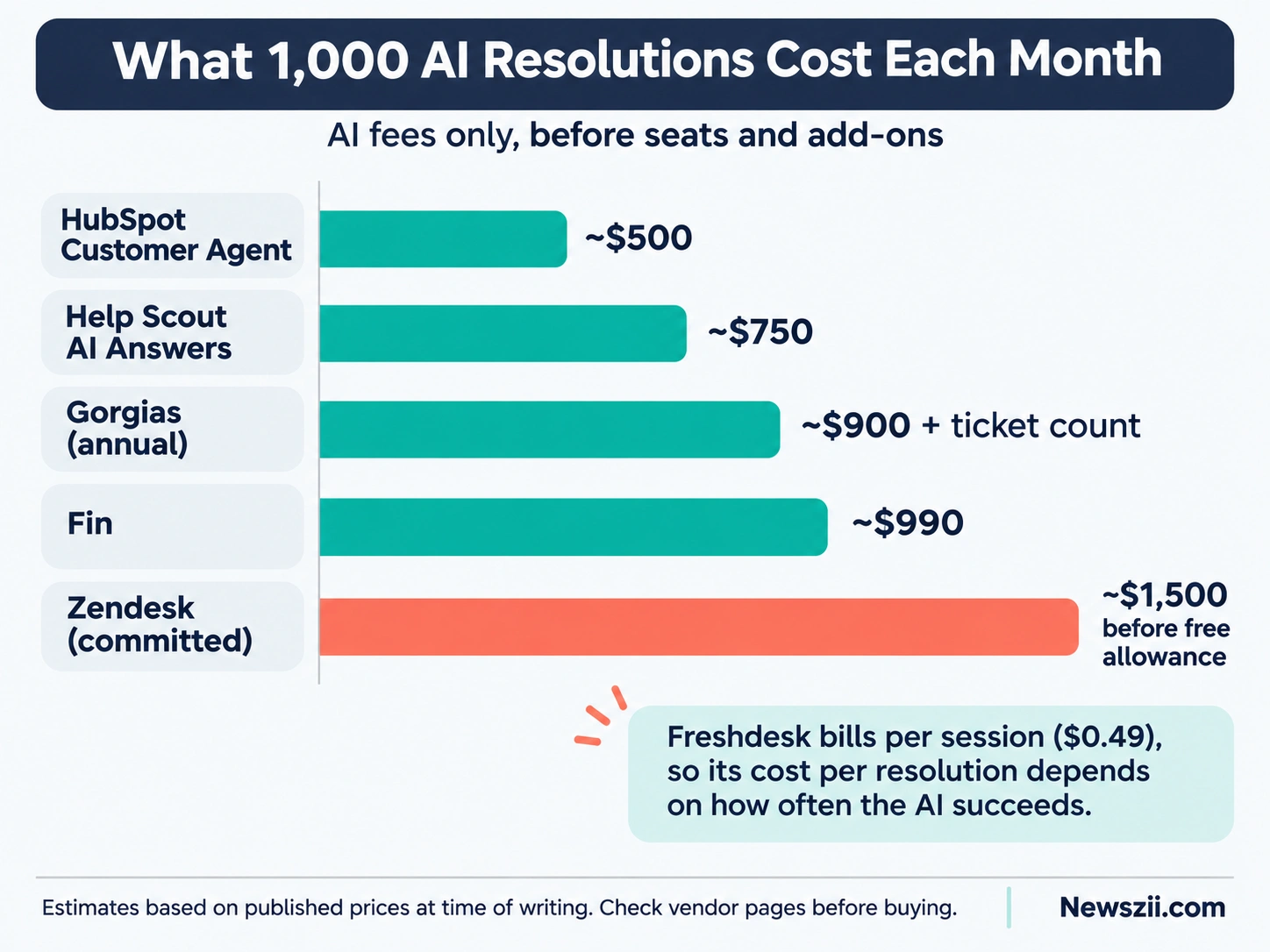
Imagine a small team whose AI resolves 1,000 conversations a month. Using the per-resolution prices above, before any seat fees:
- HubSpot Customer Agent: about $500
- Help Scout AI Answers: about $750
- Gorgias (annual): about $900, plus each one counting as a ticket
- Fin: about $990
- Zendesk (committed): about $1,500, minus the plan’s free allowance
That’s a spread of roughly three times between the cheapest and most expensive option, for the same 1,000 resolutions. Seat prices, add-ons, and how each vendor defines a “resolution” will move these numbers, so treat them as a starting point for your own math rather than a final answer.
Four ways to keep your bill under control
- Set a spending cap where the tool allows it. Help Scout does this natively.
- Model your busiest month, not your average one.
- Commit to volume only after a pilot. Zendesk’s committed price is cheaper, but only if your forecast is right.
- Track cost per resolution monthly, alongside resolution rate and customer satisfaction.
What the Data Says: Fast Adoption, Cautious Customers
AI in customer support is now mainstream. The research below shows businesses adopting AI quickly and seeing results, while customers remain more skeptical than many companies assume. Both sides matter if you want AI to help rather than hurt.
Businesses are moving fast
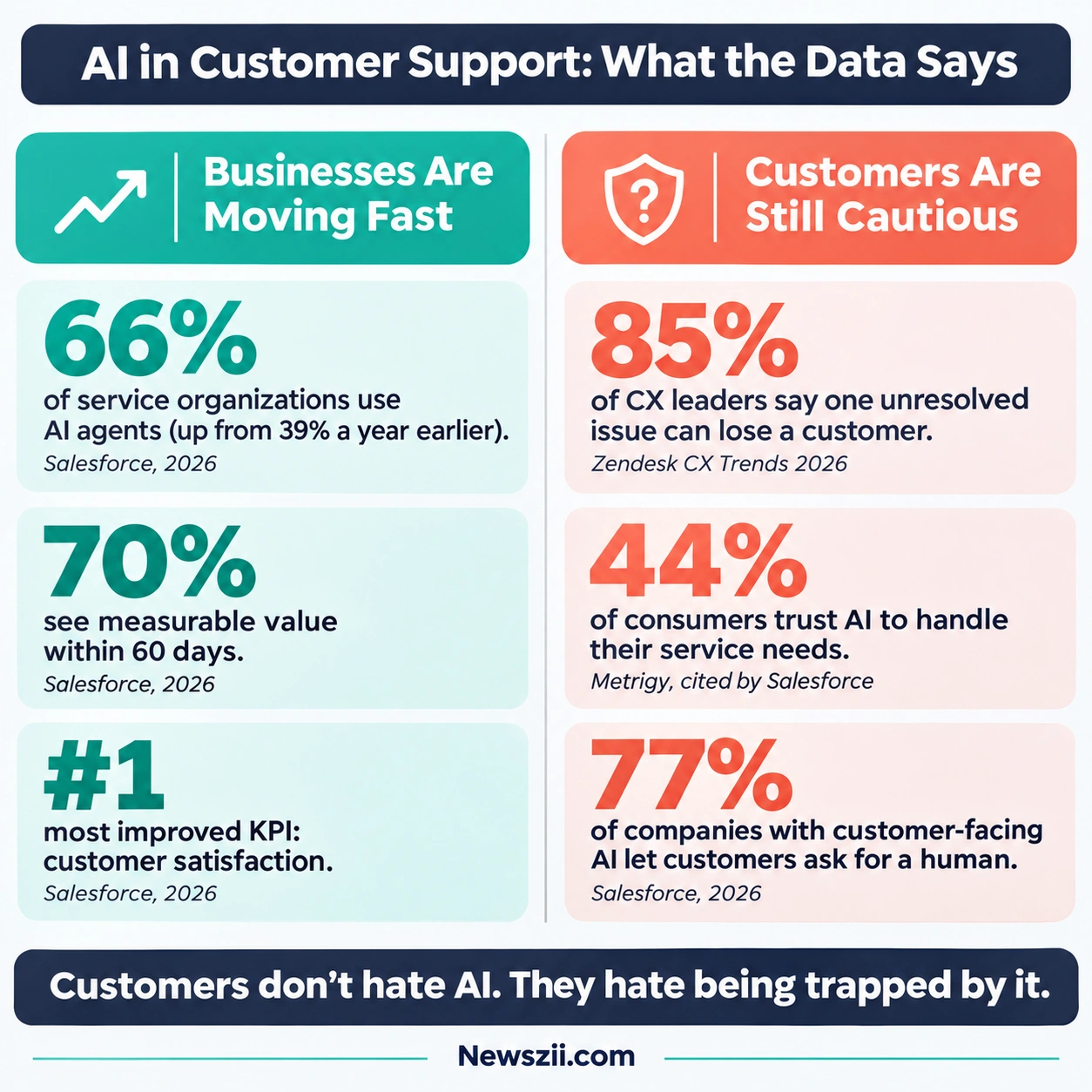
Salesforce’s State of Service: AI Agents Edition surveyed 3,075 service professionals between March 9 and April 4, 2026. The headline findings:
- 85% of service organizations use at least one form of AI.
- Use of AI agents jumped from 39% in the April/May 2025 survey to 66% a year later.
- 70% of organizations with AI agents saw measurable value within 60 days.
- When AI is used to resolve a case, it works on its own 40% of the time.
- The most improved KPI wasn’t cost or speed. It was customer satisfaction, ranking ahead of rep productivity, handle time, retention, and first-response time.
That last point surprised many in the industry. AI was sold as a cost-cutting tool, but teams are reporting happier customers first.
Gartner’s research points the same way on spending. In a survey of 199 service leaders in April and May 2026, AI spending rose 38% while overall service budgets grew only 2% (as reported by IT-Online).
The bar for service keeps rising
Zendesk’s CX Trends 2026 report, based on surveys of 6,182 consumers and 5,115 business respondents across 22 countries in June 2025, shows how little patience customers have:
- 85% of CX leaders say one unresolved issue is enough to lose a customer.
- 86% of consumers say fast, accurate answers strongly influence what they buy.
- 83% of consumers believe customer experience should be far better than it is today.
- Customer demand for transparency about AI decisions rose 63% in a single year.
But customers aren’t fully convinced
Here’s the other side of the story. In an older Gartner survey of 5,728 customers in December 2023, 64% said they would prefer companies didn’t use AI for customer service. 53% said they’d consider switching to a competitor over it. Their top fear, cited by 60%, was that it would become harder to reach a person.
That data is a few years old, and attitudes may have shifted. But more recent numbers still show a trust gap. According to the Metrigy Consumer CX Index, cited by Salesforce, just 44% of consumers trust AI to handle their customer service needs.
The lesson is straightforward. Customers don’t hate AI. They hate being trapped by it. Salesforce found that 77% of companies with customer-facing AI let customers ask for a human at any point. If your setup doesn’t, fix that before anything else.
Will AI replace support teams?
Not anytime soon. In a Gartner survey of 321 service leaders in October 2025, only 20% had reduced agent headcount because of AI. AI is changing what support teams do far more than how many people they employ.
How to Choose the Right AI Customer Support Tool
To choose an AI customer support tool, start with your biggest support problem, then match it to the task the tool does best. After that, check that it works with your existing helpdesk, forecast the cost using your real ticket volume, and run a short pilot before committing.
Here’s that process in a bit more detail.
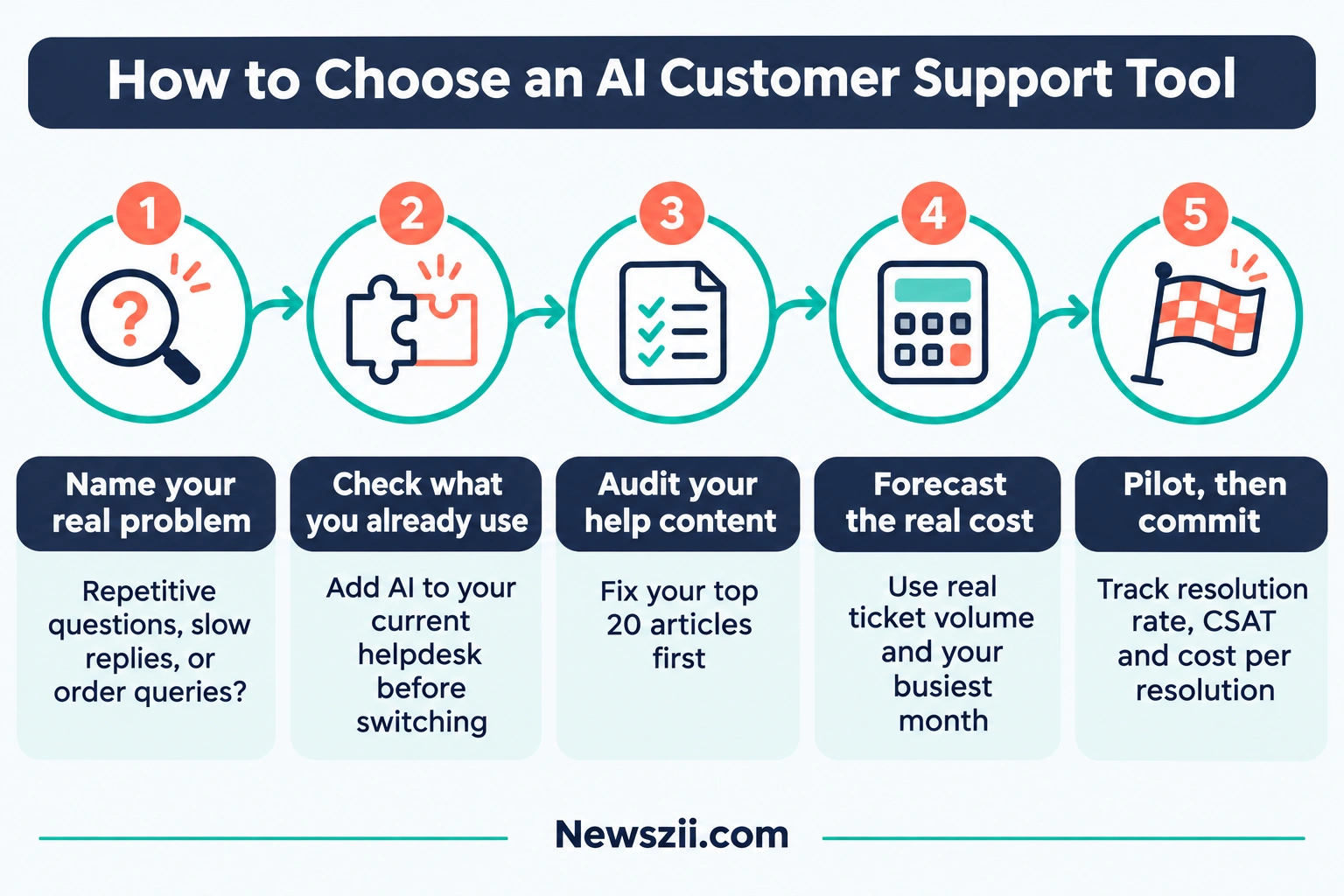
Step 1: Name your real problem
Be honest about what hurts most. Is it too many repetitive questions? Slow replies on complex tickets? Weekend coverage? Each problem points to a different kind of tool:
- Too many repetitive questions → an AI agent (Task 1)
- Slow, inconsistent replies from your team → a copilot (Task 4)
- A messy setup across email, chat, and social → a helpdesk with AI built in (Task 2)
- Order and return questions eating your week → an e-commerce tool (Task 3)
Step 2: Check what you already use
If you’re happy with your helpdesk, look for an AI agent that runs on top of it, like Fin. If you’re on HubSpot, try its Customer Agent first. Switching helpdesks just to get AI is expensive and disruptive. Only do it if your current system is already holding you back.
Step 3: Audit your help content
AI agents answer from what you’ve written down. If your help center is thin, out of date, or missing your most common questions, no AI tool will fix that. Spend a week tidying your top 20 articles before you switch anything on. It’s the cheapest performance boost you’ll get.
Step 4: Forecast the real cost
Take last month’s ticket volume. Estimate what share an AI could realistically handle. A cautious starting assumption is well below the vendors’ headline rates. Multiply by the per-resolution or per-session price, then add seats and add-ons. Do this for your busiest month too.
Step 5: Pilot, then commit
Most tools offer a free trial, and some offer more. Help Scout gives three months of unlimited AI Answers to new accounts. Use that window to measure three things: resolution rate, customer satisfaction on AI conversations, and cost per resolution.
Quick picks by team size
- Solo founder or 1–3 person team: Tidio (free plan plus Lyro) or Help Scout (free for up to 5 users)
- Small team (4–15 agents): Help Scout or Freshdesk, plus a copilot for your most experienced agents
- Growing team (15–50 agents): Zendesk or Freshdesk with AI agents, or Fin on your current helpdesk
- Online store of any size: Tidio to start, Gorgias as you scale
- HubSpot customers: HubSpot Customer Agent first, then compare it with Fin
Common Mistakes to Avoid With AI Customer Support
Most AI support projects that disappoint don’t fail because of the technology. They fail because of choices made around it. These are the mistakes worth avoiding.
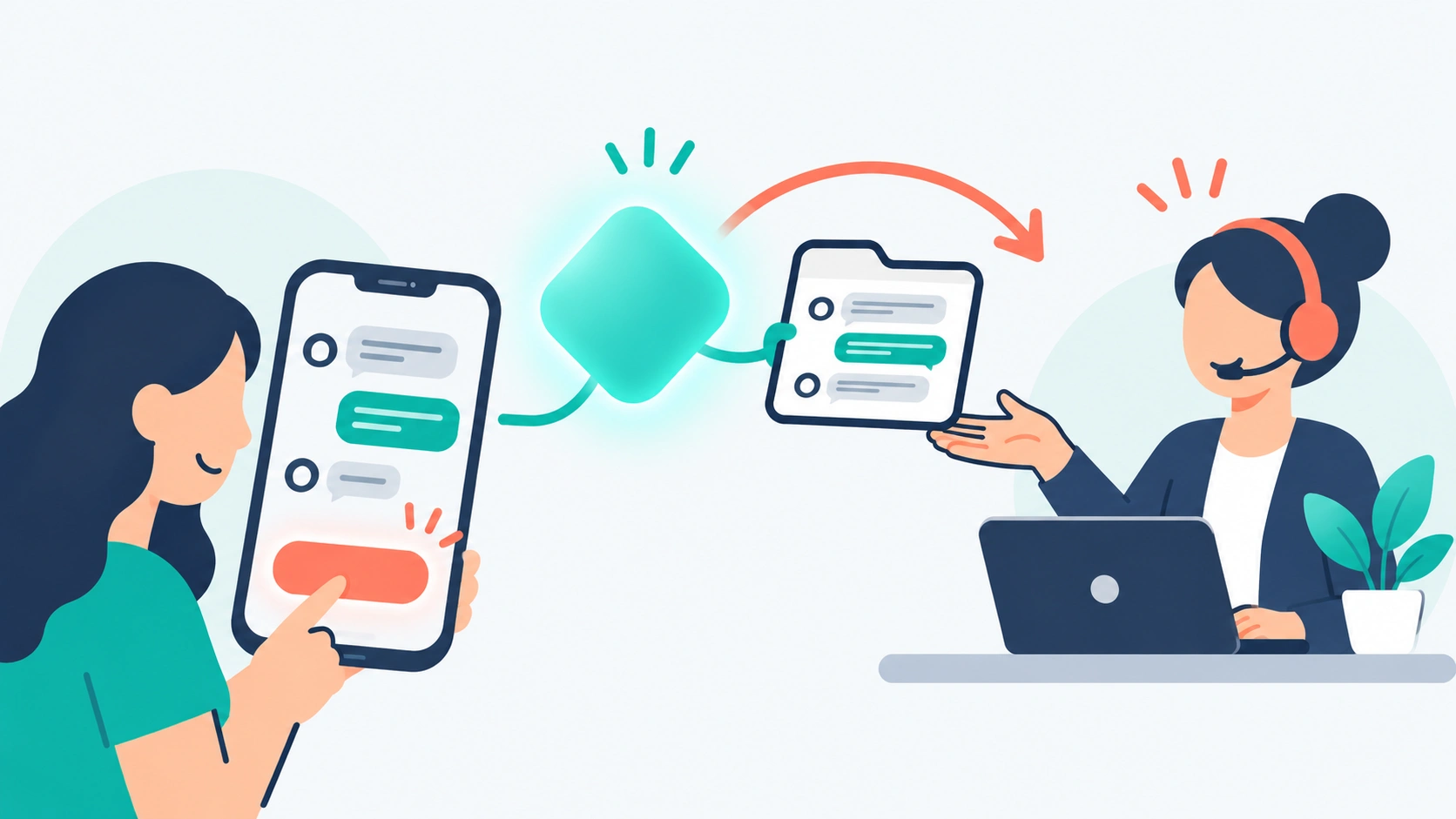
1. Hiding the human. This is the big one. Customers’ top fear is getting stuck with a bot. Always make it obvious how to reach a person, and make the handoff smooth, so the agent sees the full conversation and the customer doesn’t have to repeat themselves.
2. Launching on a thin knowledge base. An AI agent is only as good as the content it learns from. If your help center has gaps, the AI will either guess or give up. Neither looks good to customers.
3. Not setting a spending cap. With per-resolution pricing, a successful AI can quietly double your monthly bill. Use caps where they exist, and set alerts where they don’t.
4. Trusting headline resolution rates. A vendor’s 67% or 76% is an average across many customers, and averages hide a wide spread. Your first month might look very different. Set targets based on your own pilot, not the marketing page.
5. Automating the wrong conversations. Billing disputes, cancellations, and complaints from upset customers are risky to hand to AI. Start with simple, high-volume questions like order status, password resets, and opening hours.
6. Ignoring transparency. Customers increasingly want to know when they’re talking to AI and why it made a decision. Tell them up front. It builds trust instead of eroding it.
7. Cutting staff too early. AI shifts work rather than removing it. Someone still needs to manage the AI, fix knowledge gaps, review conversations, and handle everything the AI can’t. Gartner even predicts that half of companies that cut customer service staff because of AI will rehire by 2027.
What to Expect From AI Customer Support in 2027
In 2027, expect AI agents to handle a larger share of routine support, pricing to keep shifting toward pay-per-result models, and the big platforms to consolidate. Human agents will spend more of their time on complex cases and on managing the AI itself.
Here are the trends worth planning around.
More Automation, but Not Cheaper Forever
AI will resolve more on its own. Gartner predicted in March 2025 that by 2029, AI agents will resolve 80% of common customer service issues without human help, cutting operating cos