

Published on November 12th, 2026
It’s the third working day of the month. The books are closed (mostly), the coffee is cold, and somebody wants “the numbers” by Friday. Not the raw export. A proper report: what happened, why it happened, and what to watch next month.
That is exactly the job AI tools got much better at in 2026. In the space of a few months, every major AI assistant learned to work inside spreadsheets instead of beside them, and the big accounting platforms built chat-style assistants straight into the ledger. The upside is real. The catch is that there are now so many options that picking one feels like its own month-end task.
So here is the short version first.
Quick answer: the best AI tool for finance reports depends on where your numbers live.
- On QuickBooks? Use Intuit Intelligence, which is built into paid QuickBooks Online plans.
- On Xero? Use JAX plus Xero Analytics.
- Building reports or models in Excel? Use Microsoft 365 Copilot, Claude for Excel or ChatGPT for Excel.
- Working in Google Sheets? Use Gemini in Sheets (or ChatGPT for Google Sheets).
- Sending branded reports to clients or a board? Use Fathom, which sits on top of your accounting software.
- Running a mid-market FP&A team? Look at Datarails.
Whichever you choose, follow one rule: AI drafts the report and the commentary, and a person checks every number before it goes out.
The rest of this guide explains each pick in plain language. You’ll find what it’s good at, what it costs, where it falls short, and how to combine two or three of them into a reporting setup that actually saves you time. There’s also a five-step checklist for catching AI mistakes before your manager, investor or client does.
Best AI tools for finance reports at a glance
If you only read one part of this article, make it this table. It matches the kind of report you need to produce with the tool best suited to it.
| Report you need | Best AI tool | Why it fits | Starting price (USD) |
|---|---|---|---|
| Monthly P&L and cash summary on QuickBooks | Intuit Intelligence | Reads your live QuickBooks data, so there’s nothing to upload | Included with paid QuickBooks Online plans (from $38/month) |
| Small-business dashboards and insights on Xero | Xero JAX + Xero Analytics | Built into the ledger, with answers traced back to source data | Included on eligible Xero business plans |
| Branded management or board reports | Fathom | Turns ledger data into polished reports, with AI-drafted commentary | From about $53/month for one company |
| Variance reports and models in Excel (Microsoft 365 shop) | Microsoft 365 Copilot | Edits the workbook directly and lets you pick the AI model | $21/user/month (Copilot Business, under 300 users) |
| Complex Excel models and analyst-style reports | Claude for Excel | Cell-level citations, finance data connectors | Included with Claude Pro ($20/month) and up |
| Excel or Google Sheets reports on any budget | ChatGPT for Excel / Google Sheets | Available on all ChatGPT plans, asks permission before edits | Free plan; Plus $20/month |
| Reports built in Google Sheets | Gemini in Sheets | Native to Google Workspace, uses pivot tables, charts and formulas | Bundled with Workspace Business Standard ($14/user/month, annual) |
| Consolidated FP&A reporting for a finance team | Datarails | Centralizes finance data, with built-in AI agents | Custom pricing |
One thing jumps out when you lay it all out like this. For most small businesses, the best first step costs nothing extra, because the AI is already inside the accounting software you pay for. The paid spreadsheet assistants matter once you start building custom reports that your ledger can’t produce on its own.
Start here: where do your numbers live?
Most “best AI tool” lists skip this question, and it’s the only one that really matters. An AI tool can only report on data it can see. If your numbers sit in QuickBooks and your AI sits in a browser tab, you’ll spend your time exporting CSV files and pasting them around. That is the exact busywork you were trying to escape.
Work through these questions in order and stop at the first “yes.”
- Is your main source of truth an accounting app (QuickBooks or Xero)? Start with the AI built into that app. It reads your live ledger, knows your chart of accounts, and needs no setup. For many small businesses, it handles the routine reporting questions on its own, like “Why did expenses jump in March?” or “Who owes us money?”
- Do you send reports to other people (clients, a board, investors) that need to look professional? Add a reporting layer such as Fathom on top of the ledger. It handles layout, branding and consistent monthly packs. Its AI writes first-draft commentary.
- Do you build custom reports, forecasts or models in a spreadsheet? Add one spreadsheet AI. Pick it by the spreadsheet you use: Copilot or Claude for Excel-heavy Microsoft 365 users, Gemini for Google Sheets teams, and ChatGPT if you want one assistant that works in both.
- Are you a finance team pulling numbers from several systems every month? That’s an FP&A problem, not a chatbot problem. A platform like Datarails consolidates the data first, then puts AI on top of it.
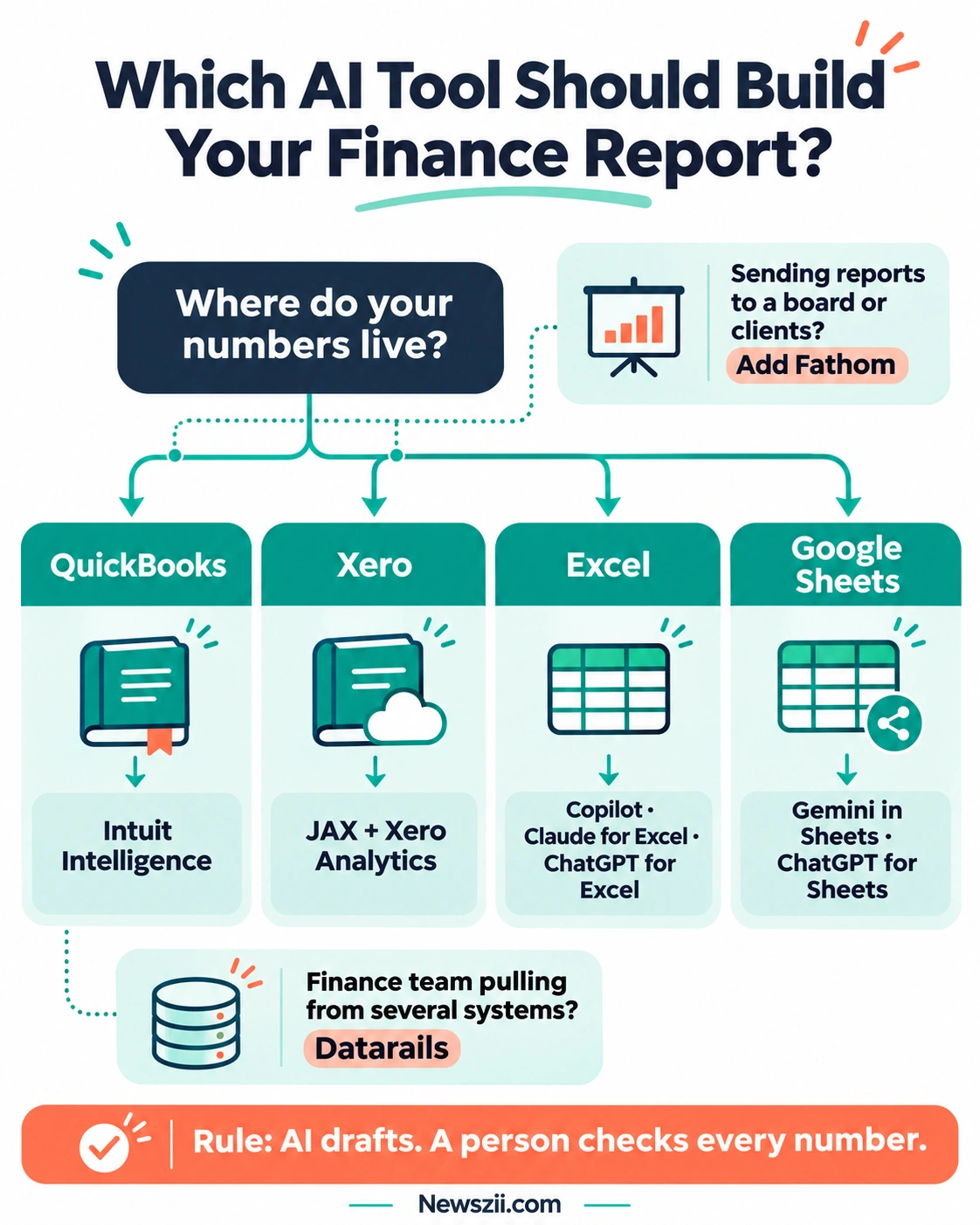
Notice the pattern. The answer is rarely one tool. It’s usually the AI inside your system of record, plus one spreadsheet assistant for everything custom. That combination is cheap, quick to set up, and covers nearly every reporting job a small company has.
Best AI tools built into your accounting software
These three tools work directly on your ledger data. That is their superpower. When the AI reads the same numbers your accountant reconciles, you skip the most error-prone step in reporting: moving data from one place to another.

1. Intuit Intelligence: best for QuickBooks users
If your business runs on QuickBooks Online, this is the obvious first stop. Intuit Intelligence is the AI assistant built into QuickBooks. You type questions in plain English, and it answers from your actual company data, not from a file you uploaded.
What it does well for reporting:
- Builds reports on request. Ask for a report with specific filters and date ranges, and it creates one. For example: “Expenses by category, monthly, for the last two quarters.”
- Explains trends. It can find specific transactions and explain why a number moved, which is the part of a report people actually read.
- Answers the “why” questions. Intuit has been pushing the assistant beyond “what happened” toward “why did it happen and what should I do about it.”
- Higher plans go further. Upper-tier plans add profit-and-loss insights and AI-written executive summaries for management reports.
What it costs: Intuit Intelligence is included with paid QuickBooks Online plans, which start at $38 a month for Simple Start. Each plan comes with a monthly allowance of chat prompts. Entry plans start with 25 a month, and a $10 monthly add-on gives you 100 more.
Where it falls short: The prompt allowance is the main catch. If you like to ask lots of follow-up questions, 25 prompts disappear quickly. Some features are still labeled beta, so read AI-generated summaries closely before forwarding them. It also only sees what’s in QuickBooks. If half your story lives in a CRM or a spreadsheet, it won’t know.
Best for: owners, freelancers and small teams on QuickBooks who want quick, accurate answers and basic reports without learning a new tool.
2. Xero JAX + Xero Analytics: best for Xero users
Xero’s answer has two parts. JAX (short for “Just Ask Xero”) is the conversational AI that answers questions and handles workflows. Xero Analytics is the reporting and insights layer, built on Xero’s acquisition of the Syft analytics platform.
What it does well for reporting:
- Traceable answers. Xero says JAX produces answers with supporting documentation and traceability. In finance, “show me where that number came from” is the most important question you can ask an AI.
- Dashboards and health checks. Xero Analytics brings dashboards, AI-generated summaries and business health scorecards into the platform you already use.
- Microsoft 365 integration. In July 2026, Xero announced an integration that lets JAX answer finance questions inside Microsoft 365 Copilot, using live Xero data. Xero has also announced it will expand into Excel, Word and PowerPoint, where live Xero data flows into tables and charts. That is a big deal for anyone who rebuilds the same P&L table in Excel every month.
What it costs: Xero Analytics is included on eligible Xero business plans, so check your plan tier. Accountants and bookkeepers can get the fuller Syft Analytics toolkit at no extra cost for clients on qualifying plans.
Where it falls short: As with QuickBooks, the AI is only as good as your bookkeeping. Messy categories or unreconciled bank lines produce confident-looking but wrong insights. The Microsoft 365 rollout is also still expanding, so check which apps are live in your region before you plan around it.
Best for: small businesses and their advisors already on Xero who want insight-style reporting without adding another subscription.
3. Fathom: best for branded management and board reports
Fathom solves a different problem. Your ledger can tell you the numbers. Fathom helps you present them. It’s a reporting, analysis and forecasting platform that sits on top of your accounting system (it connects to Xero, QuickBooks and MYOB, among others) rather than replacing it.
What it does well for reporting:
- Polished, repeatable report packs. You get branded management reports, KPI dashboards and consolidated reporting across multiple companies.
- AI Commentary Writer. This feature drafts the narrative text that explains your numbers, and keeps it traceable back to the figures underneath. Commentary is usually the slowest part of a monthly report, so this is where the time savings show up.
- Forecasting built in. Three-way cash flow forecasting and scenario planning let a report answer “what’s next?” as well as “what happened?”
What it costs: From about $53 a month for one company, according to Fathom’s own pricing pages. Multi-company plans cost more, and per-company pricing gets cheaper as you add entities.
Where it falls short: It’s a reporting layer, not a general assistant, so it won’t build you a custom pricing model or analyze a supplier contract. There’s also a learning curve to getting your report templates exactly right. One practical warning: don’t confuse it with Fathom the AI meeting notetaker (fathom.ai). They’re unrelated products, and search results mix them up constantly.
Best for: accountants, fractional CFOs, franchise groups and founders who send the same monthly or quarterly pack to clients, a board or investors.
Best AI tools for spreadsheet-based finance reports
Sooner or later, every finance report ends up in a spreadsheet. Maybe it’s a variance analysis your ledger can’t produce, a forecast with five scenarios, or a quick pivot your manager asked for in a meeting. This is where the four spreadsheet assistants below earn their keep.
The big change in 2026 is that these tools no longer just suggest formulas in a chat window. They open your workbook, build tables and charts, write formulas and update models directly. That is powerful. It also means you need to watch what they change, and all four give you some way to do that.

4. Microsoft 365 Copilot in Excel: best for Microsoft 365 teams
If your company already runs on Microsoft 365, Copilot is the path of least resistance. Its in-workbook editing feature is now called Edit with Copilot. Microsoft previously marketed it as “Agent Mode,” which is the name you’ll still see in older tutorials. It lets you build and edit a workbook side by side with Copilot, using Excel’s own features, so everything it produces stays editable.
What it does well for reporting:
- Plans before it acts. A “Plan with Copilot” mode shows which ranges, formulas and assumptions it’s about to touch before it changes anything. For financial models, that’s exactly the safeguard you want.
- Choice of AI model. Eligible licenses can choose which model does the work, including models from both OpenAI and Anthropic. If one model handles your messy workbook better, you can switch.
- Reusable finance skills. Microsoft added reusable “skills” for repeat processes such as discounted cash flow models, book closing and variance analysis. You set the process up once and get consistent structure every month.
What it costs: For organizations with fewer than 300 users, Microsoft 365 Copilot Business lists at $21 per user per month on top of an eligible Microsoft 365 Business plan. Larger organizations pay $30 per user per month for the enterprise add-on.
Where it falls short: It’s an add-on, so you pay for the Microsoft 365 base plan plus Copilot. If you’re not already a Microsoft shop, that stacks up fast. Like every tool here, it’s only as good as the structure of your workbook. A tidy table gets far better results than a sprawling sheet full of merged cells.
Best for: finance and operations people at companies already standardized on Microsoft 365 who live in Excel all day.
5. Claude for Excel: best for complex models and analyst-style reports
Claude for Excel is Anthropic’s add-in for Excel. It became generally available on May 5, 2026, alongside a broader push into financial services. It’s aimed squarely at people who build serious models: equity research, FP&A and anyone who has inherited a workbook nobody understands.
What it does well for reporting:
- Answers with cell-level citations. Ask a question about your workbook and it points to the exact cells behind the answer. That makes checking its work much faster.
- Works on existing models. It can adjust assumptions while preserving formula relationships, debug errors, and build or populate models without you leaving Excel.
- Pulls in outside data. Connectors such as S&P Global, LSEG and Daloopa bring external financial context into your analysis.
What it costs: The add-in itself has no separate fee. It’s included with paid Claude plans: Pro at $20 a month ($17 a month billed annually), Max, Team (from $25 per seat monthly, or $20 billed annually) and Enterprise.
Where it falls short: Governance is the honest weak spot for smaller plans. On Free, Pro, Max and Team plans, Claude for Excel doesn’t offer observability or audit logging. Enterprise organizations can route full audit telemetry to their own monitoring tools. Anthropic itself says not to use it for final client deliverables without human review, or for audit-critical calculations without verification. That’s good advice for every tool on this list.
Best for: analysts, FP&A professionals and founders who build or maintain detailed financial models and want a careful assistant that shows its work.
6. ChatGPT for Excel and Google Sheets: best all-rounder on a budget
OpenAI launched ChatGPT for Excel in March 2026, and since May 5, 2026, it has been generally available in both Excel and Google Sheets on all ChatGPT plans. That cross-platform reach is its biggest selling point. If your team is split between Excel and Sheets, one assistant covers both.
What it does well for reporting:
- Builds and updates models from your real cells and formulas. It can run scenarios and generate outputs while keeping your existing workbook structure intact.
- Asks before it edits. ChatGPT requests permission before making changes, so you can review each step and undo edits if needed.
- Low barrier to entry. Because it’s on every plan, you can test it on a real report before paying anything.
What it costs: Available on all ChatGPT plans. ChatGPT Plus is $20 a month. ChatGPT Business is $20 per user per month billed annually ($25 monthly), with a two-seat minimum.
Where it falls short: It’s a generalist. It doesn’t know your chart of accounts or your ledger unless you bring that data into the spreadsheet. Free plans also have tighter usage limits, which matters if you’re working through a big month-end pack.
Best for: freelancers, startups and small teams who want a capable spreadsheet assistant without committing to a specific software ecosystem.
7. Gemini in Google Sheets: best for Google Workspace teams
If your company lives in Google Workspace, Gemini is already in the building. In April 2026, Google announced that Gemini in Sheets can build and edit entire spreadsheets from plain-language requests. It uses Sheets’ own tools (tables, pivot tables, charts and formulas) to update budgets, build models and analyze data.
What it does well for reporting:
- Native to Sheets. No add-in to install or account to connect. It works inside the files your team already shares.
- Shows its sources. Google Sheets now shows the web sources behind AI-filled cells, so you can verify where outside information came from.
- Good at the everyday stuff. Cleaning data, building pivots, explaining formulas and drafting chart-ready summary tables are where it shines.
What it costs: Gemini is bundled into Google Workspace plans rather than sold separately. Business Standard, the usual starting point for full Gemini access in Sheets, is $14 per user per month on an annual plan ($16.80 monthly). Consumer Google AI Pro and Ultra subscriptions also include it.
Where it falls short: Google Sheets still isn’t Excel when it comes to giant, multi-tab financial models. Heavy modelers may hit performance limits. Advanced Gemini features also carry usage limits that depend on your Workspace tier.
Best for: startups, agencies and younger, cloud-first companies that run on Google Workspace and want AI help in the tools they already share.
Best AI tool for finance teams and FP&A
8. Datarails: best for consolidated FP&A reporting
Once a company has a real finance team, reporting stops being “make this one spreadsheet” and becomes “pull numbers from the ERP, the CRM, payroll and three Excel models, reconcile them, and explain the variance to plan.” That’s an FP&A platform’s job, and Datarails is one of the best-known options for mid-market teams that still love Excel.
What it does well for reporting:
- Consolidates first, then analyzes. Datarails centralizes finance data so every report draws from the same definitions. That is the foundation that makes AI answers trustworthy, because two people asking “what’s our gross margin?” get the same number.
- AI agents built in. Plans include Datarails AI Agents and a FinanceOS AI connector for asking questions and producing analysis on top of the consolidated data.
- Unlimited dashboards and reporting. Even the entry Professional plan includes FinanceOS, unlimited dashboards, reporting and planning, two users and one integration.
What it costs: Datarails uses custom pricing, so you’ll need a quote. It’s also moving toward usage-based pricing, reflecting the reality that AI agents, not just people, are increasingly the ones using finance software.
Where it falls short: It’s overkill for a solo founder or a five-person startup. Implementation takes real time, and the payoff depends on clean data and integrations that work. If your reporting problem is “I need a nicer monthly P&L,” one of the earlier picks will serve you far better.
Best for: CFOs, controllers and FP&A teams at growing companies who need one consolidated, governed source of truth before they let AI loose on it.
What the data says about AI in finance reporting
It’s easy to get swept up in launch-day demos. The research gives a calmer, more useful picture, and it explains why report creation is one of the smartest places to start with AI.
Report creation pays back fast. A Gartner survey of 160 senior finance leaders, run from January to April 2026, found that data extraction, accounts payable and receivable automation, and report creation generally deliver returns within nine to ten months. Among finance AI use cases, these are some of the quickest wins.
But most teams are moving slower than they hoped. In a March 2026 survey of 204 finance leaders, Gartner found that 63% of finance organizations said AI implementation was slower than expected in 2025. Gartner’s 2026 Controller Agenda goes further, noting that only 4% of finance teams have moved beyond pilots.
Productivity wins, but decisions lag. In July 2026, Gartner reported that 45% of finance AI investments lean toward productivity, while just 20% lean toward decision quality. In plain English, most teams use AI to do the same reports faster, not yet to make better calls. That’s a perfectly good place to start, but it’s worth knowing where the bigger upside sits.
Small businesses are already on board. Intuit’s 2026 AI Impact Report found that 77% of US small and midsize businesses now use AI regularly, and 43% of businesses using AI credit it with revenue gains. The same report names trust, not cost, as the biggest barrier to going further.
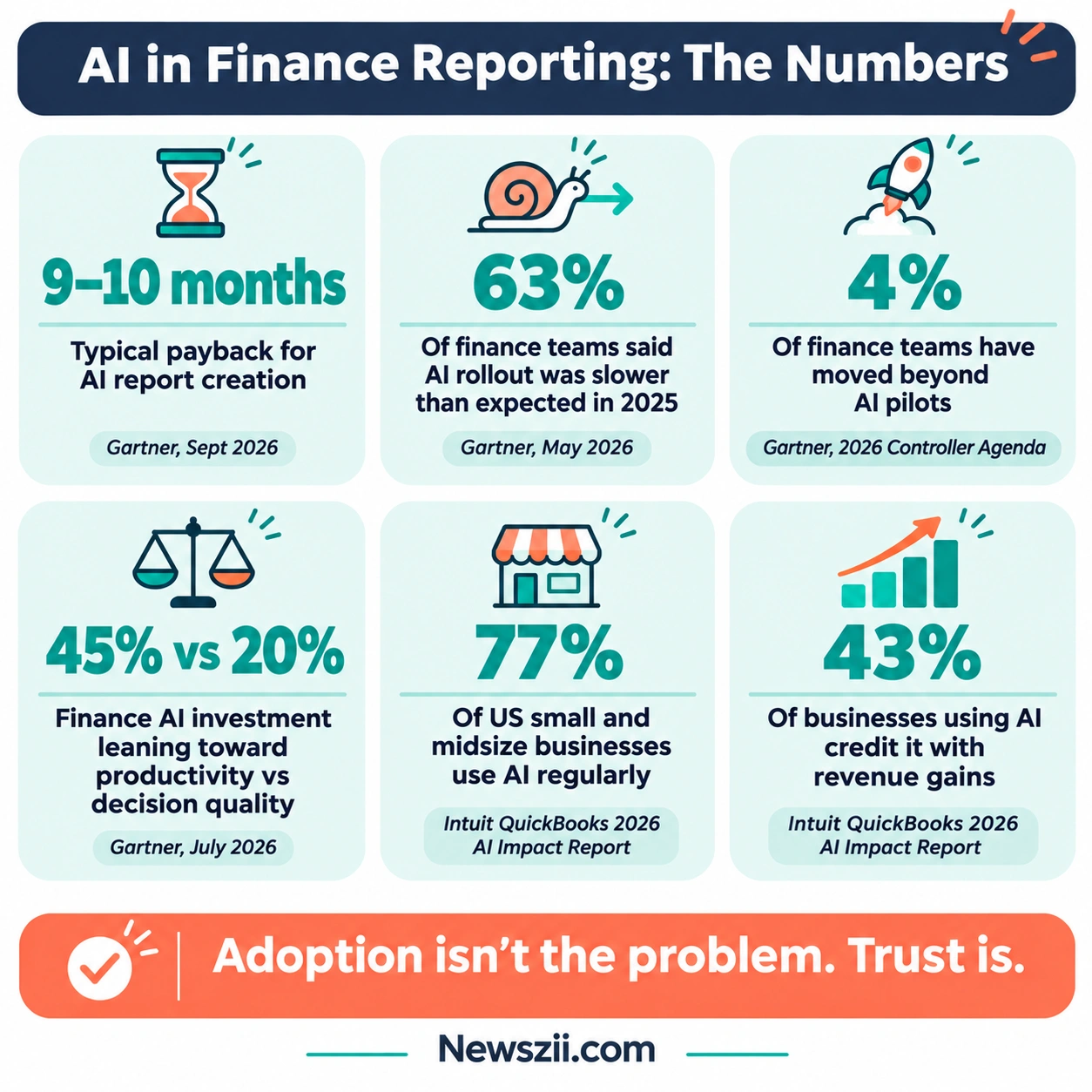
That last point is the thread running through all of this. Adoption isn’t the problem anymore. Trust is. And in finance, trust comes from one thing: being able to check the numbers.
Can you trust AI with your financial numbers?
Short answer: trust it to draft, never to sign off.
AI writes beautifully. That’s precisely the risk. A wrong number wrapped in a confident, well-written paragraph is far more dangerous than a wrong number sitting alone in a cell, because nobody stops to question it.
The research backs this up. The FAITH benchmark, presented at the ACM International Conference on AI in Finance in 2025, tested leading AI models on numbers pulled from real S&P 500 annual reports. Even top models of the time, such as Claude Sonnet 4 and Gemini 2.5 Pro, showed 10–20% error rates on multi-step numerical reasoning. Today’s models are stronger, but the lesson holds: the more steps a calculation takes, the more places it can quietly go wrong.
The vendors say the same thing. Anthropic recommends against using Claude for Excel for final client deliverables without human review, or for audit-critical calculations without verification. It’s refreshing to see a company say that out loud, and it applies to every tool in this guide.
The good news is that the newest tools are built to be checked. Copilot shows its plan before editing. ChatGPT asks permission before changes. Claude cites the cells behind its answers. Xero and Fathom trace commentary back to the underlying data. Use those features. They’re the whole point.
The 5-step check before you send any AI-generated finance report
Print this, pin it, make it a habit. It takes ten minutes and can save you a very awkward email.
- Tie the totals back to the ledger. Revenue, total expenses, net profit and closing cash in the report should match your accounting system to the cent. If they don’t, stop and find out why before you read another word.
- Check the periods and the signs. AI tools commonly mix up date ranges (fiscal vs calendar, month-to-date vs full month) and flip signs on credits and refunds. Make sure “March” really means March 1–31, and that costs still look like costs.
- Read the commentary against the numbers, line by line. If the narrative says “marketing spend fell 12%,” find that 12% yourself. Delete any sentence you can’t trace to a figure.
- Rebuild one key number by hand. Pick the most important figure in the report, such as gross margin or burn rate, and recalculate it yourself. If it matches, your confidence in the rest goes up. If it doesn’t, you’ve just found your problem.
- Look for what’s missing, not just what’s wrong. AI reports on the data it sees. If a big one-off payment, a new loan or a delayed invoice isn’t in the system yet, the report won’t mention it. A human who knows the business has to add that context.
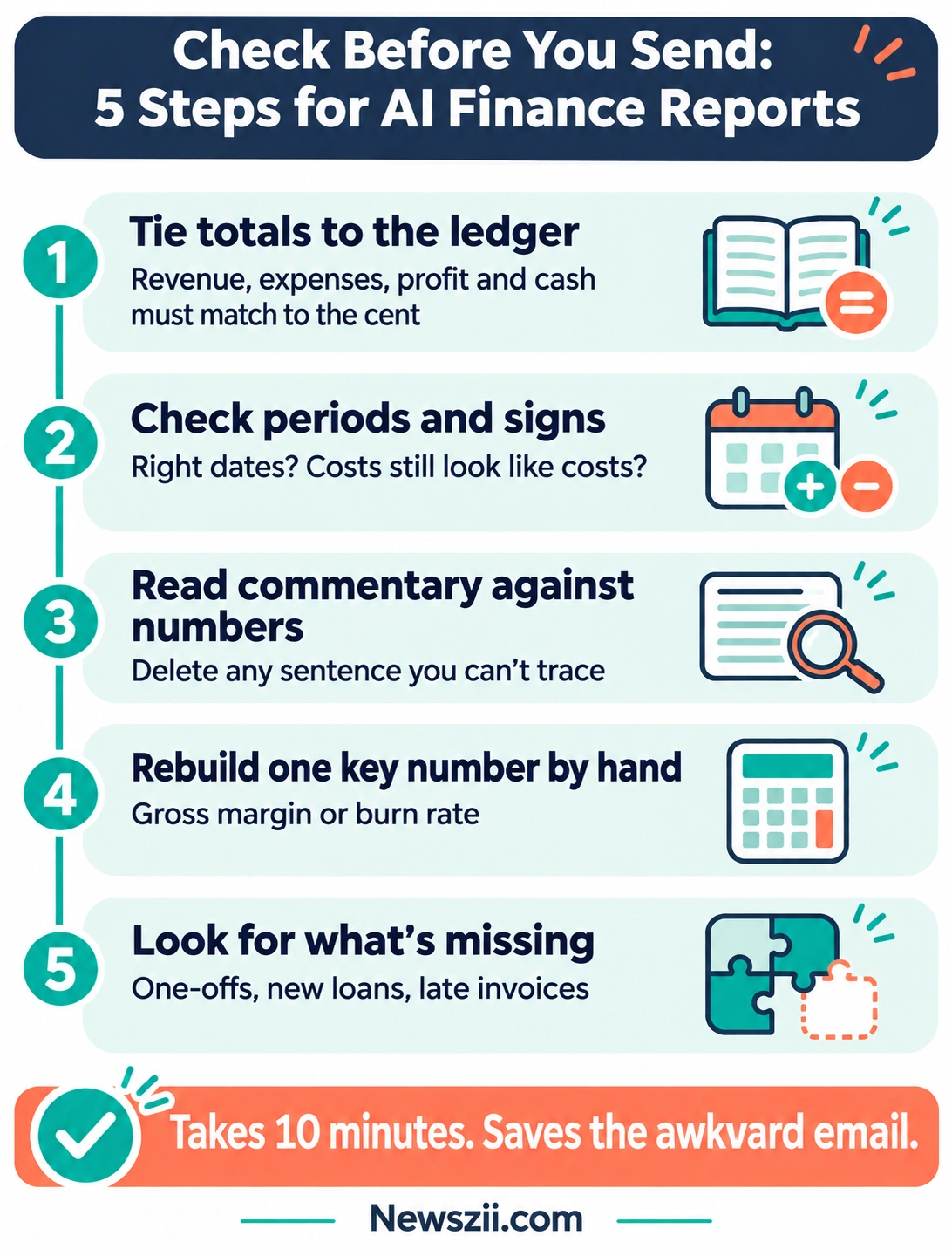
Follow these five steps and AI becomes what it should be: a fast, tireless first-draft machine with a careful human editor in charge.
AI finance reporting stacks for every budget
You don’t need all eight tools. You need the right two or three. Here are three setups that work, from a solo founder to a growing finance team. Prices below are list prices in USD for the AI layer only. They don’t include the accounting or office software you probably already pay for.
| Stack | Who it’s for | Tools | Extra AI cost (USD/month) |
|---|---|---|---|
| The $0 stack | Freelancers, solo founders, side businesses | Built-in AI in your accounting app (Intuit Intelligence or Xero) + ChatGPT for Excel or Sheets on the free plan | $0 |
| The lean stack | Small businesses that send monthly reports | Built-in accounting AI + one paid spreadsheet assistant (ChatGPT Plus, Claude Pro, or Copilot Business if you’re on Microsoft 365) | About $20–$21 per user |
| The advisor stack | Accountants, fractional CFOs, founders reporting to a board | Built-in accounting AI + Fathom + one paid spreadsheet assistant | About $73+ (Fathom from ~$53 for one company, plus ~$20) |
The $0 stack
Start with what you already have. If you’re on a paid QuickBooks Online plan, you can ask Intuit Intelligence for your monthly numbers, trends and custom reports today. On Xero, use JAX and Xero Analytics if your plan includes them. For anything custom, such as a cash runway sheet or a pricing model, add ChatGPT for Excel or Google Sheets on its free plan. The free plan has usage limits, but it’s more than enough to test whether AI actually saves you time.
The lean stack
Once you’re producing a report every month, a paid assistant pays for itself quickly. Choose based on your spreadsheet. Microsoft 365 users get the smoothest experience with Copilot Business at $21 per user. Excel modelers who want cited, careful answers should try Claude Pro at $20. If you bounce between Excel and Sheets, ChatGPT Plus at $20 covers both.
The advisor stack
If other people read your reports, presentation matters as much as accuracy. Fathom turns your ledger into branded, consistent packs and drafts the commentary. Your spreadsheet assistant handles the one-off analysis that never fits a template. For a growing finance team juggling several systems, swap this stack for a consolidated FP&A platform such as Datarails and talk to their sales team about pricing.
One tip that applies to every stack: pick one spreadsheet assistant and stick with it for a quarter. Switching tools every month means you never learn any of them well enough to trust the output.
How to choose the right AI tool for your finance reports
Feature lists all start to look the same after a while. These six questions cut through the noise. Ask them before you commit to anything.
- Can it see my data without exports? The best tool is the one closest to your numbers. Every CSV export is a chance for stale data, broken formulas and version confusion. Built-in ledger AI and direct integrations beat copy-and-paste every time.
- Can I trace every number back to its source? This is the non-negotiable. Look for cell-level citations, a visible plan before edits, or commentary linked to the underlying figures. If a tool can’t show its working, it isn’t a finance tool.
- Does it edit, or only suggest? Tools that edit your workbook directly save more time, but they need guardrails. Make sure you can review changes and undo them. All four spreadsheet assistants in this guide offer some form of this.
- What happens to my data? Finance data is sensitive. Read the vendor’s data-use terms, especially on lower-priced or free plans. For teams in regulated industries, check whether the tool feeds your audit logs and compliance systems. As we saw with Claude for Excel, full audit telemetry can be an Enterprise-only feature.
- What does it really cost per month? Add up the whole bill: the base software, the AI add-on, per-seat charges and usage caps. A “cheap” AI that needs a $10 prompt top-up every week isn’t cheap. An add-on that requires a higher base plan isn’t either.
- Will my team actually use it? The most powerful tool is useless if it lives in an app nobody opens. A slightly less capable assistant inside the spreadsheet your team already uses will almost always win.
If you’re still unsure, run a simple test. Take last month’s report and rebuild it with two candidate tools. Time each attempt, run the five-step check on both results, and count the errors. Within an hour you’ll know which tool fits your workflow, and that’s worth more than any review, including this one.
AI finance reporting in 2027: what to expect
Predictions are cheap, so here are only the trends already visible in what vendors shipped in 2026.

Agents inside the spreadsheet become normal. In 2026, Microsoft, Anthropic, OpenAI and Google all shipped AI that edits spreadsheets directly. In 2027, the question won’t be “does your spreadsheet have AI?” It’ll be “how well does it explain what it changed?”
Reusable finance skills replace one-off prompts. Microsoft’s reusable finance skills for processes like DCF models and variance analysis point to the next phase. Instead of rewriting the same prompt every month, teams will save a repeatable process once and run it each close. For monthly reporting, that means consistent structure, consistent formatting and fewer surprises.
Your ledger comes to your spreadsheet. Integrations like Xero’s live data feed into Microsoft 365 aim to kill the export-paste-fix cycle. Expect more accounting platforms to push live data into the tools where reports actually get written.
Traceability becomes the buying test. With trust named as the biggest barrier to deeper AI adoption, vendors are competing on proof: citations, visible plans, audit trails. When you evaluate tools in 2027, “can it show me its work?” will matter more than “how smart is the model?”
Pricing shifts toward usage. Prompt allowances, add-on packs and usage-based FP&A pricing (Datarails is already moving that way) suggest AI costs will track how much you use them. Budget for that, and check your usage in the first month of any new tool.
The practical takeaway for 2027 is simple. Choose tools that sit close to your data, show their working, and fit the software your team already lives in. Those three qualities will outlast any single feature launch.
Frequently asked questions
What is the best AI tool for finance reports?
There’s no single winner. The best AI tool for finance reports is the one closest to your data. QuickBooks users should start with Intuit Intelligence, and Xero users with JAX and Xero Analytics. For custom reports in a spreadsheet, choose Microsoft 365 Copilot, Claude for Excel or ChatGPT for Excel, or Gemini for Google Sheets. For branded board or client reports, Fathom is a strong pick.
Can ChatGPT make a financial report?
Yes. ChatGPT for Excel and Google Sheets can build and update reports and models using your real cells and formulas, and it’s available on all ChatGPT plans. It asks permission before editing your workbook. It doesn’t connect to your accounting ledger on its own, though, so the numbers have to be in the spreadsheet first, and you should always check the totals.
Is AI accurate enough for financial statements?
AI is good enough to draft financial reports, but not to approve them. Research on financial statements has found that even leading AI models make errors on multi-step calculations. Always tie totals back to your ledger, check date ranges and signs, and recalculate at least one key figure by hand before you share a report.
What is the best free AI tool for finance reports?
If you already pay for QuickBooks Online, Intuit Intelligence is included, with a monthly prompt allowance. Xero Analytics is included on eligible Xero business plans. For spreadsheet work, ChatGPT for Excel and Google Sheets is available on ChatGPT’s free plan, with usage limits.
Does Microsoft Copilot work with QuickBooks or Xero data?
Xero has announced an integration that brings live Xero data and its JAX AI into Microsoft 365 Copilot, with expansion into Excel, Word and PowerPoint announced. For QuickBooks, you can export reports into Excel and analyze them with Copilot, but Intuit Intelligence works directly on your live QuickBooks data without any export.
Which AI is best for Excel financial modeling?
For complex models, Claude for Excel and Microsoft 365 Copilot are the strongest fits. Claude answers with cell-level citations and preserves formula relationships when it changes assumptions. Copilot shows its plan before editing and lets eligible users choose between OpenAI and Anthropic models. ChatGPT for Excel is a capable, budget-friendly alternative.