

Published on November 3rd, 2026
Quick answer: There’s no single best AI tool for business. The right pick depends on the job. For general work, ChatGPT Business or Claude Team ($20 per seat per month, billed annually) cover most of what a team needs.
If you already run Microsoft 365 or Google Workspace, start with Copilot or the Gemini that’s already in your plan. Then add specialists: Fireflies.ai or Otter.ai for meetings, Fin for customer support, Zapier for automation, Canva for design, and Perplexity for research.
Here’s the shortlist, by job:
- Best all-round AI assistant: ChatGPT Business
- Best for long documents and careful writing: Claude Team
- Best for Microsoft 365 companies: Microsoft 365 Copilot Business
- Best for Google Workspace companies: Gemini in Google Workspace
- Best for cited research: Perplexity Enterprise Pro
- Best team knowledge base: Notion Business
- Best for polished writing everywhere: Grammarly Pro
- Best meeting assistant for sales teams: Fireflies.ai
- Best meeting assistant for everyone else: Otter.ai
- Best AI customer support agent: Fin (Intercom)
- Best AI inside a CRM: HubSpot Breeze
- Best workflow automation: Zapier
- Best for design and visuals: Canva
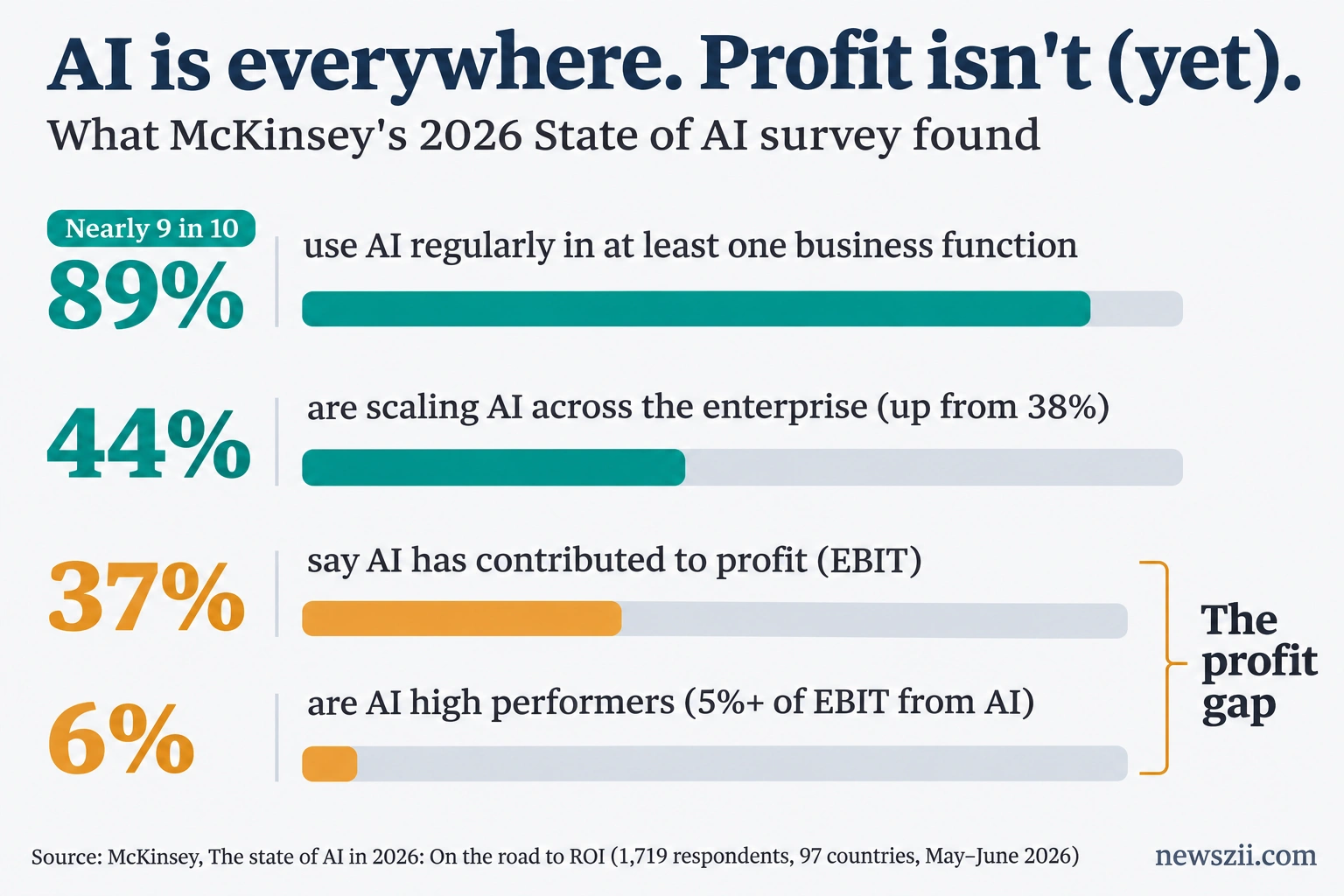
Most businesses aren’t asking whether to use AI anymore. They’re asking why it isn’t paying off. McKinsey’s 2026 State of AI survey found that nearly nine in ten organizations now use AI regularly, but only 37% say it has contributed anything to their profits. The gap usually isn’t the technology. It’s picking too many tools, or the wrong ones, and never wiring them into real work.
This guide is built to fix that. Instead of 50 tools you’ll never try, you get 13 that cover the jobs most businesses actually have, with honest notes on what each one costs once the fine print kicks in.
Best AI tools for business: quick comparison
| Tool | Best for | Starting business price | Pricing model | Free plan |
|---|---|---|---|---|
| ChatGPT Business | All-round writing, analysis, research | $20/seat (annual), $25 monthly | Per seat, 2-seat minimum | Yes (personal) |
| Claude Team | Long documents, writing, analysis | $20/seat (annual), $25 monthly | Per seat, 2–150 seats | Yes (personal) |
| Microsoft 365 Copilot Business | Teams in Word, Excel, Outlook, Teams | $18 promo / $21 list, plus an M365 plan | Add-on per user | Copilot Chat included |
| Gemini in Google Workspace | Teams in Gmail, Docs, Sheets, Meet | Included from $14/user (Business Standard) | Bundled in Workspace | No |
| Perplexity Enterprise Pro | Research with citations | $34/seat (annual), $40 monthly | Per seat | Yes (search) |
| Notion Business | Team wiki, docs, meeting notes | $20/member (annual), $24 monthly | Per member, plus agent credits | AI trial only |
| Grammarly Pro | Clear, on-brand writing | $12/member (annual), $30 monthly | Per member | Yes |
| Fireflies.ai | Sales calls and CRM sync | $10/seat (annual), $18 monthly | Per seat | Yes |
| Otter.ai | Everyday meeting notes | $8.33/user (annual), $16.99 monthly | Per user | Yes (300 min/month) |
| Fin (Intercom) | AI customer support | $0.99 per outcome, plus seats from $29 | Outcome-based | No (14-day trial) |
| HubSpot Breeze | AI inside your CRM | Included in HubSpot; agents from $0.50 per resolution | Credits | Basic assistant on Free |
| Zapier | Connecting apps and automating work | $19.99/month (annual), $29.99 monthly | Per account, by tasks | Yes (100 tasks/month) |
| Canva | Graphics, decks, brand assets | Pro $144/year; Business $250/person/year | Per person | Yes |
How we picked these tools
Every tool on this list had to clear five bars:
- A real business plan. Shared billing, admin controls and business data terms, not just a personal subscription people expense.
- Published pricing. If you can’t find the price without a sales call, it’s hard to recommend to a 10-person company.
- A clear job. Each tool does one category of work well, so you can see where it fits in your stack.
- Integrations with tools businesses already use. Gmail, Outlook, Slack, Salesforce, HubSpot and the like.
- Honest total cost. We looked past the headline price at base licenses, per-outcome fees, usage credits and seat minimums.
We also left things out on purpose. There are excellent specialist tools for coding, video, legal and finance. They belong in their own guides. This one covers the work almost every business does: writing, research, meetings, support, sales, automation and design.
Best AI assistants for business
A general-purpose assistant is the tool your team will open twenty times a day. It drafts the email, summarizes the contract, cleans up the spreadsheet and talks through the pricing idea. McKinsey’s 2026 survey found chatbots are the most widely scaled AI tool in business, with 47% of respondents saying their organization is scaling them across the company. If you only buy one AI tool this year, buy one of these.
ChatGPT Business
Verdict: The safest default for most teams. It does a bit of everything well, and most of your staff already know how to use it.
Best for: Mixed teams that write, analyze, research and occasionally code.
Pricing: $20 per user per month billed annually, or $25 monthly, for a Standard seat. A Premium seat costs $100 annually or $125 monthly. Every workspace needs at least two seats, and you can mix Standard and Premium.
What stands out:
- Two seat types on one bill. Give heavy users Premium (five times the usage of Standard, with no five-hour limit) and everyone else Standard.
- Codex included. Both seat types include OpenAI’s coding agent, which helps if a few people on the team write scripts or maintain a website.
- Business data terms. OpenAI says it doesn’t train on Business workspace data.
The catch: OpenAI cut the Standard seat by $5 in April 2026, but plenty of pages online still quote the old $25/$30 price. Don’t let an outdated number put you off. Also note that self-serve Business workspaces now cap at 200 paid seats, after which you’re talking to sales about Enterprise.
Skip it if: Your team works almost entirely inside Microsoft 365 or Google Workspace. The AI built into those suites may cover you for less.
Claude Team
Verdict: The pick for teams whose work lives in long documents: contracts, reports, proposals, research and anything where tone matters.
Best for: Consultancies, agencies, legal and finance teams, and anyone who writes for a living.
Pricing: $20 per seat per month billed annually, or $25 monthly, for a Standard seat. A Premium seat costs $100 annually or $125 monthly. Plans run from 2 to 150 seats, and you can mix seat types.
What stands out:
- Shared Projects. Load your brand guide, offers and client files once, and the whole team works from the same context.
- Claude Code on every seat. Standard seats include it, not just Premium.
- Training off by default. Anthropic doesn’t use Team plan data to train its models by default.
The catch: Usage limits are per person and can’t be pooled. A Standard seat gives 1.25 times the Pro plan’s per-session usage; a Premium seat gives 6.25 times. If one person runs long analysis jobs all day, they’ll need Premium while everyone else stays on Standard.
Skip it if: You need SCIM provisioning, audit logs or custom data retention. Those sit on Claude Enterprise ($20 per seat plus usage at API rates, with a 20-seat minimum).
Perplexity Enterprise Pro
Verdict: The best tool here for research you need to trust, because every answer shows where it came from.
Best for: Market research, competitor scans, sales prep and anyone who has to defend their sources.
Pricing: $34 per seat per month billed annually, or $40 monthly. Enterprise Max costs $271 annually or $325 monthly per seat, and organizations can mix both tiers.
What stands out:
- Citations in every answer. You can click through and check the claim, which matters when the research ends up in a client deck.
- Several top models in one place. Perplexity routes questions across models from different labs rather than tying you to one.
- Mix-and-match seats. Give the research lead Max and everyone else Pro.
The catch: Governance features such as SCIM, audit logs, role-based access and data retention now require a signed contract on both Enterprise tiers. Self-serve buyers don’t get them.
Skip it if: You want an assistant that drafts documents and runs multi-step work. Perplexity is built for finding and checking answers, so most teams pair it with ChatGPT or Claude rather than replacing them.
Best AI built into your office suite
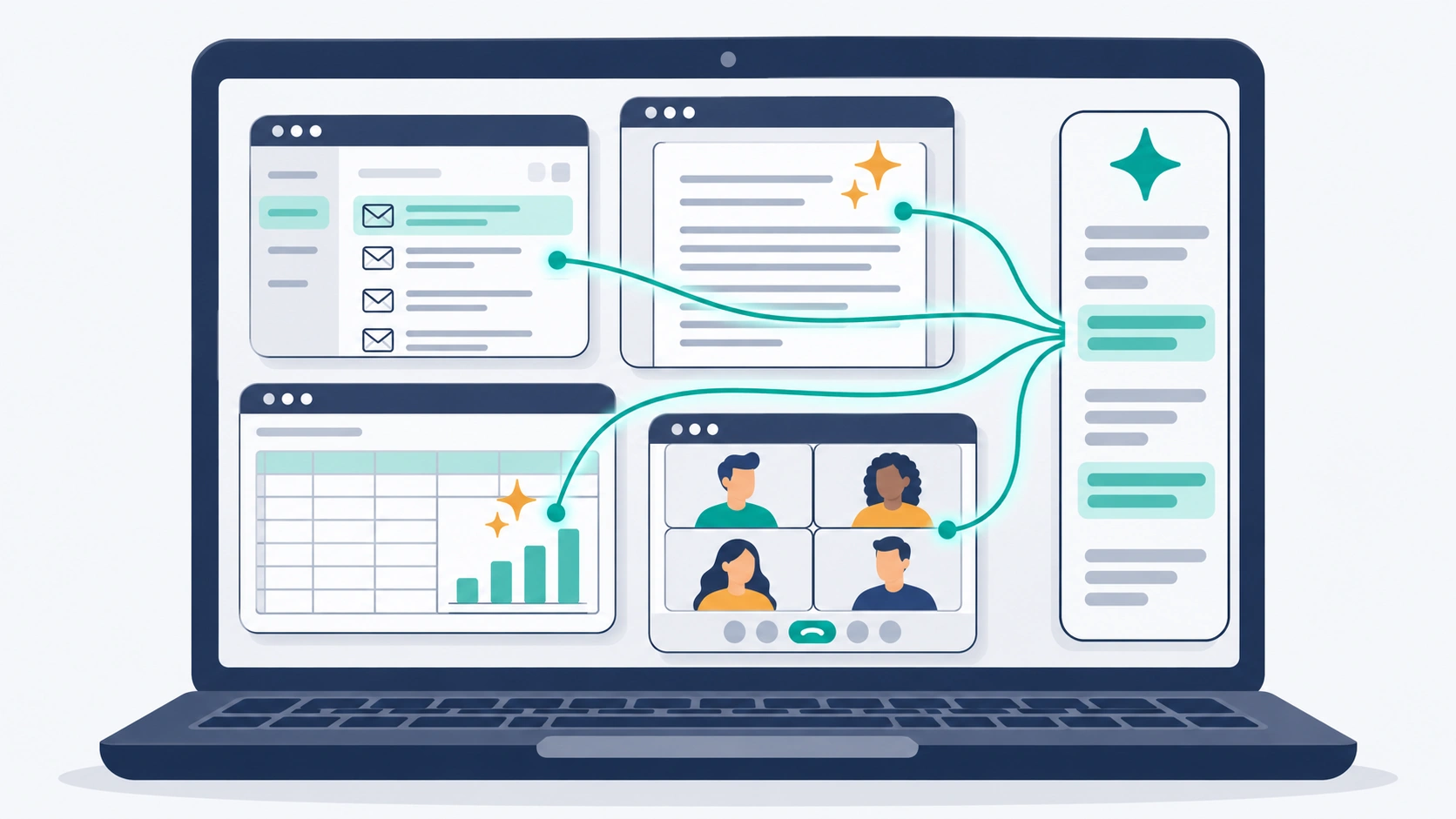
If your company already pays for Microsoft 365 or Google Workspace, start here. The AI sits inside the email, documents and meetings your team already uses, so there’s nothing new to learn and nothing to copy and paste between apps. The real question isn’t Copilot vs Gemini. It’s which suite you’re on.
Microsoft 365 Copilot Business
Verdict: The obvious choice for companies that run on Word, Excel, Outlook and Teams, as long as you budget for the base license too.
Best for: Small and midsize businesses with up to 300 users on a Microsoft 365 Business plan.
Pricing: $21 per user per month on an annual plan, or $25.20 monthly. Microsoft is offering it at $18 from July 1 to December 31, 2026, for existing Microsoft 365 Business customers on annual billing. Larger organizations on E3 or E5 pay $30 per user per month for the enterprise version.
What stands out:
- Works where your files already are. Copilot drafts in Word, analyzes in Excel, summarizes in Outlook and recaps Teams meetings.
- Bundles that simplify buying. Business Standard with Copilot is $23.50 per user per month and Business Premium with Copilot is $32, paid yearly.
- A free starting point. Basic Copilot Chat is included with eligible Microsoft 365 plans, so you can test the waters before paying for seats.
The catch: Copilot Business is an add-on, not a standalone product. Your real cost per person is the base plan plus Copilot. On Business Standard ($12.50) with the $18 promo, that’s $30.50 per user per month.
Skip it if: Your team mostly works in Google Workspace, Notion or Slack. You’d be paying for Microsoft licenses to get the AI.
Gemini in Google Workspace
Verdict: The best value on this list if you’re already on Google Workspace, because you’re already paying for it.
Best for: Teams that live in Gmail, Docs, Sheets and Meet.
Pricing: Gemini is bundled into Workspace. Business Starter is $7 per user per month (annual), Business Standard $14 and Business Plus $22. Monthly billing costs 20% more. Business plans cover up to 300 users.
What stands out:
- No add-on to buy. Google folded Gemini into its Business plans in 2025 and dropped the separate charge.
- Gemini in Docs and Meet from Business Standard. Drafting, summaries and meeting notes sit right inside the apps.
- NotebookLM for research. Useful for turning a pile of PDFs into something you can question.
The catch: Business Starter only includes Gemini in Gmail and the Gemini app. If you want it in Docs and Meet, you need Business Standard or above.
Skip it if: You’re on Microsoft 365. Moving suites to get a cheaper AI rarely pays off.
Best AI tools for documents, writing and knowledge
A general assistant writes a decent first draft. These two tools solve different problems: finding what your company already knows, and making sure everything your team sends sounds like it came from the same business.
Notion Business
Verdict: The best home for your team’s knowledge, now that its full AI is included in the plan instead of sold as an extra.
Best for: Teams that run projects, wikis, SOPs and meeting notes in one workspace.
Pricing: $20 per member per month billed annually, or $24 monthly. Custom Agents are billed separately at $10 per 1,000 Notion credits.
What stands out:
- AI included on Business. Notion Agent, AI Meeting Notes and Enterprise Search come with the plan and don’t use credits.
- Ask your workspace questions. Instead of digging through pages, you ask and get an answer from your own docs.
- Custom Agents for repeat work. Agents that run on schedules or triggers handle recurring tasks, paid for with credits only when you use them.
The catch: The old $10 AI add-on is gone. Free and Plus plans get only a limited AI trial, so full AI means Business for every member, whether or not they use it. A 10-person team pays $200 a month.
Skip it if: Your team already keeps its knowledge in Google Drive or SharePoint and has no appetite to move it.
Grammarly Pro
Verdict: The quiet workhorse. It improves every email, message and document your team writes, in almost every app they use.
Best for: Customer-facing teams, sales, support and anyone writing in a second language.
Pricing: $12 per member per month billed annually ($144 a year), $60 per quarter, or $30 monthly. Pro covers up to 149 seats.
What stands out:
- Works where people write. Email, browser, docs and chat, without switching tabs.
- 2,000 AI prompts per member per month, against 100 on the free plan.
- Team consistency. A shared style guide and brand tone keep everyone sounding like one company.
The catch: Monthly billing costs two and a half times the annual rate. Grammarly is also now part of the Superhuman suite, whose Business tier ($33 annual, $40 monthly) adds Superhuman Mail. Most teams only need Pro.
Skip it if: Your team writes mostly inside ChatGPT or Claude and is happy with the output.
Best AI meeting assistants
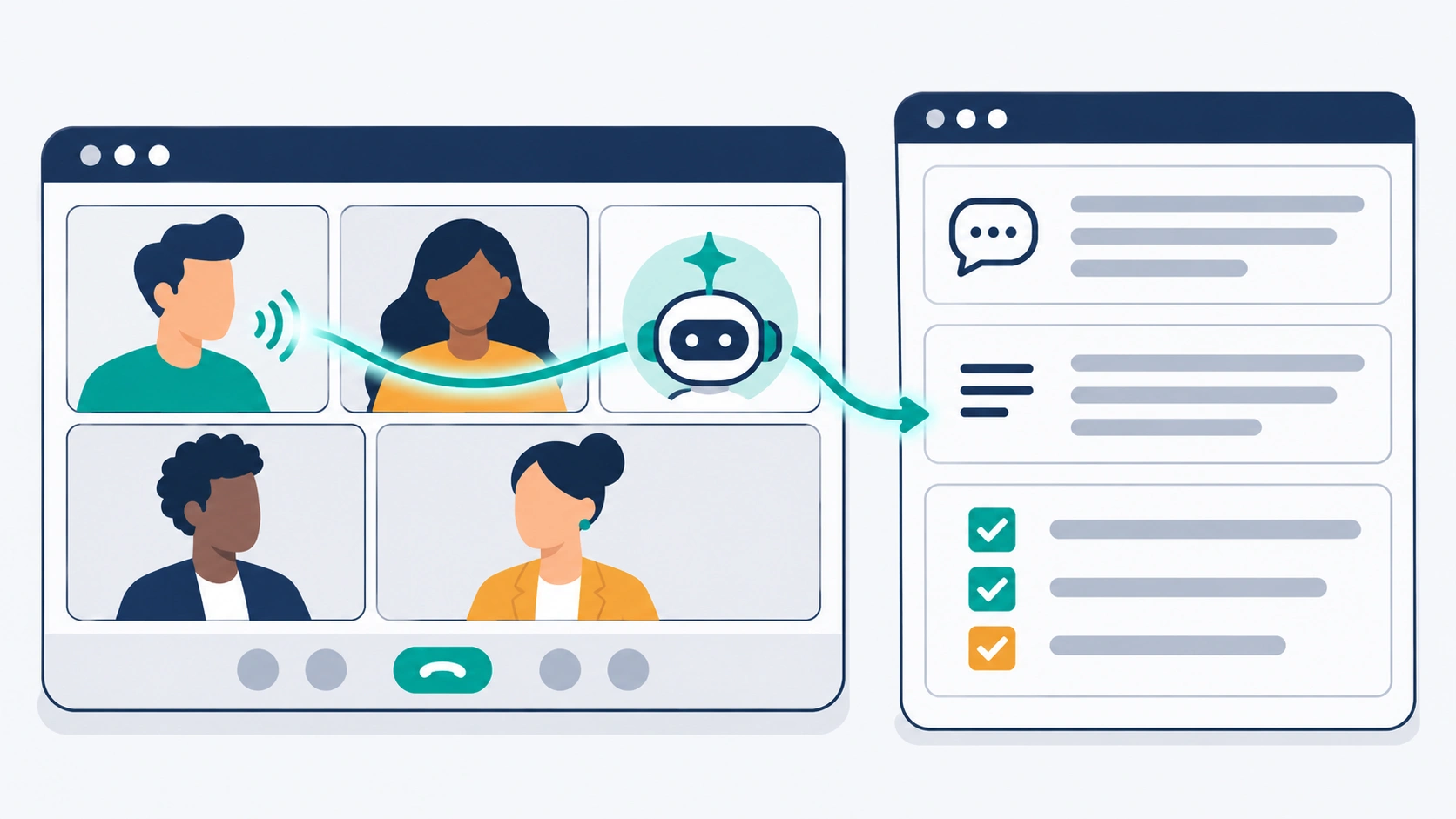
An AI note-taker is often the fastest win a business gets from AI. It joins the call, writes the notes, pulls out the action items and frees everyone from typing while the client is talking. Fireflies.ai and Otter.ai are close on price, so choose based on who’s in the meeting.
Fireflies.ai
Verdict: The stronger pick for sales and customer-facing teams that want call insights and CRM updates, not just notes.
Best for: Sales, customer success and revenue teams.
Pricing: Pro is $10 per seat per month billed annually, or $18 monthly. Business is $19 annually or $29 monthly. Enterprise is $39 per seat, annual only.
What stands out:
- Unlimited transcription on every plan, including the free one.
- Conversation intelligence on Business, with team analytics and video recording.
- CRM integrations that push call notes into the tools your sales team already uses.
The catch: Storage, not transcription, is the real limit. Free keeps 400 minutes per team and Pro 8,000 minutes per seat. Only Business and Enterprise store unlimited meetings. Free and Pro also cut meetings at two hours.
Skip it if: You only need notes from a few internal calls a week. Otter’s free plan may be enough.
Otter.ai
Verdict: The easiest meeting assistant for general teams, with live notes you can follow during the call.
Best for: Internal meetings, interviews, operations and management teams.
Pricing: Pro is $8.33 per user per month billed annually, or $16.99 monthly. Business is $19.99 annually or $30 monthly. Enterprise is custom.
What stands out:
- A usable free plan: 300 minutes a month, with conversations capped at 30 minutes.
- Live transcription and summaries in Zoom, Microsoft Teams and Google Meet.
- No monthly minute cap on Business, plus four-hour meetings and admin controls.
The catch: The low headline price is annual billing paid up front. Pro also caps you at 1,200 minutes a month and 90 minutes per conversation, which busy teams outgrow quickly.
Skip it if: Your meetings are mostly sales calls and you want analytics on talk time and deal signals. Fireflies is built for that.
Best AI tools for customer support and sales
Support and sales AI is where pricing has changed the most. Both tools here now charge per result rather than per attempt, which is good news, but it also means your bill grows as the AI gets better at its job. Model your volume before you sign.
Fin (Intercom)
Verdict: The benchmark AI support agent, with simple outcome pricing and the option to run it on the helpdesk you already have.
Best for: Support teams handling high volumes of repeat questions over chat, email and messaging.
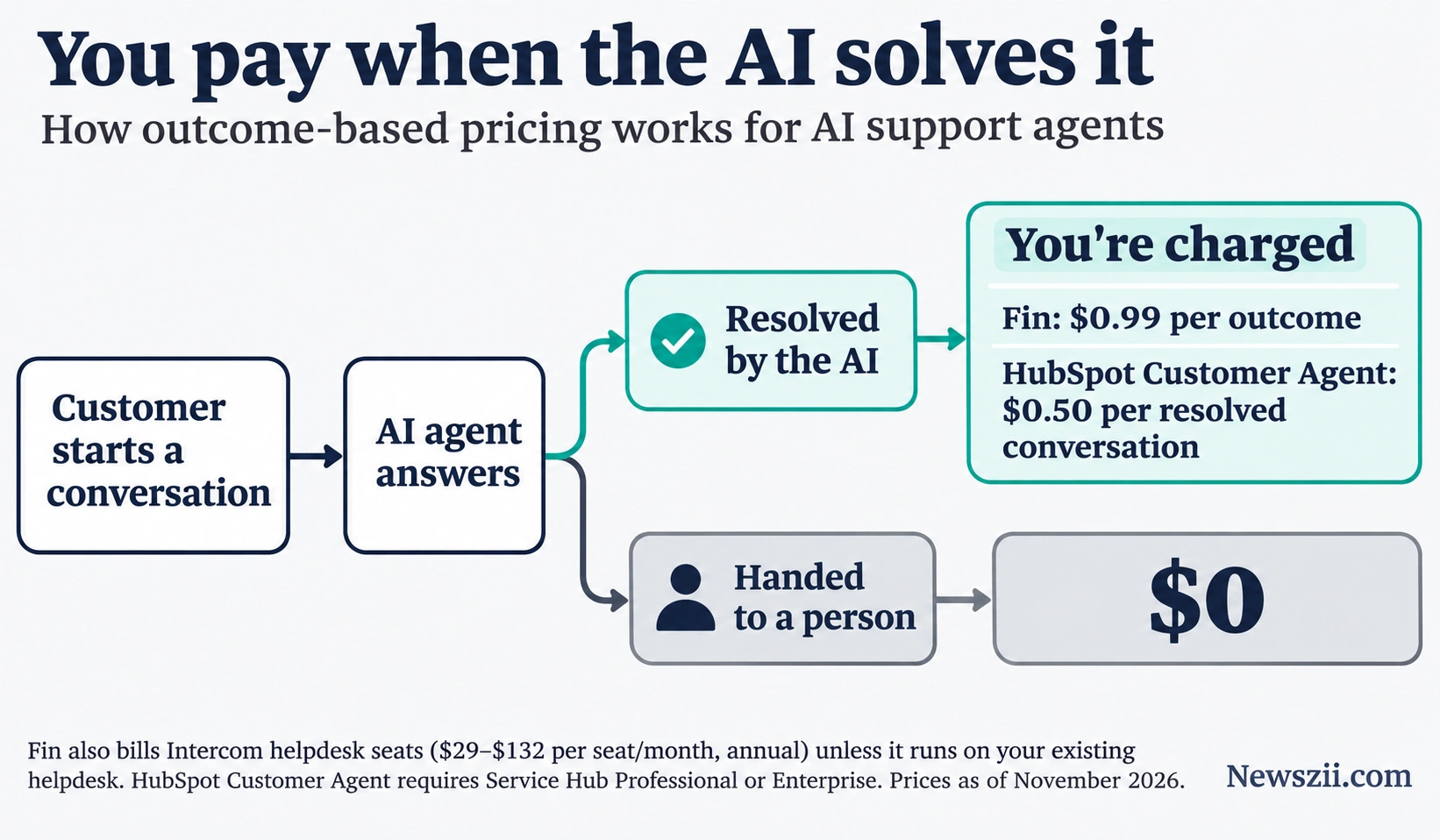
Pricing: $0.99 per outcome. If you also use Intercom’s helpdesk, seats cost $29 (Essential), $85 (Advanced) or $132 (Expert) per person per month billed annually, or $39, $99 and $139 monthly.
What stands out:
- You pay only when it works. An outcome is a resolution or a handoff you configured, charged at most once per conversation. If Fin escalates to a person, you pay nothing.
- Works on your current helpdesk. Fin runs on Salesforce, Zendesk, HubSpot and Freshdesk at the same $0.99, with no seat costs. Intercom says minimum commitments apply.
- Spending controls. Set a monthly outcome limit, and Fin hands conversations to your team once it’s reached.
The catch: At volume, outcomes become the bigger part of the bill. Intercom’s own example puts a 10-agent team handling 2,000 Fin resolutions a month at about $3,180 a month, including Copilot. Salesforce completed its acquisition of Fin (formerly Intercom) on September 10, 2026, so watch for packaging changes.
Skip it if: You handle a few dozen tickets a week. A shared inbox and good saved replies will do.
HubSpot Breeze
Verdict: The natural choice if your sales and support already run on HubSpot. The AI uses the customer data you’ve already collected.
Best for: Small and midsize teams already on HubSpot’s CRM.
Pricing: Breeze Assistant is included across HubSpot. Agents run on HubSpot Credits at $10 per 1,000. Since April 14, 2026, Customer Agent costs $0.50 per resolved conversation and Prospecting Agent $1 per lead recommended for outreach.
What stands out:
- Outcome-based agent pricing. Customer Agent used to charge $1 per conversation, resolved or not. Now unresolved conversations cost nothing.
- Credits included. Paid plans come with a monthly allowance: 500 on Starter, 3,000 on Professional and 5,000 on Enterprise.
- CRM context. Breeze works from your contacts, deals and tickets instead of starting cold.
The catch: Customer Agent isn’t on Free or Starter. You need Service Hub Professional ($90 per seat) or Enterprise ($150 per seat), and included credits don’t roll over.
Skip it if: You’re not on HubSpot. Switching CRMs to get its AI is a big project for a small gain.
Best AI tools for automation and design
These two tools turn AI from something people chat with into something that actually ships work: data moving between apps on its own, and on-brand visuals produced without waiting on a designer.
Zapier
Verdict: The easiest way for a non-technical team to connect its apps and drop AI steps into everyday workflows.
Best for: Operations, marketing and admin teams that copy data between tools by hand.
Pricing: Free gives you 100 tasks a month. Professional starts at $19.99 a month billed annually ($29.99 monthly) for 750 tasks. Team starts at $69 a month billed annually ($103.50 monthly) for 2,000 tasks and up to 25 users. Annual billing saves about 33%.
What stands out:
- Multi-step workflows on Professional, plus webhooks and premium apps.
- AI steps inside your Zaps. Since June 15, 2026, AI by Zapier steps are priced by the model you choose.
- Room to grow. Agents and chatbots are available as separately metered add-ons, and Team adds shared workspaces and SSO.
The catch: Everything is measured in tasks, and they go fast. A five-step Zap that runs 150 times a month uses all 750 Professional tasks. Professional is also a one-user plan, so a second builder means moving to Team.
Skip it if: You have a developer who’s happy running a self-hosted tool. At high volume, per-task pricing gets expensive.
Canva
Verdict: The fastest way for a small team to produce professional-looking social posts, decks and marketing assets, with AI built into every plan.
Best for: Marketing teams, founders and anyone who makes visuals without a design background.
Pricing: Pro is $144 a year ($18 monthly) for one person. Business is $250 per person per year ($25 monthly), with no seat minimum. Enterprise is quoted.
What stands out:
- AI in every plan. Magic Studio tools are included, with Business getting 20 times the free plan’s AI allowance and Pro 10 times.
- Brand control on Business: 100 Brand Kits with approvals and 500 GB of storage per person.
- A genuinely useful free plan for occasional design work.
The catch: Pro is for one person only. The moment a second person needs a login, you’re on Business at $250 each, and Canva Teams is closed to new sign-ups. Heavy AI users can also hit their allowance and need the $100-a-month AI Pass.
Skip it if: You have an in-house designer working in professional design software.
What AI tools for business really cost
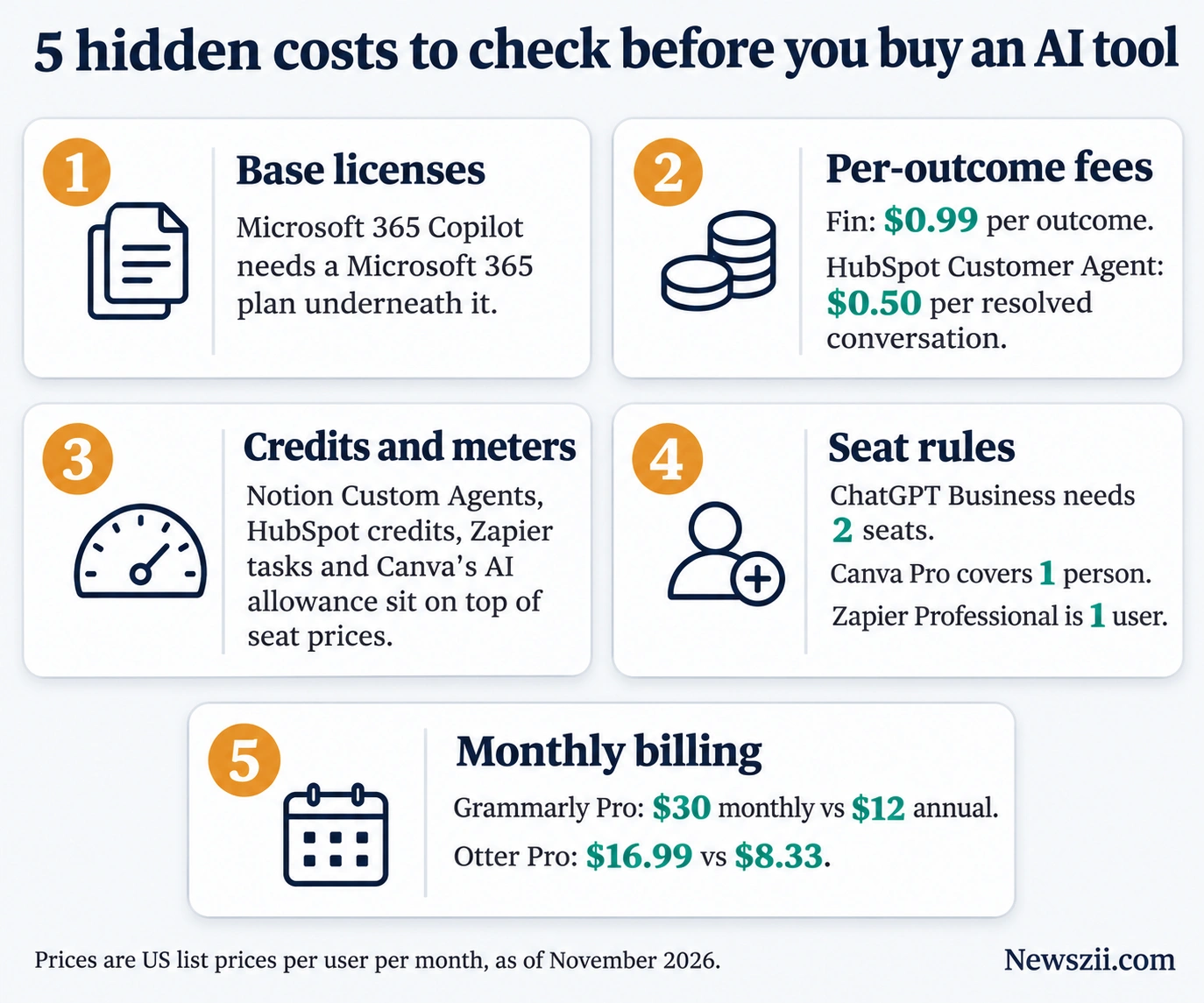
The headline price on a pricing page is rarely what lands on the invoice. Before you buy, check for these five things:
- Base licenses. Microsoft 365 Copilot can’t be bought on its own. Add the cost of the Microsoft 365 plan underneath it.
- Per-outcome fees. Fin charges $0.99 per outcome and HubSpot’s Customer Agent $0.50 per resolved conversation. Both sound small until you multiply by a month of tickets.
- Credits and usage meters. Notion’s Custom Agents, HubSpot’s agents, Zapier’s tasks and Canva’s AI allowance all run on meters that sit on top of your seat price.
- Seat rules. ChatGPT Business needs at least two seats. Canva Pro covers one person only. Zapier Professional is a single-user plan.
- Monthly billing. Paying monthly often costs far more. Grammarly Pro is $30 monthly against $12 on an annual plan; Otter Pro is $16.99 against $8.33.
A worked example. Here’s a realistic starter stack for a 10-person team, all on annual billing:
| Tool | Setup | Monthly cost |
|---|---|---|
| ChatGPT Business | 10 Standard seats at $20 | $200 |
| Otter.ai Pro | 10 users at $8.33 | $83.30 |
| Zapier Professional | 1 builder, 750 tasks | $19.99 |
| Canva Pro | 1 marketer ($144 a year) | $12 |
| Total | about $315 a month |
That’s roughly $31.50 per person per month. Switch the same stack to monthly billing and it climbs to about $468 a month, or nearly 50% more for exactly the same tools.
A starter AI stack by business size
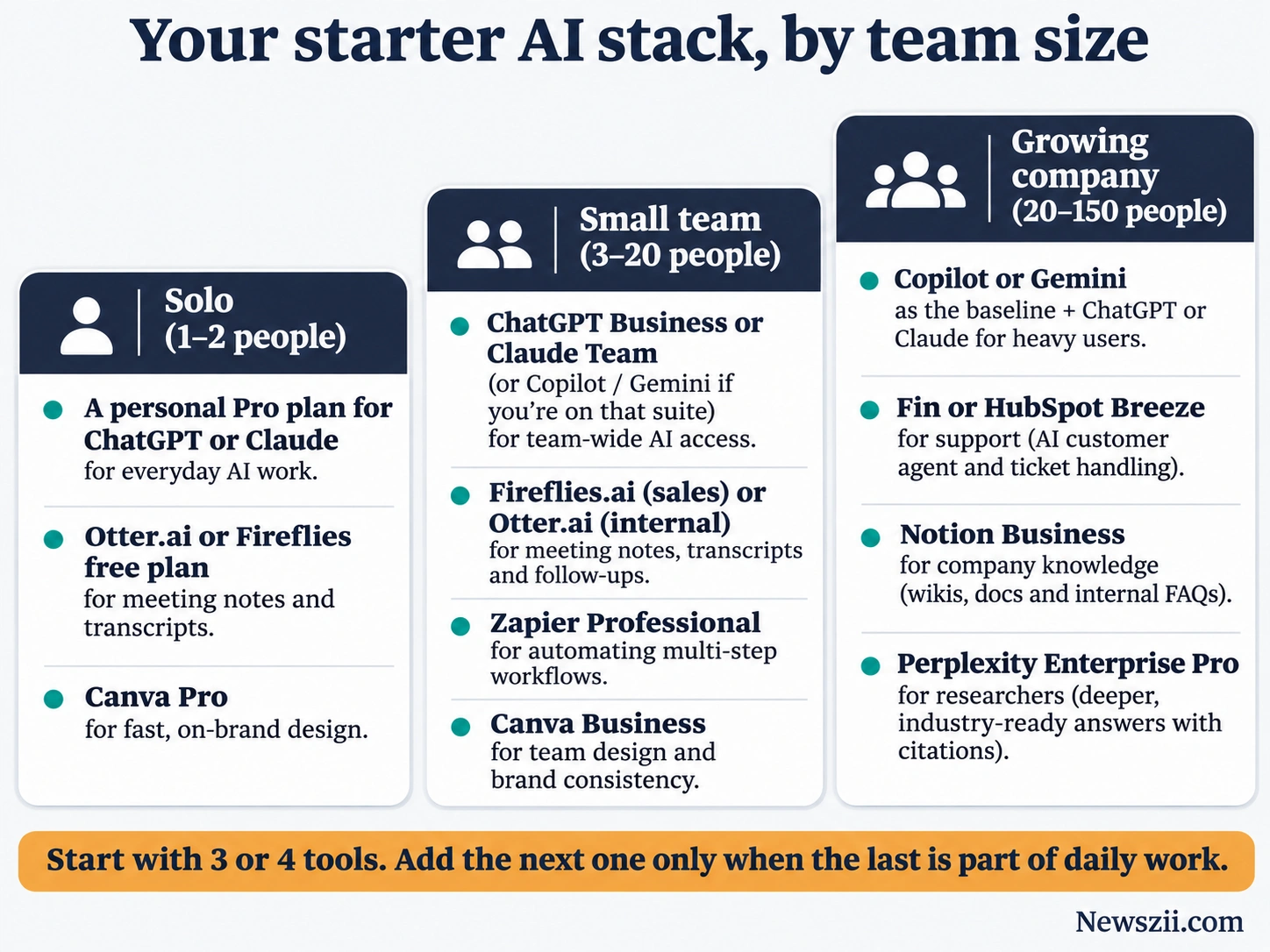
You don’t need all 13 tools. Most businesses get the bulk of the value from three or four, chosen for the work they do most.
Solo founders and freelancers (1–2 people)
- One general assistant. Personal Pro plans work here, since business plans need at least two seats.
- Otter.ai’s free plan or Fireflies’ free plan for client calls.
- Canva Pro if you make your own marketing.
Small teams (3–20 people)
- ChatGPT Business or Claude Team for everyone. If you’re on Microsoft 365 or Google Workspace, test Copilot or Gemini first.
- A meeting assistant: Fireflies.ai if you sell, Otter.ai if you mostly meet internally.
- Zapier Professional for one person to automate the busywork.
- Canva Business once more than one person needs to design.
Growing companies (20–150 people)
- Your suite AI (Copilot or Gemini) as the baseline, plus ChatGPT or Claude seats for heavy users.
- Fin or HubSpot Breeze once support volume justifies an AI agent.
- Notion Business or your suite’s search tools so people can find what the company already knows.
- Perplexity Enterprise Pro for the people who research for a living.
How to choose the right AI tool for your business
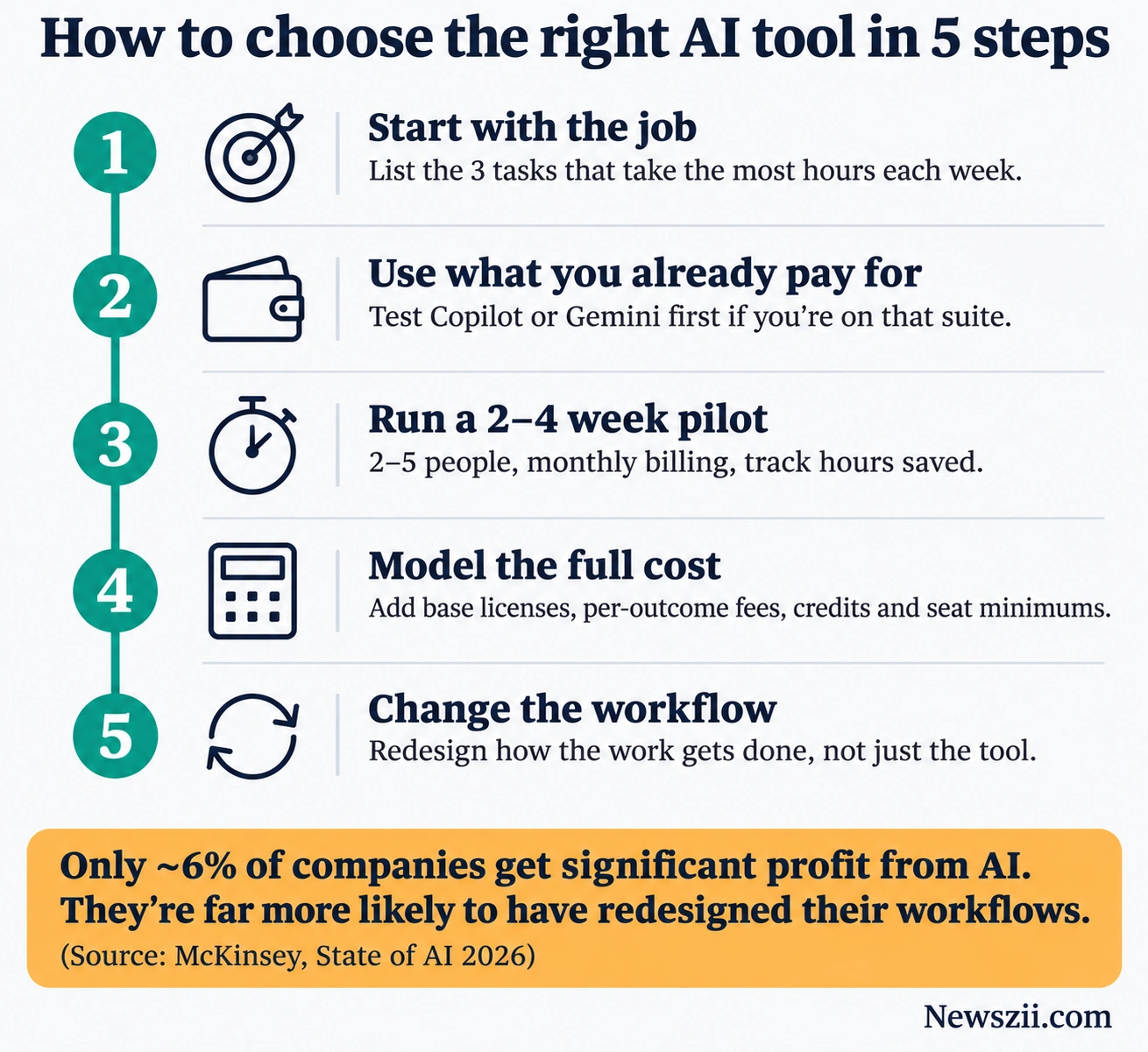
McKinsey’s 2026 survey found that 80% of respondents say AI has made them personally more productive, yet only 37% see any effect on company profit. Closing that gap comes down to how you choose and roll out tools, not which logo you pick. Use this five-step checklist.
- Start with the job, not the tool. Write down the three tasks that eat the most hours each week: meeting notes, first drafts, support replies, reporting. Pick tools for those.
- Use what you already pay for. If you’re on Microsoft 365 or Google Workspace, test the built-in AI before buying anything new.
- Run a short pilot with real work. Give two to five people the tool for two to four weeks, on monthly billing, and track hours saved on the tasks from step 1.
- Model the full cost. Add base licenses, per-outcome fees, credits and seat minimums before comparing prices (see the cost section above).
- Change the workflow, not just the tool. McKinsey’s high performers, the roughly 6% who get significant profit from AI, are far more likely to have redesigned how work gets done. A note-taker only saves time if people stop writing their own notes too.
Once the pilot proves its value, move to annual billing to cut the cost, and add the next tool only when the first one is part of daily work.
Frequently asked questions
What is the best AI tool for business?
There’s no single winner. For general work, ChatGPT Business and Claude Team are the strongest all-round picks at $20 per seat per month on annual billing. If your company already runs Microsoft 365 or Google Workspace, start with Copilot or the Gemini already included in your plan, then add specialist tools only where you need them.
What is the best free AI tool for business?
ChatGPT, Claude, Gemini and Perplexity all have free plans, and Otter.ai’s free plan includes 300 transcription minutes a month. Zapier’s free plan gives you 100 tasks a month. Free plans are fine for testing, but they lack the admin controls, shared billing and business data terms a company should have before staff put client work into them.
How much do AI tools for business cost?
Most business AI seats cost $10 to $25 per user per month on annual billing. Office-suite add-ons such as Copilot Business run $18 to $30 per user on top of the base license. Support agents are often billed per result, from $0.50 to $0.99 per resolved conversation, and premium research tiers can reach $325 per seat.
Is Microsoft Copilot or Google Gemini better for business?
Pick the one that matches your office suite. Gemini is bundled into Google Workspace, with full features in Docs and Meet from Business Standard at $14 per user per month. Copilot Business is an add-on at $21 per user ($18 on promotion through December 31, 2026) on top of a Microsoft 365 Business plan.
Is ChatGPT Business worth it for small teams?
For most teams of two or more, yes. A Standard seat costs $20 per user per month billed annually, the same as an individual Plus plan, and adds shared billing, admin controls and a commitment that OpenAI won’t train on your workspace data. Heavy users can get Premium seats with five times the usage.
Which AI tools should a small business buy first?
Start with three: a general assistant (ChatGPT Business, Claude Team, or your suite’s AI), a meeting note-taker (Fireflies.ai or Otter.ai), and one automation tool (Zapier). Together they cover drafting, meetings and repetitive admin. Add support or sales AI once your volume makes it worth paying per resolution.
Are AI tools safe for business data?
Business and team plans are much safer than personal accounts. OpenAI and Anthropic both say they don’t train on business workspace data by default, and these plans add admin controls and single sign-on. Advanced controls such as SCIM, audit logs and custom data retention usually require an Enterprise plan.
How many businesses use AI in 2026?
According to McKinsey’s 2026 State of AI survey of 1,719 respondents in 97 countries, nearly nine in ten organizations regularly use AI in at least one business function, and 44% are scaling it across the company. Only 37%, however, say AI has contributed to their profits so far.
The Bottom Line
The best AI tools for business are the ones your team actually uses every day. For most companies that means one strong general assistant, the AI already inside your office suite, and one or two specialists for the jobs that eat the most time. Start small, measure the hours saved, switch to annual billing once a tool earns its place, and only then add the next one.

Founder, Newszii.com | CEO, NICHE Digital Media
Praveen Panjiar brings nearly two decades of experience in digital media, web & mobile asset development, and growth strategies.
He built Newszii from the ground up into a global platform spanning tech, business, finance, and lifestyle, and has since developed a strong track record of building, scaling, and optimizing digital properties with a sharp focus on user growth, content strategy, and emerging technology trends.