Published on January 24th, 2026
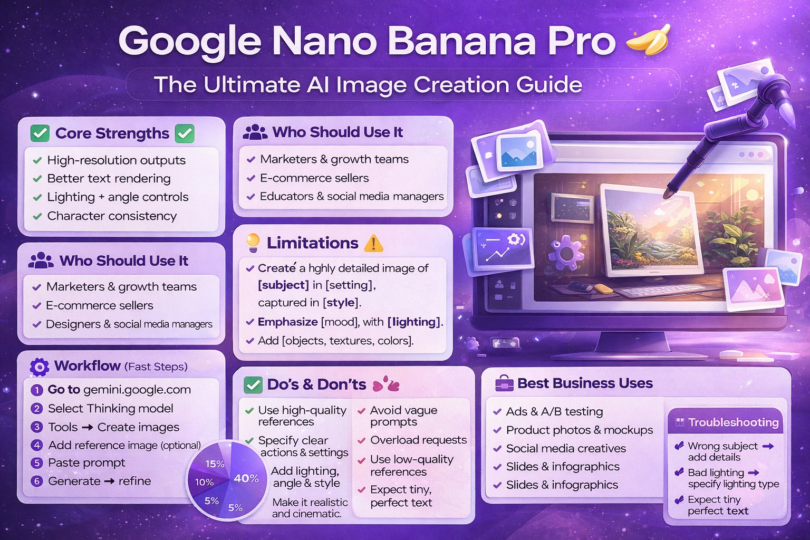
Google Nano Banana Pro represents a significant advancement in AI image generation through Gemini’s “Create images” tool.
This guide covers the proven prompt framework, step-by-step workflows, and business strategies for generating professional-quality images.
Key advantages include high-resolution output, detailed text rendering, advanced editing controls, and character consistency.
The tool excels at e-commerce product images, marketing creatives, infographics, and branded content. Success requires clear subject specification (40% of prompt quality), appropriate style selection (25%), and iterative refinement. Most users see results in 1-2 minutes per image.
What is Google Nano Banana Pro?
Google Nano Banana Pro is the advanced AI image generation capability built into Google’s Gemini platform.
Accessed through the “Create images” tool when using Gemini’s Thinking model, it allows users to generate high-resolution, professional-grade images from detailed text prompts and optional reference images.
Unlike basic AI image generators, Nano Banana Pro offers sophisticated controls over lighting, camera angles, scene composition, and character consistency.
The system includes SynthID watermarking technology for image authenticity and supports complex editing workflows that maintain quality across iterations.
The tool integrates directly with Google’s ecosystem, making it particularly valuable for teams already using Google Workspace, Google Ads, or Google Slides. This integration streamlines the workflow from image creation to deployment across marketing channels.
Who Should Use This Tool?
Target Users
1. Founders and Startup Teams benefit from rapid visual prototyping without hiring designers. Early-stage companies can create pitch deck visuals, product mockups, and marketing materials that look professionally designed.
2. Marketers and Growth Teams use the tool to test multiple creative variations quickly. Performance marketers can generate dozens of ad creatives for A/B testing, while content marketers produce blog headers, social graphics, and email campaign visuals.
3. E-commerce Sellers leverage the platform for product photography variations, lifestyle imagery, and seasonal campaign visuals. The ability to show products in different settings or lighting conditions reduces expensive photoshoot requirements.
4. Designers and Content Creators accelerate concept development and client presentations. Rather than starting from blank canvases, designers generate initial concepts that can be refined or used as creative direction references.
5. Agencies and Freelancers scale their creative output without proportionally scaling headcount. Service providers can offer rapid turnaround on client requests while maintaining consistent quality standards.
6. Educators and Course Creators develop custom instructional materials, presentation graphics, and student resources. Educational content becomes more engaging when supported by relevant, high-quality visuals.
7. Social Media Managers maintain consistent posting schedules with platform-optimized images. The tool helps create thumb-stopping content that aligns with brand guidelines across multiple channels.
Problems Solved
1. Time-Consuming Creative Production: Traditional design workflows requiring multiple rounds of feedback and revision get compressed into minutes. What previously took hours or days can now happen in a single session.
2. Expensive Design Resources: Organizations reduce dependency on external agencies or full-time designers for routine image needs. Budget constraints no longer limit creative exploration.
3. Inconsistent Branding: The tool’s character consistency and style controls help maintain visual coherence across campaigns. Brand elements remain recognizable even as creative executions vary.
4. Low-Quality AI Outputs Due to Poor Prompts: Many users struggle with AI image generation because they lack effective prompting strategies. This guide addresses that gap with proven frameworks.
5. Difficulty Producing Campaign-Ready Images Fast: Marketing campaigns often require rapid iterations based on performance data. The tool enables same-day creative refreshes rather than week-long design cycles.
How Google Nano Banana Pro Works
The underlying technology combines Google’s advanced language understanding with sophisticated image synthesis capabilities.
When a user submits a prompt, the system analyzes the semantic meaning, identifies key visual elements, and generates corresponding imagery.
The Thinking model component enables more complex reasoning about prompt requirements. Rather than treating prompts as simple keyword matches, the system interprets intent, understands relationships between elements, and makes informed decisions about composition and style.
Reference images serve as visual anchors. When uploaded, they provide the system with concrete examples of desired styles, subjects, or compositions.
The AI analyzes these references and applies similar characteristics to the generated output.
The generation process typically completes in 1-2 minutes, though complex prompts or heavy system load may extend this timeline.
Users receive high-resolution outputs suitable for professional applications, including print materials and large-format displays.
SynthID watermarking embeds invisible identifiers into generated images. This technology helps track image provenance and distinguish AI-generated content from photographed or illustrated material, addressing growing concerns about content authenticity.
The Prompt Framework That Delivers Results
Effective prompting follows a structured template that systematically addresses all critical image elements. This framework has proven successful across thousands of generation attempts:
The Complete Prompt Template:
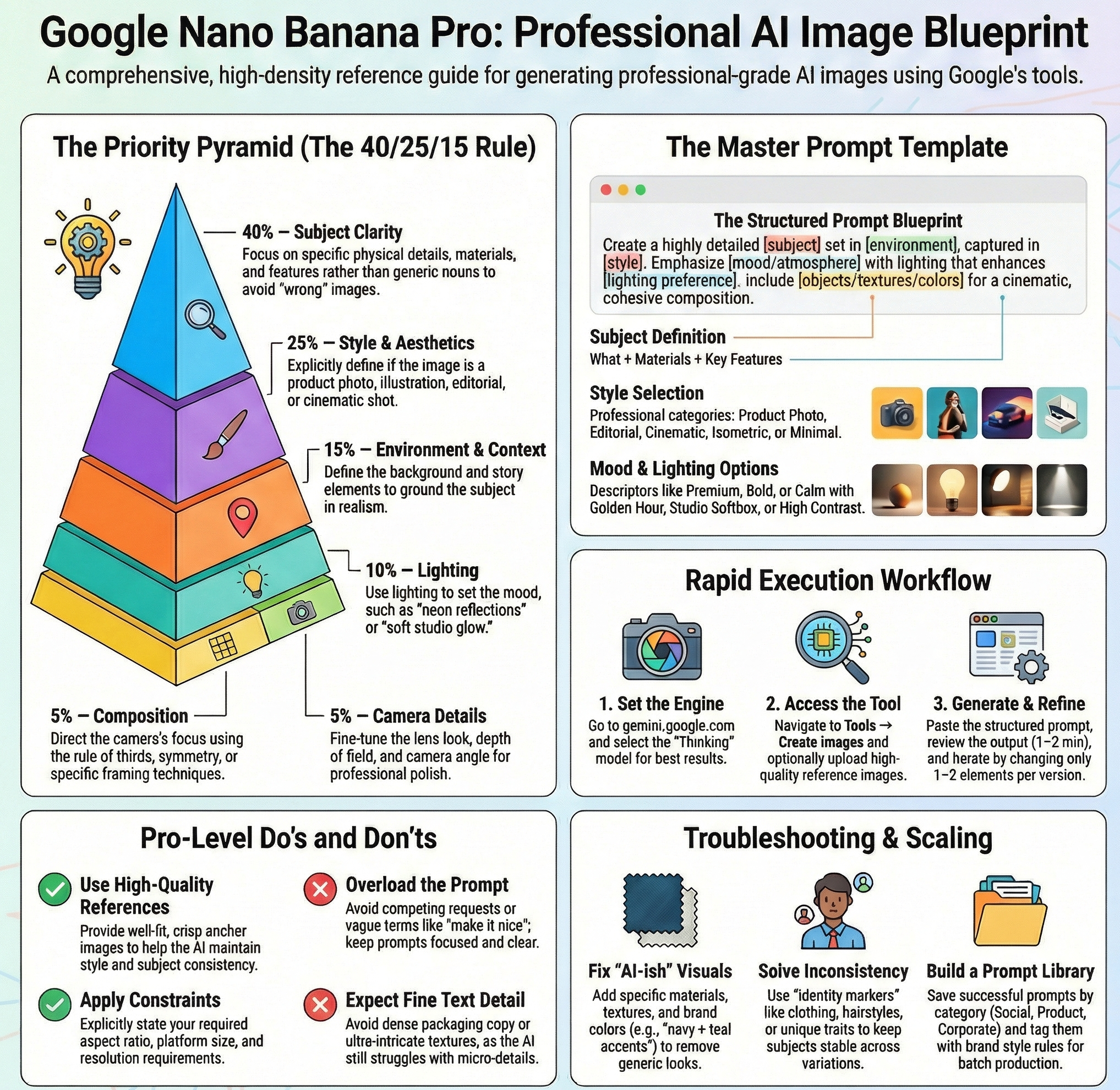
Create a highly detailed and visually striking image of [insert subject] set in [insert environment or setting], captured in [insert camera style or artistic style]. The scene should emphasize [insert key features, mood, or atmosphere], with lighting that enhances [insert lighting preference such as dramatic shadows, soft glow, neon reflections]. Include specific visual elements like [insert defining objects, textures, colors], and ensure the final image appears realistic, cinematic, and cohesive with strong composition.
Breaking Down Each Component
1. [Insert Subject]: The primary focus of the image. Specificity matters tremendously. “A smartphone” generates generic results, while “A flagship smartphone with a titanium frame and triple camera array” produces detailed, intentional imagery.
2. [Insert Environment or Setting]: Contextualizes the subject. “On a white background” serves product photography needs, while “on a minimalist desk with soft natural light from a nearby window” creates lifestyle imagery.
3. [Insert Camera Style or Artistic Style]: Determines overall aesthetic. Options include “professional product photography,” “editorial fashion photography,” “cinematic wide-angle shot,” “isometric illustration style,” or “hyperrealistic digital art.”
4. [Insert Key Features, Mood, or Atmosphere]: Guides emotional tone and focus areas. Examples: “premium and sophisticated,” “energetic and dynamic,” “calm and contemplative,” “bold and attention-grabbing.”
6. [Insert Lighting Preference]: Significantly impacts final appearance. Choices range from “soft, diffused studio lighting” to “dramatic side lighting with deep shadows” to “golden hour warm glow” to “high-contrast neon lighting.”
7. [Insert Defining Objects, Textures, Colors]: Adds specificity and visual interest. “Brushed metal textures, deep navy and copper accent colors, geometric patterns in the background” creates a distinct visual signature.
Improved Prompt Examples
Weak Prompt: “Create an image of a coffee cup”
Strong Prompt: “Create a highly detailed and visually striking image of a ceramic coffee cup with latte art set in a modern coffee shop interior, captured in professional food photography style. The scene should emphasize warmth and craftsmanship, with lighting that enhances soft morning glow from nearby windows. Include specific visual elements like steam rising from the cup, natural wood table texture, and muted earth tone colors, and ensure the final image appears realistic, inviting, and cohesive with strong composition.”
Why It Works: The improved version specifies subject details (ceramic, latte art), setting (modern coffee shop), style (food photography), mood (warmth, craftsmanship), lighting (morning glow), and supporting elements (steam, wood texture, color palette). Each addition gives the AI clearer direction.
Understanding What Matters in AI Image Prompts
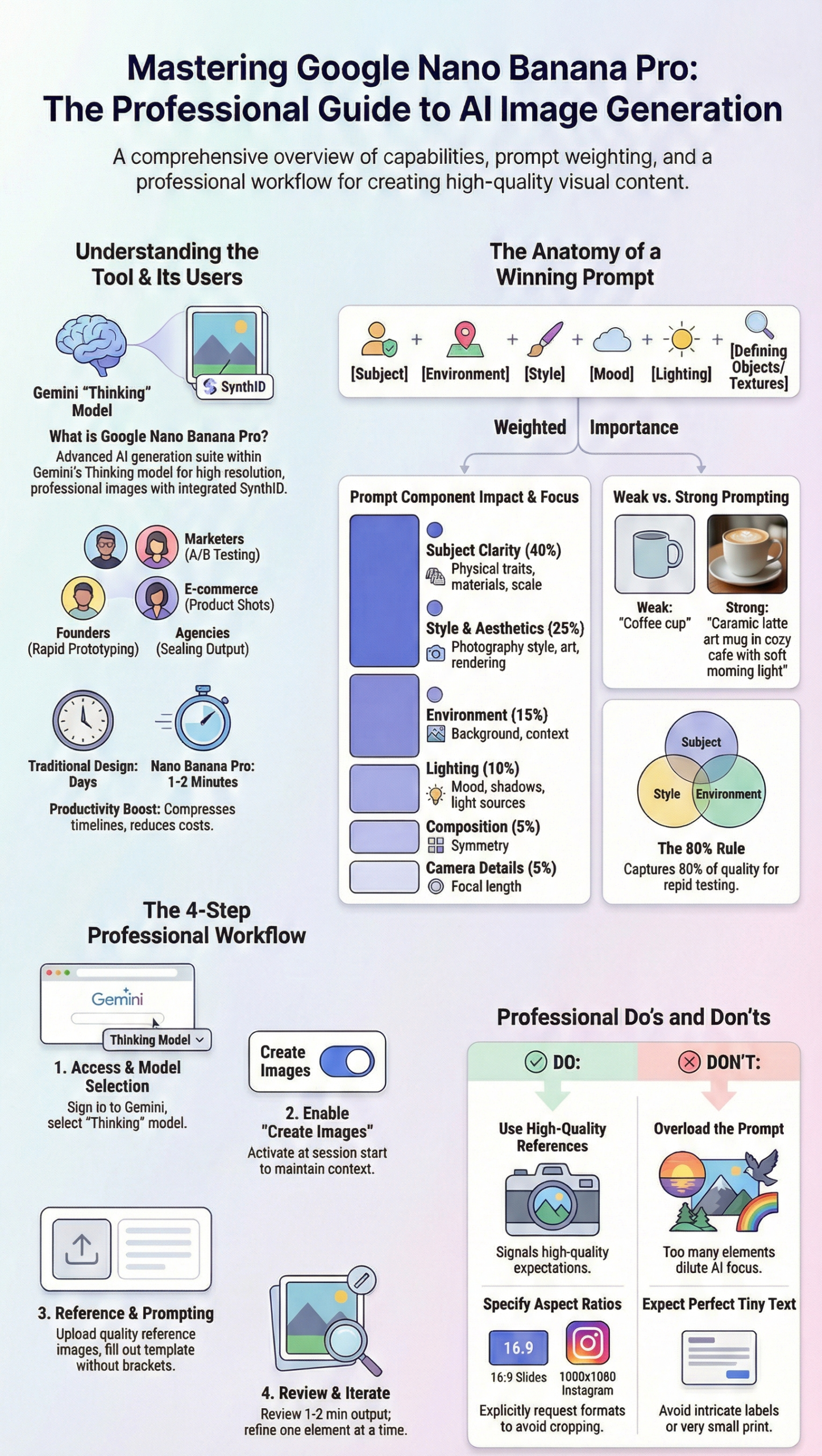
Not all prompt elements carry equal weight. Research and testing reveal the following priority distribution:
Priority Breakdown
1. Subject Clarity (40%): The most critical factor. Ambiguous subjects produce inconsistent results. Detailed subject descriptions should include physical characteristics, materials, scale indicators, and distinctive features. Investing time in subject precision yields the highest quality improvements.
2. Style and Aesthetics (25%): The second-most influential element. Style choices determine whether output looks photographic, illustrated, rendered, or artistic. This category includes photography styles (portrait, product, architectural), art movements (impressionist, minimalist, art deco), and rendering approaches (3D, isometric, flat design).
3. Environment and Context (15%): Setting provides narrative and visual context. Indoor versus outdoor, specific locations, background elements, and spatial relationships all contribute to believability and impact. Context helps viewers understand the subject’s purpose or story.
4. Lighting (10%): Lighting dramatically affects mood and realism. Natural light, studio lighting, dramatic shadows, or special effects like neon all create different emotional responses. Lighting also impacts perceived quality and professionalism.
5. Composition (5%): How elements arrange within the frame. Rule of thirds, symmetry, leading lines, and focal points guide viewer attention. While important, composition often emerges naturally from well-specified subjects and settings.
6. Camera Details (5%): Technical specifications like focal length, depth of field, and camera angle. These add polish but matter less than foundational elements. Mentioning “shot with a 50mm lens at f/2.8” helps but won’t rescue a poorly defined subject.
Practical Application
When time is limited, focus first on subject clarity. A perfectly lit image of an unclear subject fails, while a clearly defined subject with basic lighting often succeeds. Add style specifications next, then environment, then lighting refinements, and finally compositional and camera details.
For critical projects, address all categories thoroughly. For rapid iteration or testing, the 40-25-15 approach (subject-style-environment) captures 80% of quality impact.
Step-by-Step: Creating Images with Nano Banana Pro
Step 1: Access Gemini
Navigate to gemini.google.com and sign in with a Google account. The interface displays various model options and tool selections.
Best Practice: Use a dedicated Google account for business image generation to keep organizational assets separate from personal usage. This simplifies asset management and sharing.
Step 2: Select the Thinking Model
Click the model selector and choose “Thinking” from available options. This model provides the reasoning capabilities necessary for complex image generation.
Best Practice: The Thinking model interprets nuanced prompts more effectively than standard models. For simple requests, other models may work, but professional results consistently require Thinking model capabilities.
Step 3: Enable Create Images Tool
Locate the tools menu and select “Create images.” This activates the image generation interface within the conversation.
Best Practice: Enabling this tool at conversation start maintains context throughout the session. Mid-conversation activation works but may require repeating some specifications.
Step 4: Add Reference Images (Optional)
Click the image upload option and select reference files. Supported formats include JPG, PNG, and other common image types.
Best Practice: Use high-quality reference images with clear subjects and good lighting. Low-resolution or poorly composed references produce inferior results. When uploading product photos, use images with neutral backgrounds and even lighting. For style references, select images that clearly demonstrate the desired aesthetic.
Step 5: Craft Your Prompt
Type the detailed prompt following the framework provided earlier. Be specific about subject, setting, style, lighting, and desired elements.
Best Practice: Start with the complete template and fill in each bracket. Remove unnecessary sections rather than leaving brackets empty. For example, if camera details don’t matter, delete that portion entirely rather than writing “[standard camera angle].”
Step 6: Submit and Review
Send the prompt and wait for generation. The process typically takes 1-2 minutes. Review the output critically against the original specifications.
Best Practice: Check whether the AI correctly interpreted all prompt elements. Common issues include wrong colors, incorrect lighting, or misunderstood subjects. Note specific discrepancies for refinement.
Step 7: Iterate and Refine
Adjust the prompt based on output quality. Modify specific elements that didn’t match expectations and regenerate.
Best Practice: Change one or two elements per iteration rather than rewriting the entire prompt. This helps isolate which modifications improve results. Keep a log of successful prompts for future reference.
Essential Do’s and Don’ts
Do’s
✅ Always Use High-Quality, Well-Lit Reference Images
Reference images establish quality expectations. Blurry, dark, or poorly composed references signal to the AI that such quality is acceptable. Professional reference images produce professional outputs.
When sourcing references, prioritize resolution over quantity. One excellent reference outperforms five mediocre ones. For product images, photograph items in natural daylight or use proper studio lighting. For style references, select images from professional portfolios or high-quality stock libraries.
✅ Specify Subject, Action, and Setting Clearly
Vague descriptions produce vague results. Instead of “a person working,” specify “a professional woman in business casual attire typing on a laptop at a glass desk in a bright, modern office.” Each detail constrains the AI’s choices in ways that align with the vision.
Actions should include body position, facial expression, and relationship to objects. Settings should include specific location details, time of day, weather conditions, and background elements.
✅ Refine with Camera Angle, Lighting, and Style Details
After establishing core elements, add technical specifications. “Shot from a slightly elevated angle with soft studio lighting and shallow depth of field” transforms good images into professional ones.
Experiment with different combinations. The same subject with different lighting or angles creates entirely different moods and applications. A product shot with dramatic shadows serves different purposes than the same product with soft, even lighting.
✅ Use Constraints Like Aspect Ratio and Resolution
Specify output dimensions when platform requirements exist. “Create a 1080×1080 square image for Instagram” or “Generate a 16:9 landscape image for presentation slides” ensures compatibility.
Resolution specifications help the AI understand quality expectations. “High-resolution suitable for print” signals different requirements than “optimized for web display.”
✅ Iterate by Tweaking Prompts
First attempts rarely produce perfect results. Professional workflows involve multiple iterations, each refining specific elements. Save successful prompts as templates for similar future requests.
Iteration builds understanding of how the AI interprets different phrasings. This knowledge accumulates over time, making future prompts more effective from the start.
Don’ts
❎ Don’t Use Vague or Generic Prompts
“Create a nice image” or “Make something cool” wastes time. The AI requires specific direction. Generic prompts force the system to make arbitrary choices that rarely align with actual needs.
Specificity doesn’t require longer prompts. “A red sports car” is short but specific. “An image of a vehicle” is vague despite being almost as brief.
❎ Don’t Overload One Prompt with Too Many Requests
Attempting to include every possible element in a single prompt dilutes focus. “Create an image with a sunset, mountains, a lake, people having a picnic, birds flying, and a rainbow” asks the AI to balance too many competing priorities.
Complex scenes work better when broken into primary and secondary elements. Specify the main focus, then add supporting elements as complements rather than co-equals.
❎ Don’t Use Low-Resolution or Group Photos as Reference
Poor references generate poor outputs. Low-resolution images lack the detail the AI needs to understand quality expectations. Group photos create confusion about which subjects or elements to prioritize.
When only low-quality references exist, describe the desired improvement explicitly. “Generate a high-resolution version of this concept with crisp details” helps compensate for reference limitations.
❎ Don’t Forget Identity Markers When Blending People and Scenes
When combining multiple reference images of people, specify distinguishing characteristics. “The person from reference image 1 with the clothing style from reference image 2” clarifies intent.
Without clear markers, the AI may blend features in unintended ways or lose character consistency across generations.
❎ Don’t Expect Perfect Tiny Text or Intricate Textures
Current AI image generation struggles with fine details. Small text on product labels, intricate patterns, or highly detailed textures may appear blurred or incorrect.
When text matters, keep it large and simple. When intricate textures are essential, describe the general effect (“appears to have detailed wood grain”) rather than expecting pixel-perfect reproduction.
Strengths and Limitations
Strengths
1. High-Resolution Images for Professional Use
Outputs support print materials, large-format displays, and professional portfolios. The resolution exceeds minimum requirements for most business applications, from brochures to billboards.
2. Handles Detailed Text Rendering Inside Images Well
Compared to earlier AI image generators, Nano Banana Pro produces more readable text. Headlines, product labels, and signage appear clearer and more professional, though small print remains challenging.
3. Advanced Edit Controls: Lighting, Angles, Scene Blending
The system allows sophisticated post-generation modifications. Adjust lighting without regenerating entirely, change camera angles, or blend multiple scenes while maintaining consistency.
4. Built-In SynthID Watermarking for Authenticity
Invisible watermarks help establish image provenance. This becomes increasingly important as AI-generated content proliferates and authenticity concerns grow.
5. Character Consistency Across Edits and Scenes
When creating multiple images of the same subject, the tool maintains visual consistency better than most alternatives. Characters, products, or brand elements remain recognizable across variations.
Limitations
1. Sometimes Misinterprets Prompts or Repeats Errors
Despite sophisticated language understanding, the AI occasionally misreads intent. Certain phrasings consistently produce unexpected results, requiring experimentation to find working alternatives.
2. May Blur or Lower Quality on Complex Edits
Multiple rounds of editing can degrade image quality. Each modification introduces potential artifacts or softness. For critical applications, generate fresh images rather than heavily editing existing ones.
3. Struggles with Fine Details, Complex Labels, Small Text
Tiny elements lack clarity. Product packaging with extensive text, intricate logos, or detailed patterns may appear approximate rather than precise. Plan designs accordingly.
4. Limited Aspect Ratios (Mostly Square Outputs)
While some ratio variations exist, the system favors square formats. Extreme aspect ratios (ultra-wide panoramas, tall vertical formats) may produce awkward compositions or cropping issues.
5. More Computationally Expensive and Slower Than Basic Models
Generation takes 1-2 minutes compared to seconds for simpler systems. For projects requiring hundreds of images, time investment becomes significant. Plan workflows accordingly.
Business and Daily Use Cases
Business Applications
1. E-Commerce Product Images
Generate product photography variations without physical photoshoots. Show items in different settings, lighting conditions, or styling contexts. Create seasonal variations (products in summer versus winter settings) from a single product photo.
Example workflow: Upload product photo on white background, then generate lifestyle contexts (product on a desk, in a kitchen, outdoors) by varying the environment portion of prompts.
2. Multilingual Marketing Visuals
Create culturally appropriate imagery for different markets. Adjust settings, people, and contexts to resonate with specific audiences while maintaining brand consistency.
Example workflow: Generate the same product scenario with different environmental cues (Western office versus Asian tea room) to support localized campaigns.
3. Infographics and Data Reports
Design visual representations of data, processes, or concepts. Transform complex information into accessible graphics for presentations, reports, or educational materials.
Example workflow: Describe the visual metaphor (“gears representing interconnected business processes”) and specify style (“clean, modern, corporate color scheme”) to generate custom infographic elements.
4. Branded Social Media Content
Maintain consistent posting schedules with on-brand imagery. Generate platform-specific formats (square for Instagram, vertical for Stories, horizontal for LinkedIn) from a single concept.
Example workflow: Create a template prompt with brand colors, style, and mood, then vary the specific subject for different posts while maintaining visual coherence.
5. Google Slides Presentation Visuals
Develop custom imagery that aligns with presentation narratives. Avoid generic stock photos by creating specific illustrations of concepts, products, or scenarios.
Example workflow: Generate section headers, concept illustrations, and supporting imagery that match presentation themes and maintain visual consistency throughout the deck.
6. Google Ads Creative Automation
Rapidly test multiple creative variations for performance campaigns. Generate dozens of ad creatives with different value propositions, products, or stylistic approaches for A/B testing.
Example workflow: Create a base prompt template for ad creative, then systematically vary one element (headline, product featured, background color) to isolate performance drivers.
7. Edit, Retouch, and Upscale Photos
Enhance existing photography by adjusting lighting, removing distractions, or improving composition. Upscale low-resolution images for professional applications.
Example workflow: Upload existing product photo, request “enhanced lighting and removed background distractions” to polish images without full reshoots.
8. Product Variations and Fashion Mockups
Visualize products in different colors, materials, or configurations without manufacturing samples. Show fashion items on different body types or in various styling combinations.
Example workflow: Upload base product image, specify “same product in navy blue with leather accents instead of canvas” to generate variations.
9. Technical Diagrams Quickly
Create architectural plans, engineering schematics, or process flowcharts. Generate visual documentation faster than traditional CAD or illustration tools.
Example workflow: Describe the system (“network architecture showing cloud servers, edge devices, and data flow”) with specification for “clean technical diagram style with labeled components.”
Daily Life Applications
1. Home Decor Visualization
Preview furniture arrangements, paint colors, or decorating schemes before purchasing. Experiment with different styles to find preferred aesthetics.
2. Travel Photo Albums and Storyboards
Enhance travel photos or create illustrated trip summaries. Generate location-based imagery when original photos are unavailable or low-quality.
3. Greeting Cards and Invitations
Design custom cards for birthdays, holidays, or events. Create personalized imagery that reflects recipient interests or event themes.
4. Custom Wall Art and Posters
Generate unique artwork for home or office. Create pieces that match existing decor or express personal interests.
5. Recipe Cards and Meal Plans
Illustrate recipes with appetizing food photography. Create meal planning visuals that inspire healthy eating or culinary exploration.
6. Infographics for School Projects
Students can create professional-looking project visuals, science diagrams, or historical illustrations that enhance academic presentations.
7. Workout and Yoga Visuals
Generate exercise demonstration images, yoga pose illustrations, or fitness progress visualization graphics.
8. Gardening Plans (Plant Placement)
Preview garden layouts, visualize seasonal changes, or plan landscaping projects before physical implementation.
9. Turn Kids’ Drawings into Polished Art
Transform children’s artwork into refined versions suitable for framing. Maintain the original spirit while enhancing technical execution.
10. Personal Photo Editing with Lighting and Camera Angle Control
Improve personal photography by adjusting lighting, changing perspectives, or enhancing composition without professional editing software expertise.
Practical Tutorials and Examples
Tutorial 1: Beginner Prompt Walkthrough
Scenario: Create a professional image of a coffee mug for a café’s social media.
Weak Prompt: “Coffee mug”
Why It Fails: No style guidance, no setting, no mood. The AI must guess everything.
Improved Prompt: “Create a highly detailed and visually striking image of a ceramic coffee mug with latte art set in a cozy café interior, captured in professional food photography style. The scene should emphasize warmth and comfort, with lighting that enhances soft morning natural light. Include specific visual elements like steam, wooden table texture, and warm brown and cream colors, and ensure the final image appears realistic and inviting.”
Why It Works: Specifies subject (ceramic mug with latte art), setting (café), style (food photography), mood (warm, comfortable), lighting (morning natural light), and supporting details (steam, wood, colors).
What to Change If Output Is Wrong:
- Mug looks wrong? Add more physical descriptors: “tall ceramic mug with a wide rim”
- Lighting too dark? Change to “bright, diffused natural light from large windows”
- Background too cluttered? Add “minimalist café setting with blurred background”
Tutorial 2: Product Image Prompts for E-Commerce
Example 1: Tech Product
Prompt: “Create a highly detailed and visually striking image of a wireless smartphone charger with a matte black finish set on a minimalist desk workspace, captured in professional product photography style. The scene should emphasize sleek modern design and premium quality, with lighting that enhances soft studio lighting with subtle reflections. Include specific visual elements like a smartphone positioned on the charger, clean geometric shapes, and monochromatic color scheme with metallic accents, and ensure the final image appears realistic and professional.”
Why It Works: Clear product description, appropriate setting for product context, professional photography style, emphasis on key selling points (sleek, premium), and specified lighting for product detail visibility.
Example 2: Fashion Accessory
Prompt: “Create a highly detailed and visually striking image of a leather crossbody bag with brass hardware set against a neutral studio background with subtle texture, captured in editorial fashion product photography style. The scene should emphasize craftsmanship and versatility, with lighting that enhances directional studio lighting creating gentle shadows. Include specific visual elements like visible leather grain texture, polished brass buckles, adjustable strap, and rich cognac brown color, and ensure the final image appears realistic and magazine-quality.”
Why It Works: Material specifics (leather, brass), appropriate background (neutral with texture), editorial style suitable for fashion, emphasis on quality indicators, and lighting that shows texture detail.
Example 3: Food Product
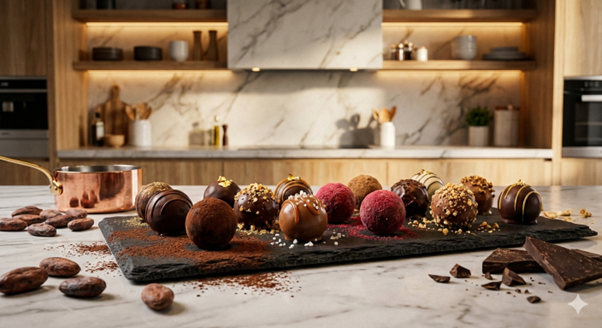
Prompt: “Create a highly detailed and visually striking image of artisanal chocolate truffles arranged on a slate serving board set in a modern kitchen setting with marble countertop, captured in professional food photography style. The scene should emphasize indulgence and premium quality, with lighting that enhances warm overhead lighting with soft shadows. Include specific visual elements like cocoa powder dusting, varied truffle textures, and rich brown tones with gold accent lighting, and ensure the final image appears realistic and appetizing.”
Why It Works: Product arrangement specified, appropriate setting (modern kitchen), food photography style, mood (indulgent, premium), lighting that creates appetite appeal, and attention to details that drive purchase decisions.
Tutorial 3: Ad Creative Prompts for Performance Marketing
Example 1: Software Product Ad
Prompt: “Create a highly detailed and visually striking image of a laptop screen displaying a clean analytics dashboard with colorful data visualizations set in a bright, modern office environment, captured in contemporary commercial photography style. The scene should emphasize clarity and professional productivity, with lighting that enhances bright, even lighting suggesting efficiency. Include specific visual elements like charts showing upward trends, clean interface design, and vibrant accent colors (blue, green, orange) against neutral grays, and ensure the final image appears realistic and professional.”
Why It Works: Shows product benefit (analytics), professional context, clear value indicators (upward trends), appropriate lighting for clarity, and colors that suggest positive outcomes.
Example 2: Fitness Product Ad
Prompt: “Create a highly detailed and visually striking image of a fitness tracker on an athlete’s wrist during an outdoor morning run set in an urban park at sunrise, captured in dynamic action photography style. The scene should emphasize energy and achievement, with lighting that enhances golden hour warm glow creating motivational atmosphere. Include specific visual elements like visible heart rate display on tracker, motion blur suggesting movement, and vibrant green nature with warm orange sunrise tones, and ensure the final image appears realistic and inspiring.”
Why It Works: Product in use context, aspirational setting (morning run, sunrise), dynamic style matches product category, motivational mood, and visual proof of product function (heart rate display).
Example 3: Home Service Ad
Prompt: “Create a highly detailed and visually striking image of a modern, organized home office workspace with professional cable management and ergonomic setup set in a bright residential room with plants, captured in lifestyle interior photography style. The scene should emphasize comfort and productivity, with lighting that enhances natural window light creating welcoming atmosphere. Include specific visual elements like monitor at correct height, wireless peripherals, green plants, and calming blue and white color scheme, and ensure the final image appears realistic and aspirational.”
Why It Works: Shows service benefit (organized space), residential context buyers can relate to, lifestyle style feels attainable, mood matches desired outcome, and details demonstrate expertise.
What to Change If Output Is Wrong:
- Ad looks too busy? Simplify by removing secondary elements
- Wrong emotional tone? Adjust mood descriptors (energetic vs. calm)
- Product not visible enough? Specify “product prominently featured in center”
Tutorial 4: Infographic and Slide Visual Prompts
Example 1: Business Process Diagram
Prompt: “Create a highly detailed and visually striking image of a circular workflow diagram showing five connected stages of a business process set on a clean white background, captured in modern infographic illustration style. The scene should emphasize clarity and professionalism, with lighting that enhances flat, even lighting for readability. Include specific visual elements like numbered stages in circular arrangement, connecting arrows, simple icons representing each stage, and corporate color scheme of navy blue and teal with white space, and ensure the final image appears clean and presentation-ready.”
Why It Works: Clear structure (five stages, circular), appropriate background (white for slides), infographic style, emphasis on clarity, and professional colors.

Example 2: Data Visualization
Prompt: “Create a highly detailed and visually striking image of a 3D bar chart showing quarterly growth trends with ascending bars set against a gradient background, captured in modern data visualization style. The scene should emphasize growth and success, with lighting that enhances subtle gradient lighting suggesting upward movement. Include specific visual elements like clearly labeled axes, percentage increase indicators, and professional color gradient from deep blue to bright cyan, and ensure the final image appears polished and impactful.”
Why It Works: Specific chart type, clear data story (growth), appropriate style, mood supports data narrative, and colors create visual hierarchy.
Tutorial 5: Consistent Character and Brand Style Prompting
Establishing Character Consistency:
Initial Prompt: “Create a highly detailed and visually striking image of a professional businesswoman in her early 30s with shoulder-length dark hair, wearing a navy blazer and white shirt set in a modern office lobby, captured in professional corporate portrait photography style. The scene should emphasize approachability and competence, with lighting that enhances soft studio portrait lighting. Include specific visual elements like friendly smile, confident posture, and neutral gray and blue tones, and ensure the final image appears realistic and professional.”
Follow-Up Prompt for Consistency: “Create a highly detailed image of the same businesswoman from the previous image (early 30s, shoulder-length dark hair, navy blazer) now presenting at a whiteboard in a conference room, captured in the same professional corporate photography style with consistent soft lighting. Maintain her friendly, confident appearance.”
Why It Works: References previous image explicitly, maintains key identifying features, keeps consistent style and lighting, and builds on established character.
Brand Style Consistency:
Create a template prompt that includes brand specifications:
“[Standard opening], captured in [brand’s photography style]. The scene should emphasize [brand values like innovation/reliability/creativity], with lighting that enhances [brand’s typical lighting approach]. Include specific visual elements aligned with brand guidelines: [brand colors], [brand textures/patterns], [brand compositional preferences], and ensure the final image appears [brand adjectives like modern/timeless/bold].”
Replace the brackets with specific brand details, then vary only the subject portion for different content needs while maintaining brand consistency.
Tutorial 6: Editing Workflow Using Reference Images
Step 1: Upload original image that needs enhancement.
Step 2: Identify specific improvements needed (better lighting, different angle, background change).
Step 3: Craft edit request: “Using the uploaded reference image, recreate the scene with enhanced studio lighting that removes shadows from the subject’s face, and replace the cluttered background with a clean, professional office setting. Maintain the subject’s position and expression.”
Step 4: Review output and iterate. If the subject’s features changed too much, add “preserve exact facial features and expression from reference image.”
Why It Works: Clear edit specifications, maintains what works (position, expression), and changes only problem areas (lighting, background).
Scaling Image Production for Business
1. Content Batching Workflows
Efficient production requires systematic approaches rather than one-off creation. Develop prompt templates for recurring needs, then batch-generate variations.
Template Development: Create master prompts for each content category (product photos, social graphics, ad creatives, presentation visuals). Store these in a shared document with clear labeling and usage notes.
Batch Generation Sessions: Schedule dedicated time for image creation rather than generating images on demand. Produce a week or month worth of content in a single session. This approach maintains consistent quality and reduces context-switching overhead.
Asset Organization: Implement clear naming conventions and folder structures. Tag images with metadata including prompt variations used, intended platforms, and campaign associations. This enables future retrieval and reuse.
2. A/B Testing Creatives
Performance marketing requires data-driven creative decisions. Generate multiple variations systematically to identify high-performing elements.
Variable Isolation: Create sets where only one element changes (background color, product angle, headline placement) while others remain constant. This isolates performance drivers.
Hypothesis-Driven Creation: Develop specific theories about what will perform (warmer colors increase engagement, people in ads drive clicks) and generate creative sets to test these theories.
Documentation: Record which prompt variations produced which outputs, and map these to performance metrics. Build a knowledge base of what works for specific audiences and objectives.
Style Rules Documentation: Create detailed specifications for brand-appropriate imagery including approved color palettes (with hex codes), typography styles when text appears in images, photography versus illustration preferences, lighting approaches, compositional guidelines, and mood/tone descriptors. Reference this document when crafting prompts.
Quality Control Workflows: Establish review processes before images enter production use. Assign brand guardians to approve AI-generated content against brand standards. Create revision protocols for images that miss the mark.
Reference Image Libraries: Maintain collections of approved images that exemplify brand aesthetics. Use these as references when generating new content to maintain visual coherence.
3. Templates for Teams and Agencies
Collaboration requires standardized approaches that multiple team members can execute consistently.
Role-Based Template Sets: Create prompt collections tailored to different roles. Social media managers need platform-specific templates, while sales teams need presentation visual templates. Each set includes instructions, examples, and common variation patterns.
Client-Specific Configurations: For agencies serving multiple clients, develop dedicated prompt sets for each account. Include client brand guidelines, approved styles, and sample outputs. This ensures consistency regardless of which team member handles the work.
Training Documentation: Develop guides that teach team members the prompt framework, common troubleshooting approaches, and best practices. Include before-and-after examples showing how prompt refinements improve output.
Feedback Loops: Implement systems for team members to share successful prompts and learn from failed attempts. Regular knowledge-sharing sessions help the entire team improve capabilities.
4. How Creators Can Offer This as a Service
Service providers can build offerings around AI image generation expertise without overpromising capabilities.
Service Positioning: Frame offerings around solving specific client problems (faster content production, creative testing, brand consistency) rather than generic “AI services.” Focus on outcomes and efficiency gains.
Package Development: Create tiered offerings based on volume, complexity, and turnaround time. Entry packages might include basic product photography variations, while premium tiers offer comprehensive creative campaigns with multiple formats and extensive iteration.
Process Transparency: Educate clients about the generation process, including typical revision cycles and limitation areas. Managing expectations upfront prevents disappointment and builds trust.
Value-Added Components: Combine AI generation with strategic guidance, brand consulting, or creative direction. The technology enables execution, but strategy and judgment create differentiated value.
Quality Assurance: Implement rigorous review processes. AI-generated content requires human oversight to ensure appropriateness, accuracy, and alignment with client objectives. Position quality control as core service value.
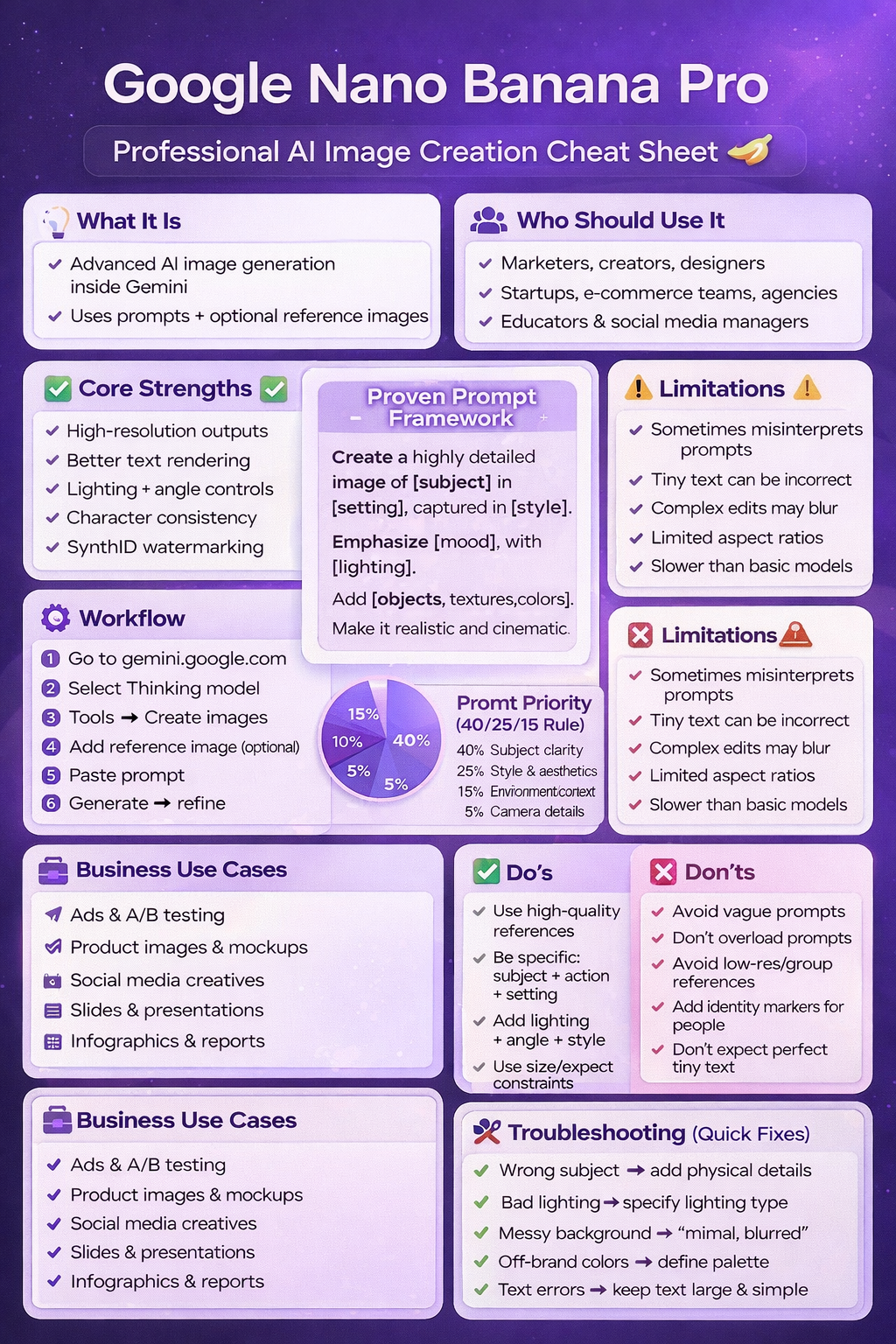
Frequently Asked Questions
1. What is Google Nano Banana Pro and how does it differ from other AI image generators?
Google Nano Banana Pro represents the advanced image generation capability within Google’s Gemini platform, accessed through the “Create images” tool when using the Thinking model.
It differs from other generators through superior text rendering in images, built-in SynthID watermarking for authenticity tracking, better character consistency across multiple generations, and integration with Google’s ecosystem for streamlined workflows.
2. How long does it typically take to generate an image?
Most images generate in 1-2 minutes. Complex prompts, system load, or high-resolution requests may extend generation time.
For projects requiring dozens or hundreds of images, plan accordingly and consider batch processing sessions rather than real-time generation.
3. Can Nano Banana Pro maintain consistent characters across multiple images?
Yes, the tool offers better character consistency than many alternatives.
When generating a series featuring the same subject, reference the initial image and maintain consistent descriptors (physical features, clothing, distinctive characteristics) across prompts. Explicitly stating “same character as previous image” helps maintain continuity.
4. What image formats and aspect ratios are supported?
The tool primarily generates square outputs but supports some aspect ratio variations. Extreme formats (ultra-wide panoramas, very tall vertical images) may produce suboptimal results.
Specify desired dimensions in prompts when platform requirements exist, such as “1080×1080 for Instagram” or “16:9 for presentation slides.”
5. How should prompts be structured for best results?
Follow the proven framework: specify subject with details, define environment/setting, identify camera or artistic style, emphasize key features and mood, describe lighting preferences, and include defining objects, textures, and colors. The subject clarity matters most (40% of quality), followed by style selection (25%) and environment (15%).
6. What are the main limitations to be aware of?
Current limitations include occasional prompt misinterpretation, potential quality degradation with complex edits, difficulty rendering fine details and small text accurately, preference for square aspect ratios over extreme dimensions, and longer generation times (1-2 minutes) compared to simpler AI models.
7. Can this tool be used for commercial purposes?
Check Google’s current terms of service regarding commercial use of AI-generated images through Gemini. Policies may vary based on account type, usage volume, and specific applications. The built-in SynthID watermarking helps establish provenance for generated content.
8. How can teams maintain brand consistency when using this tool?
Develop prompt libraries with approved templates, document brand style rules (colors, lighting, mood, composition preferences), create reference image collections exemplifying brand aesthetics, implement quality control workflows with brand guardians reviewing outputs, and maintain shared documentation of successful prompts and common issues.
9. What types of reference images work best?
High-quality, well-lit images with clear subjects and minimal distractions perform best. For product photography, use neutral backgrounds and even lighting.
For style references, select professional-quality examples that clearly demonstrate desired aesthetics. Avoid low-resolution images, group photos without clear focal points, and poorly composed references.
10. How many iterations typically needed to get the desired result?
Most professional results require 2-4 iterations. First generations establish baseline quality and identify misinterpretations.
Subsequent iterations refine specific elements based on what worked and what needs adjustment. Complex or highly specific requests may need more refinement cycles.
11. Can existing photos be edited or enhanced using this tool?
Yes, upload existing photos as references and request specific modifications like lighting adjustments, background changes, compositional improvements, or quality enhancements.
Specify which elements to preserve (subject features, positioning) and which to modify (background, lighting, atmosphere).
12. What should be done if generated images include errors?
Analyze which prompt elements the AI misinterpreted, modify those specific portions of the prompt, and regenerate.
Common issues include wrong colors (specify hex codes or precise color names), incorrect lighting (describe lighting more explicitly), or misunderstood subjects (add more physical descriptors). Change one or two elements per iteration to isolate what improves results.
Conclusion
Effective use of Google Nano Banana Pro requires understanding the structured prompt framework that prioritizes subject clarity (40%), style selection (25%), and environmental context (15%). Following the complete template ensures consistent, professional results.
High-quality reference images dramatically impact output quality. Well-lit, clearly composed references establish quality expectations that the AI follows. Avoid low-resolution or cluttered reference images.
The tool excels at generating e-commerce product images, marketing creatives, infographics, branded content, and presentation visuals. It handles text rendering better than earlier AI image generators, though tiny text remains challenging.
Professional workflows require iteration. First generations rarely produce perfect results. Successful users systematically refine prompts based on output quality, changing one or two elements per iteration to isolate improvements.
Business scaling depends on systematic approaches including prompt template libraries, batch generation sessions, brand consistency documentation, quality control workflows, and team training on best practices.
Current limitations include occasional prompt misinterpretation, quality degradation on complex edits, difficulty with fine details and small text, preference for square aspect ratios, and longer generation times compared to simpler models.
The built-in SynthID watermarking provides authenticity tracking, addressing growing concerns about AI-generated content provenance. This feature becomes increasingly valuable as synthetic media proliferates.
Success requires balancing specificity with focused requests. Overloaded prompts attempting too many competing elements produce diluted results. Clear prioritization of primary subjects and supporting elements yields better outcomes.
Integration with Google’s ecosystem streamlines workflows for teams using Google Workspace, Google Ads, or Google Slides. Generated images flow directly into existing business tools and platforms.
Service providers can build viable offerings around AI image generation expertise by focusing on specific problem-solving (faster content production, creative testing, brand consistency) rather than generic capabilities, and combining generation with strategic guidance and quality assurance.
For Creators and Freelancers: Start building a prompt library today. Document successful prompts, note which variations produce best results, and develop templates for recurring client needs. The knowledge compounds over time, making each project faster and more reliable than the last.
For Marketers and Growth Teams: Implement systematic A/B testing workflows using batched creative generation. Produce multiple variations testing specific hypotheses about what drives performance. Let data guide creative decisions rather than relying on intuition alone.
For Agencies and Teams: Develop comprehensive brand guidelines that translate into AI prompting frameworks. Create client-specific prompt templates, establish quality control processes, and train teams on systematic approaches. Standardization enables scaling while maintaining quality and consistency.
This guide provides practical frameworks for generating professional AI images using Google Nano Banana Pro. Success comes from systematic application of the prompt template, iterative refinement based on output quality, and structured workflows that scale image production while maintaining brand consistency.