

Published on November 20th, 2026
Ask a sales rep what they did yesterday and you will rarely hear “I sold all day.” You will hear about CRM updates, a list that needed cleaning, three follow-up emails that took forty minutes, a call recap nobody had time to write, and maybe two real conversations with buyers.
That gap between the job title and the actual job is exactly where AI tools for sales reps earn their keep. Not the flashy “replace your SDR team” promises. The quieter, more useful stuff: finding the right contact faster, writing a cleaner email, logging the call while you are already on the next one.
This guide is organized the way a rep’s day is organized, by task. For each job you do, you will find the tool that handles it best, what it costs at the time of writing, and who it is actually built for. No 40-tool list, no filler. Just the picks worth your time heading into 2027.
Quick answer: the best AI tools for sales reps
The best AI tools for sales reps depend on the task. Apollo.io is the strongest all-in-one pick for prospecting, Clay for custom data enrichment, Lavender for writing emails, Nooks for high-volume cold calling, Fathom for meeting notes, Gong for call coaching, and your CRM’s built-in AI (Salesforce, HubSpot or Microsoft 365 Copilot) for pipeline work.
If you only have budget for one paid tool, start with whichever task eats the most hours in your week. For most reps, that is either prospecting or post-call admin.
Quick picks by task
| Task | Best tool | Best for | Starting price (at time of writing) |
|---|---|---|---|
| Prospecting and contact data | Apollo.io | Reps who want data, sequences and a dialer in one place | Free plan; Basic $49/seat/month billed annually |
| Enrichment and account research | Clay | Ops-minded reps and teams building custom lead lists | Free plan; Launch from $167/month billed annually (unlimited users) |
| Writing sales emails | Lavender | Reps who write their own cold emails | Free (5 emails/month); Starter $27/month billed annually |
| Cold calling | Nooks | SDR teams that live on the phone | Custom quote (reported ~$4,000-5,000/user/year) |
| Meeting notes and CRM logging | Fathom | Reps who want call notes without the busywork | Free plan; Premium $16/month billed annually |
| Call coaching and deal insights | Gong | Mid-size and enterprise sales teams | Custom quote (reported ~$1,300-1,600/user/year plus platform fee) |
| AI inside the CRM | Salesforce, HubSpot, Microsoft 365 Copilot | Teams that want AI where their pipeline already lives | Varies by platform (see below) |
| Everyday drafting and research | ChatGPT Business | Prep, summaries, objection practice | $20/user/month billed annually |
One honest note before we dig in: prices in this space change often, and several vendors do not publish them at all. Every price here was checked in November 2026. Where a figure comes from buyer reports rather than the vendor, we say so.
Why sales reps need AI tools now: the numbers
The short version: reps spend most of their week on work that is not selling, and AI is the first technology in years that actually chips away at it.
Reps sell for less than half their week
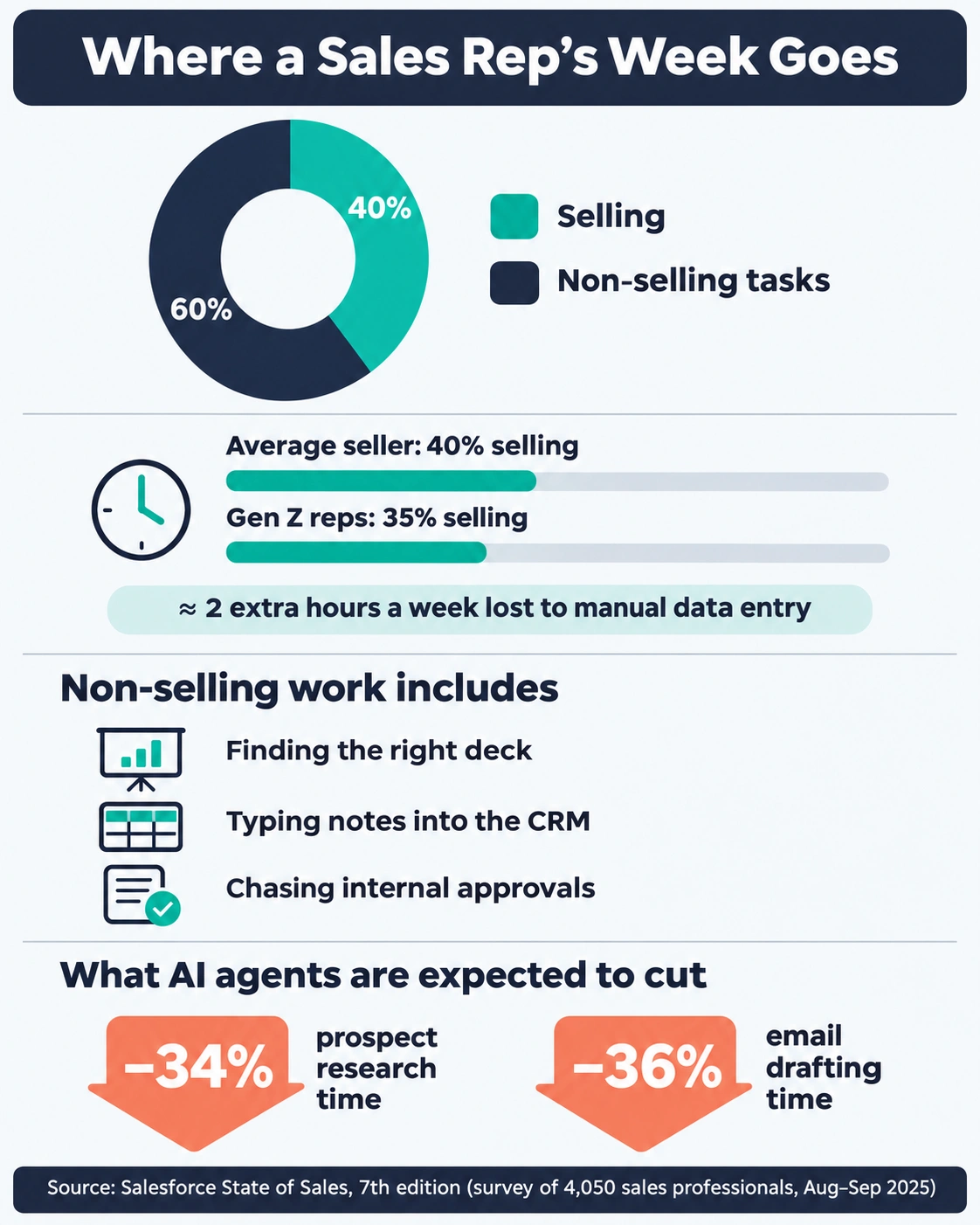
Salesforce’s State of Sales report, its seventh edition, surveyed 4,050 sales professionals across 22 countries between August and September 2025. The headline finding is uncomfortable. The average seller spends just 40% of their time actually selling. For Gen Z reps, it drops to 35%, which works out to roughly two extra hours a week lost to manual data entry.
Put another way, Salesforce says reps spend 60% of their time on non-selling tasks. That is hunting for the right deck, typing notes into the CRM, and chasing internal approvals.
Nobody becomes a sales rep because they love data entry. So when sellers in the same survey were asked what AI agents could do for them, their answer was specific. Once fully implemented, they expect agents to cut prospect research time by 34% and email drafting time by 36%.
Reps who use AI feel the difference
The same Salesforce research found that among sellers already using AI, 89% say it deepens their understanding of customers, and 87% say it makes their job less stressful. Among reps using AI agents, 88% say the technology increases their odds of hitting their targets.
There is also a performance gap. High performers are 1.7 times more likely than underperformers to use prospecting agents. Correlation is not causation, of course. Top reps may simply adopt new tools faster. But the pattern is consistent enough to take seriously.
And prospecting is where the pain is sharpest. Nearly half of sales reps told Salesforce that cold calling is the worst part of their job. Already, 55% of sales professionals use AI for prospecting, and another 38% plan to.
HubSpot’s 2025 State of Sales report, based on more than 1,000 sales professionals, tells a similar story. Only 8% of reps said they do not use AI at all, and AI was rated the highest-ROI tool in the sales stack, picked by 31% of respondents.
A fair caveat: Salesforce and HubSpot both sell AI sales software. Their surveys are large and useful, but read them as vendor research, not neutral science.
Analysts see 2027 as a turning point
Gartner, which does not sell sales tools, is even more direct about where this is going. In May 2026, it predicted that by 2027, 95% of sellers’ research workflows will begin with AI, up from less than 20% in 2024.
The same research found that sales organizations giving sellers AI-enabled “next best actions” are 2.6 times more likely to achieve commercial growth. Teams that prioritize upskilling sellers on AI are 2.4 times more likely to see strong revenue growth.
That does not make human sellers obsolete. Gartner also found that 69% of buyers still prefer to validate AI-generated insights with a sales rep at key decision points. Buyers are doing more research with AI, then turning to a person to sanity-check it. That is a job for a well-prepared rep, not a bot.
But more AI is not automatically better
Here is the part most “best AI tools” lists skip. Gartner also predicts that by 2028, AI agents will outnumber sellers ten to one, yet fewer than 40% of sellers will say those agents improved their productivity.
Gong’s State of Revenue AI 2026 report adds a sobering data point. Sales leaders said 52% of their reps hit or beat quota in 2024. In the latest survey, that number fell to 46%. Gong’s analysis of 7.1 million opportunities across 3,613 companies also found that teams using AI as a core part of their revenue strategy were 65% more likely to increase win rates.
Read those two findings together and the lesson is clear. AI helps when it is pointed at a specific job and woven into how you work. It hurts when it becomes one more tab, one more login, one more thing to babysit. That is why this guide is built around tasks, not tools.
How we picked these tools
Every tool on this list had to pass four simple tests.
- It does one rep task clearly better than doing it by hand. If we could not name the exact job it replaces, it did not make the cut.
- A rep can feel the benefit in the first week. Tools that need a six-month implementation before anyone sees value are better suited to a RevOps buying guide than this one.
- The pricing is knowable. Either the vendor publishes it, or there is enough consistent buyer data to give you a realistic range. We label which is which.
- It works with the stack reps already use. Gmail or Outlook, Zoom or Teams, and a CRM like Salesforce or HubSpot.
We also tried to keep the list short on purpose. One strong tool per task beats five overlapping ones. If you already pay for a platform that covers a task reasonably well, you probably do not need a separate tool for it. We will point out where that overlap usually happens.
A quick word on labels you will see below. “Official” means the price comes from the vendor’s own pricing page. “Reported” means the vendor does not publish pricing, and the figure comes from buyer data or third-party pricing guides. “Vendor research” means a statistic comes from a study run by a company that sells in this space.
The best AI tools for sales reps, by task

Task 1: Prospecting and finding contacts — Apollo.io
Best for: Reps and small teams who want contact data, email sequences and a dialer in one place.
Prospecting is where most reps lose the most time, and Apollo.io is the tool most of them reach for first. It combines a large B2B contact database (more than 200 million contacts) with email sequencing, a built-in dialer and AI-assisted writing. For an individual rep or a small team, that means you can find a prospect, verify their email, drop them into a sequence and call them, without stitching four tools together.
Where Apollo shines is speed. You can filter by job title, company size, industry and buying signals, then push a list straight into outreach. Its AI features help draft emails and suggest who to contact next, which is exactly the “research and write” work Salesforce’s survey says reps want off their plate.
Pricing (official, billed annually): There is a free plan to start. Basic costs $49 per seat per month and Professional costs $79. Billed monthly, those rise to $65 and $99. For teams that need SSO and advanced security, Apollo offers custom pricing.
Watch out for: Apollo runs on credits, and phone numbers burn through them faster than emails. Check how many mobile numbers you actually need before choosing a plan. Like any large database, data accuracy varies by region and industry, so verify key accounts before a big campaign.
Our take: If you are a rep with no prospecting tool today, Apollo’s free plan is the easiest place to start. Upgrade only once you hit the limits.
Task 2: Enrichment and account research — Clay
Best for: Ops-minded reps, SDR leads and teams that want custom, highly targeted lead lists.
How Clay works for sales reps
If Apollo is a well-stocked shop, Clay is a workshop. Instead of relying on one database, Clay pulls data from a large marketplace of providers and lets you build workflows on top of it. You can find a company, enrich it with tech stack and hiring data, find the right person, write a personalized first line with AI, and push the result to your CRM or sequencer.
That flexibility is why Clay has become a favorite of growth teams. You can build list logic that would be impossible in a standard prospecting tool, like “Series A SaaS companies hiring their first sales manager in the last 30 days, with a VP of Sales who posted on LinkedIn this month.”
Clay pricing and limits
Pricing (official): Clay charges for usage, not seats, and every plan includes unlimited users. There is a free plan with 500 actions and 100 data credits a month. Launch starts at 167amonthbilledannually(185 monthly). Growth starts at 446amonthbilledannually(495 monthly), with higher allowances that begin at 40,000 actions and 6,000 data credits a month. Enterprise is custom.
Watch out for: Clay has a real learning curve. Most individual reps will not build complex tables from scratch. It works best when one person on the team owns the workflows and everyone else uses the output. Credits can also go faster than expected if you enrich large lists without filtering first.
Our take: Clay is not the first tool a solo rep needs. It is the tool that makes a good outbound team great.
Task 3: Writing sales emails — Lavender
Best for: Reps who write their own cold emails and follow-ups and want them to land.
Writing is quietly one of the biggest time sinks in sales. Lavender sits inside Gmail and Outlook and acts like a coach looking over your shoulder. As you type, it scores your email, flags what is hurting it (too long, too formal, too much “I”), and suggests fixes. It can also pull quick research on your prospect to help you personalize the opening.
What makes Lavender different from a generic AI writer is the coaching angle. It does not just write the email for you. It teaches you why one version is better than another. Over a few weeks, most reps start writing shorter, clearer emails on their own, which is a skill that sticks even if you stop using the tool.
Pricing (reported consistently by several independent pricing checks): Basic is free and covers five email analyses and five personalizations a month. Starter costs 27amonthbilledannually(29 monthly). Individual Pro costs 45amonthannually(49 monthly). The Team plan costs 89perseatamonthannually(99 monthly) and adds a coaching dashboard for managers.
Watch out for: Lavender improves the email you write. It will not find leads or send sequences. Pair it with Apollo, your CRM, or a sales engagement platform.
Our take: For $27 a month, Lavender is one of the cheapest ways a rep can measurably improve their own output. Start with Starter and see if your reply rates move.
Task 4: Cold calling — Nooks
Best for: SDR and BDR teams that make a high volume of calls every day.
Remember that nearly half of reps call cold calling the worst part of the job. A big reason is the dead time: ringing, voicemails, wrong numbers, and gatekeepers. Nooks attacks that directly. It is an AI-powered parallel dialer, which means it dials several numbers at once and connects you only when a real person picks up.
Around that core, Nooks adds a virtual salesfloor (so remote reps can call “together”), AI coaching, automatic call logging, sequencing, buying signals and contact enrichment. For a calling-heavy team, that turns a demoralizing afternoon of voicemails into a focused block of real conversations.
Pricing (reported): Nooks does not publish prices. Every package is quoted by its sales team. Third-party estimates put it at roughly $4,000 to $5,000 per user per year, billed annually, with a minimum of around five seats.
Watch out for: This is a team investment, not a solo-rep tool. Parallel dialing also needs good, compliant data and clear calling rules in your region. Check local regulations on automated dialing before you scale.
Our take: If your team’s quota depends on phone conversations, Nooks is worth a demo. If calling is an occasional part of your week, the dialer inside Apollo or your CRM is probably enough.
Task 5: Meeting notes and CRM logging — Fathom
Best for: Any rep who runs a lot of calls and hates writing recaps.
Think about the last discovery call you ran. Now think about how long it took to write the notes, update the CRM and send the follow-up. For many reps, that admin takes almost as long as the call itself. Fathom is one of the simplest fixes.

Fathom joins your Zoom, Google Meet or Microsoft Teams calls, records and transcribes them, and sends an AI summary as soon as the meeting ends. For sales, the useful part is its templates. It can structure notes around frameworks reps already use, including SPICED, MEDDPICC and BANT. Higher plans sync those notes into CRMs like HubSpot and Salesforce, so the record updates without you typing a word.
Pricing (official): The free plan includes unlimited recording and transcription, with limited advanced AI summaries. Premium costs $20 a month, or $16 billed annually. Team costs 19peruseramonth(15 annually) and Business costs 34peruseramonth(25 annually). Team and Business both require at least two users.
Watch out for: The free plan’s advanced AI summaries are capped, so a rep with daily calls will hit the limit quickly. Also, always tell buyers you are recording. Consent rules for call recording vary by country and state.
Our take: Fathom has one of the best value-for-money ratios in sales AI. Start free, and upgrade when the summary cap starts to bite.
Task 6: Call coaching and deal insights — Gong
Best for: Mid-size and enterprise sales teams with managers who coach.
Fathom tells you what happened on a call. Gong tells you what it means. Gong records and analyzes calls, emails and meetings across your whole team, then surfaces patterns: which deals are at risk, which talk tracks win, where a rep is losing control of the conversation, and what competitors keep coming up.
For individual reps, the biggest benefit is feedback. Managers rarely have time to listen to every call, and Salesforce’s research found that 75% of reps say they are more likely to hit their targets with a coach or mentor. Gong makes it possible for a manager to coach from real moments in real calls, and for reps to review their own calls without sitting through the full recording.
Pricing (reported): Gong does not publish a price list. Its pricing page states only that licenses are priced per user, plus a platform fee based on the number of users. Buyer data puts the core license at roughly $1,300 to $1,600 per user per year, plus an annual platform fee of about $5,000 to $50,000. According to Vendr data, the median contract is around $55,000 a year.
Watch out for: Gong is a team-level purchase, usually led by sales leadership or RevOps. It pays off when managers actually use it to coach. Without that habit, it becomes an expensive recording library.
Our take: Gong is the gold standard for revenue intelligence. A solo rep does not need it, but a team of 20 or more reps with active managers probably does.
Task 7: AI inside your CRM — Salesforce, HubSpot and Microsoft 365 Copilot
Best for: Teams that want AI where their pipeline already lives, without adding new tools.
Before buying anything new, check what your CRM already includes. All three major platforms now bundle AI that drafts emails, summarizes accounts, and suggests next steps, and Gartner’s research suggests that “next best action” guidance is where AI pays off most.
Salesforce Agentforce Sales
Salesforce (Agentforce Sales). The company has rebuilt its Sales Cloud editions around AI agents. Official list prices are $25 per user a month for Starter Suite, $100 for Pro Suite, $195 for Core, $395 for Advanced and $550 for Max. Agentforce features sit across the higher editions, and Salesforce uses its own agents internally to work leads that would otherwise go untouched. If your company already runs on Salesforce, start by asking your admin which AI features are switched on.
HubSpot Sales Hub with Breeze AI
HubSpot Sales Hub (Breeze AI). HubSpot’s AI layer is called Breeze. Sales Hub Professional starts at $90 to $100 per seat a month depending on billing term, and Enterprise starts at $150. Professional includes 3,000 HubSpot credits a month, which power AI features like the Breeze Prospecting Agent, and Enterprise includes 5,000. Note the one-time onboarding fee: $1,500 for Professional and $3,500 for Enterprise.
Microsoft 365 Copilot for sales teams
Microsoft 365 Copilot (Sales). If your team lives in Outlook and Teams, this is the quiet bargain of the list. The tool once sold as Copilot for Sales is now included in the Microsoft 365 Copilot license at no extra cost. It previously needed a separate add-on of around $20 per user a month. Microsoft 365 Copilot itself costs $30 per user a month on yearly billing, and the sales features connect to both Dynamics 365 Sales and Salesforce.
Our take: CRM-native AI rarely beats a specialist tool at its own task. But it is often good enough, and it has one huge advantage: it is already where reps work. Use it first, and buy specialists only for the tasks where it falls short.
Task 8: Everyday drafting, prep and research — ChatGPT Business
Best for: Call prep, account research, summarizing documents and practicing objection handling.
Not every rep task needs a sales-specific tool. A general AI assistant handles a surprising amount of daily work: summarizing a prospect’s annual report, drafting a business case, rewriting a proposal for a CFO audience, or role-playing a skeptical buyer before a big call.
ChatGPT Business is the sensible choice for teams because it adds a shared, secure workspace, and business data is not used to train models by default.
Pricing (official): $20 per user a month billed annually, or $25 monthly. Each workspace needs at least two paid seats.
Watch out for: A general assistant does not know your CRM data unless you connect it or paste it in. Never paste customer data into a personal AI account. Use the business workspace your company approves.
Our take: For $20 a month, a general assistant is often the highest-return tool a rep can add, as long as it is used for prep and drafting, not as a replacement for real customer knowledge.
Try this prompt before your next discovery call: “I’m meeting the VP of Operations at a 300-person logistics company. Based on their public website and recent news I’ll paste below, list the three most likely business problems they’re facing, one question to test each, and the objection they’re most likely to raise about switching tools.”
AI tools for sales reps compared
Here is everything side by side. Prices are as listed or reported in November 2026 and may change.
| Tool | Main task | Free option | Paid entry point | Pricing type | Who usually buys it |
|---|---|---|---|---|---|
| Apollo.io | Prospecting and contact data | Yes | $49/seat/month (annual) | Official | Rep or small team |
| Clay | Enrichment and list building | Yes | $167/month for the whole org (annual) | Official | Team or ops lead |
| Lavender | Email coaching | Yes (5 emails/month) | $27/month (annual) | Reported | Individual rep |
| Nooks | Parallel dialing | No | ~$4,000-5,000/user/year | Reported | Sales leadership |
| Fathom | Call notes and CRM sync | Yes | $16/month (annual) | Official | Individual rep |
| Gong | Coaching and deal insights | No | ~$1,300-1,600/user/year + platform fee | Reported | Sales leadership or RevOps |
| Salesforce Agentforce Sales | CRM with AI agents | Yes (Free Suite) | $25/user/month | Official | Company |
| HubSpot Sales Hub | CRM with Breeze AI | Yes | From $90-100/seat/month for Professional | Official | Company |
| Microsoft 365 Copilot | AI in Outlook, Teams and CRM | No | $30/user/month (annual) | Official | Company IT |
| ChatGPT Business | Drafting, prep, research | No | $20/user/month (annual) | Official | Rep, team or company |
Three ready-made AI stacks by budget
You do not need every tool on this list. Here is how we would combine them at three budget levels.
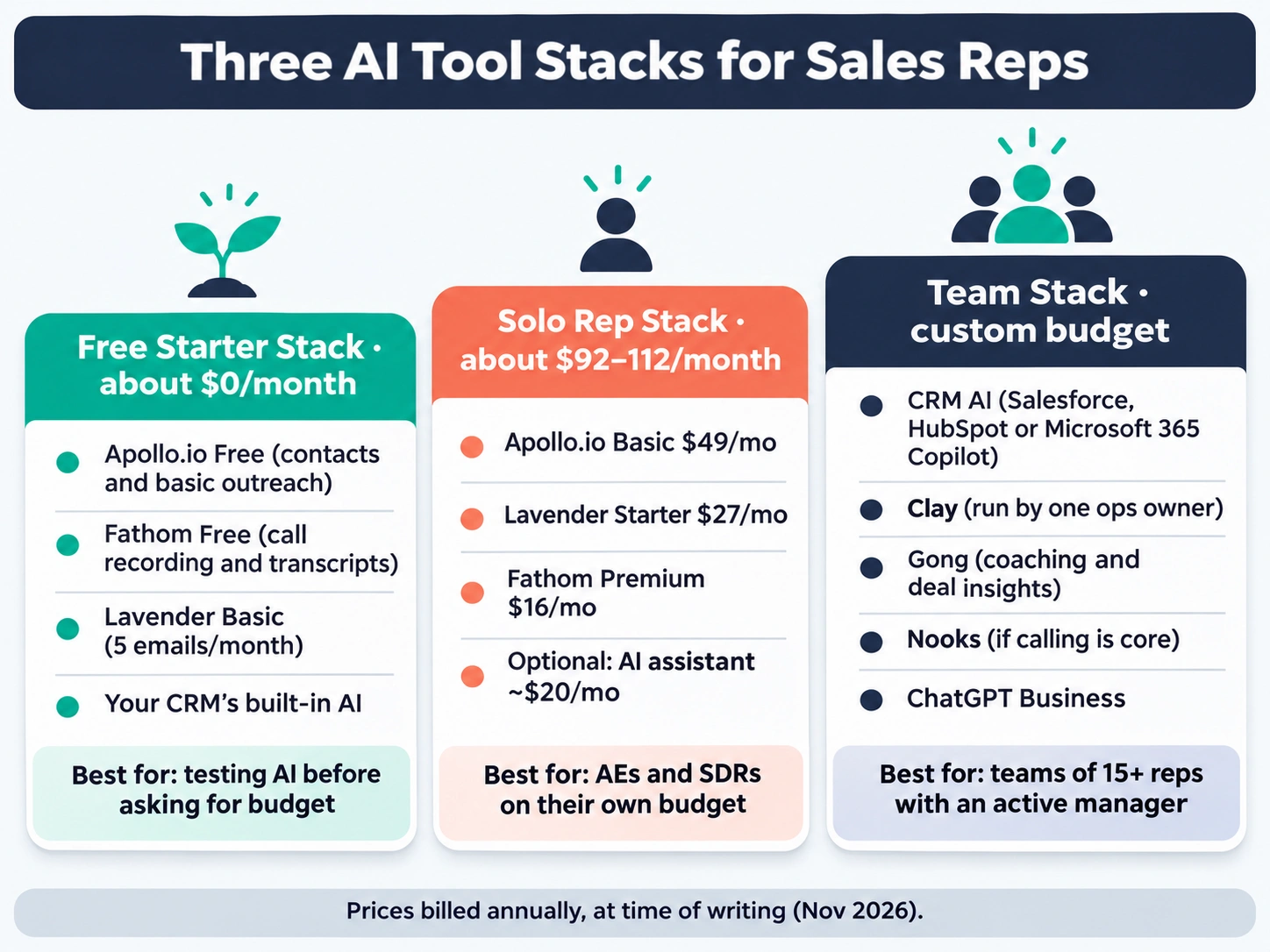
The free starter stack (about $0 per month)
For a rep who wants to test AI without asking for budget.
- Apollo.io Free for finding contacts and basic outreach
- Fathom Free for call recording, transcripts and some AI summaries
- Lavender Basic for scoring a handful of your most important emails each month
- Your CRM’s built-in AI, if your company already pays for it
This stack will not cover heavy volume, but it will show you within two weeks which task benefits most from a paid upgrade.
The solo rep stack (about $92-112 per month)
For an account executive or SDR paying from their own budget or a small expense line.
- Apollo.io Basic at $49/month (annual) for prospecting and sequences
- Lavender Starter at $27/month (annual) for email coaching
- Fathom Premium at $16/month (annual) for unlimited AI call notes
- Optional: a general AI assistant for prep and research
That combination covers the three biggest time sinks Salesforce’s research highlights: research, writing and admin.
The team stack (custom budget)
For a sales team of 15 or more reps with a manager who coaches.
- Your CRM’s AI (Salesforce, HubSpot or Microsoft 365 Copilot) as the foundation
- Clay run by one ops owner to build targeted lists for everyone
- Gong for coaching, forecasting signals and deal reviews
- Nooks if calling is a core part of the motion
- ChatGPT Business for shared, secure everyday drafting
At this level, the bigger cost is not software. It is the time it takes to roll tools out properly. Which brings us to how to choose.
How to choose the right AI tool for your sales role
The right tool depends less on which product is “best” and more on where your week actually goes. Before you sign up for anything, spend five minutes on this.
Step 1: Audit one normal week
Look back at your last full week. Roughly how many hours went to each of these?
- Researching accounts and finding contacts
- Writing emails and follow-ups
- Making calls that never connected
- Writing call notes and updating the CRM
- Preparing for meetings and demos
The biggest number is your first tool. It really is that simple. A rep losing six hours a week to CRM updates needs Fathom long before they need Clay.
Step 2: Match the tool to your role
Different sales roles feel the pain in different places.
| Your role | Biggest time drain | Start with |
|---|---|---|
| SDR / BDR | Finding contacts, cold outreach, calling | Apollo.io, Lavender, Nooks (team) |
| Account executive | Call prep, notes, follow-ups, deal tracking | Fathom, ChatGPT Business, your CRM’s AI |
| Account manager | Account research, renewals, upsell signals | Your CRM’s AI, Fathom, Gong (team) |
| Sales manager | Coaching, forecasting, pipeline reviews | Gong, your CRM’s AI |
| Founder doing sales | Everything, with no team | Apollo.io Free, Fathom Free, ChatGPT |
Step 3: Check what you already pay for
This step saves more money than any discount. Many companies already pay for Microsoft 365 Copilot, a Salesforce edition with AI features, or HubSpot Professional with Breeze credits. Ask your manager or admin before you buy. You may already have much of what you need.
Step 4: Run a 14-day test with one number
Pick one tool and one metric. Reply rate for Lavender. Hours spent on notes for Fathom. Conversations per day for Nooks. Measure it for a week before and two weeks after. If the number does not move, the tool is not for you, no matter how good the demo looked.
Your first week with AI: a simple rollout plan
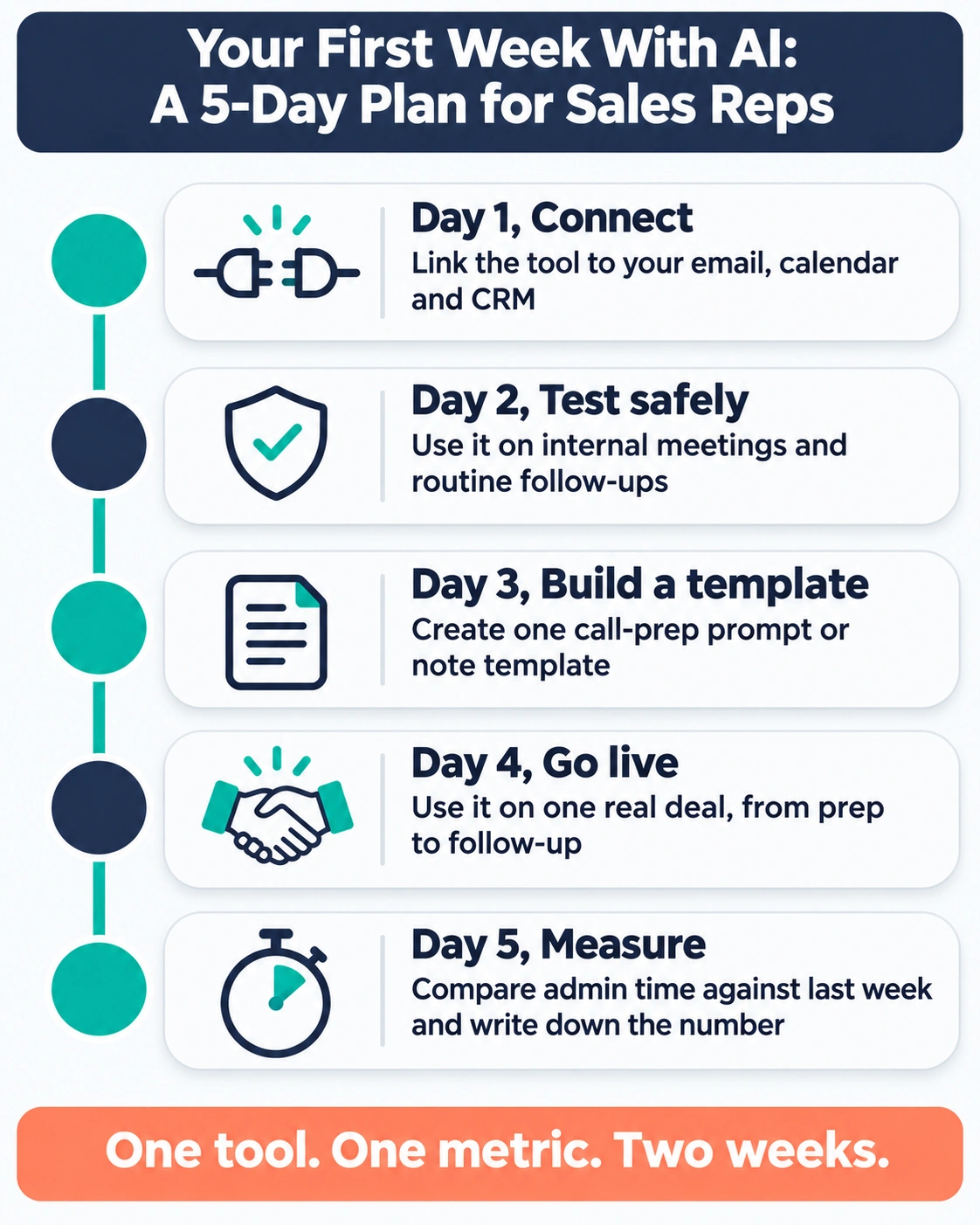
Tools fail most often because nobody changes their habits around them. Here is a realistic first week for a rep adding AI to their day.
- Day 1: Connect the tool to your email, calendar and CRM. Most tools are close to useless until they see your real data. Set up integrations first, before you test anything.
- Day 2: Use it on low-stakes work. Let the note-taker join internal meetings. Run Lavender on follow-ups, not your biggest prospect’s first email.
- Day 3: Build one repeatable prompt or template. For example, a call-prep prompt, or a Fathom summary template set to your sales framework.
- Day 4: Use it on one real deal. Prep a discovery call with AI research, record it, and let the tool draft the follow-up. Edit, then send.
- Day 5: Check the time saved. Compare how long your admin took this week versus last. Write down the number. That is your business case if you want your company to pay for it.
Common mistakes reps make with AI tools
We see the same handful of mistakes again and again. Avoid these and you are already ahead of most teams.
Buying a tool for every task at once. Gartner’s warning that agents will outnumber sellers ten to one, while fewer than 40% of sellers will feel more productive, is really a warning about tool overload. Add one tool at a time.
Sending AI-written emails without editing them. Buyers can spot generic AI copy instantly. Use AI to draft and research, then add something only you would know: a detail from your last call, a mutual connection, a specific result.
Trusting data without checking it. Contact databases and AI summaries are both wrong sometimes. Verify the details that matter, like a decision-maker’s title or a number quoted on a call, before you act on them.
Skipping consent and privacy. Tell people when a call is recorded. Never paste customer data into a personal AI account. Use company-approved tools with business privacy terms.
Letting AI replace the conversation. Remember the Gartner finding that 69% of buyers still want to validate AI-generated insights with a rep. Your value in 2027 is judgment, context and trust. AI should buy you more time for that, not less.
What AI for sales reps looks like in 2027
If 2025 was the year sales teams experimented with AI and 2026 was the year they bought it, 2027 looks like the year it becomes simply part of the job. Here is what we expect to matter most.

How research, agents and pricing will change
AI-first research becomes the default. Gartner expects 95% of sellers’ research workflows to begin with AI by 2027. In practice, that means the rep who walks into a call without an AI-built account brief will be the exception, and probably the one who loses the deal.
Agents move from novelty to coworker. Salesforce’s own sales team already uses agents to work leads that used to slip through the cracks, and Microsoft and HubSpot are building similar agents into their platforms. Expect more of the repetitive top-of-funnel work, like first-touch emails to inbound leads, to be handled by agents, with reps stepping in when a buyer is ready to talk.
Pricing shifts from seats to outcomes. You can already see this happening. Clay charges for usage instead of seats. HubSpot meters AI through credits. Microsoft folded its sales Copilot into the main Copilot license. In 2027, expect more “pay for what the AI actually did” pricing, which makes it even more important to track what each tool delivers.
Why fewer tools and human skills will win
Consolidation beats collection. Gong’s data showing quota attainment falling from 52% to 46% is a reminder that AI on its own does not fix sales performance. The teams that win will run fewer, better-integrated tools, with clean CRM data underneath. Salesforce found that 51% of sales leaders with AI say tech silos delay or limit their AI initiatives. Fixing that matters more than any new purchase.
The human skills get more valuable, not less. As buyers use AI to research on their own, the rep’s role shifts toward helping them make sense of what they found and building confidence in the decision. AI can draft the email. It cannot earn the trust.
The practical takeaway for 2027 is to get fluent now. Learn one or two tools deeply, build good habits around them, and spend the time you save on the parts of sales only a person can do.
Frequently asked questions
What is the best AI tool for sales reps?
There is no single best tool, because reps do several different jobs. For most reps, Apollo.io is the best all-round starting point for prospecting, Fathom is the best value for call notes, and Lavender is the best for writing better emails. Teams with active managers get the most from Gong.
Are there free AI tools for sales reps?
Yes. Apollo.io, Clay, Fathom and Lavender all offer free plans at the time of writing. They come with usage limits, but they are enough to test whether a