
Published on November 4th, 2026
Ask ten small business owners whether they use AI and you’ll get two very different answers depending on who’s counting. A U.S. Chamber of Commerce survey found that 58% of small businesses use generative AI, up from 23% just two years earlier. The U.S. Census Bureau, meanwhile, puts AI use across all U.S. businesses at under 20%, and says the smallest firms haven’t really moved at all.
Both numbers are real. We’ll get to why they disagree further down. But the takeaway for anyone running a lean business is simpler: plenty of your competitors are already using AI for the boring stuff, and plenty more are still sitting on the fence, unsure where to start.
This guide is for the second group. Instead of another flat “top 30” list, we’ve sorted 13 AI tools for small business by the job they actually do: writing, design, customer support, sales, bookkeeping, meetings and automation.
Quick answer: What are the best AI tools for small business?
Most small businesses start with one general AI assistant (ChatGPT, Claude, Gemini or Microsoft Copilot), choosing the one that fits the software they already use. They then add task-specific tools: Canva for design, Tidio or Fin for customer support, HubSpot for CRM, the AI built into QuickBooks or Xero for bookkeeping, Otter or Fireflies for meeting notes, and Zapier for automation.
The 13 best AI tools for small business at a glance
Use this table to shortlist, then jump to the section for the job you need help with. Prices are in USD, per user per month unless noted, and reflect the cheapest paid option (usually annual billing).
| Tool | Job it does | Free plan? | Paid plans from | Best for |
|---|---|---|---|---|
| ChatGPT Business | All-round AI assistant | Yes (individual) | $20/user (annual, 2+ users) | Teams wanting a flexible all-rounder |
| Claude Team | All-round AI assistant | Yes (individual) | $20/seat (annual, 2+ seats) | Long documents, careful writing, analysis |
| Gemini in Google Workspace | AI inside Gmail, Docs, Sheets | No (bundled) | $7/user (Business Starter) | Businesses already on Google |
| Microsoft 365 Copilot Business | AI inside Word, Excel, Outlook, Teams | No | $21/user add-on ($18 promo to Dec 31, 2026) | Businesses already on Microsoft 365 |
| Canva | Design and marketing visuals | Yes | $15/mo or $120/yr (Pro) | Social posts, flyers, brand assets |
| Tidio | Live chat + Lyro AI agent | Yes | $24.17/mo (Starter, annual) | Ecommerce and small support teams |
| Fin (formerly Intercom) | AI customer service agent | No | $0.99 per outcome + seats from $29 | Higher-volume support |
| HubSpot | CRM with Breeze AI | Yes | Starter (price varies by promo) | Tracking leads and customers |
| QuickBooks Online | Bookkeeping with Intuit Assist | No | Varies by plan | U.S. small businesses |
| Xero | Bookkeeping with JAX | No | Varies by plan | Service businesses, multi-currency |
| Otter.ai | Meeting transcription and notes | Yes | $8.33/user (Pro, annual) | Solo owners and small teams |
| Fireflies.ai | Meeting notes and search | Yes | $10/user (Pro, annual) | Sales and client calls |
| Zapier | No-code automation | Yes (100 tasks) | $19.99/mo (Professional, annual) | Connecting apps without code |
General AI assistants: start here
A general AI assistant is the one tool almost every small business should have. It drafts emails, rewrites product descriptions, summarizes contracts, builds rough spreadsheets and talks you through problems at 11 p.m. when nobody else is around. The right pick usually depends less on which model is “smartest” and more on the software you already pay for.
1. ChatGPT Business
ChatGPT is the default for a reason. It handles writing, research, data analysis and image generation in one place, and it connects to tools like Google Drive, Microsoft 365 and Slack.
Pricing: According to OpenAI’s help center, standard seats cost $25 per user per month on monthly billing or $20 on annual billing. Premium seats, with more usage, cost $125 monthly or $100 annually. The plan needs at least two users.
Good to know: If you’ve seen “ChatGPT Team” mentioned in older articles, that’s the same product. OpenAI renamed it ChatGPT Business in August 2025. Business data isn’t used to train OpenAI’s models by default, which matters if you’ll be pasting in customer information.
2. Claude Team
Claude, made by Anthropic, is a strong choice when the work involves long documents: contracts, proposals, policies, research reports. It tends to follow detailed instructions closely and write in a measured, natural tone.
Pricing: Per Claude’s pricing page, Standard seats are $25 per month or $20 on annual billing, and Premium seats are $125 or $100. In July 2026 Anthropic dropped the minimum from five seats to two, so a two-person business can now use the Team plan.
Good to know: Some 2026 articles still say Team needs five seats. That’s out of date.
3. Gemini in Google Workspace
If your business already runs on Gmail and Google Docs, you may be paying for AI without using it. Google folded Gemini into its Workspace plans in 2025 rather than selling it as a separate add-on.
Pricing: On a one-year commitment, Workspace costs $7 (Business Starter), $14 (Business Standard) or $22 (Business Plus) per user per month.
Good to know: The plans aren’t equal. Starter gives you Gemini in Gmail and the Gemini chat app. To get Gemini inside Docs, Sheets and Meet, you need Business Standard or higher.
4. Microsoft 365 Copilot Business
Copilot is the Microsoft-shop equivalent. It works directly inside Word, Excel, PowerPoint, Outlook and Teams, so it can summarize an email thread or turn meeting notes into a slide deck without copy-pasting anything.
Pricing: Copilot Business is an add-on for organizations with up to 300 users. Its list price is $21 per user per month, discounted to $18 through December 31, 2026. You also need a Microsoft 365 Business Basic, Standard or Premium subscription underneath.
Good to know: Count the base license when comparing costs. Copilot is cheaper than it looks only if you’re already paying for Microsoft 365.
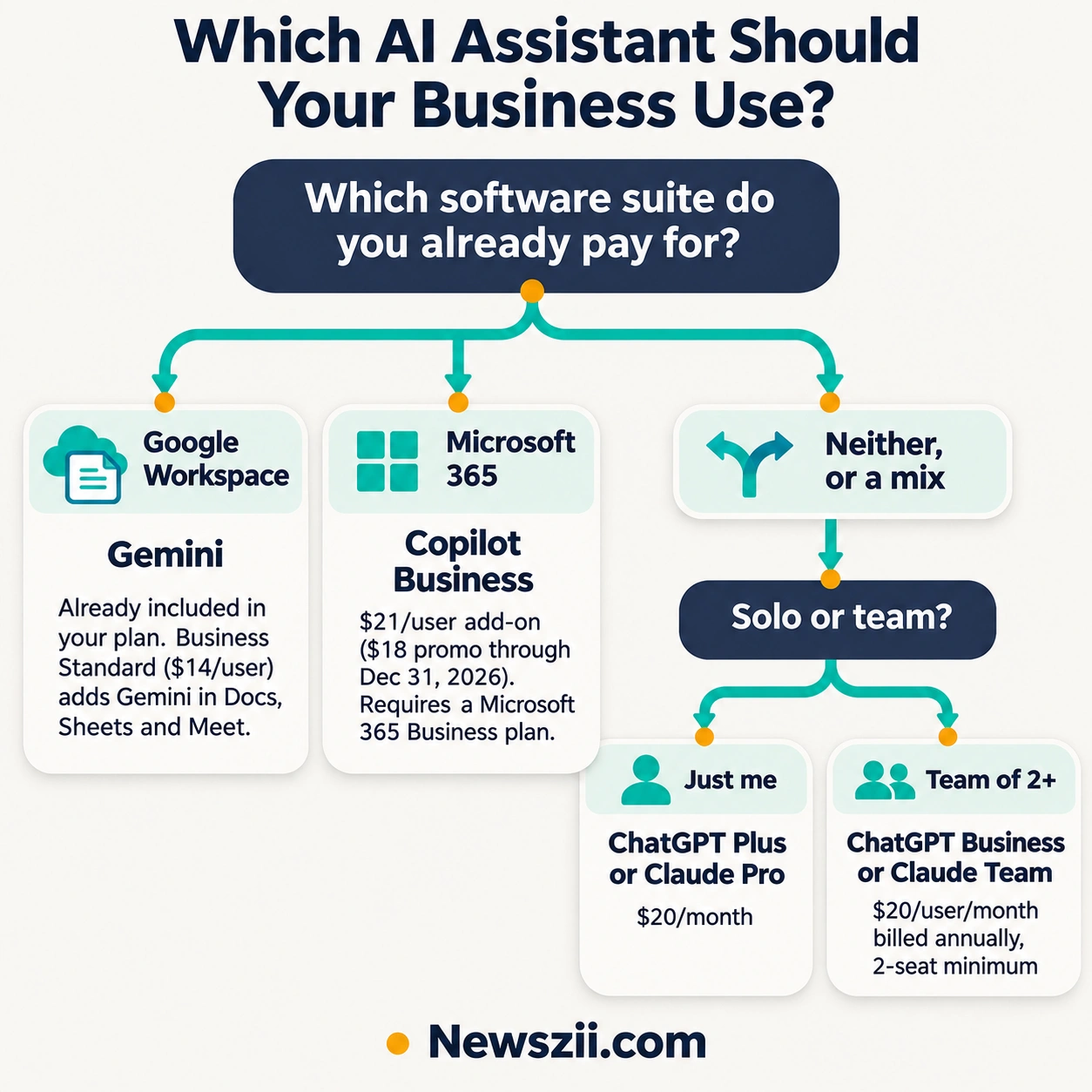
Which assistant should you choose?
- You live in Gmail and Google Docs: check whether your Workspace plan already includes Gemini before buying anything else.
- You live in Outlook, Word and Excel: Copilot Business fits most naturally.
- You use a mix of tools, or none of the above: ChatGPT Business or Claude Team. Try the free tiers of both for a week on real work and keep the one you reach for.
- You’re a solo owner: an individual plan is enough. ChatGPT Plus and Claude Pro are $20 a month, and Google AI Pro is $19.99.
AI tools for design and marketing
Marketing is where most small businesses feel the time squeeze first. You need a steady stream of social posts, promo graphics and email headers, but hiring a designer for every Instagram story doesn’t make sense.
5. Canva (Magic Studio)
Canva has quietly become the design tool for people who aren’t designers. Its AI features, grouped under the name Magic Studio, can generate images from a text prompt, remove backgrounds, resize one design into a dozen social formats and draft copy to go with it.
Pricing: The free plan is permanent and includes limited AI usage. Canva Pro costs $15 a month or $120 a year for one person and unlocks the full Magic Studio, Brand Kit and premium templates.
Good to know: The Brand Kit is the underrated feature here. Upload your logo, colors and fonts once, and every template snaps to your brand. For a business without a marketing team, that consistency alone is worth the upgrade.
Real-world use: A bakery owner can write “autumn pumpkin bread launch, warm and cozy” and get a starting design for Instagram, a printable counter card and a Facebook cover in minutes, all in her brand colors.

AI tools for customer support
Customer engagement is the single most common way small businesses put AI to work, according to the U.S. Chamber’s 2025 report. An AI chat agent can answer “Where’s my order?” and “Do you ship to Canada?” at 3 a.m. and hand anything tricky to a human in the morning.

One warning before you pick: AI support tools are often priced by usage, not just by seat. That’s fair when volume is low, but it can surprise you when traffic spikes.
6. Tidio
Tidio combines live chat, email and social messages in one inbox, with an AI agent called Lyro that learns from your FAQs and help pages. It’s especially popular with Shopify and WooCommerce stores.
Pricing: There’s a free plan. Paid plans start at $29 a month for 100 human-handled conversations, or $24.17 a month on annual billing, according to a September 2026 pricing breakdown. Lyro and the Flows automation builder are billed as separate meters on top.
Good to know: Model your Lyro usage before you commit. Tidio counts a Lyro conversation once the AI replies, whether or not it solves the problem.
7. Fin (formerly Intercom)
Fin is the AI agent built by the company formerly known as Intercom, which renamed itself after its flagship product in 2026. It’s one of the more capable AI support agents available, and it can work inside Intercom’s own helpdesk or alongside tools like Zendesk.
Pricing: Fin charges $0.99 per outcome, roughly one resolved conversation. If you also use Intercom’s helpdesk, seats cost $29, $85 or $132 per person per month on annual billing.
Good to know: Pay-per-outcome is easy to start with and easy to justify, because you only pay when the AI actually helps. It suits businesses with steady support volume more than a tiny shop answering five chats a week. Salesforce agreed in June 2026 to buy the company, so watch for product and pricing changes.
Which one? For a small online store just starting out, Tidio’s free plan is the lower-risk entry point. For a growing business handling hundreds of tickets a month, Fin’s per-outcome model is worth running the numbers on.
AI tools for sales and CRM
If your leads live in a spreadsheet, your inbox and your memory, you’re probably losing some of them. A CRM keeps every contact, deal and conversation in one place, and modern CRMs now use AI to fill in the gaps.
8. HubSpot (Breeze AI)
HubSpot’s free CRM has been a small-business favorite for years, and it now ships with Breeze, HubSpot’s AI layer. On the free plan you get the Breeze Assistant, which can summarize records, draft emails and answer questions about your pipeline. Paid Starter plans add AI agents for prospecting and data enrichment, powered by a monthly allowance of HubSpot credits.
Pricing: The CRM is free with no time limit. Starter pricing has moved around a lot in 2026, with different promotional rates for annual and monthly billing, so check HubSpot’s pricing page for the current figure.
Good to know: The jump from Starter to Professional is steep. HubSpot’s more advanced AI agents, including the full customer service agent, live in the higher tiers. Start free, and upgrade only when you hit a specific limit.
AI tools for bookkeeping and finance
Here’s a tip that saves money: before you buy a separate AI bookkeeping app, look at the accounting software you already use. Both major small-business platforms now build AI in at no extra charge.
9. QuickBooks Online (Intuit Assist)
Intuit Assist is a set of AI agents inside QuickBooks Online that handle routine accounting, payments, customer management and financial analysis, according to Coefficient’s feature overview. In practice, that means auto-categorized transactions, invoice reminders, anomaly alerts and plain-English answers to questions like “How did my cash flow look last quarter?”
Good to know: Not every agent is available on every plan. Entry-level plans get the basics, such as AI categorization and smart invoicing, while the fuller agent suite sits higher up.
10. Xero (JAX)
Xero’s assistant is called JAX, short for “Just Ask Xero.” You can ask it to create an invoice, edit a quote or reconcile transactions in conversation, and it’s included in standard Xero plans at no additional cost.
Good to know: Xero is especially strong for service businesses and anyone billing in multiple currencies.
One rule for both: let AI do the data entry, but keep a human reviewing the books. AI categorization is fast and usually right. “Usually” isn’t good enough at tax time.
AI tools for meetings and admin
An AI note-taker joins your calls, transcribes them and sends a summary with action items afterwards. For owners who spend half the week on client and vendor calls, it means no more scribbling notes while trying to listen.
11. Otter.ai
Otter is known for a clean interface and live, collaborative notes. Several people can highlight and comment on the transcript while the meeting is still running.
Pricing: There’s a free plan. Otter Pro costs $16.99 a month, or $8.33 a month billed annually.
Best for: solo owners and small teams with a moderate number of meetings.
12. Fireflies.ai
Fireflies leans toward sales and client-facing teams. It makes past calls searchable, so you can find the moment a client mentioned their budget three weeks ago.
Pricing: Pro costs $18 a month, or $10 billed annually. The free plan includes unlimited transcription and AI summaries, with 400 minutes of storage per team.
Good to know: Always tell people when a meeting is being recorded. In some places it’s a legal requirement, and everywhere it’s good manners.
AI tools for automation
Automation is where small amounts of AI turn into real hours saved. Instead of copying a new order from your shop into a spreadsheet, then emailing the customer, then pinging your team, you set it up once and it runs on its own.
13. Zapier
Zapier connects thousands of apps without code. You build “Zaps” (if this happens in app A, do that in app B) and can drop AI steps in the middle, such as summarizing a form submission or drafting a reply before it’s sent to you for approval.
Pricing: Per Latenode’s check of Zapier’s pricing page, the free plan includes 100 tasks a month. Professional starts at $19.99 a month billed annually for 750 tasks, or $29.99 billed monthly. New accounts get a 14-day Professional trial with no card required.
Good to know: Zapier bills by task, and every successful action step counts as one. A four-step Zap that runs 100 times a day uses 12,000 tasks a month, not 3,000. Do that math before you scale up.
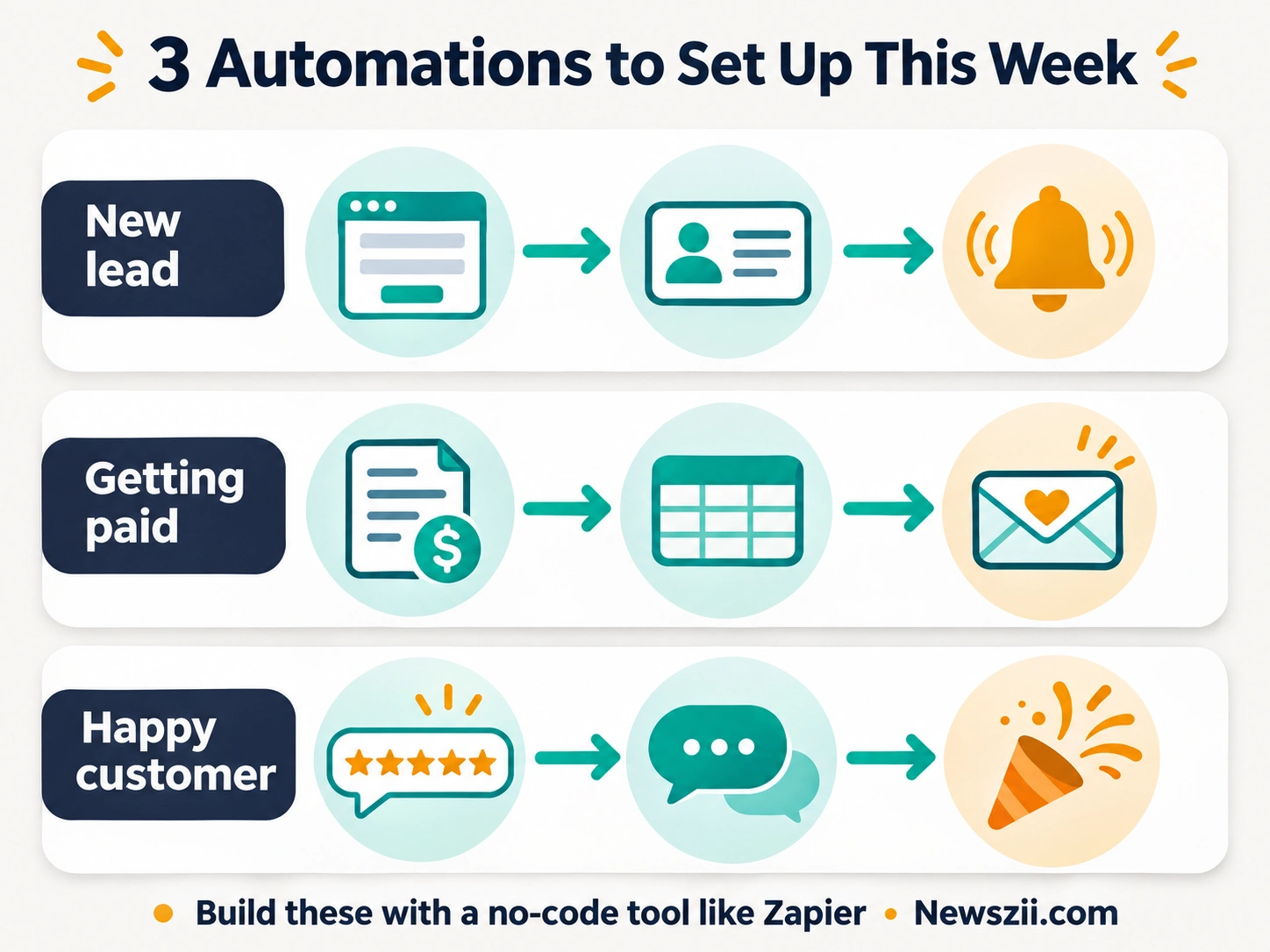
Three starter automations worth setting up this week:
- New website form entry → add the lead to your CRM → send yourself a Slack or email alert.
- New paid invoice → log it in a Google Sheet → send the customer a thank-you email.
- New five-star review → post it to your team chat so everyone sees the win.
How many small businesses actually use AI?
It depends on the survey, and the gap is bigger than you’d expect. Here’s what the two most-cited U.S. sources found.
| Source | What it measured | Result |
|---|---|---|
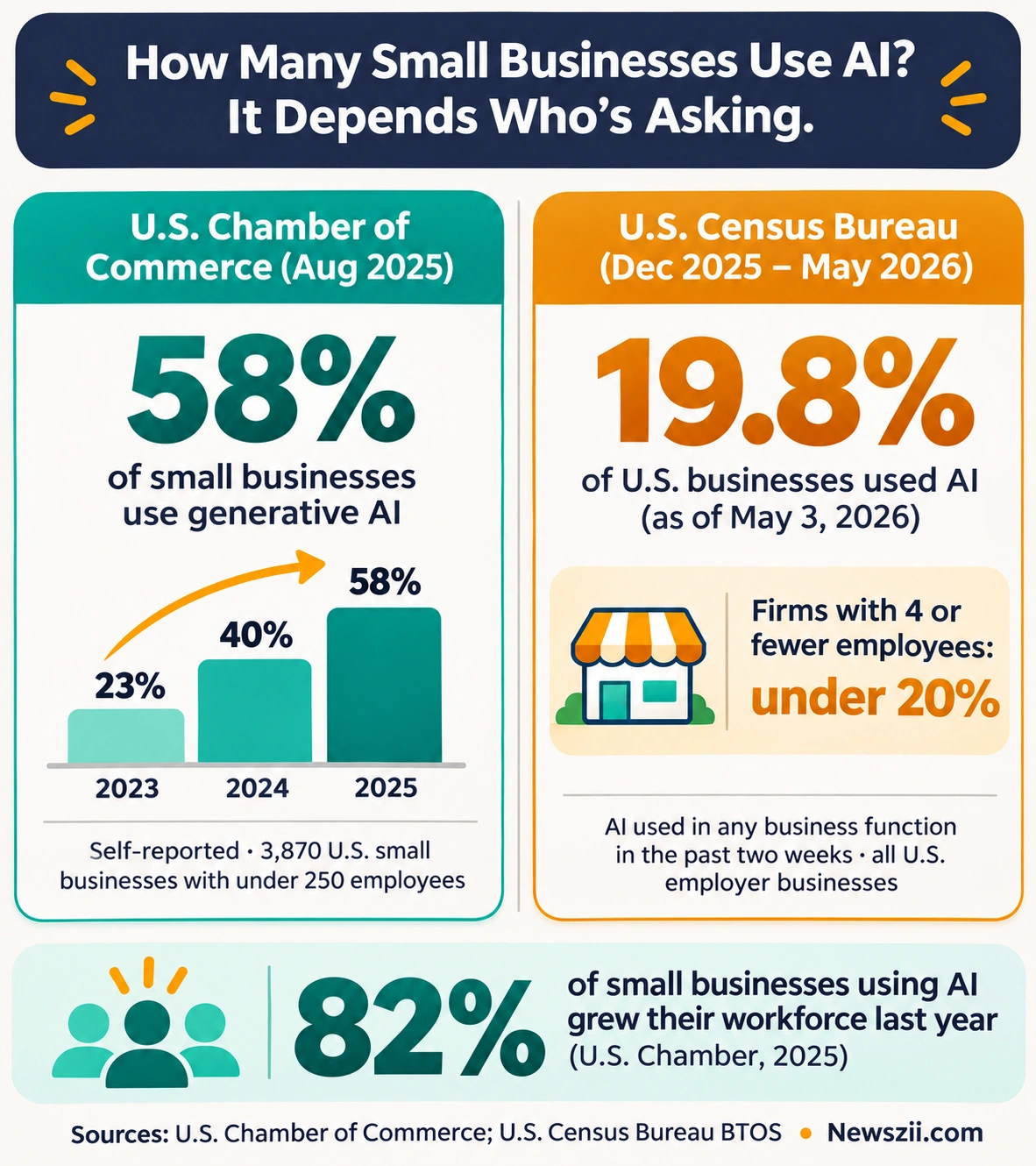
| U.S. Chamber of Commerce, Empowering Small Business (Aug 2025) | 3,870 small businesses with fewer than 250 employees, self-reported generative AI use | 58% use generative AI (40% in 2024, 23% in 2023) |
| U.S. Census Bureau, Business Trends and Outlook Survey (Dec 2025 – May 2026) | All U.S. employer businesses, AI used in any business function in the past two weeks | 17–20% overall; 19.8% as of May 3, 2026 |
Why the numbers differ. The Chamber asks owners whether they use generative AI at all, and an owner who drafts the occasional email with ChatGPT counts. The Census asks whether the business used AI in any business function in the last two weeks, across every kind of employer firm. One captures casual use; the other captures regular, operational use.
The Census data carries a detail small business owners should pay attention to. Between December 2025 and May 2026, AI use grew among firms with 20 or more employees but didn’t change significantly among smaller ones. Fewer than 20% of firms with four or fewer employees reported using AI.
In other words, larger businesses are pulling ahead. That’s a gap, but it’s also an opening: the tools above cost less than a single part-time hire, and most have free plans you can try today.
One more finding worth sharing with anyone worried about jobs. According to the Chamber, 82% of small businesses using AI increased their workforce over the past year. For most small firms, AI is taking over tasks rather than replacing people.
How to choose AI tools for your small business
The best AI tool is the one that removes a task you genuinely hate. Start there, not with whatever’s trending this week.
- Pick one painful task. Write down the three jobs that eat the most time each week. Choose the one that’s most repetitive.
- Check what you already pay for. Google Workspace, Microsoft 365, QuickBooks, Xero and HubSpot all include some AI now. You may not need a new subscription.
- Check it works with your stack. A tool that doesn’t connect to your email, store or calendar creates new copy-paste work.
- Read the pricing model, not just the price. Per-seat, per-task and per-outcome pricing behave very differently as you grow. Watch for seat minimums too.
- Check the data settings. Use business plans for anything involving customer data, and confirm whether your inputs are used to train the vendor’s models.
- Run a two-week trial on real work. Track roughly how many hours it saves. If you can’t point to a number, cancel it.
Starter AI stacks by budget
| Budget | Stack | Approximate monthly cost |
|---|---|---|
| Free | Free tiers of ChatGPT, Claude or Gemini; Canva Free; HubSpot Free CRM; Fireflies Free; Zapier Free | $0 |
| Solo owner | ChatGPT Plus or Claude Pro ($20) + Canva Pro ($15, or $10 billed yearly) + Zapier Professional ($19.99 annual) | About $50–55 |
| Small team on Google | Workspace Business Standard ($14/user) for Gemini in every app + Canva Pro + Zapier | Scales per user |
| Small team on Microsoft | Microsoft 365 Business plan + Copilot Business ($21/user, $18 promo through Dec 31, 2026) | Scales per user |
| Small team, mixed tools | ChatGPT Business or Claude Team ($20/user annual, 2-seat minimum) + task tools as needed | From $40 for two people |
Mistakes to avoid
- Tool sprawl. Five overlapping AI subscriptions cost more and get used less than one well-chosen assistant.
- Paying for seats nobody uses. Give team plans to people who use AI daily. Occasional users can share workflows or stay on free tiers.
- Ignoring usage-based bills. Support agents billed per conversation or per outcome, and automations billed per task, can climb quickly during a busy season. Set alerts or caps.
- Pasting sensitive data into consumer plans. Customer records, contracts and financials belong in business plans with clear data terms.
- Skipping the human check. AI drafts, summaries and bookkeeping entries are a starting point. Someone should still read what goes out the door.
Frequently asked questions
What is the best AI tool for a small business?
There’s no single best tool, but most small businesses get the biggest return from one general AI assistant. Choose Gemini if you use Google Workspace, Copilot if you use Microsoft 365, or ChatGPT or Claude if you use a mix. Add task-specific tools only once you know which jobs eat the most time.
Are there free AI tools for small businesses?
Yes. ChatGPT, Claude and Gemini all have free tiers. Canva Free includes limited AI design features, HubSpot’s CRM is free with the Breeze Assistant, Fireflies has a free plan with unlimited transcription, and Zapier’s free plan covers 100 tasks a month.
How much do AI tools cost for a small business?
Individual AI assistant plans cost about $20 a month. Team plans for ChatGPT Business and Claude Team start at $20 per user per month on annual billing, with a two-seat minimum. Support tools often add usage fees, such as Fin’s $0.99 per outcome.
What percentage of small businesses use AI?
According to the U.S. Chamber of Commerce, 58% of small businesses used generative AI in 2025. The U.S. Census Bureau measured AI use across all U.S. businesses at 17–20% between December 2025 and May 2026. The difference comes from how each survey defines “using AI.”
Will AI replace employees in my small business?
The data so far says no. The U.S. Chamber found that 82% of small businesses using AI increased their workforce over the past year. Most small firms use AI to take over repetitive tasks so people can focus on customers and growth.
Do I have to pay extra for Gemini in Google Workspace?
No. Gemini is included in Google Workspace business plans. Business Starter covers Gemini in Gmail and the Gemini app, while Business Standard and Plus add Gemini inside Docs, Sheets, Slides and Meet.
Can a two-person business use a team AI plan?
Yes. Both ChatGPT Business and Claude Team now require only two seats, so even the smallest teams can get shared workspaces, admin controls and business data protections.
Final thoughts
You don’t need a dozen AI subscriptions to get real value. Start with one assistant that fits the software you already use, pick the single task that drains the most hours, and add one tool to fix it. Give it two weeks. If it saves time, keep it and move to the next task. If it doesn’t, cancel and try something else.
The businesses pulling ahead with AI aren’t the ones with the biggest budgets. They’re the ones that started small and kept going.

Founder, Newszii.com | CEO, NICHE Digital Media
Praveen Panjiar brings nearly two decades of experience in digital media, web & mobile asset development, and growth strategies.
He built Newszii from the ground up into a global platform spanning tech, business, finance, and lifestyle, and has since developed a strong track record of building, scaling, and optimizing digital properties with a sharp focus on user growth, content strategy, and emerging technology trends.