Published on November 5th, 2026
The best AI tools for marketing are the ones matched to a specific job. Most teams start with one general AI assistant (ChatGPT, Claude or Gemini) for drafting and research. Then they add task tools: Canva for design, Buffer for social scheduling, Mailchimp or HubSpot for email and CRM, and Semrush for SEO. For paid ads, the AI is already built into Google Ads (AI Max) and Meta (Advantage+), so you don’t pay extra for it.
That’s the short answer. The longer one is more useful, because “AI marketing tool” now covers almost everything. Your email platform writes subject lines. Your design app generates images. Your ad account rewrites your headlines whether you asked it to or not.
So the real question isn’t which AI tools exist. It’s which ones are worth paying for, for the work you actually do. This guide sorts the best tools by marketing task, so you can build a stack that fits your budget going into 2027.
Quick note on prices: AI software prices move fast. Canva alone has changed its Pro price several times this year. Confirm on the vendor’s site before you buy.
AI tools for marketing at a glance
If you only have two minutes, start here. Each row is one marketing job, the tool that handles it best for most teams, and what it costs to start.
| Marketing task | Best pick | Starting price (USD) | Free option? |
|---|---|---|---|
| Drafting, research, ideas | ChatGPT, Claude or Gemini | $20/month ($4.99 for Google AI Plus) | Yes, all three |
| Brand-consistent copy at scale | Jasper | $59/month per seat, billed yearly | 7-day trial only |
| Design and visuals | Canva | $18/month or $144/year | Yes |
| Social media scheduling | Buffer | $6 per channel/month | Yes, 3 channels |
| Email marketing | Mailchimp | $20/month (Standard, 500 contacts) | Free plan, no AI |
| CRM and automation | HubSpot | $20/seat/month (Starter) | Free CRM |
| SEO and AI search visibility | Semrush | $139.95/month | Limited free account |
| Google search ads | Google Ads AI Max | No extra cost | Built in |
| Facebook and Instagram ads | Meta Advantage+ | No extra cost | Built in |
Ad platforms charge for media, not for the AI features.
How marketers actually use AI in 2026
Almost every marketer uses AI now. Far fewer can prove it pays off. That gap is the most useful thing to understand before you buy anything.
Here’s what the 2026 research shows:
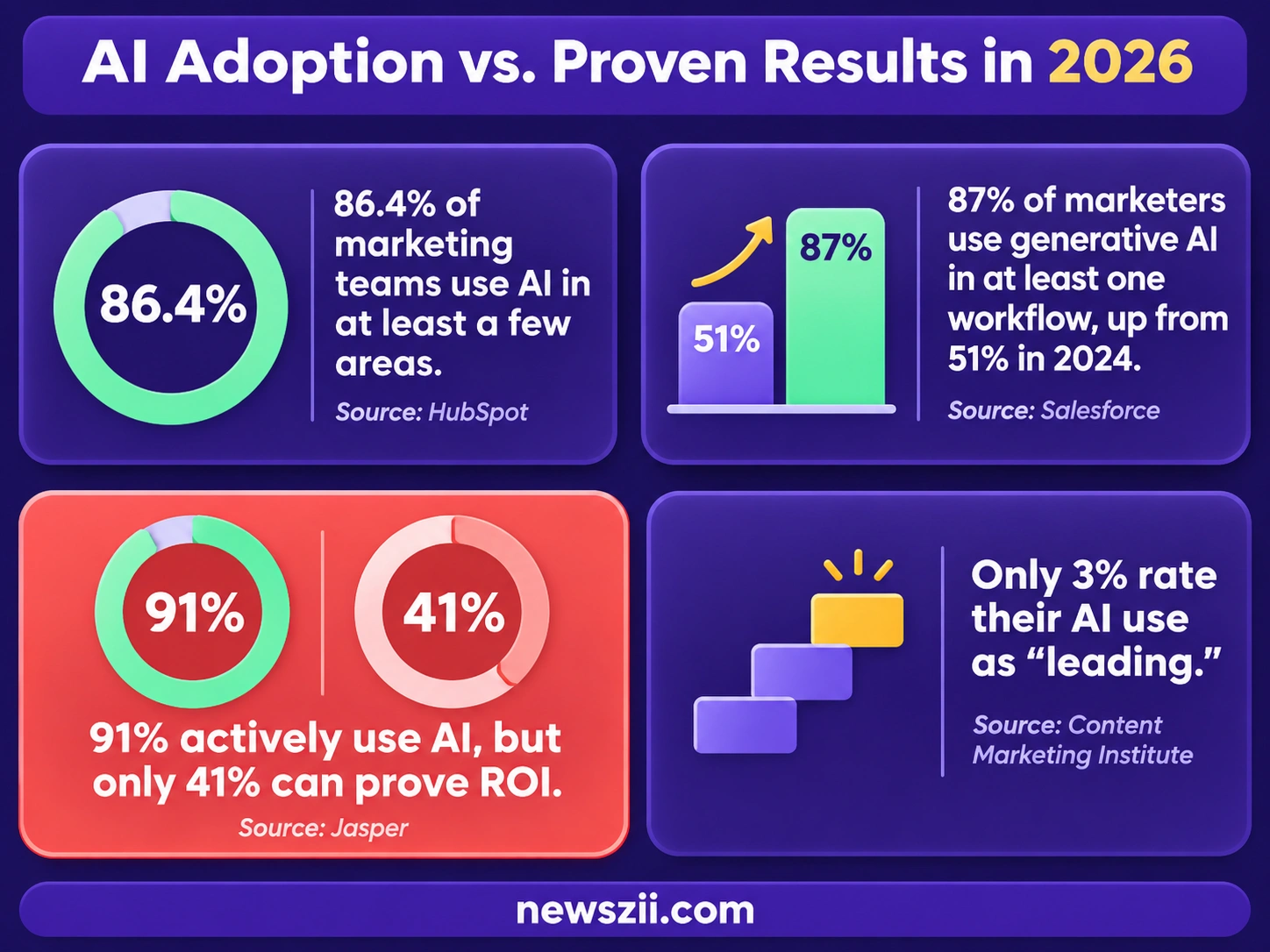
- Adoption is close to universal. HubSpot found 86.4% of marketing teams use AI in at least a few areas. Only 1.7% don’t use it and don’t plan to.
- It happened fast. Salesforce’s State of Marketing survey of 4,450 decision-makers found 87% of marketers use generative AI in at least one workflow, up from 51% in 2024.
- Proving ROI is getting harder, not easier. Jasper surveyed 1,400 marketers and found 91% actively use AI. Yet only 41% could prove its ROI in 2026, down from 49% the year before.
- Most teams are still early. In the Content Marketing Institute’s 2026 B2B survey, only 3% of marketers rated their AI use as “leading.” Content creation tools were the most adopted, at 89%. Predictive analytics and targeting tools sat at just 12%.
What small businesses are doing
Small businesses have moved even faster than you might expect. Constant Contact’s Q1 2026 survey of more than 1,500 small business owners across five countries found 54% already use AI marketing tools. The most common uses were analyzing trend data (45%) and writing content (44%).
In the US alone, the jump is sharper. AI use in small business marketing went from 26% in 2023 to 87% by April 2026, according to Constant Contact’s Small Business Now research. The same research found 40% of small businesses are turning to AI and automation to handle their marketing workload instead of simply spending more.
What this means for you: buying an AI tool is the easy part. The teams that get real value pick tools for specific jobs, measure what changes, and keep a human editing the output. The rest of this guide is built around that idea.
The best AI tools for marketing, by task

1. ChatGPT, Claude or Gemini: for drafting, research and ideas
Best for: first drafts, brainstorming, research and repurposing. Costs: about $20 a month.
A general AI assistant is the foundation of almost every marketing stack. It’s where you outline a campaign, draft a blog post, rewrite a landing page, summarize a competitor’s site or turn one webinar into ten social posts.
The three big options cost nearly the same. ChatGPT Plus is $20/month, Claude Pro is $20/month ($17/month billed annually), and Google AI Pro is $19.99/month. All three have free tiers that are fine for light use.
On a tight budget, Google AI Plus costs $4.99 a month. One caveat: from November 13, 2026, AI Plus members lose the ability to manually pick Google’s more capable Pro models in the Gemini app.
How to choose: pick the one that fits the software you already live in. Gemini makes sense if your team runs on Google Workspace. Otherwise, try the free versions of ChatGPT and Claude on a real task for a week, and pay for the one whose drafts need the least fixing.
2. Jasper: for on-brand copy across a team
Best for: teams that need every piece of copy to sound like the same brand. Costs: $59/month per seat billed yearly, or $69 monthly.
Jasper is built for marketers rather than everyone. Its main selling point is brand control: you teach it your voice, products and audiences, and it applies them to everything it writes.
Jasper now offers two plans. Pro includes one seat, 2 brand voices, 5 knowledge assets and 3 audiences. Business adds custom agents, API access and admin controls, at custom pricing. There’s no free plan, but you can try Pro free for 7 days.
Worth it if: you have several people writing for one brand, or several brands to keep separate. A solo marketer will usually get similar drafts from a $20 general assistant.
3. Canva: for design and visuals
Best for: social graphics, presentations, ads and quick visuals without a designer. Costs: $18/month or $144/year.
Canva’s AI features (it calls them Magic Studio) handle the jobs that used to eat an afternoon: removing backgrounds, resizing one design for every platform, generating images and drafting copy inside your design.
Canva Pro costs $144 a year or $18 a month for one person. Pro unlocks 141M+ premium assets and 10x the AI allowance of the free plan. Canva has changed this price several times in 2026, so check before you buy.
Start free: the free plan is genuinely usable. Upgrade when you’re hitting the AI limits or need brand kits.
4. Buffer: for social media scheduling
Best for: small teams and solo marketers posting across a few platforms. Costs: free for 3 channels, then $6 per channel a month.
Buffer keeps things simple, and its AI Assistant is included on every plan, even the free one. It writes posts from a topic, rewrites drafts in a different tone and suggests ideas. It doesn’t create images, video or carousels, so pair it with Canva.
Paid plans are priced per channel: Essentials is $6 per channel a month ($5 billed yearly) and Team is $12 ($10 billed yearly).
Worth it if: you manage fewer than about 10 social profiles. Beyond that, the per-channel pricing adds up quickly.
5. Mailchimp: for email marketing
Best for: small businesses that want AI help writing and timing emails. Costs: from $20/month on the Standard plan.
Mailchimp’s AI layer is called Intuit Assist. It drafts emails and subject lines, suggests improvements and helps build automated flows.
The catch is plan level. Mailchimp offers Intuit Assist on Standard and Premium plans, not the free or Essentials tiers. It’s still labeled beta, available in select countries and in English only, at no extra cost for now. Standard starts at $20/month for up to 500 contacts and rises with your list size.
6. HubSpot: for CRM and marketing automation
Best for: businesses that want marketing, sales and customer data in one place. Costs: Starter from $20 per seat a month.
HubSpot’s AI is called Breeze. Breeze Assistant, which drafts emails, summarizes contact records and answers questions about your CRM data, is included on every plan. Breeze Agents, which handle tasks like customer support and prospecting, are billed per outcome using HubSpot credits.
Marketing Hub Starter lists at $20 per seat a month, and new customers can currently get it for $7 per seat on annual billing. The jump to Professional is steep, at $890/month, so most small businesses should stay on Starter until they clearly need advanced automation.
7. Semrush: for SEO and AI search visibility
Best for: keyword research, site audits, competitor analysis, and tracking whether AI tools mention your brand. Costs: from $139.95/month.
Search has split in two. People still Google things, but they also ask ChatGPT, Perplexity and Google’s AI Overviews. Semrush now tracks both.
Its classic SEO plans run $139.95 (Pro), $249.95 (Guru) and $499.95 (Business) per month. Semrush One bundles those SEO tools with AI visibility tracking at $199, $299 and $549 per month, with up to 17% off on annual billing. If you only want the AI visibility tracking, it costs $99 a month per domain.
Worth it if: organic search is a major channel for you. If you publish occasionally, start with the classic Pro plan and add AI tracking later.
8. Google Ads AI Max: for search ads
Best for: anyone running Google search campaigns. Costs: no extra fee; you pay for clicks as usual.
AI Max is a setting inside your existing Google search campaigns, not a separate product. It expands which searches your ads match, writes headline and description variations, and sends people to the most relevant page on your site.
It’s also becoming hard to avoid. New Search campaigns now have AI Max switched on by default, so if you want tight keyword control, change the setting when you set up the campaign. And to show ads inside Google’s AI Mode and AI Overviews, your campaign needs AI Max or broad match.
Our advice: test it on one campaign first and watch the search terms report closely. More reach isn’t always more relevant reach.
9. Meta Advantage+: for Facebook and Instagram ads
Best for: small businesses without a dedicated ads specialist. Costs: no extra fee; you pay for ad spend.
Advantage+ is Meta’s AI system for finding your audience and testing creative. It automatically creates ad variations and shows each person the version they’re most likely to respond to. Small businesses can use it even when running a simple ad from their Facebook page.
Meta has reported that, across 15 A/B tests, Advantage+ shopping campaigns delivered 12% lower cost per purchase than advertisers’ usual ads. Treat that as Meta’s own claim, and run your own comparison before moving your whole budget over.
Free AI marketing tools worth starting with
You can build a capable AI marketing setup without paying anything. These free plans are real products, not 7-day teasers:
- ChatGPT, Claude or Gemini (free tiers): enough for occasional drafting, brainstorming and research.
- Canva Free: templates, basic design tools and a small monthly AI allowance.
- Buffer Free: 3 social channels, 10 scheduled posts per channel at a time, and the full AI Assistant.
- HubSpot Free CRM: contact management and basic marketing tools for up to two users.
- Google Ads AI Max and Meta Advantage+: built into the ad platforms. You only pay for ad spend.
One gap to know about: Mailchimp’s free plan doesn’t include its AI writing features. If AI-assisted email matters to you, budget for the Standard plan.
A sensible rule: stay free until a tool’s limit actually blocks your work. That moment tells you exactly which upgrade is worth paying for.
A starter AI marketing stack for every budget
You don’t need all of these tools at once. Here are three realistic stacks, priced at monthly billing.
| Budget | Stack | Approx. monthly cost |
|---|---|---|
| Free | Free tiers of ChatGPT or Claude, Canva Free, Buffer Free, HubSpot Free CRM, AI built into your ad accounts | $0 |
| Starter | ChatGPT Plus or Claude Pro ($20), Canva Pro ($18), Buffer Essentials for 2 channels ($12) | About $50 |
| Growth | The Starter stack with Buffer on 5 channels ($30), plus Mailchimp Standard ($20) and Semrush Pro ($139.95) | About $230 |
Paying yearly cuts these totals. Canva drops to about $12 a month on the annual plan, and Semrush offers up to 17% off.
Where to spend first: a paid general assistant. It touches every other task, so it pays back fastest. Add SEO tools only once organic search is a channel you’re seriously investing in.
What to watch in 2027
Three changes will shape how marketers use AI next year. The first has a hard date.
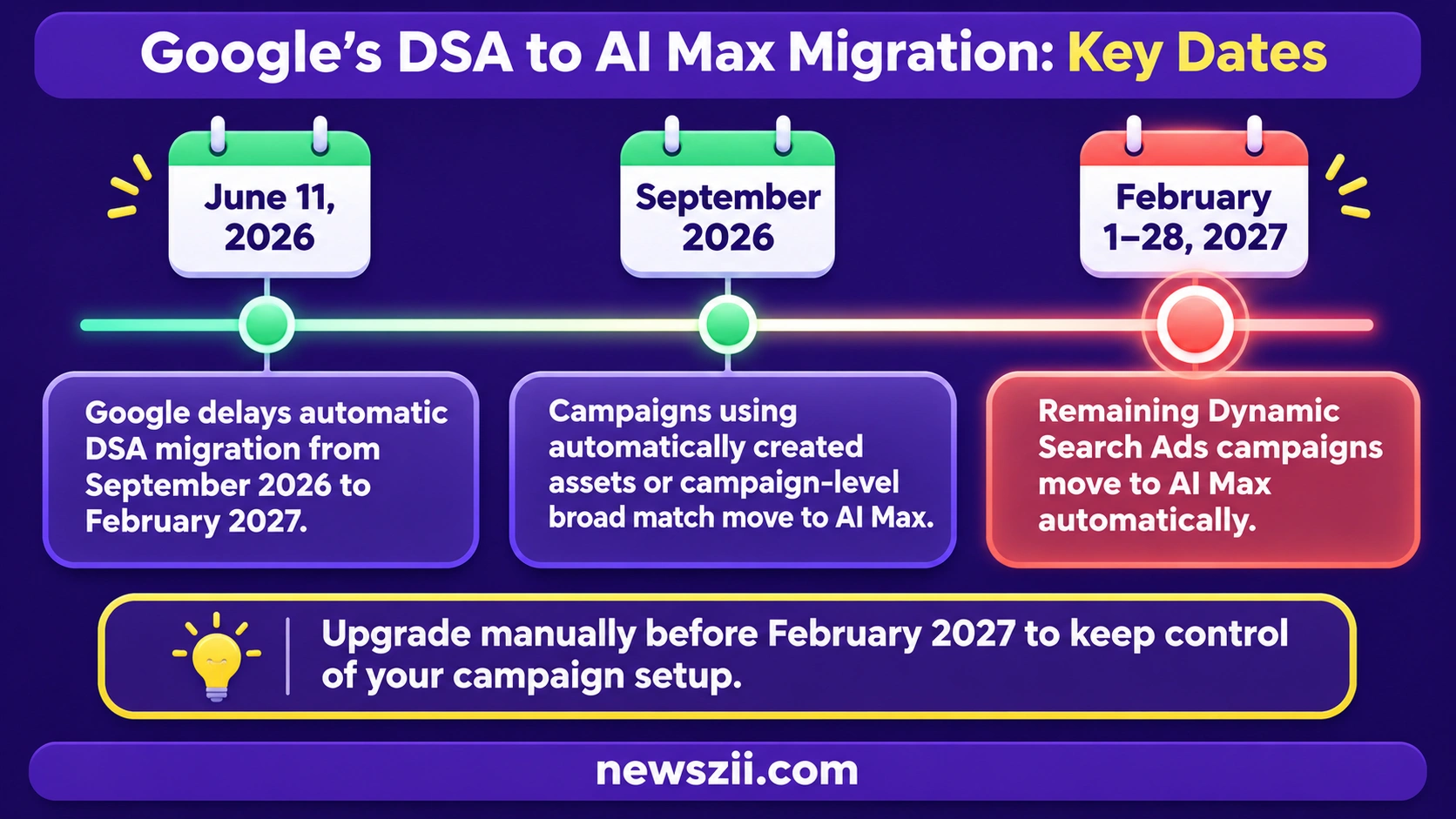
1. Google’s Dynamic Search Ads move to AI Max in February 2027. In June 2026, Google pushed the automatic migration of Dynamic Search Ads (DSA) from September 2026 to February 2027. Any DSA campaigns still running will be moved to AI Max between February 1 and 28, 2027. If you run DSA, upgrade manually before then so you control the setup, rather than letting Google decide it for you.
2. AI search visibility becomes a standard metric. More buyers now get answers from ChatGPT, Perplexity and Google’s AI Overviews before they ever click a link. Expect “how often does AI mention us?” to join rankings and traffic in your monthly reports. Tools like Semrush One already track it.
3. Customers will expect you to label AI content. Constant Contact found 46% of consumers want businesses to clearly label AI-generated content, and 37% of small businesses already disclose their AI use fully. A simple, honest disclosure policy is cheap trust insurance.
Common mistakes to avoid with AI marketing tools
Most AI disappointments come from how the tools are used, not the tools themselves. Watch for these:

- Publishing AI drafts without editing. AI writes fluent, average copy fast. Your edge is what you add: real examples, a clear opinion, details only you know. Treat every AI output as a first draft.
- Buying tools before defining the job. “We need AI” isn’t a use case. “We spend six hours a week resizing social graphics” is. Start with the task, then pick the tool.
- Not measuring anything. Remember that fewer than half of marketers could prove AI ROI in Jasper’s 2026 survey. Before you start, note how long a task takes or what it costs. Check again after a month.
- Letting ad AI run unchecked. AI Max and Advantage+ can find new customers, but they can also spend on poor-fit traffic. Review search terms and placements weekly, especially in the first month.
- Stacking overlapping subscriptions. Many tools now include AI writing. If your email platform, design app and CRM all draft copy, you may not need a separate writing tool at all.
- Feeding sensitive data into free tools. Check each tool’s data policy before pasting in customer lists, contracts or unreleased plans. Business plans usually offer stronger privacy controls.
Frequently asked questions
What is the best AI tool for marketing?
There’s no single best tool, because marketing covers very different jobs. For most teams, the best starting point is a general AI assistant such as ChatGPT, Claude or Gemini, at about $20 a month. Add specialist tools like Canva, Buffer or Semrush as specific needs come up.
Are there free AI tools for marketing?
Yes. ChatGPT, Claude and Gemini all have free tiers. Canva Free includes basic AI design features, Buffer’s free plan includes its AI Assistant for 3 social channels, and HubSpot offers a free CRM. The AI in Google Ads and Meta Ads costs nothing beyond your ad spend.
Can AI replace a marketing team?
No. AI is very good at speeding up drafting, resizing, scheduling and testing. It’s weak at strategy, original insight and knowing your customers. The teams getting the most from AI use it to free up time for that human work, not to remove it.
Which AI tool is best for social media marketing?
For most small teams, pair Canva for visuals with Buffer for scheduling. Buffer’s AI Assistant writes and rewrites posts on every plan, including the free one, and Canva handles images, resizing and design.
How much do AI marketing tools cost?
Most core tools cost $15 to $25 a month per user. General assistants are about $20, Canva Pro is $18 a month, and Mailchimp Standard starts at $20. Specialist platforms cost more: Semrush starts at $139.95 a month, and HubSpot Marketing Hub Professional is $890 a month.
Do I need to disclose AI-generated marketing content?
Rules vary by country and platform, so check what applies to you. Either way, your customers increasingly expect it. Constant Contact found 46% of consumers want AI-generated content clearly labeled. A short, honest disclosure builds trust and costs nothing.
The bottom line
The right AI tools for marketing save you hours each week, but only if each one is matched to a real job. Start with one general assistant. Add Canva and Buffer if social media is a big part of your week, Mailchimp or HubSpot for email and customer data, and Semrush once search becomes a serious channel. Let Google and Meta’s built-in AI handle your ads, but keep a close eye on where the money goes.
Most of all, measure. Note how long tasks take today, try one tool for a month, and keep it only if the numbers move. That simple habit puts you ahead of most marketers heading into 2027.

Founder, Newszii.com | CEO, NICHE Digital Media
Praveen Panjiar brings nearly two decades of experience in digital media, web & mobile asset development, and growth strategies.
He built Newszii from the ground up into a global platform spanning tech, business, finance, and lifestyle, and has since developed a strong track record of building, scaling, and optimizing digital properties with a sharp focus on user growth, content strategy, and emerging technology trends.