Published on November 4th, 2026
Picture a recruiter on a Monday morning with 200 applications for one role. By the fortieth resume, the bullet points start to blur together. Everyone “spearheaded cross-functional initiatives.” Everyone is “results-driven.” Half of them sound like they were written by the same person, because in a way, they were.
That’s the job market heading into 2027. AI resume tools are everywhere, and recruiters know it. So the question isn’t really whether you should use AI to write your resume. It’s how to use it without ending up in the pile that all sounds the same.
This guide covers the seven best AI tools for resume writing going into 2027, what each one is actually good at, what it costs, and how to use them so your resume still sounds like you.
What are the best AI tools for resume writing?
Teal is the best all-round pick for tailoring your resume to each job. Rezi is strongest for ATS-focused formatting, Kickresume is best for design and students, and Jobscan or Resume Worded are best for checking a finished resume against a job description. A free AI assistant like ChatGPT, Claude or Gemini works well for drafting bullet points, as long as you rewrite the output with your own specifics.
The right choice depends on where you’re stuck. If you’re starting from a blank page, you need a builder. If you already have a resume but keep getting rejected, you need a checker. Most people end up using one of each.
Quick picks
- Best overall: Teal, for tailoring one resume to many jobs and tracking where you applied
- Best for ATS-friendly formatting: Rezi
- Best for design and students: Kickresume
- Best for visual, modern layouts: Enhancv
- Best ATS match checker: Jobscan
- Best line-by-line feedback: Resume Worded
- Best free option for drafting: ChatGPT, Claude or Gemini
AI resume tools compared
Prices are in US dollars and come from each vendor’s pricing page or help docs as of November 2026. Resume tools change prices often and run frequent sales, so check before you pay.
| Tool | Best for | Free plan | Paid price (USD) |
|---|---|---|---|
| Teal | Tailoring to each job + tracking applications | Yes: builder, job tracker, Chrome extension | About $29/month |
| Rezi | ATS-focused resumes | 1 resume, 3 PDF downloads | $29/month or $149 lifetime |
| Kickresume | Design, students | 4 templates, unlimited downloads | $24/month, $18/month quarterly, $8/month yearly |
| Enhancv | Visual, modern resumes | 7-day trial | Monthly, quarterly or semiannual plans |
| Jobscan | Match-rate scanning against a job post | About 5 scans/month | $49.95/month or $89.95/quarter |
| Resume Worded | Line-by-line feedback, LinkedIn review | Limited | Reported around $49/month |
| ChatGPT / Claude / Gemini | Drafting bullets and summaries | Yes | Optional paid plans |
The 7 best AI tools for resume writing

1. Teal: best overall for tailoring
Teal works less like a resume builder and more like a job-search home base. You build one master resume, then spin off tailored versions for each role, with AI help writing your summary, bullet points and cover letter. A job tracker and Chrome extension let you save postings as you browse.
The free plan is genuinely useful, not a teaser. It includes unlimited job tracking, the extension and a basic builder. Teal+ costs about $29 a month and adds deeper keyword matching against each job description.
Who it’s for: anyone applying to more than a handful of jobs who wants every resume matched to the posting.
The catch: Teal tries to do a lot, and it can feel busy at first. It also doesn’t apply to jobs for you. You still send every application yourself.
2. Rezi: best for ATS-friendly resumes
Rezi is built around one goal: getting your resume through applicant tracking systems. It scores your resume, flags missing keywords from the job description, and keeps formatting simple so ATS software can read it cleanly.
Pricing is refreshingly clear. The free plan gives you 1 resume and 3 PDF downloads. Pro is $29 a month, and Lifetime is a one-time $149, with a 30-day money-back guarantee on both.
Who it’s for: people applying to large companies where ATS screening is almost certain.
The catch: the designs are functional rather than eye-catching. And the Lifetime plan isn’t quite the same as Pro. It leaves out the free monthly expert review and unlimited AI credits that Pro includes.
3. Kickresume: best for design and students
Kickresume is the pick if you want your resume to look polished without learning design software. It has 40+ premium templates, matching cover letters, an AI writer and a built-in ATS checker.
The free plan includes 4 basic templates and unlimited downloads. Premium costs $24 a month, $18 a month on the quarterly plan, or $8 a month billed yearly ($96). There’s also a 14-day money-back guarantee.
Who it’s for: students, recent graduates and anyone in a field where presentation matters. If you can verify your student status through ISIC, ITIC or UNiDAYS, Premium is free.
The catch: some templates lean decorative. For conservative fields like law or finance, stick to the simpler ones.
4. Enhancv: best for visual, modern resumes
Enhancv focuses on resumes that stand out visually while still giving you content suggestions as you write. It’s good at helping you add personality through custom sections beyond the usual work history and education.
The free version is really a 7-day trial, and you’ll need Pro to download a finished resume. Pro is billed monthly, quarterly or semiannually, with the longer plans saving up to 35% and 50%. Check the current price on Enhancv’s site, since its own help pages list different monthly figures.
Who it’s for: creative, marketing and startup roles where a bit of visual flair helps.
The catch: there’s no lasting free plan, and heavily designed layouts carry more ATS risk than plain ones.
5. Jobscan: best ATS match checker
Jobscan doesn’t really build resumes. It checks them. Paste in your resume and a job description, and it gives you a match rate plus a list of the keywords and skills you’re missing.
The free tier gives you 5 scans a month. Premium is $49.95 a month or $89.95 a quarter for unlimited scans.
Who it’s for: anyone who already has a decent resume but keeps getting silence after applying.
The catch: it’s the priciest tool here, and a match score measures keyword overlap, not quality. Chasing a perfect score can make your resume read like a keyword list.
6. Resume Worded: best line-by-line feedback
Resume Worded scores your resume against what recruiters look for and gives feedback on individual lines. Weak verbs, vague bullets, missing numbers: it calls them out one by one. It also reviews LinkedIn profiles, which is handy since recruiters check both.
There’s a limited free version. Resume Worded doesn’t publish its Pro price publicly, but review sites report around $49 a month, with cheaper rates on longer plans. Confirm the price after signing up.
Who it’s for: people who want to understand why their resume isn’t working, not just have it rewritten.
The catch: the pricing isn’t transparent, and you’ll still do the rewriting yourself.
7. ChatGPT, Claude or Gemini: best free drafting help
General AI assistants are surprisingly good at the hardest part of resume writing: turning “I did stuff” into clear bullet points. Describe what you did in plain language, ask for three versions of a bullet, and pick the one closest to the truth.
All three have free plans, so this costs nothing to try.
Who it’s for: everyone, as a first-draft partner alongside a builder or checker.
The catch: these tools don’t know your real results, so they’ll fill gaps with confident, generic language. That’s exactly what recruiters have learned to spot. Treat the output as a rough draft, never a final one.
Builder, checker or chatbot: which do you need?
These tools fall into three groups, and knowing which one you need saves you from paying for the wrong thing.
| Your situation | What you need | Tools to try |
|---|---|---|
| Starting from scratch, or your resume is years old | A builder | Teal, Rezi, Kickresume, Enhancv |
| You have a resume but keep hearing nothing back | A checker | Jobscan, Resume Worded |
| You know what you did but can’t put it into words | A chatbot for drafting | ChatGPT, Claude, Gemini |
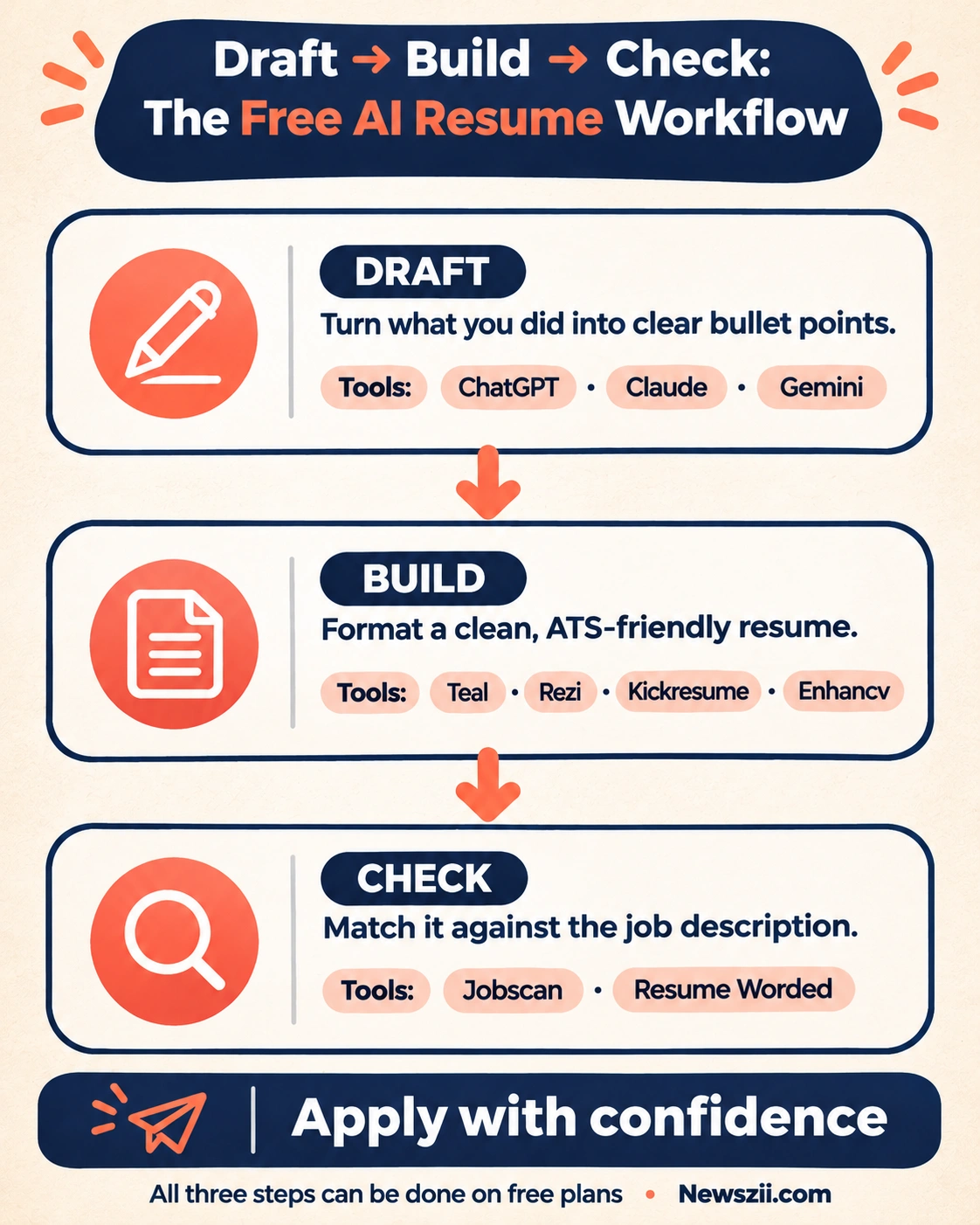
A simple setup that works for most people: draft bullets with a free chatbot, assemble them in a builder, then run the finished resume through a checker before you hit apply. You can do all three for free if you stay within the free plans.
How to use AI on your resume without sounding like AI
Here’s the uncomfortable truth: using AI is now normal, and recruiters have adjusted. A Novoresume survey of 2,000 U.S. adults found that 42.6% used AI the last time they updated their resume, and 7.5% let AI write most or all of it.
Employers have noticed. In a May 2026 study of 998 employers by Criteria Corp and Lighthouse Research & Advisory, 92% of recruitment leaders said AI-generated resumes are now commonplace. Only a third said they’re highly confident a resume reflects a candidate’s real abilities. Robert Half found that 65% of hiring managers say AI-generated resumes are making hiring harder.
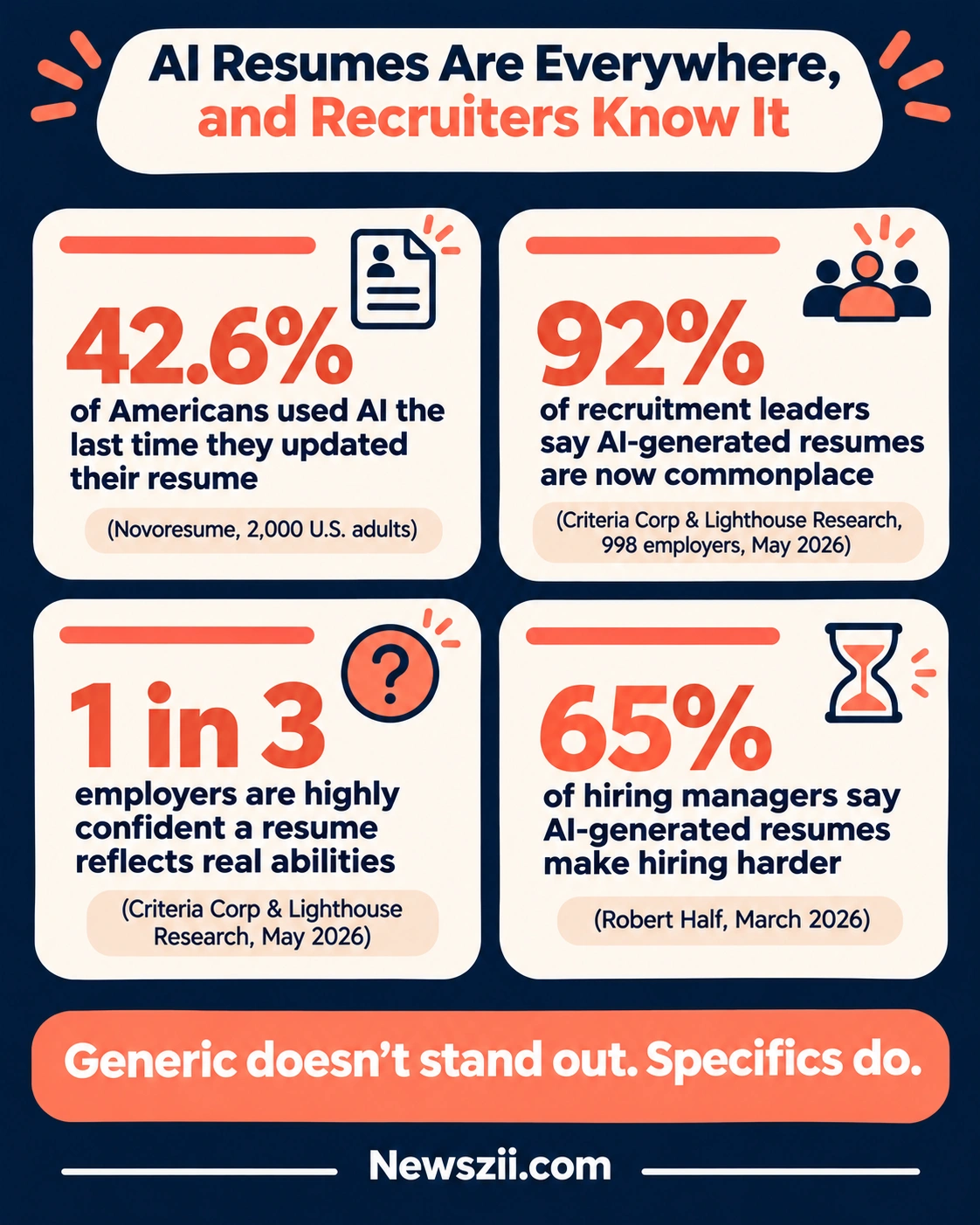
So a polished, generic resume no longer stands out. It blends in. Here’s how to use these tools and still sound like a real person.
- Feed it facts, not vibes. Before you ask AI for anything, write down your actual numbers: sales closed, users grown, hours saved, people trained. AI can’t invent your results, and when it tries, it shows.
- Rewrite every bullet in your own words. Use the AI version as a starting point. If a line includes a word you’d never say out loud, like “spearheaded” or “synergized,” change it.
- Add one specific detail per role. A named tool, a client type, a real project. Specifics are the clearest sign a human wrote the resume.
- Tailor for keywords, but don’t stuff them. Use a checker to find missing skills, then work them in naturally. A resume that reads like a keyword list fails the human reading it.
- Read it out loud. If it sounds like a corporate press release, it’ll read like one too.
- Never let AI add claims you can’t back up. If you can’t explain a bullet in an interview, cut it.
Here’s what that looks like in practice:
| Generic AI version | Human-edited version |
|---|---|
| Responsible for managing social media accounts and driving engagement | Grew our Instagram from 2K to 11K followers in 6 months with a weekly Reels series |
| Spearheaded cross-functional initiatives to optimize processes | Cut invoice processing time from 5 days to 2 by moving the team to a shared tracker |
There’s a bigger reason to get this right. The same Criteria research found 98% of talent leaders trust skills assessments, structured interviews and work samples more than resumes. Your resume’s job is to get you to that stage, and real specifics are what get you there.
Best free AI resume tools for students and tight budgets
You don’t need to spend anything to build a strong first resume. If you’re a student, applying for internships, or job hunting on zero budget, start here:

- Kickresume with student verification: full Premium free if you can verify through ISIC, ITIC or UNiDAYS. This is the best free deal on the list.
- Teal’s free plan: the builder, job tracker and Chrome extension cost nothing.
- Rezi’s free plan: enough for one strong ATS-friendly resume, with 3 PDF downloads.
- Jobscan’s free scans: about 5 a month, enough to check your top-choice applications.
- ChatGPT, Claude or Gemini: free help turning class projects, part-time jobs and volunteer work into solid bullet points.
A tip for first-time job seekers: don’t let AI pad your resume to look more experienced. Recruiters hiring for entry-level roles expect entry-level resumes. A clear, honest one-pager with two or three real projects beats an inflated one every time.
Frequently asked questions
Is it okay to use AI to write my resume?
Yes. Using AI to draft, structure or check your resume is now common and widely accepted. What hurts you is a resume that reads as generic or includes claims you can’t back up. Use AI for speed, then add your own results and wording.
Can recruiters tell if a resume was written by AI?
Often, yes. Not because of special software, but because AI-written resumes tend to share the same vague phrases and lack specific results. Concrete numbers, named projects and natural language are what make a resume read as human.
What is the best free AI resume builder?
For most people, Teal’s free plan is the most useful, since it includes a builder, job tracker and browser extension. Students who can verify their status should try Kickresume, which offers Premium free through ISIC, ITIC or UNiDAYS.
Is ChatGPT good for writing a resume?
ChatGPT is good for drafting bullet points and summaries, but not for producing a finished resume on its own. It doesn’t know your real results and will fill gaps with generic language. Pair it with a resume builder for formatting and a checker for keywords.
Do ATS systems reject AI-written resumes?
Applicant tracking systems mainly read and sort resumes by format and keywords. They aren’t built to reject a resume just because AI helped write it. The bigger risks are complex layouts the system can’t read and missing keywords from the job description.
Which is better, Teal or Rezi?
Teal is better if you’re applying to many jobs and want to tailor each resume and track applications in one place. Rezi is better if your main goal is a clean, ATS-friendly resume with clear pricing, including a $149 lifetime option.
The Bottom Line
The best AI tool for resume writing is the one that fixes your actual problem. Start with Teal if you need to tailor resumes for lots of applications, Rezi if ATS screening worries you, or Kickresume if you’re a student. Run the result through Jobscan or Resume Worded before you apply.
Whichever you pick, remember what recruiters are tired of seeing: polished resumes that say nothing. Let AI handle the structure and the first draft. The specifics that get you hired still have to come from you.
Read More: “AI tools for small business” and “best AI tools for business”

Founder, Newszii.com | CEO, NICHE Digital Media
Praveen Panjiar brings nearly two decades of experience in digital media, web & mobile asset development, and growth strategies.
He built Newszii from the ground up into a global platform spanning tech, business, finance, and lifestyle, and has since developed a strong track record of building, scaling, and optimizing digital properties with a sharp focus on user growth, content strategy, and emerging technology trends.