

Published on November 20th, 2026
Quick answer: There’s no single best AI tool for sales prospecting. The right tool depends on which part of the job you want help with. For most people, Apollo.io is the best all-rounder: it has a free plan, and paid plans start at $49 per user per month billed annually. Use Clay for deep prospect research, LinkedIn Sales Navigator if you sell mainly on LinkedIn, and HubSpot’s Prospecting Agent if you already run on HubSpot ($1 per recommended lead). For high-volume cold email, pick Instantly or lemlist. Whatever you choose, let AI find leads and draft messages, and have a human approve every send.
That’s the short version. The longer version is more useful, because the price tag on most of these tools tells you very little.
Why most AI prospecting tool lists are already out of date
The AI prospecting market changed a lot in 2026. Clay rebuilt its pricing in March. HubSpot stopped charging for its prospecting agent by the month and started charging per lead. Salesforce renamed its SDR agent. ZoomInfo stopped selling Copilot as a standalone product. If you read a “best AI prospecting tools” list from 2025, a good part of it is now wrong.
There’s a bigger problem too. Most lists rank tools as if they all do the same thing, and they don’t. Some are databases that find people for you. Others research those people. A few write the emails, while the rest send them at volume. Buying the “#1 tool” when you need help with a different job is how teams end up paying $300 a month for software that solves the wrong problem.
This guide sorts the nine tools worth your time by the job each one does best. Every price and plan detail was checked against the vendor’s own pricing page or official announcement in November 2026. You’ll also find reply-rate numbers, budget stacks, the hidden costs that inflate your bill, and a checklist to run before anything goes out.
Who it’s for: founders who do their own selling, solo SDRs, freelancers, small agencies and lean sales teams. Enterprise buyers will find two picks near the end, but this isn’t written for a procurement committee.
The 9 best AI tools for sales prospecting at a glance
Scan this table to find your match, then jump to that tool’s section for the details and catches.
| Tool | Best for (prospecting job) | Starting price | Free plan or trial |
|---|---|---|---|
| Apollo.io | All-in-one: find, enrich and sequence | $49/user/mo (annual), $65 monthly | Free plan |
| Clay | Deep research and enrichment | From $167/mo, unlimited seats | Free plan (includes Claygent) |
| LinkedIn Sales Navigator | LinkedIn-first selling | $89.99/mo (annual), $119.99 monthly | Free trial |
| HubSpot Prospecting Agent | Teams already on HubSpot | $1 per recommended lead | 28-day free trial |
| Amplemarket | Signal-based AI copilot for small teams | $600/mo for 2 users (annual) | Free trial |
| lemlist | Multichannel outreach (email + LinkedIn + calls) | $55/user/mo (annual), $69 monthly | 14-day free trial |
| Instantly | High-volume cold email | $37.60/mo (annual), $47 monthly | Free trial |
| ZoomInfo GTM Workspace | Enterprise data and agents | Usage-based, quote for teams | ZoomInfo Lite (free forever) |
| Salesforce Agentforce Lead Nurturing | Inbound lead follow-up in Salesforce | $2 per conversation, or Flex Credits | Via Salesforce plans |
Prices are list prices in US dollars before tax, checked November 2026. Vendors change pricing often, so confirm on the live page before you buy.
What “AI for sales prospecting” actually means: the four jobs
Prospecting is four separate jobs that happen one after another. AI is very good at some of them and only average at others. Once you see the split, choosing a tool is much easier.
- Find: build a list of people who fit your ideal customer profile and get verified contact details for them. This is a data problem. The AI layer helps you search in plain English (“heads of marketing at Series A fintechs in Germany”) rather than fiddling with twenty filters.
- Research: work out why this person, and why now. Did the company just raise money? Is it hiring three SDRs? Did the prospect post about a problem you solve? This is where AI agents shine, because reading websites, job boards and news is slow, repetitive work.
- Write: turn that research into a short, relevant message. AI is fast here, but it is also where the most damage happens. Generic AI copy is easy to spot, and inbox providers are getting better at filtering it.
- Run: send the sequence, handle deliverability, follow up and sort the replies. This is plumbing: warmup, mailbox rotation, reply detection and CRM sync.
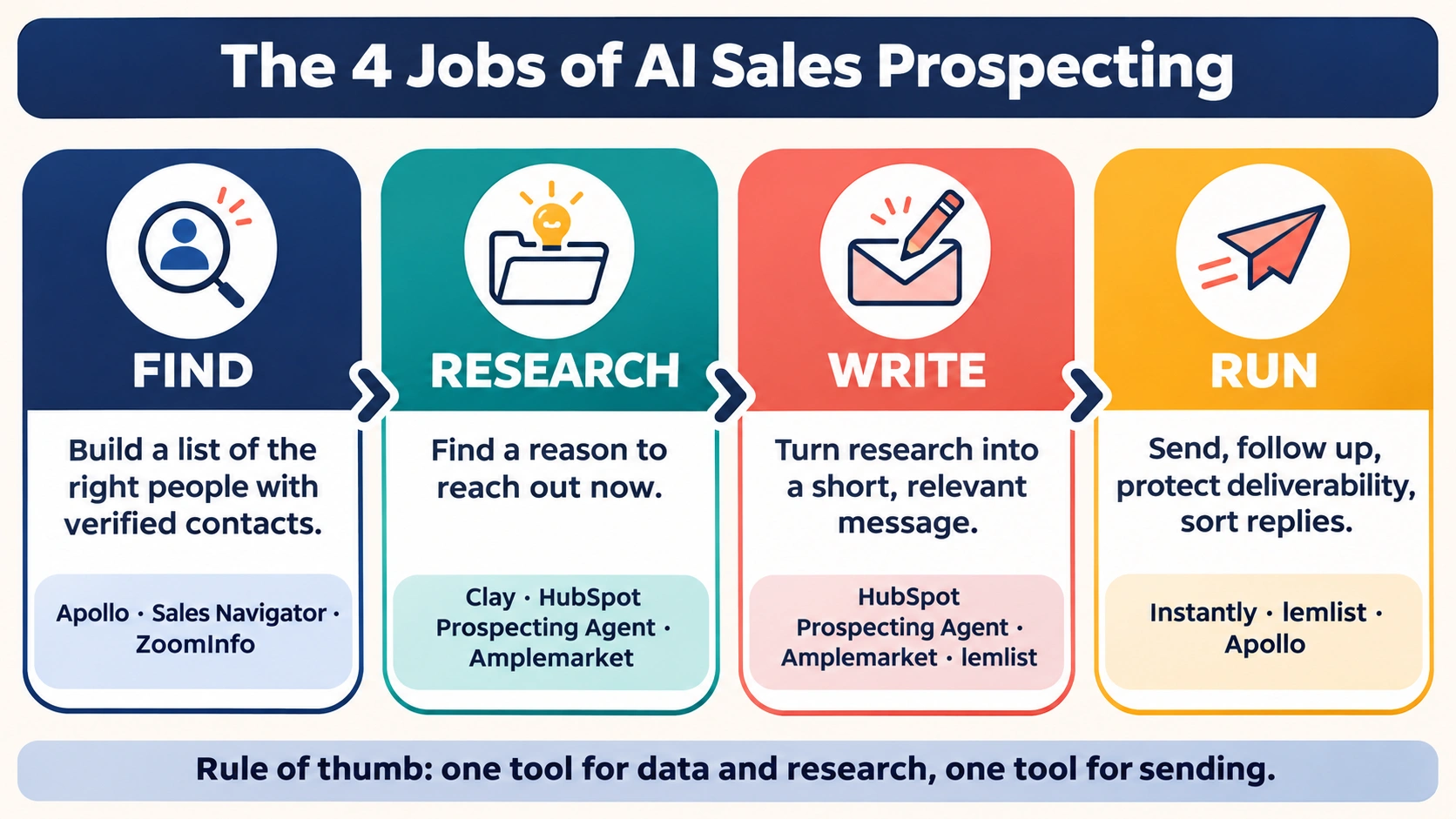
A founder with no list needs help with job 1 first. An SDR team with plenty of leads but weak reply rates needs jobs 2 and 3. An agency sending 50,000 emails a month lives in job 4. Same keyword, very different shopping lists.
How these tools were chosen
Each tool on this list had to meet four conditions:
- Real AI doing real prospecting work. That means agents that research, recommend or draft, not just a “write with AI” button added onto an old product.
- Public pricing, or at least an honest pricing model. Where a vendor only quotes privately, we say so and explain what you’re paying for.
- Current as of late 2026. Every price, plan name and feature was checked against the vendor’s own page or announcement in November 2026.
- A clear best-fit user. If we couldn’t name the person a tool is right for, it didn’t make the list.
One honest disclaimer: no tool here will write emails people love by itself. The best results still come from a person who understands the buyer, using AI to cover more ground.
The 9 best AI tools for sales prospecting, reviewed
1. Apollo.io: best all-in-one AI prospecting tool
Best for: founders, solo sellers and small teams who want one tool for finding, enriching and emailing prospects.
Apollo is where most people should start, and the free plan is the reason. You get a large B2B contact database, email sequencing and an AI research feature in one place, and you can use it before you spend anything. For a first-time founder, that removes a lot of decisions.
The AI research runs inside the product and costs 1 credit per run. That’s cheap enough to use on every prospect you actually plan to contact.
Pricing (per seat):
- Free: $0, with 900 credits per seat per year
- Basic: $49/month billed annually, or $65 monthly, with 2,500 credits a month
- Professional: $79 annually, or $99 monthly, with 4,000 credits a month
- Organization: $119 annually, with a 3-seat minimum and annual billing only
The catch: credits are shared across your team, arrive at the start of each billing cycle and don’t roll over. If you pull a lot of phone numbers or export big lists, you’ll hit the ceiling faster than the headline price suggests. Apollo has also been reworking its plan names, and its live page now mentions a “Custom” tier for teams that need SSO and API access, so check the current plan names before you commit.
Verdict: the safest first purchase for most readers of this guide. Start free, prove you can book meetings, then upgrade.
2. Clay: best for AI prospect research and enrichment
Best for: growth-minded founders, RevOps people and agencies who want research that a database alone can’t give them.
If Apollo is a well-stocked shop, Clay is a workshop. It looks like a spreadsheet: each row is a company or person, and each column can pull data from one of many providers or run an AI agent. That agent is Claygent. You give it a question in plain language (“Does this company sell to enterprises? Do they mention SOC 2 on their site?”), and it visits websites, reads them and writes back a structured answer. Clay launched Claygent in September 2023, and it passed a billion runs by June 2025.
This is the tool for job 2, research, done properly. It is also what produces the signal-based personalization that actually gets replies: you reference a specific detail because the agent found it.
Clay pricing and credits in 2026
Pricing: In March 2026 Clay split usage into two pools: Data Credits for buying enrichment data and Actions for running the platform. It said data costs dropped 50–90% as part of the change.
- Free: 100 Data Credits and 500 Actions a month, unlimited seats, and Claygent included
- Launch: headline price $167/month, with 3,000 Data Credits a month and Actions from 15,000 a month
- Growth: headline price $446/month, with 6,000 Data Credits a month, Actions from 40,000, CRM auto-sync and web intent signals
- Enterprise: custom
Every plan has unlimited seats, so your bill doesn’t grow when you hire. One oddity: Clay’s own FAQ quotes Launch at “starting at $185/mo” and Growth at “$495/mo,” which doesn’t match the headline prices. Check the live page.
The catch: Clay has a real learning curve, and extra Data Credits cost a 30% premium on Launch and Growth. Badly designed tables can burn through credits quickly. Clay also doesn’t send email itself at scale, so you’ll pair it with a sequencer.
Verdict: the best research engine on this list. Worth learning if personalization is your edge.
3. LinkedIn Sales Navigator: best for LinkedIn-first selling
Best for: account executives, consultants and B2B sellers whose buyers actually live on LinkedIn.
If your deals start with a connection request rather than a cold email, Sales Navigator is still hard to beat. Its data is LinkedIn’s own, so job changes and new hires show up quickly. The AI layer makes it faster to use:
- AI-assisted search: type what you want in conversational language, and Sales Navigator picks the filters for you.
- Account IQ and Lead IQ: AI summaries of a company and a person, so you can prepare in a minute rather than fifteen.
- Message Assist: drafts a message using the prospect’s profile.
- Sales Assistant: LinkedIn’s prospecting agent. It sends pre-screened leads daily and drafts outreach. It’s still in beta, and LinkedIn says it will be available on Advanced and Advanced Plus plans at launch.
Pricing:
- Core: $119.99 a month, or $1,079.88 a year (about $89.99 a month)
- Advanced: $159.99 a month, or $1,799.88 a year (about $149.99 a month)
- Advanced Plus: custom quote
LinkedIn positions Advanced as the plan for “AI-powered lead and account research,” so expect most of the AI features from Advanced upward.
The catch: Sales Navigator doesn’t give you email addresses or phone numbers, and it won’t run email sequences. Most people pair it with Apollo, lemlist or Instantly.
Verdict: essential if LinkedIn is your main channel. An expensive extra if it isn’t.
4. HubSpot Breeze Prospecting Agent: best for HubSpot users
Best for: small and mid-sized teams already running their CRM on HubSpot.
HubSpot’s Prospecting Agent is the clearest example of where this market is heading. It watches for buying signals such as job postings, funding rounds and technology changes. It researches the account, finds the right contacts and drafts personalized email outreach. Reps review and approve every message before it goes out, which is exactly the right design.
The pricing is the interesting part. Since April 14, 2026, HubSpot charges $1 per lead the agent recommends for outreach (100 HubSpot Credits). It no longer bills a monthly fee per enrolled contact. You pay for output, not for access. There’s a 28-day free trial, and the agent now works on any paid HubSpot plan from Starter up, not just Sales Hub Professional.
The catch: credits come from a shared pool. If marketing is heavily using HubSpot’s Content Agent, it draws from the same credits your sales team needs. Extra capacity costs $10 per 1,000 credits a month. And if you’re not on HubSpot, this isn’t a reason to switch CRMs.
Verdict: if you’re on HubSpot, try this before you buy anything else. Native CRM context is a real advantage.
5. Amplemarket: best AI sales copilot for small teams
Best for: small outbound teams who want signals, data, AI copy and sequences in one package, with support included.
Amplemarket is built around Duo, its AI copilot. Duo watches for buying signals, researches prospects and drafts multichannel sequences for reps to review. Where Apollo gives you parts to assemble, Amplemarket is closer to a complete system.
Pricing:
- Startup: $600 a month for 2 users, billed annually, with AI Intent Signals and Duo Copilot
- Growth: custom, 4 users, adds Duo Voice
- Elite: custom, 10 users, adds Duo Inbox (listed as an add-on in the comparison table)
Every plan includes a free trial.
The catch: $600 a month on an annual term is a real commitment for a two-person team, roughly $7,200 a year before you’ve booked a meeting. It’s hard to justify until outbound is a proven channel for you.
Verdict: a strong choice for teams ready to scale outbound. Too much for someone still testing whether outbound works.
6. lemlist: best for multichannel outreach
Best for: sellers and agencies who mix email, LinkedIn and calls in one sequence.
lemlist made its name with personalized cold email and is now a full multichannel platform. It includes a lead database of more than 650 million contacts, an email and phone finder, deliverability tools and warmup. Its AI layer now goes beyond writing: the Email plan lists lemAgent and dedicated Signal, Enrichment and Messaging AI agents, plus an MCP connector.
Pricing (per month):
- Email: $69 monthly, or $55 billed yearly
- Multichannel: $109 monthly, or $87 billed yearly; adds LinkedIn, SMS and calling
- Enterprise: custom
Data comes as add-ons. Lead enrichment costs $20 a month ($16 yearly) for 2,000 credits, enough for about 400 verified emails or 100 phone numbers. Buying-intent signals cost $29 a month ($21 yearly) for 100 signals. The 14-day trial includes 200 free credits, and credits roll over while your subscription stays active.
The catch: add-ons stack up. Once you add data and signals to a multichannel seat, the real cost per rep is well above the headline price.
Verdict: the best fit for sellers who live in email and LinkedIn at once.
7. Instantly: best for high-volume cold email
Best for: agencies, lead-gen freelancers and founders running cold email at scale.
Instantly’s big advantage is that you pay a flat fee per workspace with unlimited email accounts, not per seat. If you run many sending inboxes, that changes the maths completely compared with per-user tools. It has added a lead database (SuperSearch), an AI Sales Agent that finds leads, an AI Reply Agent that handles responses, and a CRM layer.
Outreach pricing:
- Growth: $47 monthly, or $37.60 billed yearly
- Hypergrowth: $107 monthly, or $85.58 billed yearly
- Light Speed: $358 monthly, or $286.30 billed yearly
Lead data is a separate subscription: Growth Credits cost $47 a month for 1,500–2,000 credits, Supersonic $97 for 5,000–7,500, and Hyper from $197. According to Instantly’s own guide, the AI Sales Agent uses 5 credits per lead it generates and the AI Reply Agent uses 5 credits per reply.
The catch: the low entry price is for sending only. Add data and a CRM, and a realistic starter setup costs about three times the headline number. Volume also makes deliverability your responsibility.
Verdict: the best value for high-volume email. Just budget for data and treat deliverability seriously.
8. ZoomInfo GTM Workspace: best enterprise data platform
Best for: larger sales organizations that need deep, verified data and agent workflows across many teams.
ZoomInfo has reorganized its products. In late 2026 it confirmed that Copilot is no longer sold as a standalone product. Its AI engine is now the agent layer inside GTM Workspace, ZoomInfo’s seller workspace, which launched in October 2025. In October 2026 ZoomInfo added Agent Teams, where specialized agents run complete plays within limits and approvals the team sets.
Pricing: ZoomInfo now says it is “free to start with consumption credits based on usage,” and warns that old third-party estimates such as “$14,995 per year” are outdated. ZoomInfo Lite is a permanent free plan with no credit card required. Team pricing is still quoted privately.
The catch: the depth is excellent, but the buying process is built for companies with a procurement team. Solo founders will get more value per dollar from Apollo.
Verdict: the enterprise pick. Use the free Lite plan to judge the data quality before you get a quote.
9. Salesforce Agentforce Lead Nurturing: best for inbound follow-up in Salesforce
Best for: companies on Salesforce with more inbound leads than their reps can handle.
If you’re searching for “Agentforce SDR,” this is it under its new name. Salesforce renamed the agent Lead Nurturing, which is a more honest name for what it does. It works leads over email once they’re in Salesforce: it answers questions using your own product documents, follows up and hands warm leads to a rep. It handles inbound follow-up, not outbound list-building.
Pricing: usage-based. Each action, including the agent’s first email, uses either one Conversation (about $2) or 20 Flex Credits. Flex Credits are sold at $500 per 100,000, so a standard action costs about $0.10.
The catch: it only makes sense inside Salesforce, and usage pricing is hard to forecast until you’ve run a real month.
Verdict: the right tool for one specific job, inbound follow-up at enterprise scale. Small teams can skip it.
Bonus: general AI assistants for research on a budget
You don’t need a specialist tool to start. A general assistant like ChatGPT Plus or Claude Pro ($20 a month each; Claude Pro is $17 a month billed annually) can research a short list of accounts, summarize a prospect’s recent posts and draft first-pass emails for you to rewrite. It won’t find contact data or send sequences. For a founder contacting 20 hand-picked accounts a week, though, it covers a surprising amount of the research and writing.
Which AI prospecting tool fits your setup?
Ignore the feature lists for a moment and answer one question: what does your selling actually look like today? Find your situation below.
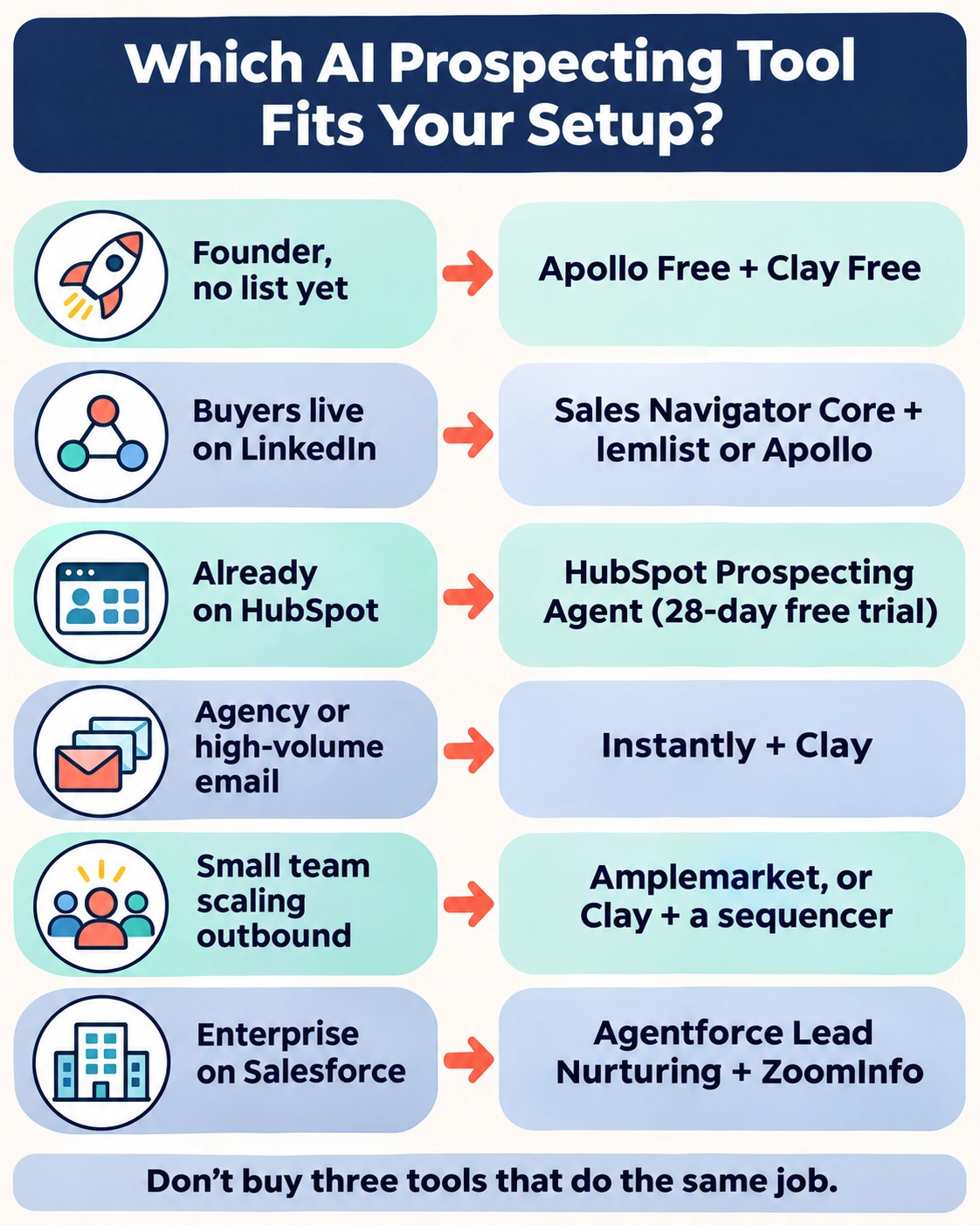
You’re a founder doing your own sales, with no list yet. Start with Apollo’s free plan to build a list and send your first sequences. Add Clay’s free plan when you want deeper research on your top 50 accounts. Don’t pay for anything until you’ve booked a handful of meetings and know your message works.
Your buyers live on LinkedIn. Sales Navigator Core is your base. Pair it with lemlist if you want email and LinkedIn steps in one sequence, or with Apollo if you mainly need email addresses.
You’re already on HubSpot. Turn on the Prospecting Agent’s 28-day free trial before you buy anything else. At $1 per recommended lead, you’ll know within a month whether the agent’s picks turn into conversations. Add a dedicated data tool only if its suggestions run out.
You run an agency or send cold email at volume. Instantly is built for you, because flat workspace pricing with unlimited inboxes beats per-seat pricing at scale. Add Clay upstream for list quality, because volume without targeting is how domains get burned.
You’re a small team ready to scale outbound properly. Compare Amplemarket (one system, one contract) with a Clay-plus-sequencer stack (more flexible, more setup). If nobody on the team wants to build workflows, the all-in-one wins.
You’re an enterprise on Salesforce, with heavy inbound. Agentforce Lead Nurturing for follow-up, plus ZoomInfo (or your existing data provider) for outbound data. Expect a real procurement process for both.
A useful rule of thumb: one tool for data and research, one tool for sending. Buying three tools that all do job 1 is the most common and most expensive mistake in this category.
Starter stacks by budget
Most people don’t need one perfect tool. They need a small, sensible stack that matches their budget. Here are three that work, built from the prices above.
| Budget | Stack | Roughly what you pay | Who it suits |
|---|---|---|---|
| $0 | Apollo Free + Clay Free + manual LinkedIn | $0 a month | Founders testing whether outbound works at all |
| About $100–200/month | Apollo Basic + Instantly Growth | $49 (annual) + $37.60–$47 a month | Solo sellers who need data and reliable sending |
| About $100–200/month | Sales Navigator Core + lemlist Email | $89.99 + $55 a month (annual) | LinkedIn-first sellers who also email |
| Team level | Clay Launch + a sequencer (Instantly or lemlist) | From $167 + sequencer a month | Teams for whom personalization is the edge |
| Team level | Amplemarket Startup | $600 a month for 2 users (annual) | Small teams who want one vendor and one contract |
How to move between them: stay on the free stack until you can point to meetings it produced. Move up a level when the free limits, not your curiosity, are what’s holding you back. An upgrade should solve a bottleneck you can name. That might be “we ran out of verified emails in week two” or “we spend four hours a day researching accounts.”
One habit pays for itself at every level: decide your monthly cap before you start. Credit-based tools are designed to let you spend a little more every time you’re in a hurry.
The hidden costs nobody puts on the pricing page
The sticker price is the cheapest part of most AI prospecting tools. Here’s where the real bill comes from, tool by tool.

- Apollo: credits that disappear. Credits arrive at the start of each billing cycle and don’t roll over. Mobile numbers and big exports use them up quickly.
- Clay: the top-up premium. Run out of Data Credits mid-month on Launch or Growth and you pay a 30% premium for more. Unused Actions don’t roll over either.
- Instantly: data is a second subscription. The $47 outreach plan sends email. Finding leads is a separate plan, and a CRM is another one.
- lemlist: add-ons per seat. Enrichment and buying-intent signals are monthly add-ons on top of a per-user plan, so costs grow as you hire.
- HubSpot: one shared credit pool. The Prospecting Agent draws from the same credits as HubSpot’s other AI agents, so another team’s busy month can drain sales’ budget.
- Amplemarket: the annual commitment. $600 a month on an annual term is about $7,200 a year, committed before you’ve proven the channel.
- Salesforce Agentforce: unpredictable usage. Per-conversation and per-action billing is fair in principle but hard to forecast until you’ve watched a real month.
There’s also a cost no vendor bills you for: your sending reputation. Blast a poorly targeted list through any of these tools and you can damage your domain for months. That costs far more than any subscription. Buy a separate sending domain, warm it up and keep daily volume modest. It’s the cheapest insurance in sales.
What the data says about AI in sales prospecting
AI prospecting is already mainstream, and it saves real time. Whether that time turns into revenue depends on what you do with it. Here’s the evidence, without the vendor spin.
Most sellers already use AI to prospect
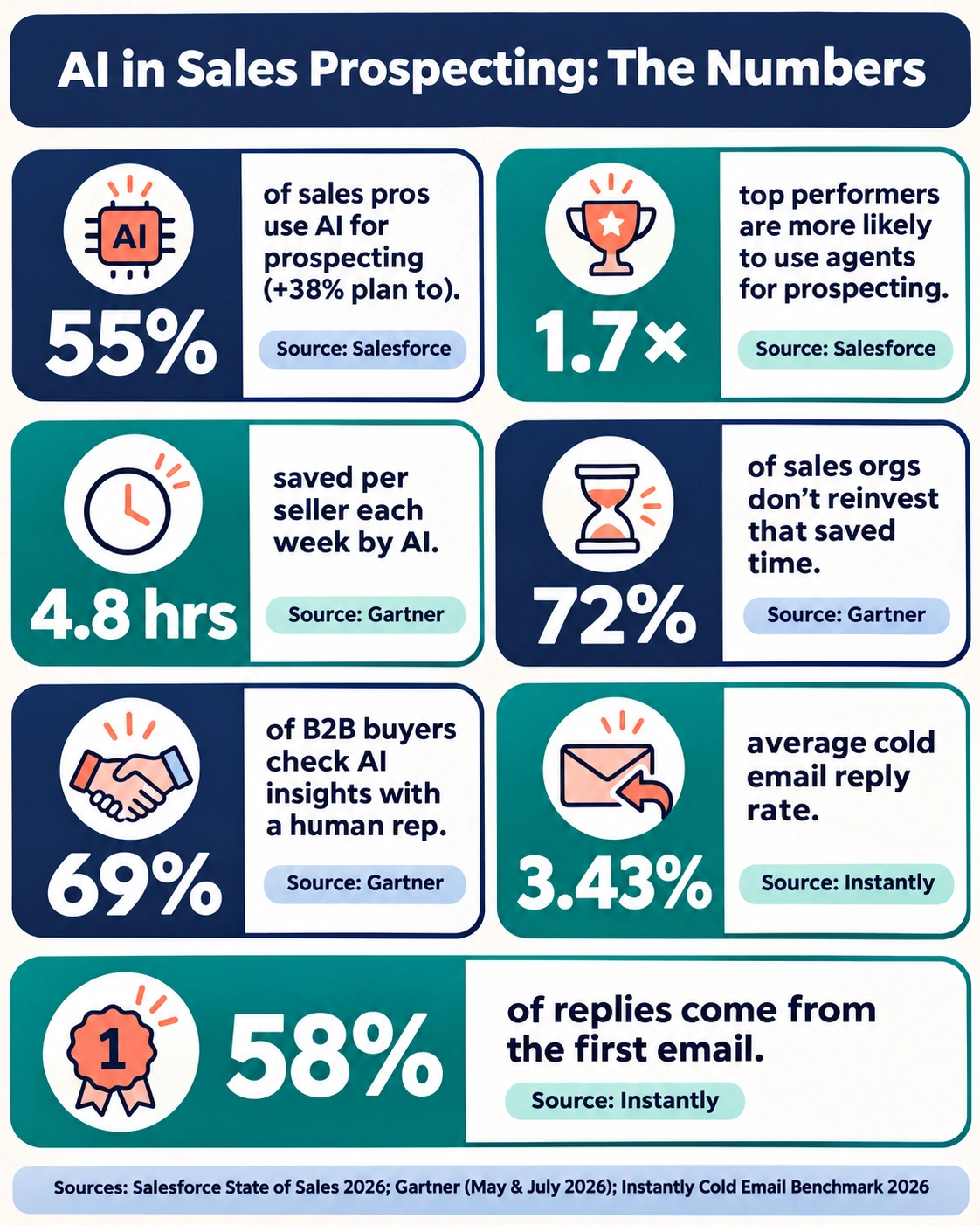
Salesforce’s 2026 State of Sales report, a survey of 4,050 sales professionals worldwide, found that 55% already use AI for prospecting, and another 38% plan to. Sellers expect AI agents to cut research time by 34% and content-creation time by 36%. High performers, meaning sellers who substantially grew revenue year over year, were 1.7 times more likely than underperformers to use agents for prospecting.
The same report shows why the demand is there. Reps spend nearly a full working day each week on prospecting, yet 48% say they still don’t have the bandwidth for proper cold outreach.
The time saved often gets wasted
Gartner’s numbers add an important caveat. A survey of 210 chief sales officers and senior sales leaders, run in January and February 2026, found that AI tools save sellers an average of 4.8 hours a week. But 72% of sales organizations don’t reinvest that time in high-value work. In other words, many teams buy the tool, save the hours and then fill them with more of the same. (Gartner, May 2026)
In July 2026 Gartner went further. It predicted that by 2028 AI agents will outnumber sellers 10 to 1, yet fewer than 40% of sellers will say agents improved their productivity. More agents don’t automatically mean better selling. (Gartner, July 2026)
Buyers still want a human at the important moments
A Gartner survey of 645 B2B buyers found that 69% prefer to check AI-generated insights with a sales rep. Buyers are doing more of their own research with AI, but they still want a person to confirm what it told them. That’s the strongest argument for using AI to prepare and a human to have the conversation. (Gartner, May 2026)
The reply-rate reality check
This is the number vendors prefer not to lead with. Instantly’s 2026 Cold Email Benchmark, built from billions of emails on its platform, puts the average reply rate at 3.43%. The top 10% of senders get more than 10%. It also found that 58% of all replies come from the first email in a sequence.
Other studies count differently and land even lower. A Belkins study of 7.53 million cold emails, which counted unique replies against every email sent, found 0.45% (compared here by Reply.io).
The exact number matters less than the pattern. Expect low single-digit reply rates, and know that targeting beats volume. AI’s real value isn’t sending more emails. It’s making your first email relevant enough to be one of the few that get answered. If a vendor promises 15% or more on cold lists, ask exactly how they’re counting.
How to use AI for prospecting without sounding like a robot: a 5-step check before you hit send
Every tool above can draft a message in seconds. Whether that message helps or hurts you comes down to the minute you spend checking it. Run these five steps before anything goes out.

- Verify the address. Run every email through your tool’s verifier. Bounces damage your sender reputation faster than anything else, and one bad list can undo weeks of warmup.
- Check that the signal is real. If the AI says the prospect “just raised a Series B” or “is hiring SDRs,” click through and confirm it. AI research agents are fast, but they sometimes misread a page or pull an old article. Getting a fact wrong in the first line is worse than having no personalization at all.
- Cut the AI fluff. Delete “I hope this email finds you well,” “I came across your profile” and anything that praises the prospect’s “impressive journey.” Keep the first email short: one observation, one relevant point, one easy question.
- Add one line only a human would write. A specific opinion, a mutual connection or a detail from a podcast they spoke on. This is the line that makes a reply feel worth sending.
- Cap your daily volume. Keep sending steady and modest per inbox, and raise it slowly. Sending at a consistent pace protects deliverability better than bursts of activity followed by silence.
The rule behind all five: AI drafts, humans decide. HubSpot built its Prospecting Agent so reps approve every message before it’s sent. That’s a good default for every tool on this list.
AI sales prospecting in 2027: four shifts to plan for
The tools will keep changing, but the direction is already clear. Here’s what to expect over the next year and what it means for what you buy now.

1. Research starts with AI by default
Gartner predicts that by 2027, 95% of sellers’ research workflows will begin with AI, up from less than 20% in 2024 (Gartner, May 2026). Research will stop being a competitive edge and become a basic expectation. The advantage will move to what you do with the research: your judgment about which accounts matter and what to say to them.
2. Paying for outcomes, not seats
HubSpot’s $1-per-recommended-lead model is a sign of where pricing is going. Salesforce already bills per conversation and per action. Expect more vendors to tie price to a result, such as a qualified lead or a booked meeting. That’s good for buyers, as long as you’re clear about what counts as an “outcome” before you sign.
3. Agents built into platforms, not sold on their own
ZoomInfo folded Copilot into GTM Workspace. Salesforce merged and renamed its SDR agent. HubSpot gathered its agents into one hub. Standalone AI SDR products will face more pressure as the big platforms include agents for free or at usage-based prices. When you choose a tool now, favor platforms that will still exist in two years over a clever single-feature startup.
4. Signals beat volume
With reply rates in the low single digits and inbox filters getting smarter, the “send more” strategy is running out of road. The tools gaining ground, such as Clay, Amplemarket and HubSpot’s agent, all work by spotting a reason to reach out (funding, hiring, a new tool, a job change) before writing a word. In 2027 the best prospectors will send fewer, better-timed messages, not more of them.
The practical takeaway: build your process around signals and human review now, and almost any tool change you make later will be easy.
Frequently asked questions
What is the best AI tool for sales prospecting?
For most people, Apollo.io is the best overall choice because it combines a contact database, AI research and email sequencing, and it has a free plan. Clay is better for deep research, LinkedIn Sales Navigator for LinkedIn-first selling, and HubSpot’s Prospecting Agent for teams already on HubSpot.
What is the best free AI prospecting tool?
Apollo’s free plan is the strongest free option, with 900 credits per seat per year plus email sequencing. Clay’s free plan includes its Claygent research agent, with 100 Data Credits and 500 Actions a month. ZoomInfo Lite is a permanent free plan for checking ZoomInfo’s data. Using two of these together costs nothing.
Can AI replace an SDR?
Not fully, and the data suggests it shouldn’t. AI agents now handle much of the research, list-building and first drafts, saving sellers an average of 4.8 hours a week according to Gartner. But 69% of B2B buyers still want to check AI-generated insights with a human rep. The winning model is one SDR covering far more accounts with AI help, not no SDR at all.
Do AI-written cold emails actually work?
They work when a human edits them and they’re based on a real signal. Average cold email reply rates sit around 3.43% in Instantly’s 2026 benchmark, with the top 10% of senders above 10%. The gap comes from targeting and relevance, not from whether AI wrote the draft. Unedited, generic AI copy usually lands in the bottom half.
Apollo vs Clay: which one do I need?
Apollo is a database plus a sending tool: it finds contacts and emails them. Clay is a research and enrichment workshop: it pulls data from many providers and uses AI agents to research each prospect, but it isn’t built to send email at scale. Choose Apollo if you need to start prospecting quickly. Add Clay when you need deeper, more personalized research.
Does LinkedIn Sales Navigator have AI features?
Yes. Sales Navigator includes AI-assisted search (search in plain language), Account IQ and Lead IQ (AI summaries of companies and people), and Message Assist for drafting messages. Its prospecting agent, Sales Assistant, is in beta and will launch on the Advanced and Advanced Plus plans.