Published on November 7th, 2026
The best AI tool for HR teams is usually the one already built into your HR system, paired with one general AI assistant for writing. For a small company, that means the AI inside BambooHR, Gusto or Rippling, plus ChatGPT Business or Microsoft 365 Copilot. Specialist tools like Lattice for reviews or Ashby for recruiting earn their place only when one task is eating your week.
Here’s something nobody tells you when you become the “HR person” at a growing company. Half your job is writing. Job descriptions, offer letters, policy updates, the awkward email about the holiday party. The other half is answering the same twelve questions over and over.
That’s exactly where AI helps. It’s also why every HR software company now says it has an “AI agent” for you.
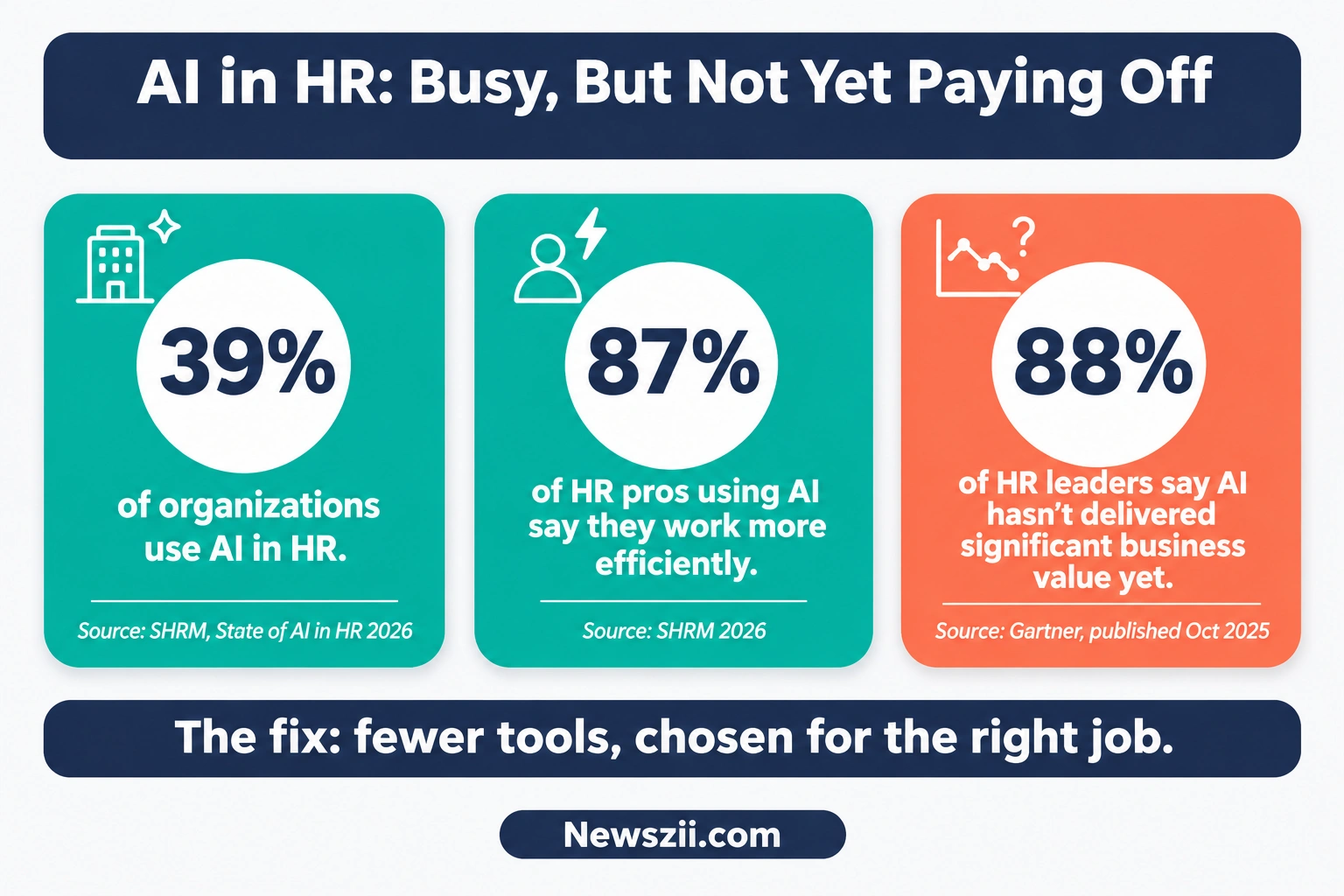
The numbers back up the hype, though only partly. SHRM’s State of AI in HR 2026, based on a survey of 1,908 HR professionals, found that 39% of organizations now use AI in HR. Among HR people who use it, 87% say they work more efficiently.
But there’s a catch. In a Gartner survey published in October 2025, 88% of HR leaders said their organizations hadn’t yet seen significant business value from AI tools.
So AI makes individual HR work faster. Yet most teams still haven’t turned that speed into real results. Usually that’s because they bought the wrong tool, or too many of them.
This guide is here to fix that. We’ll walk through ten tools, sorted by the job they do best and the size of team they fit. You’ll get real prices, honest trade-offs, and the 2027 rules that change how you can use AI in hiring.
At a glance: the best AI tool for each HR job
- Small business, all-round HR: BambooHR (Bamboo AI)
- US payroll plus HR in one place: Gusto (Gus)
- Fast-growing company running HR, IT and finance together: Rippling (Rippling AI)
- Global or remote teams: Deel (Deel AI)
- Performance reviews: Lattice
- Recruiting at a startup or scale-up: Ashby
- Enterprise HR and high-volume hiring: Workday with Paradox
- Enterprise video interviews: HireVue
- Enterprise employee self-service: Leena AI
- Writing and analysis for any HR team: ChatGPT Business or Microsoft 365 Copilot
How we picked these tools
There are hundreds of “AI for HR” products out there, and new ones launch every week. We narrowed the field with four simple tests.
- It does real HR work, not just chat. Each tool had to handle an actual HR job, like screening, reviews, payroll checks or answering employee questions.
- The AI is shipping today. We skipped features that were only on a roadmap. Where something is still in beta, we say so.
- The pricing is clear. We checked each vendor’s own pricing page in November 2026. Where a company doesn’t publish prices, we say “custom pricing” instead of guessing.
- It fits a real team. Every pick has a clear “choose this if…” reason. If we couldn’t name one, it didn’t make the list.
One more thing before we start. Nothing here is a paid placement. You’ll see the downsides of each tool alongside the good parts.
Best AI tools for HR teams compared
| Tool | Best for | Starting price (Nov 2026) | Is the AI extra? |
|---|---|---|---|
| BambooHR | Small business HR | From $10/employee/mo (flat from $250/mo for 25 or fewer) | Included; features vary by plan |
| Gusto | US payroll + HR | $49/mo + $6/person | Included (Gus) |
| Rippling | HR, IT and finance in one | Custom pricing | Rippling AI |
| Deel | Global and remote teams | HR from $5/employee/mo; EOR from $599/employee/mo | Included, no add-on |
| Lattice | Performance reviews | $10/seat/mo (Performance); $13 bundle | Included |
| Ashby | Recruiting for growing teams | Foundations from $400/mo, priced by company size | Metered AI credits |
| Workday + Paradox | Enterprise HR and volume hiring | Custom pricing | Agents not publicly priced |
| HireVue | Enterprise video interviews | Custom pricing | Core product |
| Leena AI | Enterprise employee self-service | Custom pricing | Core product |
| ChatGPT Business / Microsoft 365 Copilot | Writing and analysis | $20/user/mo (annual) / $21/user/mo plus a Microsoft 365 plan | Core product |
Prices are list prices in US dollars. Most HR software also charges for add-ons like payroll, benefits or extra job postings, so treat these as starting points.
The 10 best AI tools for HR teams, reviewed

1. BambooHR: best for small business HR
If your company has somewhere between 20 and a few hundred people, there’s a good chance BambooHR is already on your shortlist. It’s the classic first HR system: employee records, time off, onboarding, and simple hiring, all in one tidy place.
The AI story got much bigger this year. In July 2026, BambooHR launched Bamboo AI, a set of AI agents built into the platform. It can build reports from a plain-English question, help put together shift schedules, and flag unusual changes in a payroll run before you approve it. As of November 2026, Bamboo AI is in open beta for all customers, and admins can switch it off whenever they like.
In October 2026, BambooHR also launched a Claude connector. That lets your team ask HR questions and pull reports from inside Claude, with the same permissions they have in BambooHR.
Pricing: BambooHR publishes its rates. Companies with more than 25 employees pay from $10 (Core), $17 (Pro) or $25 (Elite) per employee per month. Teams of 25 or fewer pay a flat monthly rate starting at $250. (source)
Choose it if: you want one friendly system for core HR, and you’d rather have AI built in than bolt on another tool.
Watch out for: the flat minimum. A 10-person team on Core still pays $250 a month, which works out to $25 per person. Payroll, benefits and time tracking are add-ons too.
2. Gusto: best for US payroll plus HR
Gusto started as payroll software for small US businesses and grew into a full HR platform. Its AI assistant, Gus, answers payroll, benefits and HR questions in plain language, on the web or in the mobile app. Each answer links back to a help article, so you can double-check before you act. (Gusto Help Center)
In June 2026, Gusto added Cofounder, an AI assistant for handling more of the day-to-day running of a small business.
Pricing (November 2026): Simple costs $49 a month plus $6 per person. Plus is $80 a month plus $12 per person, and Premium is $180 a month plus $22 per person. (source)
Choose it if: you’re a US small business owner or office manager who needs payroll done right first, with HR alongside it.
Watch out for: Gusto’s core payroll is US-only. If you hire one person in a second state, you’ll need the Plus plan, which doubles the per-person fee.
3. Rippling: best for fast-growing companies running HR, IT and finance together
Rippling’s big idea is that HR, IT and finance should share one source of truth. When someone joins, the same system sets up their payroll, laptop, app access and corporate card. When they leave, it switches everything off.
In March 2026, the company launched Rippling AI. It can create reports, answer employee questions, and take actions across HR, IT and finance, all within each person’s permissions. Rippling says its AI runs real queries against your live company data and shows its work, rather than just guessing.
Pricing: custom. Rippling’s pricing page is a quote form, and the cost depends on which modules you choose.
Choose it if: you’re growing fast, hiring every month, and tired of keeping five systems in sync by hand.
Watch out for: it’s modular, so the final bill can grow quickly as you add products. Get a full quote for everything you’ll need in year two, not just year one.
4. Deel: best for global and remote teams
If you hire people in more than one country, Deel is hard to ignore. It handles contractors, global payroll, and employer-of-record (EOR) hiring in places where you don’t have a legal entity.
Deel AI is built into the platform. It answers HR and compliance questions using Deel’s knowledge base, which covers more than 150 countries, and it can also report on your own team data. In March 2026, Deel added AI agents for hiring, onboarding, payroll and time off. The best part for budgets: Deel says its AI comes included in your plan, with no separate add-on and no per-question fees.
Pricing (October 2026): Deel HR starts at $5 per employee per month. Contractor management costs $49 per contractor per month, and EOR starts at $599 per employee per month. (source)
Choose it if: your team spans several countries, or you hire contractors and full-time staff abroad.
Watch out for: EOR costs add up fast. At $599 per person per month, it’s worth comparing quotes once you have a large team in one country.
5. Lattice: best for performance reviews
No one loves writing performance reviews. Managers put them off, then rush them, and the feedback ends up vague. Lattice is built to fix that.
Its AI Agent helps managers draft reviews from goals, feedback and one-on-one notes, and it spots themes across a team. Since July 2026, Lattice says the AI Agent is available to all customers at no extra cost.
Pricing (October 2026, billed annually): Performance costs $10 per seat per month. The Foundations bundle (Performance plus Goals & OKRs) is $13, Goals & OKRs alone is $8, and Engagement surveys are $4.
Choose it if: reviews, goals and engagement are your biggest headache, and you already have a separate HR system.
Watch out for: costs stack up per module and per seat, and Lattice bills annually. Also remember that AI-drafted reviews still need a manager’s honest judgment before anyone sees them. A review that reads like a template does more harm than good.

6. Ashby: best for recruiting at startups and scale-ups
Ashby is a recruiting platform that puts the applicant tracking system, sourcing, candidate CRM, interview scheduling and hiring analytics in one place. Recruiters at fast-growing tech companies like it because the reporting is strong and the workflows feel modern.
Its AI helps review applications, spot fraudulent applicants, and resurface past candidates who might fit a new role. These features run on AI credits. The Foundations plan includes 1,500 credits a month, and extra credits cost $100 per 1,000 on monthly billing. (source)
Pricing: Ashby prices by company size. Its pricing page shows Foundations (up to 100 employees) from $400 a month, with 10% off for annual billing. Plus and Enterprise plans are quote-based.
Choose it if: you’re hiring steadily, you want one recruiting system instead of four, and you care about hiring data.
Watch out for: the extras. SSO costs another $100 a month on Foundations, and heavy AI use can push you past your included credits. For a team with only two or three open roles, it may be more than you need.
7. Workday with Paradox: best for enterprise HR and high-volume hiring
Workday runs HR and finance for many of the world’s largest employers. Over the past year it has gone all-in on AI agents.
Two moves matter most for HR teams. First, Workday completed its acquisition of Paradox on October 1, 2025. Paradox’s conversational AI handles candidate questions, interview scheduling and applications by chat, which is a huge help for retailers, restaurants and other high-volume hiring. Paradox says it has powered more than 189 million AI-assisted candidate conversations.
Second, at Workday Rising in October 2026, the company made Sana the new Workday home screen. Employees ask for what they need in plain language, and Workday’s agents do the work. Workday also introduced Sana Concierge for HR and IT requests, plus “autopilot” agents that handle routine work in the background, starting with recruiting. (Workday newsroom)
Pricing: custom. None of the October 2026 announcements included prices for Sana, Concierge or the autopilot agents.
Choose it if: you’re a large organization already on Workday, or you hire hundreds of frontline workers a month.
Watch out for: many of the newest agents were still rolling out to early adopters in late 2026. Ask exactly what’s available today, and what it costs, before you sign.
8. HireVue: best for enterprise video interviews
HireVue is one of the best-known names in video interviewing and hiring assessments. Candidates record answers or join live interviews, and recruiters review them on their own schedule. It sits on top of your existing applicant tracking system rather than replacing it.
Pricing: custom. HireVue doesn’t publish prices, and its pricing page sends buyers to a sales team.
Choose it if: you’re a large employer screening thousands of candidates, and you want structured, consistent interviews across many hiring managers.
Watch out for: AI that evaluates candidates is exactly what new laws target (more on that below). Ask any vendor for its bias audit, and keep a human making the final call.
9. Leena AI: best for enterprise employee self-service
In a big company, HR teams drown in repeat questions. How much leave do I have? Where’s my payslip? What’s the parental leave policy? Leena AI is built to answer those for you.
It deploys AI agents that answer employee questions and resolve routine tickets across HR, IT and finance, connecting to the systems you already use. It’s aimed at mid-size and large organizations, typically those with more than 500 employees.
Pricing: custom. You’ll need to contact Leena AI for a quote.
Choose it if: you have thousands of employees and your HR team spends hours each day on the same questions.
Watch out for: it’s an enterprise purchase, with enterprise setup. A small company will get more value from the AI already inside its HR system.
10. ChatGPT Business or Microsoft 365 Copilot: best for writing and analysis
Here’s the honest truth: a lot of the most useful HR AI isn’t “HR software” at all. A good general assistant can draft a job description in two minutes, turn messy survey comments into clear themes, or rewrite a policy in plain English.
- ChatGPT Business costs $20 per user per month billed annually, or $25 monthly, with a two-user minimum. OpenAI cut the price by $5 in April 2026. (source)
- Microsoft 365 Copilot Business lists at $21 per user per month for organizations with up to 300 users. It works inside Outlook, Word, Excel and Teams, but it needs a qualifying Microsoft 365 plan underneath. (source)
Good HR jobs for a general assistant:
- Job descriptions and interview question sets
- First drafts of policies and handbook sections
- Offer letter and onboarding email templates
- Summaries of engagement survey comments
- Training outlines and FAQ pages
Choose it if: you need a flexible writing partner, whatever HR system you use.
Watch out for: privacy. Use a business plan, not a personal account, and don’t paste sensitive candidate or employee data unless your company has approved it.
Which AI tool fits your team size?
The right stack changes a lot as a company grows. Here’s a simple way to think about it.
| Team size | Start with | Add when you need it |
|---|---|---|
| Startup (under 25 people) | A general assistant (ChatGPT Business or Copilot) + Gusto (US) or Deel (global) | Ashby once hiring becomes constant |
| Small business (25–100) | BambooHR, Gusto or Rippling, using the AI built in | Lattice when review season becomes painful |
| Mid-market (100–1,000) | Rippling or BambooHR Elite + Lattice | Ashby or another dedicated recruiting platform |
| Enterprise (1,000+) | Workday | Paradox for volume hiring, HireVue for interviews, Leena AI for self-service |
If you’re the first HR hire at a startup, keep it lean. One HR or payroll system and one general assistant will cover about 80% of your work. Don’t buy a specialist tool until you can name the exact hours it will save you.
If you run a small business, use the AI that came with the HR system you already pay for. Bamboo AI, Gus, Rippling AI and Deel AI are all included in their plans. That’s real value you may not be using yet.
If you’re mid-market, this is where specialist tools start paying off. A 300-person company running reviews twice a year will feel the difference Lattice makes. A company hiring 50 people a quarter will feel the difference Ashby makes.
If you’re an enterprise, your core HR system decides most things. Pick tools that plug into it cleanly, and put your effort into governance, which we cover below.
What HR teams actually use AI for
Recruiting is the clear front-runner. According to SHRM’s State of AI in HR 2026, here’s where organizations put AI to work in HR:
| HR area | Share of organizations using AI there |
|---|---|
| Recruiting | 27% |
| HR technology | 21% |
| Learning and development | 17% |
| Employee experience | 14% |
Company size matters a lot. In the same report, 60% of very large organizations (5,000+ employees) had adopted AI in HR, compared with 35% of midsize firms and 33% of small ones.
The benefits people report are real. Among HR professionals using AI, 87% saw efficiency gains, 75% saw better work quality, and 70% said it helped their creativity.
Yet there’s a surprising gap. SHRM found that 52% of organizations don’t involve HR in building their overall AI strategy. And 67% of HR leaders say the biggest thing holding them back is simply not knowing what AI can do.
That second number is good news, honestly. It means the barrier isn’t money or technology. It’s knowledge, and that’s the easiest one to fix. You’re fixing it right now by reading this.

Everyday HR tasks AI handles well today:
- Writing and refreshing job descriptions
- Screening and ranking applications (with a human review)
- Scheduling interviews
- Answering repeat employee questions about leave, pay and policies
- Drafting performance review summaries
- Building headcount, turnover and payroll reports
- Summarizing survey feedback into themes
- Creating onboarding checklists and training outlines
The hidden costs of HR AI tools
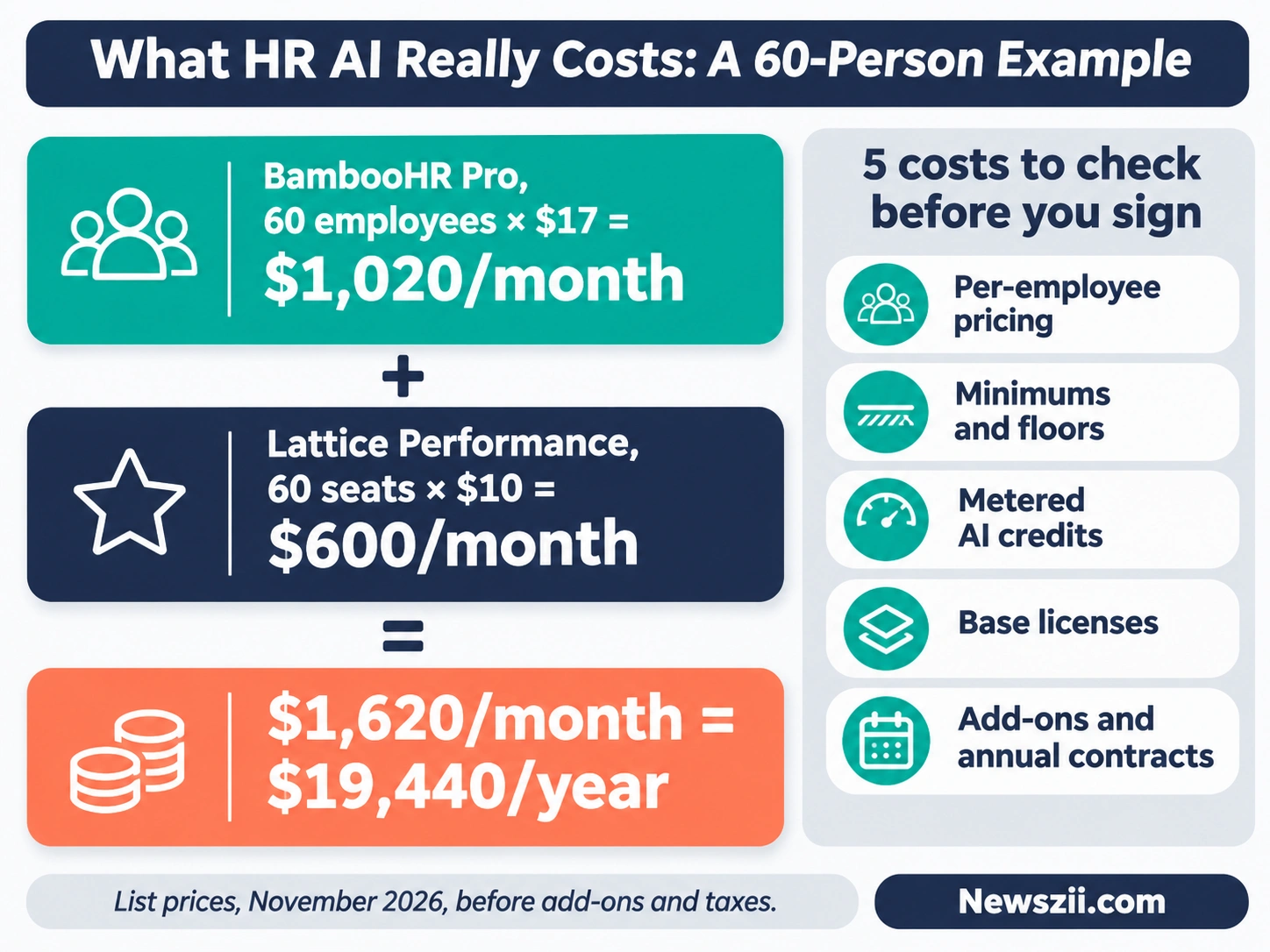
The price on the website is rarely the price you pay. Before you sign anything, check these five things.
- Per-employee pricing grows with you. Most HR platforms charge for every employee, not just the HR team. Hire 20 people, and your bill rises even if nobody new logs in.
- Minimums and floors. BambooHR’s small-team plans start at a flat $250 a month. ChatGPT Business needs at least two seats. Small teams often pay more per person than the headline suggests.
- Metered AI. Some tools include AI for free, while others count it. Ashby’s AI features use monthly credits, and heavy users buy more. Ask how AI usage is billed before it shows up on an invoice.
- Base licenses. Microsoft 365 Copilot can’t be bought on its own. You need a qualifying Microsoft 365 plan underneath, so the real cost per person is the two added together.
- Add-ons and annual contracts. Payroll, benefits, SSO and extra job postings are often extras. Lattice bills annually, so you’re paying for the year up front.
A quick example. Say you run a 60-person company on BambooHR Pro at $17 per employee. That’s $1,020 a month before any add-ons. Add Lattice Performance for 60 seats at $10, and you’re at $1,620 a month, or about $19,440 a year. That may be well worth it. Just know the number before you start.
How to use AI safely in HR (and the 2027 rules to know)
HR handles some of the most sensitive decisions a company makes: who gets hired, promoted, paid more, or let go. That’s why lawmakers are paying close attention to AI in HR.
Yet awareness is low. SHRM found that 57% of HR professionals in US states with AI laws don’t know the local rules covering hiring tools. Two deadlines are worth putting in your calendar now.
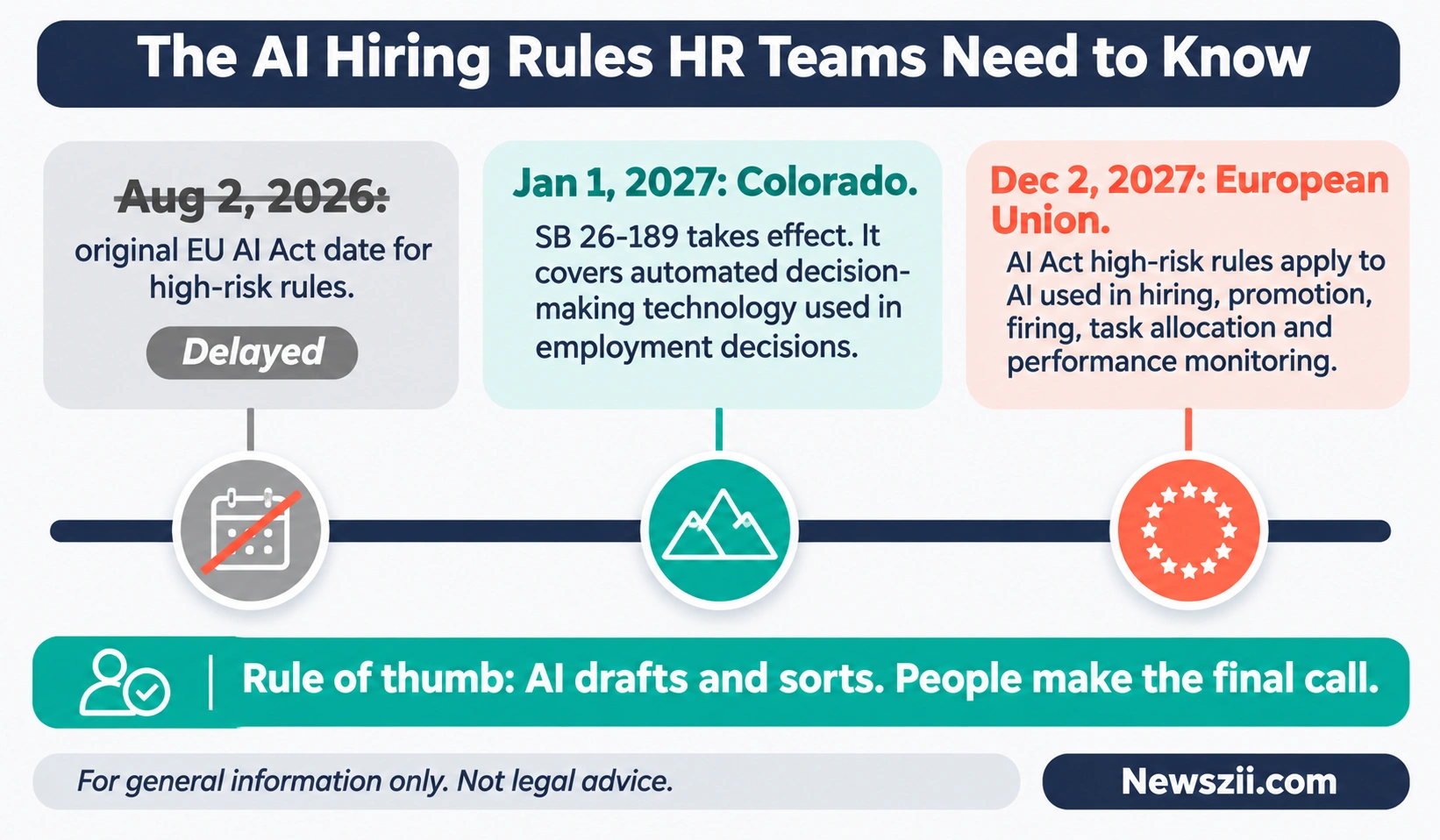
1. Colorado: January 1, 2027. In May 2026, Colorado replaced its original AI Act with a new law, SB 26-189. It covers automated decision-making technology used in important decisions, including employment, and it takes effect January 1, 2027. If you hire in Colorado, ask your vendors what they’re doing to support it.
2. The European Union: December 2, 2027. Under the EU AI Act, AI used in hiring, promotion, firing, task allocation or performance monitoring counts as “high-risk.” In 2026, the EU pushed the start date for those rules from August 2, 2026 to December 2, 2027. That’s a delay, not a cancellation. Most transparency rules were not delayed at all.
Other US states and cities have their own rules too. If you hire across borders, a short call with an employment lawyer is money well spent.
Five habits that keep you safe, wherever you are:
- A human makes the final call. Let AI draft, sort and summarize. People decide on hiring, firing, pay and promotions.
- Ask vendors hard questions. Does the tool train on your data? Has it been audited for bias? Can you see why it ranked one candidate above another?
- Tell people when AI is involved. Candidates and employees should know when AI plays a role in decisions about them.
- Protect personal data. Use business-grade tools with proper permissions. Never paste salary data or medical details into a personal chatbot.
- Write it down. A one-page AI policy for your HR team covering approved tools, banned uses and who signs off is a great start.
The good news is that the leading vendors are building these controls in. Bamboo AI and Rippling AI follow each person’s existing permissions, Deel says customer data is never used to train AI models, and Workday’s agents ask a person to approve before they act.
How to choose: a 5-question checklist
Still not sure? Answer these five questions, in order, and the right choice usually becomes obvious.
- What HR system do you already use? Try its built-in AI first. It already knows your data, and you’re often already paying for it.
- Which single task wastes the most time each week? Recruiting, reviews, employee questions or payroll? Buy for that one job, not for a dozen.
- Where are your people? One US state, several states, or several countries? That alone can decide between Gusto, Rippling and Deel.
- What will it really cost in year two? Do the math for your expected headcount, including add-ons, AI credits and base licenses.
- Can the vendor answer your safety questions? Data training, bias audits, permissions and human approval. If the answers are vague, keep looking.
The bottom line
The best AI tool for HR teams isn’t the one with the flashiest demo. It’s the one your team will actually use, every week, on the work that drains them most.
For most teams in 2027, that means making full use of the AI inside your HR system, adding one good general assistant, and bringing in a specialist only when one problem clearly earns it. Start small, measure the hours you save, and keep a human in charge of the decisions that matter. That’s how you end up in the group that gets real value from AI, not just more software.
Frequently asked questions
What is the best AI tool for HR teams?
For most small and mid-sized teams, it’s the AI built into their HR platform, such as Bamboo AI, Gusto’s Gus, Rippling AI or Deel AI, paired with ChatGPT Business or Microsoft 365 Copilot for writing. For specific jobs, Lattice is a strong pick for performance reviews and Ashby for recruiting. Large enterprises usually build around Workday.
Is there a free AI tool for HR?
General chatbots have free plans, but they aren’t built for sensitive HR data. A better deal is AI that comes free with software you already pay for. Deel says its AI is included in every plan with no add-on, and Lattice’s AI Agent comes at no extra cost for customers.
Can AI replace an HR team?
No. AI is very good at drafting, sorting and answering routine questions, and SHRM found 87% of HR professionals who use it work more efficiently. But hiring, pay, conflict and culture need human judgment, and new laws increasingly require a human in the loop.
Is it legal to use AI in hiring?
Yes, but rules are tightening. Colorado’s automated decision-making law takes effect on January 1, 2027, and the EU AI Act’s high-risk rules for employment apply from December 2, 2027. Check the rules where you hire, and keep humans in charge of final decisions.
What do HR teams use AI for most?
Recruiting. SHRM’s 2026 research found 27% of organizations use AI for recruiting, more than any other HR area. HR technology (21%) and learning and development (17%) come next.
How much do AI tools for HR cost?
It varies widely. Module add-ons like Lattice start at $4 to $13 per seat per month. HR platforms like BambooHR start at $10 per employee per month, and general assistants cost about $20 to $21 per user. Enterprise tools like Workday, HireVue and Leena AI use custom pricing.
Should a small business buy a specialist HR AI tool?
Usually not at first. Start with the AI in your HR or payroll system and one general assistant. Add a specialist tool only when a single task, like hiring or review season, clearly costs you hours every week.

Founder, Newszii.com | CEO, NICHE Digital Media
Praveen Panjiar brings nearly two decades of experience in digital media, web & mobile asset development, and growth strategies.
He built Newszii from the ground up into a global platform spanning tech, business, finance, and lifestyle, and has since developed a strong track record of building, scaling, and optimizing digital properties with a sharp focus on user growth, content strategy, and emerging technology trends.