
Published on November 5th, 2026
Here’s a number that says a lot about how software companies get built now: the median startup in Y Combinator’s 2026 batch lists just two employees. In 2018, it was fifteen. Those two people still ship code, answer customers, chase leads and run meetings. The difference is that AI tools now do a big share of the work.
If you’re running a small SaaS team, that’s the opportunity. It’s also the problem. There are thousands of AI tools for SaaS startups, most claim to do everything, and two of the biggest names changed owners in 2026. Prices moved too.
This guide cuts through it. We’ve grouped the best AI tools for SaaS startups by the job they actually do: building the product, prototyping, customer support, sales, analytics and internal ops. At the end, you’ll find three ready-made stacks for different stages, from pre-revenue to a seed-funded team of five.
Quick answer: what are the best AI tools for SaaS startups?
The best AI tools for SaaS startups in 2027 are GitHub Copilot, Claude Code or Cursor for coding; Lovable for prototyping; Fin for customer support; Apollo or Clay for sales; PostHog for product analytics; and Notion AI plus Granola for internal work. Several have free tiers, so a two-person team can start for well under $100 a month and add paid seats only when a tool proves its worth.
Quick picks at a glance
“Starts at” is the lowest paid option most startups would actually use.
| Task | Tool | Starts at | Free option? |
|---|---|---|---|
| Coding | GitHub Copilot | $10/month (Pro) | Yes |
| Coding | Claude Code | $20/month (Claude Pro) | No |
| Coding | Cursor | $30/month (Premium) | Yes, limited |
| Prototyping | Lovable | $25/month per workspace | Yes |
| Customer support | Fin (formerly Intercom) | $0.99 per resolved conversation | Trial only |
| Sales data | Apollo.io | $49/seat/month (annual) | Yes |
| Sales workflows | Clay | $185/month | Yes |
| Product analytics | PostHog | $0 | Yes, generous |
| Docs and knowledge | Notion AI | $20/user/month (annual) | Trial only |
| Meeting notes | Granola | $14/user/month | Yes |
Why SaaS startups run lean on AI now
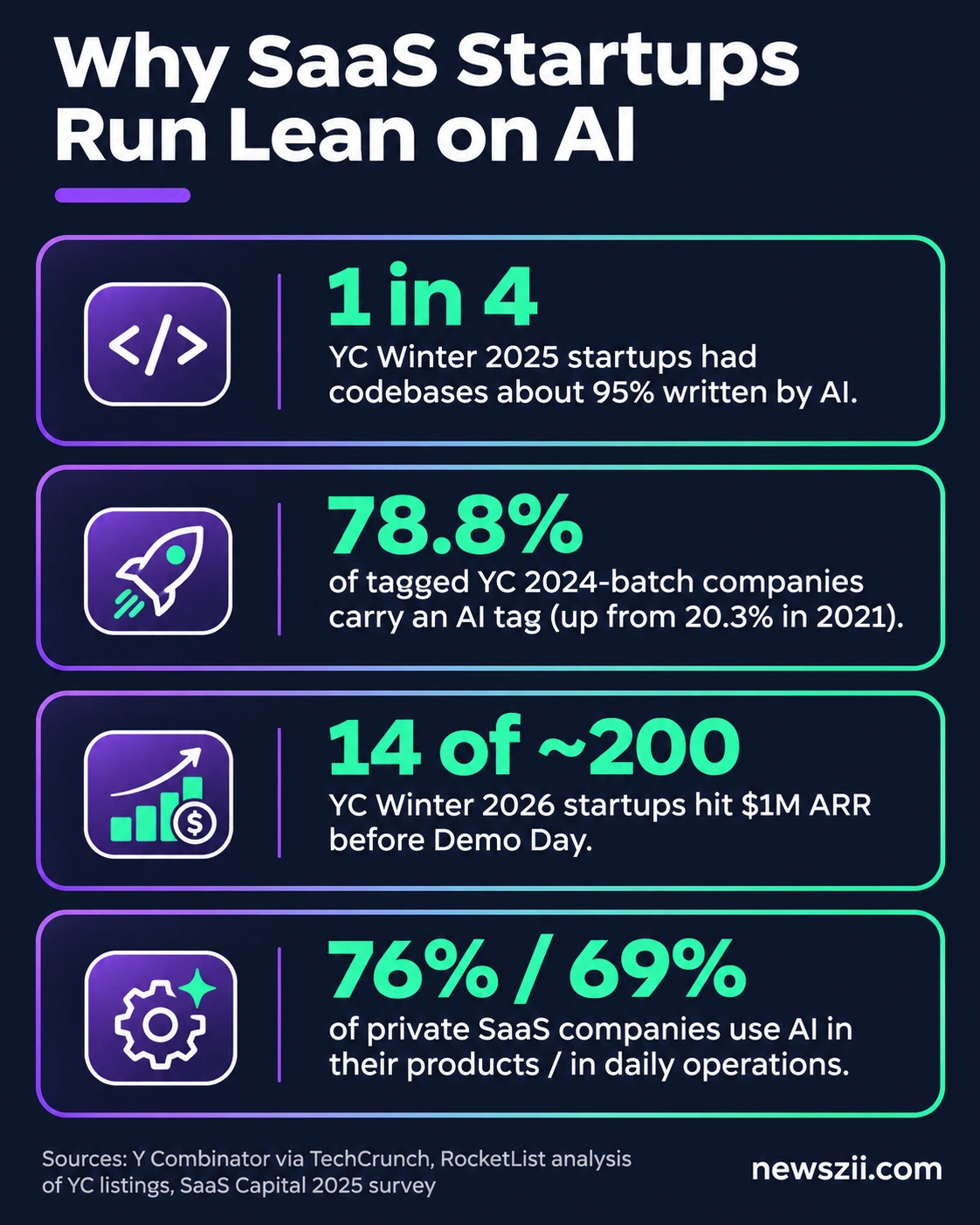
SaaS startups lean on AI because it lets a tiny team do the work that used to need a department. The data backs this up from several directions.
- Code is increasingly written by AI. Back in early 2025, YC’s Jared Friedman said a quarter of the W25 batch had codebases that were about 95% AI-generated. These weren’t non-technical founders, either.
- AI is now the default focus. An analysis of YC’s public company listings by RocketList found that 78.8% of tagged companies in the 2024 batch carried an AI tag, up from 20.3% in 2021.
- Revenue is arriving faster. According to YC’s Garry Tan, 14 of roughly 200 companies in the Winter 2026 batch reached $1 million in annual recurring revenue before Demo Day. Historically, it’s been more like three to five per batch.
- Established SaaS companies are on board too. SaaS Capital’s 2025 survey of private SaaS firms found that over 76% use AI in their products and 69% use it in day-to-day operations.
Looking ahead, ICONIQ’s July 2026 State of AI report surveyed about 305 executives at software companies. Respondents said AI products made up 32% of their revenue in 2025 and expect that to reach 42% in 2026 and pass 53% in 2027. Treat those as projections, not facts, but the direction is clear.
The catch nobody mentions
Adoption is high. Trust isn’t. Stack Overflow’s 2026 Developer Survey, with more than 30,000 responses from 169 countries, found that 65.9% of developers use coding assistants or agents. Yet only 6.6% said they’d trust AI output for an important decision. Most trust it only when they can check it easily.
There’s also a well-known study worth keeping in mind. In a 2025 trial by the research group METR, experienced developers working in codebases they knew well took 19% longer with AI tools, even though they believed afterward that AI had made them about 20% faster. That study used early-2025 tools, and things have moved on since. The lesson still stands: measure the time you actually save instead of assuming it.
AI coding tools for building your SaaS product
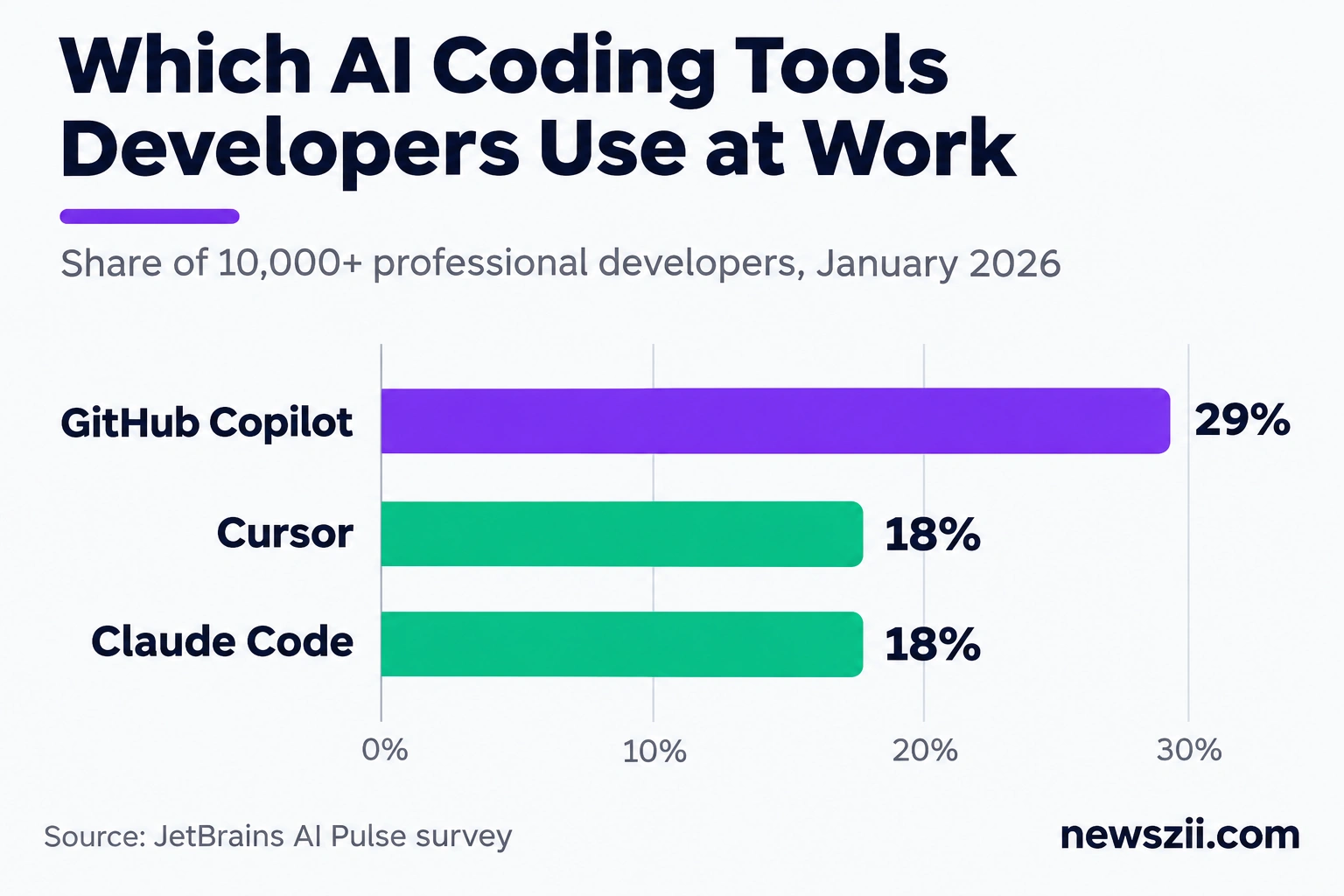
For most SaaS startups, the best AI coding tool is GitHub Copilot if you want the cheapest predictable option, Claude Code if you want an agent that can take on whole tasks, or Cursor if you want an AI-first editor. Many teams end up using two of them. In JetBrains’ January 2026 survey of more than 10,000 professional developers, Copilot led work adoption at 29%, with Cursor and Claude Code tied at 18%.
GitHub Copilot
Best for: teams already living in GitHub who want low, predictable costs. Price: free tier, then $10/month.
Copilot is the safe default. It works inside VS Code, JetBrains IDEs and most other editors, and it handles completions, chat and agent tasks. GitHub now offers seven plans: Free, Student, Pro ($10), Pro+ ($39), Max ($100), Business ($19 per seat) and Enterprise ($39 per seat).
The thing to know for 2027: since June 1, 2026, every plan runs on usage-based AI Credits. Your plan includes a monthly allowance, and heavy agent use draws it down faster. For a small team doing everyday coding, Pro or Business is usually plenty.
Claude Code
Best for: founders who want an AI agent that reads the codebase, plans changes and carries them out. Price: included with Claude Pro at $20/month.
Claude Code isn’t sold on its own. It comes with Anthropic’s paid Claude plans: Pro ($20/month, or $17 billed annually), Max 5x ($100) and Max 20x ($200). The free Claude plan doesn’t include it.
For teams, Claude’s Team plan has Standard seats ($25/month, $20 billed annually) and Premium seats ($125/month). If your developers will use Claude Code heavily, plan on Premium seats and confirm what Standard seats include on Anthropic’s pricing page, as the details have shifted during 2026. A good rule: start one developer on Pro, and move to Max only when they hit limits several times a week.
Cursor
Best for: developers who want an editor built around AI from the ground up. Price: free tier, then $8/month, with $30/month (Premium) the realistic starting point.
Cursor had the biggest shake-up of the year. SpaceX completed its acquisition of Cursor on August 14, 2026, and on October 12 launched The X Subscription, a single plan that bundles Cursor with Grok and X Premium. Many pricing guides online still show Cursor’s old $20 Pro plan. That plan is now legacy and isn’t sold to new customers.
The new tiers are Free, Plus ($8), Premium ($30), Super ($100) and Ultra ($200) a month. Cursor itself suggests Premium for new AI users and Super for daily agent users. Usage comes from one shared weekly pool across Cursor and Grok.
Two details matter for startups:
- Team seats cost the same as individual plans: $30, $100 or $200 per user per month. Plus isn’t available for teams.
- Third-party models (such as Claude or GPT models inside Cursor) aren’t covered by the monthly fee. They’re billed separately at API list prices through prepaid top-up credits, so watch that line if your team prefers non-Grok models.
Coding tools compared: cost per developer
| Tool | Solo developer | Per team seat | Billing catch |
|---|---|---|---|
| GitHub Copilot | $10/month (Pro) | $19/month (Business) | Usage-based AI Credits since June 2026 |
| Claude Code | $20/month (Pro) | $125/month (Team Premium) | Shared usage limits with regular Claude use |
| Cursor | $30/month (Premium) | $30/month (Premium seat) | Third-party models billed on top |
Prototyping tools: from idea to MVP
If you need a working prototype before you need a codebase, a “vibe coding” tool like Lovable is the fastest route. You describe the app in plain English, and it builds a full-stack web app you can click through, share with early users and refine by chatting.

Lovable
Best for: non-technical founders validating an idea, and technical founders who want a clickable demo by Friday. Price: free plan, then $25/month.
Lovable is the breakout name in this category. It raised a $400 million Series C at a $13.3 billion valuation in August 2026. Its plans are Free, Pro ($25/month), Business ($50/month) and Enterprise. On annual billing, Pro drops to $21/month and Business to $42/month.
One detail makes it unusually good for small teams: no plan charges per user. The price covers the workspace, so three co-founders can share one Pro plan. You pay for credits, and bigger credit bundles cost more, so a busy build month can push you up a tier.
A word of caution. A 2026 security study of apps built through vibe coding found recurring problems, including incomplete logic, unfiltered inputs and exposed secrets. That doesn’t mean you shouldn’t use these tools. It means a prototype isn’t production software. Before real customer data goes in, have someone review authentication, input handling and where API keys live.
AI customer support for SaaS startups
For AI customer support, Fin is the leading option for SaaS teams, and its pay-per-resolution pricing suits startups because the bill grows only when it actually solves problems. Support is often the first place a small team feels the strain, so this is where AI can save real hours early.
Fin (formerly Intercom)
Best for: SaaS teams that want an AI agent answering customers across chat, email and other channels. Price: $0.99 per resolved conversation.
If you’ve been searching for “Intercom AI”, this is it. Intercom renamed itself Fin in May 2026, after its AI agent, and Salesforce completed its acquisition of the company on September 10, 2026. Fin serves more than 30,000 companies and reports an average resolution rate of 76%. That’s the company’s own figure, so test it on your own tickets.
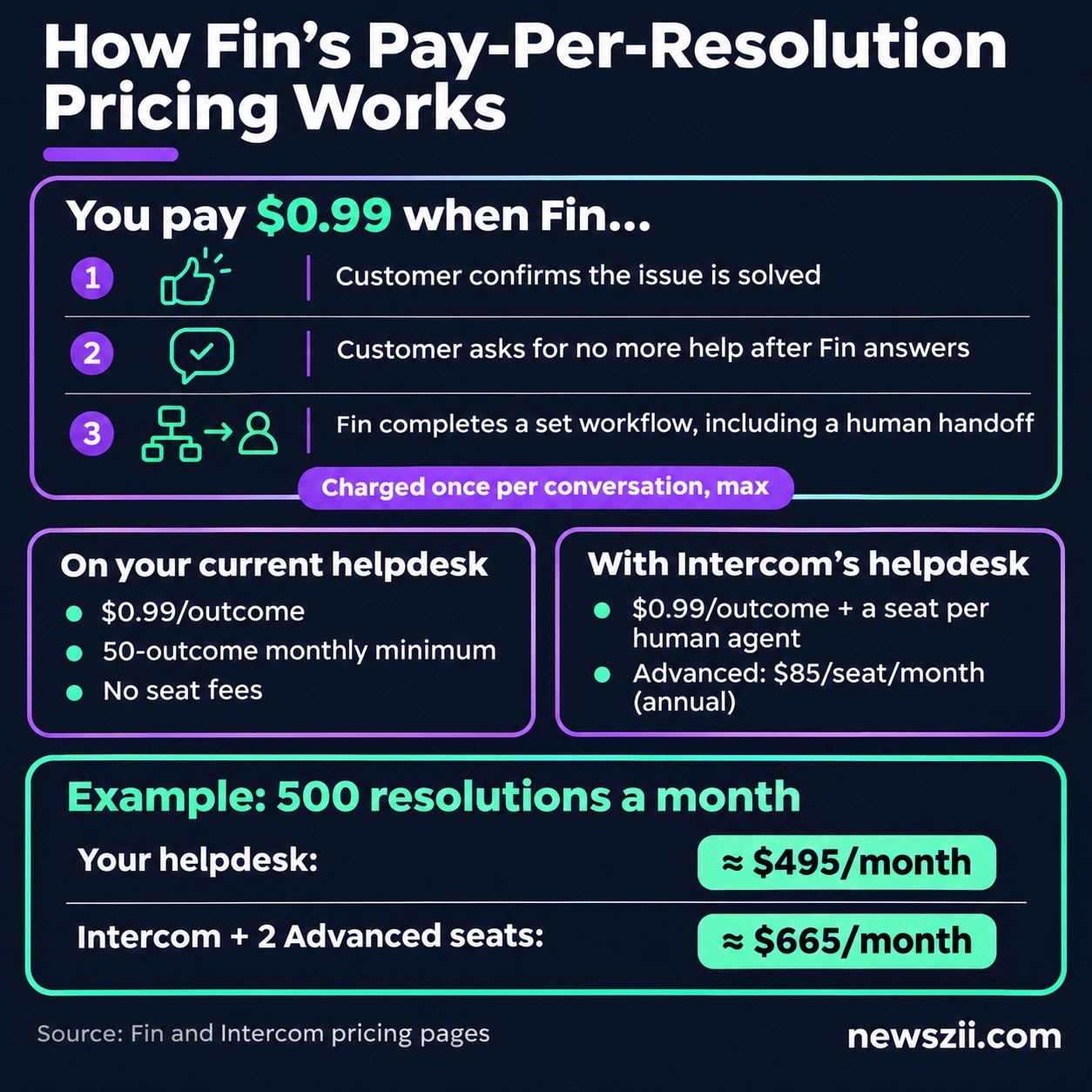
How the pricing works. Fin charges $0.99 per “outcome”, and never more than one per conversation. An outcome counts when a customer confirms their issue is solved, when they don’t ask for more help after Fin’s answer, or when Fin completes a defined workflow, including a handoff to a human.
You can buy Fin two ways:
- With Intercom’s helpdesk: $0.99 per outcome plus a seat for each human agent. Intercom’s plans are Essential, Advanced ($85 per seat/month billed annually) and Expert ($132). The Essential seat appears at $19 or $29 per month depending on which version of the pricing page you see, as Fin is currently testing prices.
- On the helpdesk you already use (Zendesk, Salesforce, HubSpot and others): $0.99 per outcome with a 50-outcome monthly minimum, and no seat, setup or platform fees.
A quick example. Say Fin resolves 500 conversations a month. That’s about $495 in outcomes. On your existing helpdesk, that’s roughly your whole Fin bill. On Intercom with two Advanced seats billed annually, add $170 for about $665 a month.
On a tight budget? Featurebase says its Fibi agent uses the same pay-when-resolved model at $0.29 per resolution. That’s Featurebase’s own claim, but it’s worth comparing if your ticket volume is high and your questions are simple.
With Salesforce now the owner, expect Fin’s packaging to evolve through 2027. Lock in pricing in writing if you sign an annual deal.
AI tools for startup sales and outbound
For startup sales, use Apollo.io if you want a contact database and email sequences in one place, and Clay if you want to build custom enrichment and research workflows. They solve different problems, which is why plenty of B2B SaaS teams run both.
Apollo.io
Best for: founders doing their own outbound who need contacts, emails and sequences without stitching tools together. Price: free plan, then $49/seat/month billed annually.
Apollo bundles a large B2B contact database with email sequencing and AI-assisted writing. Its paid plans cost $49, $79 and $119 per seat per month on annual billing, and the free plan includes 900 credits per seat per year. Paying monthly costs more: $59, $99 and $149.
For most early-stage teams, the free plan is enough to test whether outbound works at all. Upgrade once you know your ideal customer and need more credits. And watch the renewal terms: some reviewers note that Apollo contracts auto-renew unless you cancel well ahead of time.
Clay
Best for: growth-minded founders and RevOps people who want to enrich lead lists from many data sources and automate research. Price: free plan, then from $185/month.
Clay is less a database and more a workbench. It pulls data from many providers, lets AI research each company or person, and pipes the results into your CRM or outreach tool. After a pricing overhaul on March 11, 2026, its self-serve plans are Free, Launch (from $185/month) and Growth (from $495/month), plus a custom Enterprise tier. Some trackers list $167 and $446, which looks like the annual-billing rate, so confirm on Clay’s pricing page.
Clay now bills with two kinds of credits, and it helps to understand them before you start:
- Data Credits are spent when Clay buys information, like an email address or company details. Launch includes 2,500 a month.
- Actions are spent when Clay does work, like running a step in a workflow. Launch includes 15,000 a month.
A long workflow run across a big list can burn through Actions quickly, so start with a small test list. The upside for small teams: Clay doesn’t charge per seat.
Product analytics with AI
PostHog is the strongest product analytics pick for early SaaS startups because its free tier covers most of what a young product needs, with AI features layered on top. You’ll want to know where users drop off long before you can justify an analytics budget.
PostHog
Best for: SaaS teams that want analytics, session replays, feature flags and surveys in one tool. Price: free, then pay-as-you-go.
PostHog’s free allowance resets every month and includes 1 million analytics events, 5,000 session recordings, 1 million feature flag requests, 100,000 error-tracking exceptions and 1,500 survey responses. There’s no per-seat fee, so your whole team can log in.
On the free plan, usage simply stops at the limits, so you can’t get a surprise bill. On pay-as-you-go, you keep the same free allowance and can set a billing limit for each product. PostHog says 97% of companies use it for free.
Two changes to know about the AI side:
- Free AI credits shrank. In June 2026, PostHog cut its free monthly AI credits from $20 worth to $5 worth (500 credits). That covers light use of its AI assistant, not heavy daily querying.
- Startup credits may not cover AI. PostHog’s startup program has offered sizable credits, but a pricing tracker reports that since September 14, 2026, those credits can’t be spent on PostHog’s AI tools. Check the startup page before you plan around them, and set a billing limit on AI products from day one.
AI tools for docs, meetings and internal ops
For internal work, Notion AI keeps your company knowledge searchable and Granola turns meetings into clean notes without a bot joining the call. These tools won’t win you customers, but they stop a small team from losing decisions, context and hours.
Notion AI
Best for: teams that already run their wiki, specs and roadmap in Notion. Price: $20/user/month billed annually ($24 monthly).
Notion no longer sells AI as a separate add-on. Full AI, including Notion’s agent, AI meeting notes and search across your connected tools, comes with the Business plan. Free and Plus plans get only a limited trial. Custom Agents, which run tasks for you in the background, cost extra at $10 per 1,000 Notion credits a month.
If your team lives in Notion, Business is easy to justify. If you only want AI writing help, a general AI assistant is cheaper.
Granola
Best for: founders in back-to-back calls with customers, investors and candidates. Price: free plan, then $14/user/month.
Granola captures audio on your own device, so no bot joins the meeting. You jot rough notes as you talk, and afterward Granola combines them with the transcript into tidy, structured notes. Plans are Basic (free), Business ($14 per user per month) and Enterprise ($35). Billing is monthly only.
The free plan keeps 30 days of meeting history, and it now includes the Slack integration. Business unlocks unlimited history plus integrations with tools like Notion, HubSpot, Attio and Zapier. That makes it handy for logging sales calls into your CRM.
Notion or Granola for meeting notes? If you’re already paying for Notion Business, try its built-in AI meeting notes first. If you want something lighter that works outside Notion, Granola is the more focused tool.
What about AI marketing tools?
Marketing deserves its own guide, so we wrote one. For content, design, social, email, SEO and ad tools, read our full breakdown of AI tools for marketing. Most SaaS startups can start with a general AI assistant for writing and add specialized tools once a channel is working.
Sample AI tool stacks for SaaS startups by stage
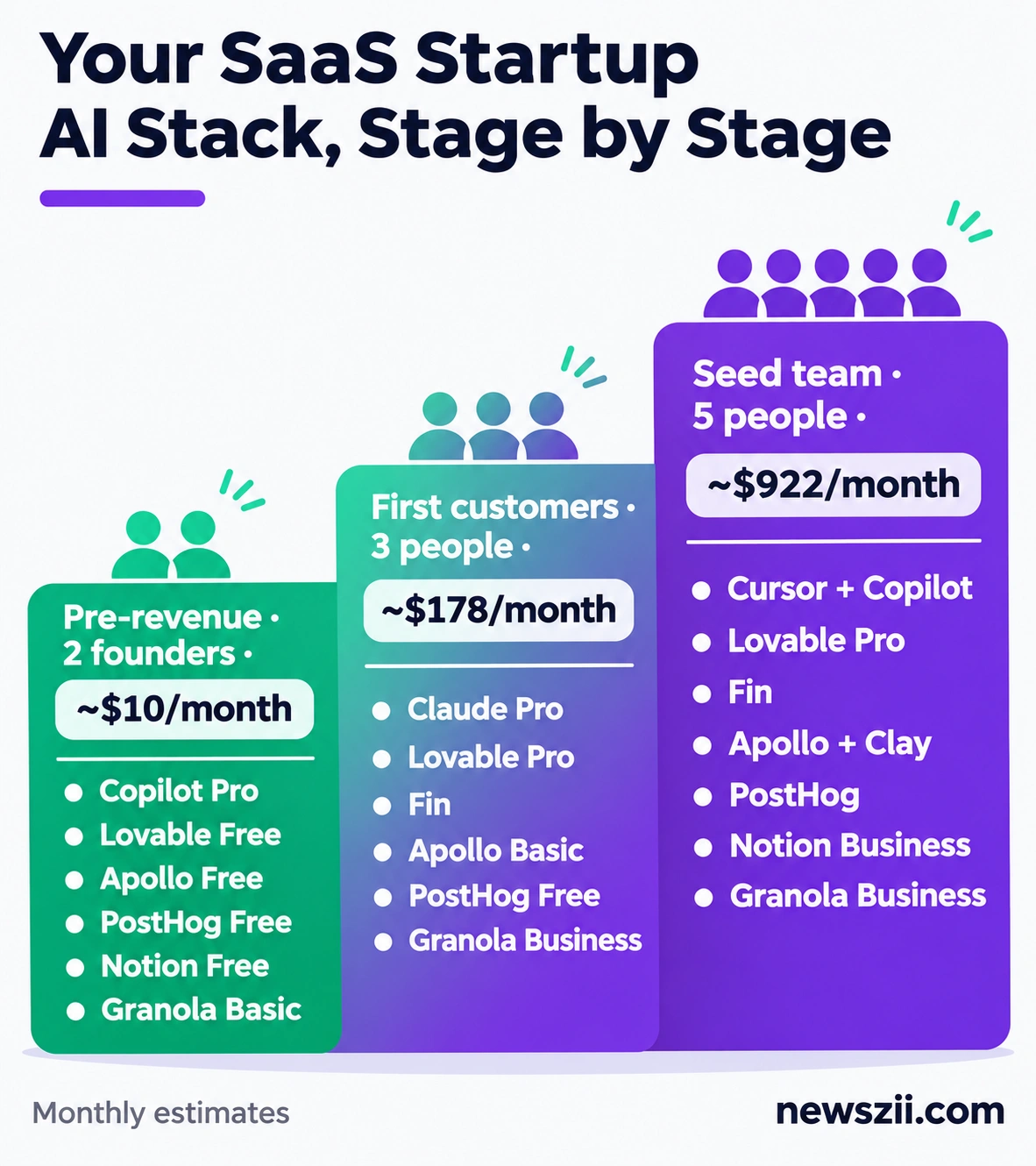
A pre-revenue SaaS startup can run on about $10 a month in AI tools, a team with its first customers on roughly $180, and a seed-funded team of five on around $920. Here’s how those numbers break down.
| Job | Pre-revenue (2 founders) | First customers (3 people) | Seed team of 5 |
|---|---|---|---|
| Coding | Copilot Pro, 1 dev: $10 | Claude Pro, 2 devs: $40 | Cursor Premium + Copilot Business, 3 devs: $147 |
| Prototyping | Lovable Free: $0 | Lovable Pro: $25 | Lovable Pro: $25 |
| Support | Shared inbox: $0 | Fin, 50 resolutions: ~$50 | Fin, ~300 resolutions: ~$297 |
| Sales | Apollo Free: $0 | Apollo Basic, 1 seat: $49 | Apollo Basic, 2 seats + Clay Launch: $283 |
| Analytics | PostHog Free: $0 | PostHog Free: $0 | PostHog (within free tier): $0 |
| Docs | Notion Free: $0 | Notion Free: $0 | Notion Business, 5 users: $100 |
| Meetings | Granola Basic: $0 | Granola Business, 1 user: $14 | Granola Business, 5 users: $70 |
| Monthly total | ~$10 | ~$178 | ~$922 |
Assumes annual billing where it’s offered (Apollo, Notion), monthly billing elsewhere, and Fin running on a helpdesk you already have.
A few principles behind these picks:
- Free first, paid when it hurts. Every tool in the first column has a free tier. Upgrade only when a limit actually slows you down.
- One tool per job. Two overlapping tools double the bill and split your data. The seed stack pairs Copilot with Cursor only because different developers prefer different workflows.
- Variable costs need a ceiling. Fin, Clay and PostHog all charge by usage. Set billing limits or alerts before you scale, not after the first big invoice.
What will change for SaaS startup AI tools in 2027
Expect three shifts in 2027: new owners repackaging familiar tools, usage-based billing becoming the norm, and AI turning into the core of SaaS revenue rather than a feature.
- Big owners, new bundles. Cursor now sits inside SpaceX’s X Subscription, and Fin belongs to Salesforce. Ownership changes like these usually bring bundles, renamed plans and price changes. If a tool is central to your workflow, keep an eye on its pricing page every quarter.
- Paying per use, not per seat. Copilot moved to AI Credits, Clay bills by Actions and Data Credits, PostHog meters its AI, and Fin charges per resolution. That’s good news for small teams, because you pay for what you use. It also means bills can swing. Budgeting for AI now looks more like budgeting for cloud hosting.
- AI becomes the product. Respondents to ICONIQ’s 2026 survey expect AI products to pass half of their revenue in 2027. If you’re building a SaaS product, your customers will increasingly expect AI inside it, not just in your own workflow.
Mistakes to avoid when choosing AI tools for your startup
The most expensive mistakes aren’t picking the wrong tool. They’re using the right tools without guardrails.
- Shipping AI code nobody reviewed. AI writes code fast, but it also writes bugs and security holes fast. Keep human code review, especially for authentication, payments and anything touching customer data.
- Ignoring credit and overage costs. A headline price of $20 or $25 rarely tells the whole story for usage-based tools. Read how credits are consumed before you commit.
- Skipping a written AI policy. Stack Overflow’s 2026 survey found only 24% of developers said their employer had approved tools or an official AI policy. Even a one-page doc covering which tools are allowed and what data can go into them prevents a lot of headaches.
- Paying for seats nobody uses. Review seat counts every quarter. A $14 or $30 seat that sits idle is pure waste.
- Assuming AI saves time without checking. Track a few real tasks before and after you adopt a tool. The METR study is a good reminder that “feels faster” and “is faster” aren’t the same thing.
Frequently asked questions
What AI tools do SaaS startups use most?
Coding assistants are the most widely used. In JetBrains’ January 2026 survey, GitHub Copilot led work adoption at 29%, with Cursor and Claude Code at 18% each. Beyond coding, SaaS startups commonly use AI for customer support (Fin), sales prospecting (Apollo, Clay), product analytics (PostHog) and internal docs (Notion AI).
What’s the best AI coding tool for a startup?
It depends on how you work. GitHub Copilot is the cheapest predictable option at $10 a month. Claude Code, included with Claude Pro at $20 a month, suits founders who want an agent to handle whole tasks. Cursor, now sold through The X Subscription from $30 a month for most users, fits developers who want an AI-first editor.
Can a non-technical founder build a SaaS product with AI?
Yes, at least the first version. Tools like Lovable turn plain-English descriptions into working web apps, which is enough to validate an idea with real users. Before you handle customer data or payments, though, get a developer to review security. Studies of AI-built apps keep finding issues like exposed secrets and unfiltered inputs.
How much should a SaaS startup spend on AI tools?
Less than you’d think at the start. A pre-revenue team can get by on about $10 a month using free tiers. A team with early customers typically spends around $150 to $250 a month, and a seed-stage team of five around $900 to $1,000. That works out to under $200 per person per month.
Are there free AI tools for SaaS startups?
Yes, plenty. GitHub Copilot, Lovable, Apollo.io, PostHog, Granola and Clay all have free plans. PostHog’s is especially generous, with 1 million analytics events and 5,000 session recordings a month. Cursor has a limited free tier, and Notion offers a short AI trial on its free plan.
Is AI-generated code safe to ship?
Only after a human reviews it. AI-generated code can contain bugs, outdated patterns and security gaps. Stack Overflow’s 2026 survey found most developers trust AI output only when they can verify it easily, and just 6.6% would trust it for important decisions. Treat AI code like a pull request from a fast but junior teammate.
Final thoughts: build a lean AI stack, then grow it
The best AI tools for SaaS startups aren’t the ones with the longest feature lists. They’re the ones that take a specific job off your plate. Start with one tool per task, lean on free tiers while you find product-market fit, and upgrade only when a limit actually slows you down.
Keep an eye on the market, too. With Cursor now part of SpaceX’s X Subscription and Fin owned by Salesforce, 2027 will bring more bundles and repricing. A quick pricing check each quarter will save you money.
Want to go further? Read our guides to AI tools for small business and AI tools for marketing to round out your startup’s stack.

Founder, Newszii.com | CEO, NICHE Digital Media
Praveen Panjiar brings nearly two decades of experience in digital media, web & mobile asset development, and growth strategies.
He built Newszii from the ground up into a global platform spanning tech, business, finance, and lifestyle, and has since developed a strong track record of building, scaling, and optimizing digital properties with a sharp focus on user growth, content strategy, and emerging technology trends.