
April 13th, 2026 | Updated on April 17th, 2026
When was the last time you added alt text to one of your Instagram posts?
If the answer is never — you’re in good company. Most Instagram users skip this step entirely. But that means you’re missing out on two real benefits: making your content accessible to a wider audience, and giving Instagram’s algorithm — and now Google — a clearer signal about what your images contain.
In this guide, you’ll learn exactly how to add alt text to new posts, how to edit it on existing ones, the situation with Reels and Stories, and how to write alt text that actually works.
If you’re unsure whether Google is even reading your Instagram content, our piece on whether your Instagram content is being indexed by search engines covers that in detail.
Quick answer
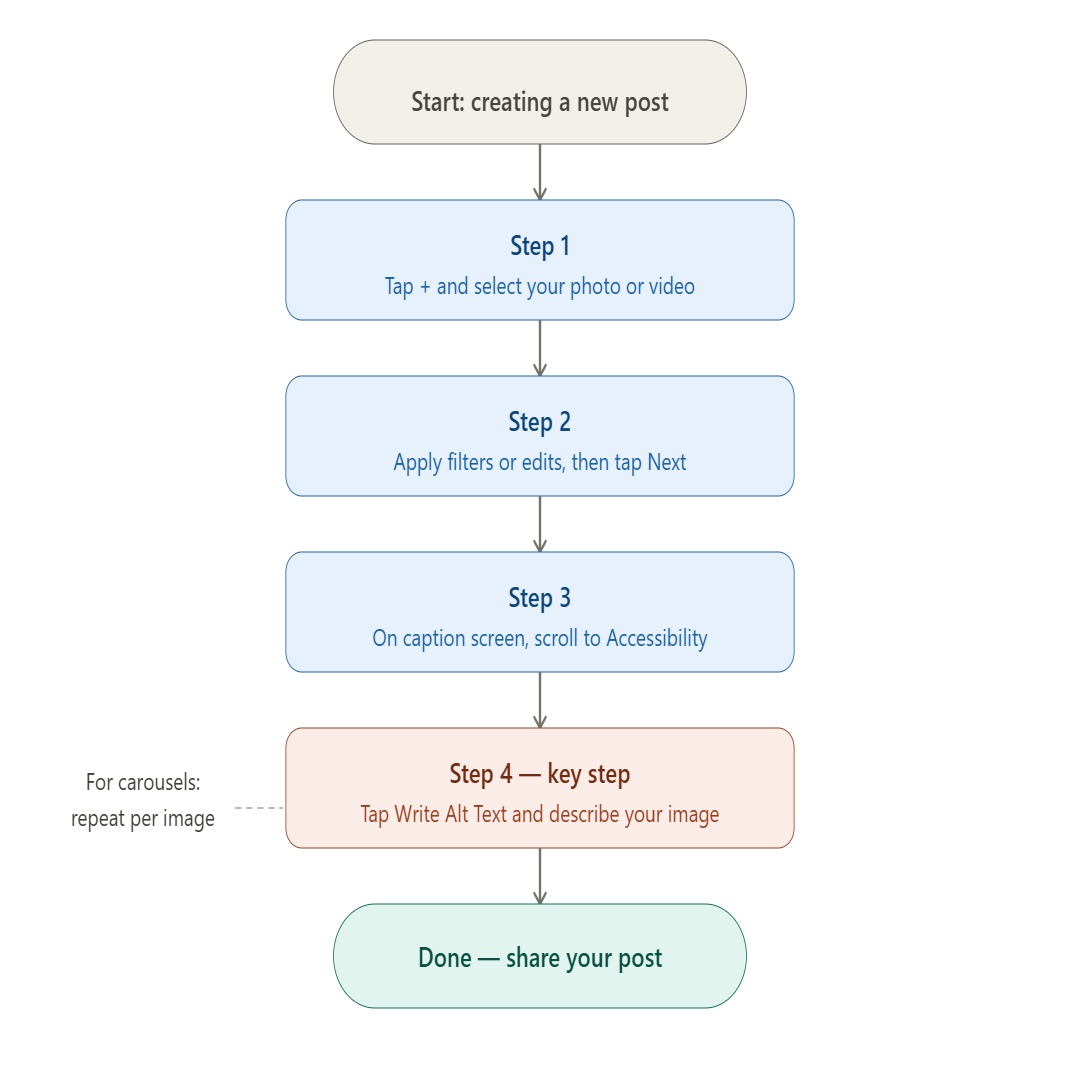
New post: tap + → select photo → Next → Accessibility → Write Alt Text → describe your image → Done → share.
Existing post: open post → tap … → Edit → tap image → tap alt text icon (bottom-right) → write description → Done → save.
What Is Instagram Alt Text?
Instagram alt text is a short written description attached to a photo or video. It was designed so that screen readers — software used by visually impaired people — can read aloud what an image contains.
It sits invisibly behind your posts. Your followers can’t see it in the feed. But screen readers detect it, and Instagram’s algorithm uses it to understand your content.
The catch: if you don’t write it yourself, Instagram auto-generates alt text using its own AI.
The results are often painfully generic. A carefully composed flat-lay might get: “Image may contain: food, plate, indoor.” You can do much better — and it only takes 30 seconds.
Why Should You Add Alt Text To Your Instagram Posts?
1. Accessibility
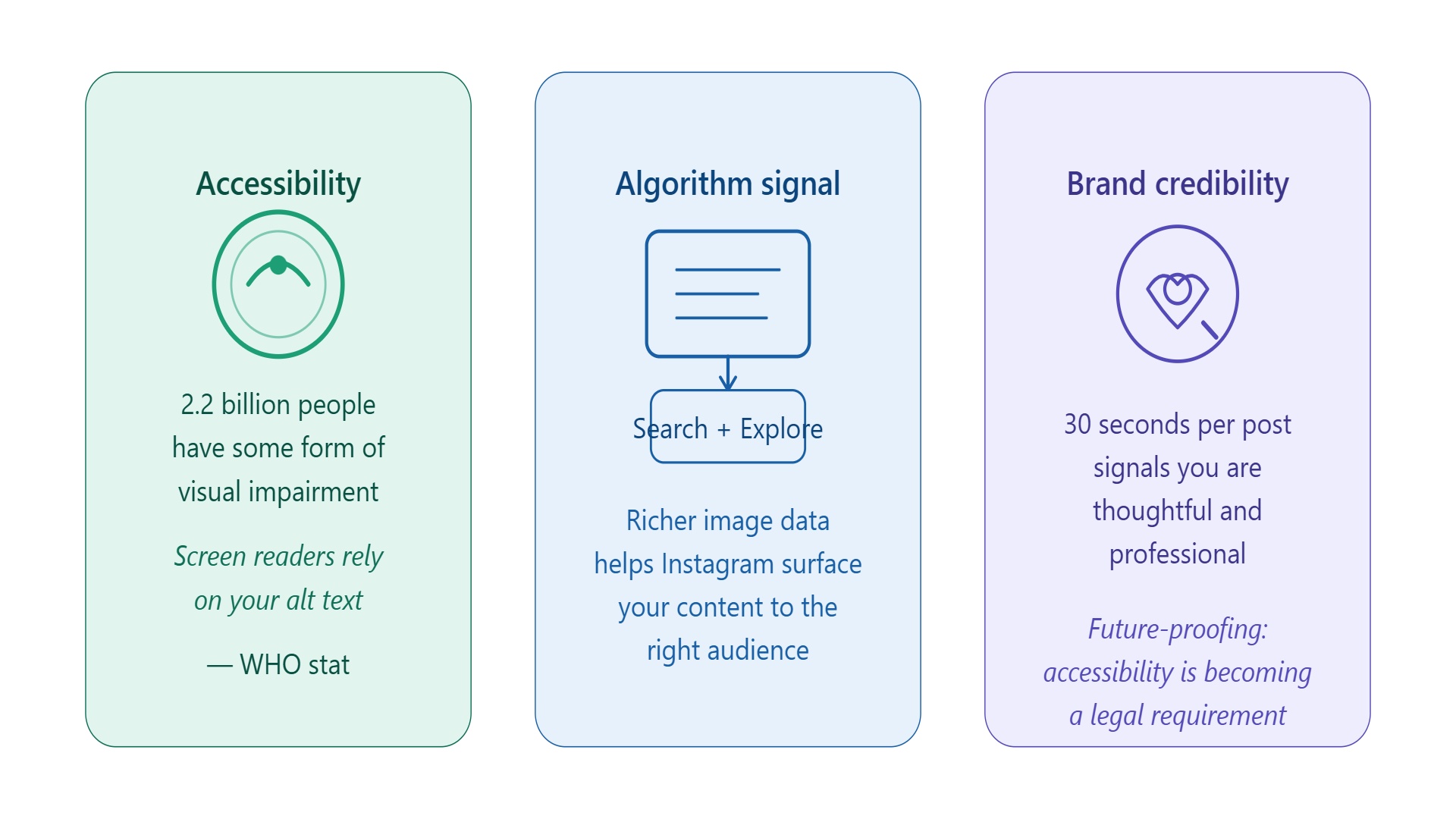
According to the World Health Organization, approximately 2.2 billion people globally live with some form of visual impairment.
Screen readers are how many of these users navigate social media. Descriptive alt text means your content lands for all of them — not just the people who can see your images.
Accessibility standards are also becoming legal requirements in more markets. Building the habit now puts you ahead of the curve.
2. SEO — Instagram Posts Now Appear In Google Search
Major update — July 2025:
Starting July 10, 2025, public posts from professional Instagram accounts are indexed by Google by default. Your captions, hashtags, and — critically — your alt text are now being read by Google’s crawlers. Descriptive, keyword-informed alt text directly affects how your posts appear in Google Search and Google Images.
This changes the SEO case for alt text considerably. Before this update, alt text mostly influenced Instagram’s own internal algorithm.
Now it feeds directly into Google’s understanding of your content — the same way image alt text works on any webpage.
Honest caveat:
Instagram hasn’t confirmed alt text as a direct ranking factor within the app itself. Think of it as valuable context for the algorithm rather than a guaranteed shortcut. But with Google now indexing posts, descriptive alt text has a clear, direct SEO benefit you’d be leaving on the table by skipping it.
3. Brand Credibility
Small things add up. An account that takes 30 seconds to write proper alt text signals that it’s thoughtful and professional. For businesses and creators trying to build trust, that impression compounds over time.
How To Add Alt Text To A New Instagram Post
Instagram has alt text built directly into the posting flow — most people just don’t know where to look. Pair this with the free Instagram tools every creator should use and your workflow becomes genuinely efficient.
1. Tap the + icon and select your photo or video as usual.
2. Apply any filters or edits, then tap Next.
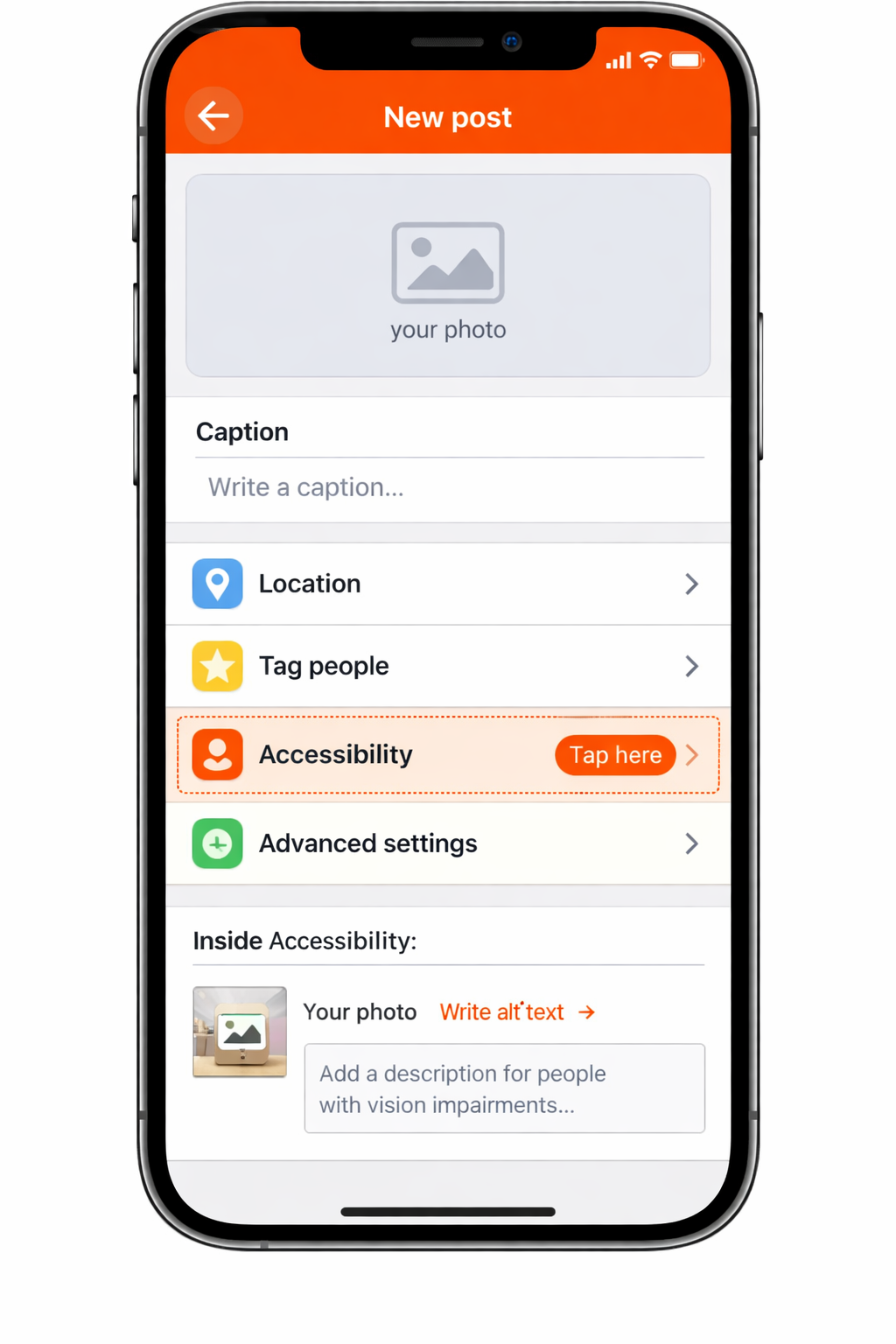
3. On the caption screen, scroll down past Location and other options until you see Accessibility. Tap it.
4. Tap Write Alt Text next to your image.
5. Type your description — more on writing good alt text below — and tap Done.
6. Finish your caption, add hashtags, and share as normal.
Pro tip — carousels:
For carousel posts with multiple images, write alt text for each image individually. Instagram shows them one at a time inside the Accessibility menu. Don’t skip any — each image is a separate indexable asset for both Instagram and Google.
How To Edit Alt Text On Existing Instagram Posts
Already have a library of posts with no alt text? You can add it retroactively without reposting — and it’s worth doing for your best-performing content.
1. Go to the published post and tap the three-dot menu (⋯) in the top-right corner.
2. Tap Edit.
3. Tap the image itself. You’ll see a small Edit Alt Text icon in the bottom-right corner of the image — tap it.
4. Write or update your description in the text field.
5. Tap Done, then tap the checkmark to save.
With Google now indexing professional Instagram content going back to January 2020, updating the alt text on your strongest archive posts is time well spent. Even covering your top 20 posts is a worthwhile half-hour.
Alt Text For Instagram Reels And Stories
Reels
Instagram doesn’t currently offer a native alt text field for Reels. The best workaround: use your Reel caption to describe key visual content, and enable on-screen captions for any spoken audio. Both feed the algorithm and Google’s indexer.
Stories
Stories similarly lack a dedicated alt text field. If you want to make a Story more accessible, use Instagram’s built-in text sticker to add a brief written description of what’s happening visually.
If you’ve run into Stories visibility issues in general, our troubleshooting guide on Instagram Stories not showing might be useful.
Keep an eye on this:
Instagram’s accessibility features are evolving quickly — particularly following the July 2026 Google indexing rollout. It’s reasonable to expect Reels and Stories to gain alt text support in the near future. Meta’s accessibility page is worth bookmarking.
How To Write Good Instagram Alt Text: Tips And Examples
Knowing where to click is half the job. Writing alt text that’s actually useful — and that does SEO work — takes a bit of thought.
Alt text is just one piece of a well-optimised profile; if you haven’t already, see our guide on building a high-converting Instagram profile for the bigger picture.
Be Specific And Descriptive
Describe what is literally in the image. Not what you want people to feel, not what you hope they infer — what’s actually there.
Think: describe this to someone on a phone call.
Keep It Concise
Aim for 100 to 125 characters. Instagram technically allows up to ~2,200 characters, but screen reader users are navigating quickly — get to the point. Very long alt text can also read as over-optimisation to Google’s crawlers.
Skip The Obvious Opener
Don’t start with “Photo of…” or “Image of…”. Screen readers already announce it’s an image before reading your alt text. Start with the actual description.
Include Text That Appears In The Image
If your image is a quote graphic, infographic, or contains any important on-screen text, include that text in your alt description. Otherwise it’s invisible to screen readers — and to Google.
Include Keywords Naturally — Don’t Stuff Them
If a keyword fits naturally in your description, use it. But don’t treat alt text as a keyword field. Keyword-stuffed alt text is a bad experience for screen reader users and Google flags it as a spam signal — the opposite of what you want now that posts are indexed.
Good Vs. Auto-generated — Examples
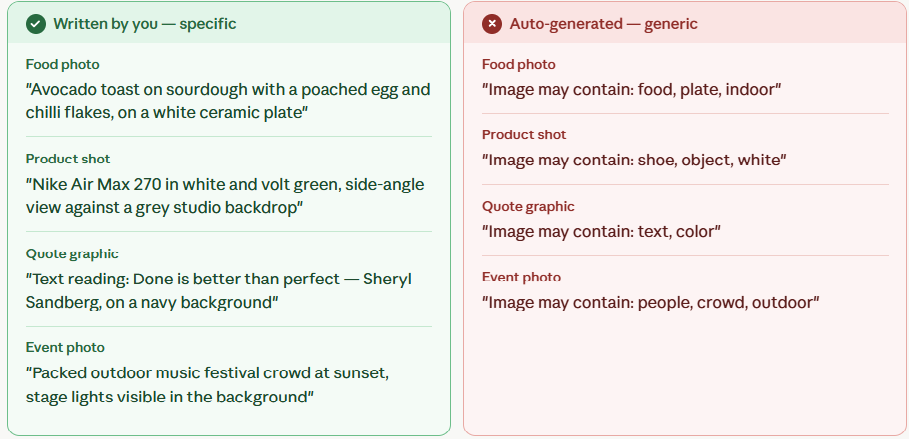
| Image type | ✓ Written by you — specific | ✗ Auto-generated — generic |
|---|---|---|
| Food photo | Avocado toast on sourdough with a poached egg and chili flakes, on a white ceramic plate | Image may contain: food, plate |
| Product shot | Nike Air Max 270 in white and volt green, side-angle view against a grey studio backdrop | Image may contain: shoe, object, white |
| Quote graphic | Text reading: Done is better than perfect — Sheryl Sandberg, navy background | Image may contain: text, color |
| Event photo | Packed outdoor festival crowd at sunset, stage lights visible in background | Image may contain: people, crowd, outdoor |
Frequently Asked Questions
What Is Alt Text On Instagram?
Alt text on Instagram is a short written description of an image or video, embedded behind the post.
It’s read aloud by screen readers for visually impaired users, and used by Instagram’s algorithm and Google’s search crawlers — since July 2026 — to understand what your content shows.
Does Instagram Alt Text Help With SEO?
Yes, more directly than before. Since July 2026, public posts from professional Instagram accounts are indexed by Google by default.
Descriptive, keyword-informed alt text strengthens how those posts appear in Google Search and Google Images.
Within the Instagram app, alt text also helps the algorithm surface content to relevant users — though in-app, behavioural signals like saves and watch time carry more weight.
How Do I Add Alt Text To An Existing Instagram Post?
Open the post, tap the three-dot menu (⋯), tap Edit, then tap the image itself. An Edit Alt Text icon appears in the bottom-right corner — tap it, write your description, tap Done, and save.
Can My Followers See My Instagram Alt Text?
No. Alt text is invisible in the feed. It’s only read by screen readers and search/algorithm crawlers. It doesn’t appear below your post or anywhere visible in the UI.
Is There A Character Limit For Instagram Alt Text?
Instagram technically permits up to ~2,200 characters. In practice, keep it between 100 and 125 characters — concise enough for screen reader users and clean enough to avoid over-optimisation flags from Google.
Does Instagram Automatically Generate Alt Text If I Skip It?
Yes. Instagram’s AI generates it automatically using object and scene detection.
The results are often generic — “image may contain: person, outdoor” — and miss the specific context you could provide. Now that Google is reading it too, writing your own is more important than ever.
Can I Add Alt Text Using Third-party Scheduling Tools?
Yes — Buffer, Later, and Hootsuite all support Instagram alt text when scheduling posts.
Check whichever tool you use and make alt text a standard item in your scheduling checklist. For a full rundown of tools worth using, see our guide to the top free Instagram tools every creator should use.
Final thoughts
Adding alt text to Instagram posts takes 30 seconds. The cost is negligible. The benefits — accessibility for millions of visually impaired users, better in-app discoverability, and now a direct SEO benefit via Google indexing — are real and growing.
The best time to start was your first post. The second-best time is your next one.
Want to take your Instagram presence further? Our guide on how to use Instagram Stories to grow your brand is a good next read — and if you’re curious about how much of your content Google is actually picking up, start with is your Instagram content being indexed by search engines?.

Founder, Newszii.com | CEO, NICHE Digital Media
Praveen Panjiar brings nearly two decades of experience in digital media, web & mobile asset development, and growth strategies.
He built Newszii from the ground up into a global platform spanning tech, business, finance, and lifestyle, and has since developed a strong track record of building, scaling, and optimizing digital properties with a sharp focus on user growth, content strategy, and emerging technology trends.