October 17th, 2023 | Updated on November 4th, 2025
Google’s relentless pursuit of innovation in the realm of photography has taken another leap with the introduction of Magic Editor, unveiled during Google I/O 2023.
This feature, exclusive to the Google Photos app on the Pixel 8 and Pixel 8 Pro, is a marvel of artificial intelligence, pushing the boundaries of what we can achieve with image editing.
Magic Editor doesn’t just enhance your photos; it transforms them into something entirely unreal, yet surprisingly easy to accomplish.
Magic Editor is a generative AI-powered gem residing within Google Photos on the Pixel 8 series.
Leveraging the immense capabilities of AI, it assists in framing subjects and even conjures new content to seamlessly fill gaps when resizing or repositioning subjects within an image.
Additionally, it offers intelligent suggestions to optimize lighting and background, making every photo a work of art.
Let’s delve into the enchanting world of Magic Editor and explore how it can redefine your photography experience.
Read More: 15 Best Camera Apps For Android: Boost Your Photography
The Role Of Magic Editor In Google Photos
Google Photos stands as a prominent Android-based photo gallery and editing application, initially rising to prominence by offering free and unlimited high-quality photo backups to users’ Google accounts.
While the limitless free storage has been reined in, the app’s popularity endures, buoyed by a continuous stream of feature enhancements.
Among these enhancements, Magic Editor stands out as a notable addition by Google, designed to elevate the utility of Google Photos.
This novel feature harnesses generative AI and various AI techniques, eliminating the need for users to possess professional-level photo editing skills.
It empowers users to execute advanced photo edits with remarkable ease.
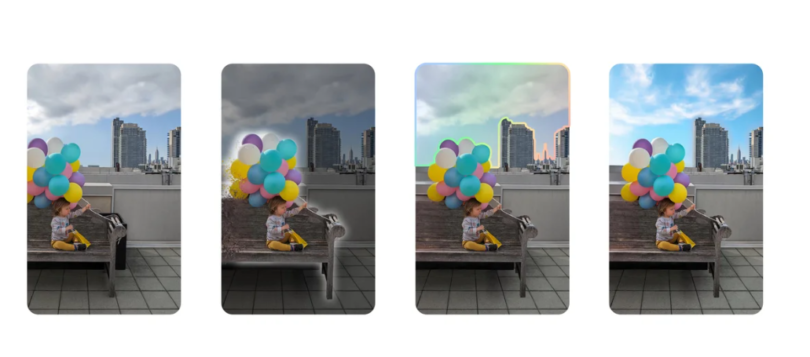
Magic Editor’s capabilities encompass a spectrum of functions, including the alteration of sky color and patterns, stylization of images, object and person relocation, element resizing, and content removal.
Impressively versatile, the tool yields edits that often exhibit a high degree of realism.
Google conscientiously appends metadata to images edited using Magic Editor, ensuring transparency in discerning edited content from original material.
However, it is pertinent to note that metadata can be easily removed, potentially leading to the creation of misleadingly authentic-looking edited images.
It is important to acknowledge that the performance of Magic Editor is not infallible, as it occasionally produces inaccurate results.
Google candidly acknowledges that this feature is still in its nascent stages of development and may not consistently deliver precise outcomes.
The company is actively receptive to user feedback, utilizing it to refine and enhance Magic Editor in subsequent iterations.
Utilizing Magic Editor Within Google Photos
To access Magic Editor in the Google Photos app, follow these steps:
- Open the Google Photos app and select the image you want to edit.
- Choose the “Edit” option.
- Look for the Magic Editor button located in the upper left corner, just above the “Cancel” option.
- Select Magic Editor and review the provided prompt explaining the feature.
- Tap “Try now” to accept Google’s GenAI terms and initiate Magic Editor.
- Once in Magic Editor, you’ll have a variety of editing options at your disposal, allowing you to make adjustments to your images. You can also generate additional edits if the initial results do not meet your preferences.
Read More: Top Phones For Faster And Improved Gameplay
Altering Background And Image Style Using Magic Editor:
A fundamental strength of Magic Editor lies in its ability to comprehensively transform the appearance of your image, encompassing both the background and the image style.
This remarkable feature offers three distinct options for altering the background and style of your photos: “Sky,” “Golden Hour,” and “Stylized.”
However, it’s important to note that the first two options, “Sky” and “Golden Hour,” are exclusively applicable to outdoor images, as they are designed to manipulate elements related to the sky and sunlight.
When editing indoor shots, you will only encounter the “Sky” and “Golden Hour” options within Magic Editor.
For non-outdoor images, the “Stylized” option becomes the sole editing choice.
Here’s a breakdown of what each of these Magic Editor options can achieve:
- Sky Option: This feature allows you to add or remove clouds and other sky-related elements in your image. It provides you with a range of choices for the type of sky you wish to integrate into your photo.
- Golden Hour Option: Designed to transform a gray or lackluster sky into the enchanting hues of a golden-hour sunset, this option lends a warm and dramatic ambiance to your outdoor images.
- Stylize Option: The Stylize option, as the name suggests, alters the style of your photo by applying various artistic effects and enhancements, allowing you to infuse a unique visual flair into your images.
These options within Magic Editor empower users to exercise a high degree of creative control over their images, enabling them to achieve a desired look and feel, whether through dramatic sky transformations or artistic stylization.
Resizing, Repositioning, And Object Removal: Utilizing Magic Editor’s Advanced Functions:
An Intriguing Aspect of Magic Editor: Object Repositioning, Resizing, and Removal
Magic Editor offers a remarkable feature set that allows users to seamlessly reposition objects, including human subjects, within their images, ensuring they find the perfect spot within the frame.
Moreover, users can resize elements or even completely eliminate multiple objects from their photos to enhance the overall composition.
What sets Magic Editor apart is its utilization of generative AI to intelligently replace and fill the visual information in areas where objects have been relocated, resized, or removed.
To initiate the process of resizing or repositioning an object, you can employ tapping, circling, or brushing to select the specific elements you wish to modify.
Once the object is selected, it can be effortlessly moved across the frame, granting you full control over its positioning.
You can also use pinch and expand gestures to adjust the size of the object according to your preferences.
Magic Editor offers an erasure feature, which excels in seamlessly repairing the background, providing a more effective solution compared to Google’s Magic Eraser tool.
A helpful tip is to zoom into the image for a finer and more precise selection of the object or element you intend to relocate, erase, or resize.
This level of control empowers users to craft images that align perfectly with their creative vision.
Read More: Android 14 Features: A Comprehensive Overview
Availability Of Google Photos’ Magic Editor On Non-Pixel Phones
Google has made an exciting revelation, declaring that the Magic Editor feature in Google Photos is set to make its debut on the Pixel 8 series, along with a slew of other AI-driven photography enhancements, commencing on October 12, 2023.
To embark on your magical editing journey, ensure you have a recent iteration of the Google Photos app, specifically version 6.54 or 6.55, installed on your Pixel 8 or 8 Pro.
For those on the Pixel 7 series or older Pixel models, the mystical allure of Magic Editor remains out of reach for now.
However, there’s a tantalizing glimmer of hope in the air, as Google has hinted at the possibility of a wider rollout in the future.
Stay tuned for the enchanting possibilities that might unfold beyond the Pixel 8 series.
As we gaze into the future of Google’s Magic Editor, speculation abounds.
It’s quite plausible that Magic Editor could be primarily confined to Pixel phones equipped with Tensor SoCs.
This implies that the Pixel 6 series and even the Pixel 7 series, including the A series, may very well find themselves under the enchantment of Magic Editor at some point in the future.
A lingering question on our minds pertains to the inclusion of Magic Editor in the arsenal of perks for paid Google One subscribers.
Given that the image processing capabilities of Magic Editor are likely orchestrated through cloud resources, this possibility remains tantalizing.
Rest assured, we’ll keep our eyes peeled for any official announcements from Google.
When the wizardry behind Magic Editor’s availability is unveiled, you can count on us to provide the latest updates.
Stay tuned for more enchanting developments on this captivating feature.
Feature Image: blog.google