
Published on November 28th, 2026
Quick answer: AI tools for recruiting are software that automate or assist specific hiring tasks: sourcing candidates, screening applications, scheduling interviews, taking interview notes and spotting fake applicants. The smartest way to choose them is by task, not by brand. Keep a human making the final hiring decision, and check local rules such as NYC Local Law 144, Illinois HB 3773 and the EU AI Act, whose recruiting rules apply from December 2, 2027.
Ask any recruiter what changed most in the last two years and you will probably hear one word: volume. Recruiters now handle nearly three times as many applications per role as they did in 2021, according to Greenhouse. A lot of those applications were written, polished or mass-submitted with AI. So recruiters reached for AI too, and now both sides of the hiring table are running software at each other.
That is the real backdrop for this guide. The question is no longer whether to use AI in recruiting. It is which tool to use for which job, what it actually costs, and where it can get you into legal trouble.
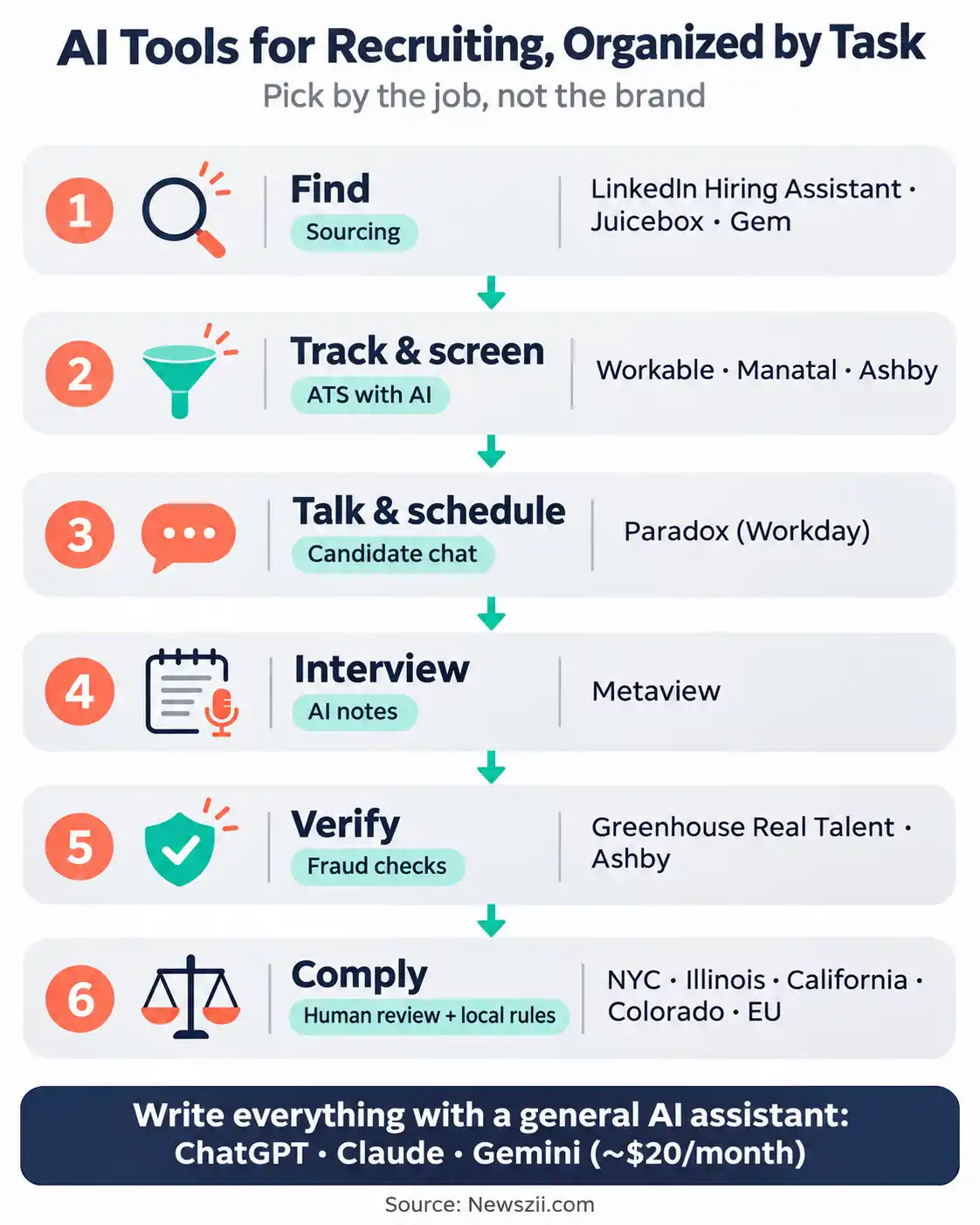
So this guide follows the way a recruiting week actually runs. First you find people. Then you screen them, talk to them, interview them, check that they are real, and stay on the right side of the law. Each section covers the tools that do that one job well, with published prices and the trade-offs vendors tend to leave out of their demos.
One note before we start. Prices and features in this space move fast, sometimes monthly. Every figure here was checked against vendor pricing pages in November 2026, but confirm on the vendor's own site before you sign anything.
Quick picks: the best AI tools for recruiting by task
If you only have two minutes, this table is the guide. Each row is one recruiting job, the tool I would look at first, and who it suits best.
| Recruiting task | Tool to look at first | Starting price (published) | Best for |
|---|---|---|---|
| Sourcing on LinkedIn | LinkedIn Recruiter + Hiring Assistant | Quote only (add-on) | Teams that already live in LinkedIn Recruiter |
| Sourcing across the open web | Juicebox (PeopleGPT) | $99/seat/month, billed annually | Lean teams and agencies hiring specialized roles |
| Sourcing + CRM for startups | Gem | About $130/month (1-10 employees, yearly); free for six months under 30 employees | Early-stage startups building a talent pipeline |
| ATS with AI agents | Workable | $299/month (1-20 employees) | Small and mid-size companies wanting one system |
| Budget ATS | Manatal | $15/user/month, billed annually | Small agencies and tight budgets |
| All-in-one ATS + analytics | Ashby | $400/month (up to 100 employees) | Data-minded startups and scale-ups |
| Candidate chat and scheduling | Paradox (Workday) | Quote only | Frontline and high-volume hiring |
| Interview notes | Metaview Notetaker | Free (25 calls/month); Pro $60/user/month | Any team running lots of interviews |
| Fake candidate detection | Greenhouse Real Talent | Quote only | Remote-heavy hiring, tech and finance roles |
| Writing JDs, outreach, questions | ChatGPT Plus, Claude Pro, Google AI Pro | About $20/month each | Everyone, as a daily writing partner |
Notice that no single tool covers every row. That is normal. Most teams end up with a core system (an ATS) plus one or two specialist tools, and a general AI assistant for writing.
AI tools for sourcing candidates
Sourcing is where AI has changed recruiting the most, and fastest. The old way meant writing long Boolean strings, scrolling through hundreds of profiles, and sending InMails that mostly went unanswered. The new way is closer to briefing a research assistant: you describe the person you want, and the tool goes looking.
Three tools stand out, and they suit very different teams.
LinkedIn Recruiter + Hiring Assistant
If your team already pays for LinkedIn Recruiter, start here. Hiring Assistant is LinkedIn's AI agent for recruiters, and it has been generally available since September 2025 as an add-on to Recruiter. The current version, Hiring Assistant 2, is rolling out now with more features planned.
In practice, it works like this. You hand it a job description or your intake notes from the hiring manager. It turns those into a search strategy, runs the searches, builds a shortlist, and helps draft personalized outreach. It can also pre-screen candidates who reply, and it learns from which candidates you accept or reject.
LinkedIn reports some strong numbers from its July 2026 data:
Recruiters find qualified matches while reviewing 83% fewer profiles.
Recruiters are 4x more likely to contact candidates sourced by Hiring Assistant.
Recruiters find interview-quality applicants 33% faster.
Treat those as vendor-reported figures, not independent research. Still, the direction matches what most recruiters say: the biggest win is not finding more people, it is wasting less time on the wrong ones.
It is available in English, French, German, Dutch, Spanish, Portuguese and Italian, though availability for Hiring Assistant 2 varies by feature.
The catch: LinkedIn does not publish a price. You buy it through a sales rep as an add-on to Recruiter, which already sits at the premium end of the market. It also works best inside LinkedIn's own network, so if your ideal candidates are not active there, its edge shrinks.
Juicebox (PeopleGPT)
Juicebox is the tool I would point a small, scrappy team toward. Its search engine, PeopleGPT, lets you describe a candidate in plain English instead of building Boolean strings. Something like "backend engineers in Bangalore who have worked at a fintech and know Go" is a perfectly good search.
Pricing is published, which is refreshingly rare in this market. Plans start at $99 per seat per month billed annually ($119 monthly), with a Growth plan around $179 to $199 and a custom Business plan on annual billing only. Its autonomous AI agents cost $199 per agent per month, on top of the seat price.
The catch: those agent fees add up quickly. A team of five recruiters, each with an agent, is suddenly paying for ten line items. Contact data quality can also vary by region, so test it on your real hiring markets during a trial.
Gem
Gem is built for teams that want sourcing, a candidate CRM, scheduling and analytics in one place. It can sit on top of your existing ATS or replace it with its All-in-One plan.
For most companies, pricing is custom and based on headcount. Startups get a better deal. Gem's Startup Program lists about $130 per month for companies with 1 to 10 employees on yearly billing. Even better, companies with fewer than 30 employees get Gem All-in-One free for six months, then 50% off when they move to a paid plan.
The catch: once you grow past the startup program, you are in a sales conversation with custom pricing. Gem's real strength is pipeline building over months, so it pays off most for companies that hire steadily, not once a year.
Which sourcing tool should you pick?
You live in LinkedIn Recruiter already: add Hiring Assistant and measure it for a quarter.
You are a small team or agency on a budget: trial Juicebox on two or three live roles.
You are an early-stage startup: apply for Gem's startup program while it is free.
AI tools for screening and applicant tracking
Your applicant tracking system (ATS) is the backbone of your hiring. It is where every application lands, where candidates move through stages, and where your hiring managers leave feedback. In 2026, almost every ATS added AI, but they add it in very different ways. Some bundle it in. Some charge for it by the credit. That difference matters more than any feature list.
Workable
Workable is a solid all-rounder for small and mid-size companies. Pricing scales with company headcount, not recruiter seats. For a company of 1 to 20 employees, plans run $299 a month for Standard, $599 for Premier and $719 for Enterprise.
Its AI sits in a set of agents. A Job Brief Agent comes with every plan. The Sourcing, Screening and Engagement Agents run on AI credits, and each plan includes 3,000 complimentary credits. After that, you buy packs: 5,000 credits for $600, 10,000 for $1,000, or 50,000 for $4,750.
Here is how the credits get spent, so you can estimate your own bill. Screening one candidate against your ideal profile costs 1 credit. Adding one passive candidate to your pipeline costs 2. A chat session where a candidate answers at least one question costs 10.
The catch: the free trial does not include the Workable Agent, so you cannot fully test the AI before paying. Also, credits expire one year after purchase and are non-refundable, so do not buy the big pack on day one.
Manatal
Manatal is the budget pick, and a good one. It charges per user, and its prices are some of the lowest in the market:
| Plan | Billed yearly | Billed monthly | What you get |
|---|---|---|---|
| Professional | $15/user/month | $19/user/month | Up to 15 jobs |
| Enterprise | $35/user/month | $39/user/month | Unlimited jobs |
| Enterprise Plus | $55/user/month | $59/user/month | Adds ChatGPT, Claude and LLM integration, plus the open API |
For a two-person agency or a small in-house team, Manatal can cost less per month than one dinner out.
The catch: the Professional plan caps you at 15 jobs, and the AI model integrations and API sit only on the top tier. Manatal mainly works with candidates who are already in your pipeline. It is not a sourcing database, so you may still need a sourcing tool alongside it.
Ashby
Ashby is popular with startups that care about data. It combines ATS, CRM, sourcing, scheduling and analytics, and its reporting is a big reason teams switch to it.
The published price is $400 a month for its All-In-One Foundations plan, for companies with up to 100 employees, with a 10% discount for annual commitments. Plus (101 to 1,000 employees) and Enterprise (1,000+) are quote-only. Foundations includes 1,500 AI credits per month.
The catch: some useful AI features cost extra. AI Notetaker and AI Interviewer are paid add-ons on every plan, and single sign-on costs $100 a month on Foundations. Budget for those up front rather than discovering them at renewal.
How to choose an AI-powered ATS
Ask every vendor three questions before you sign:
How is AI billed? Included, per credit, or as a separate add-on?
Can a human see why the AI ranked a candidate? If the answer is vague, that is a compliance problem waiting to happen.
Does pricing follow headcount or seats? Headcount pricing can jump when your company grows, even if your recruiting team does not.
AI for candidate chat and interview scheduling
If you hire warehouse staff, retail associates, drivers or restaurant crews, your problem is not finding candidates. It is keeping up with them. Hundreds of people apply, many from their phones, and the ones who do not hear back within a day often take another offer. This is where conversational AI earns its keep.
Paradox (now part of Workday)
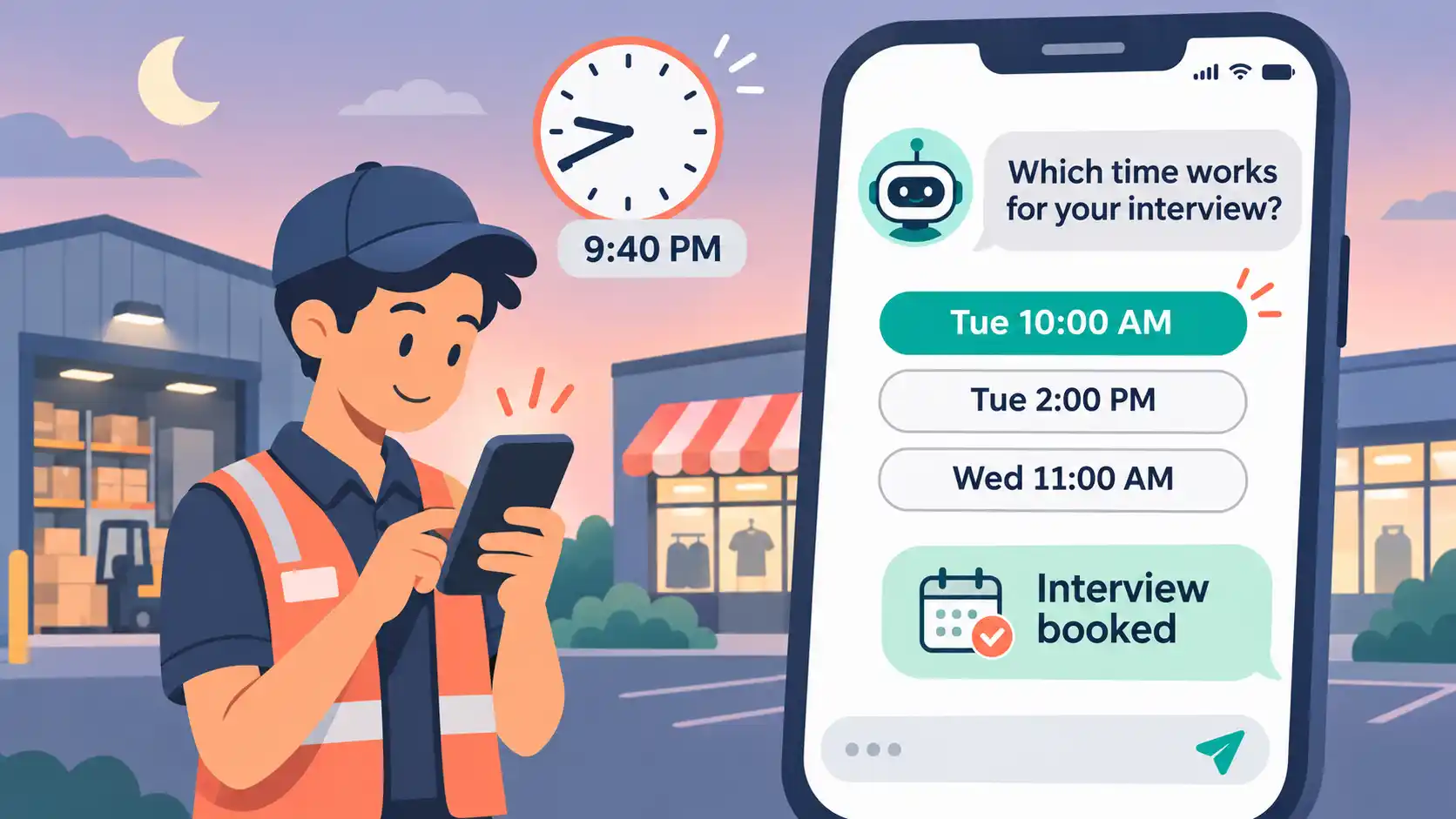
Paradox is the best-known name here. Workday completed its acquisition of Paradox on October 1, 2025, and folded it into Workday's own recruiting suite. Its AI assistant, Olivia, chats with candidates by text or web chat. It answers their questions, screens them with a few basic questions, and lets them book their own interview slot, at any hour.
Paradox says its platform has powered more than 189 million AI-assisted candidate conversations, with time-to-hire as low as three and a half days for some roles. Those are vendor claims, and "as low as" is doing a lot of work in that sentence. But anyone who has hired at volume knows why the idea appeals: the bottleneck is usually scheduling, not judgment.
Who it suits: large employers with frontline or hourly roles, especially those already on Workday.
The catch: it is quote-only enterprise software. If you are a 20-person company hiring a few people a month, it is far more than you need.
Smaller teams: use the scheduling you already have
You may not need a dedicated chat tool at all. Most modern ATS platforms now include self-scheduling, and some include text messaging. Workable, Gem and Ashby all cover scheduling inside their platforms. Before you buy a separate tool, check whether the one you already pay for does 80% of the job.
A word on AI interviews
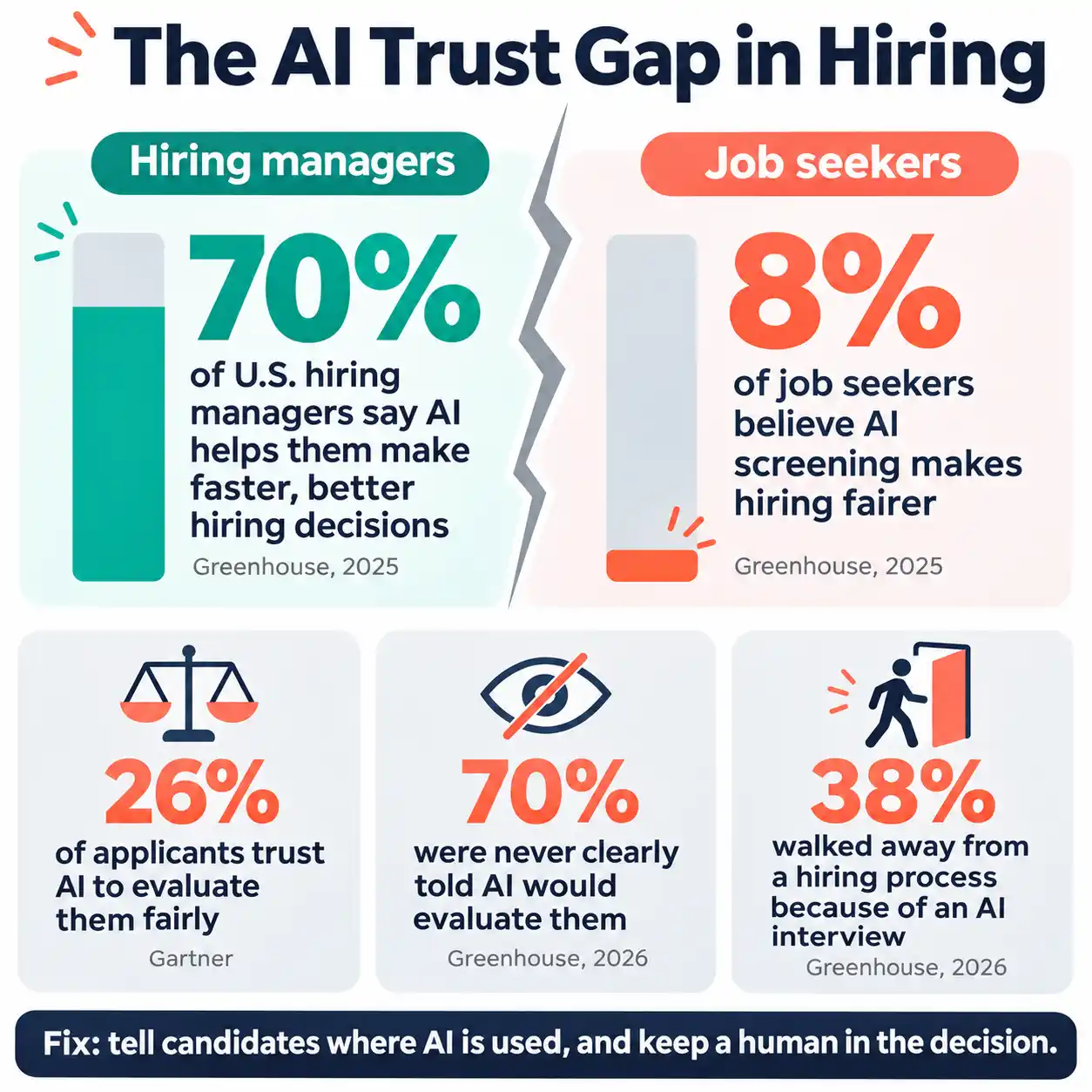
Some tools now go further and run the first interview themselves, as a chatbot or a voice agent. Be careful here. Greenhouse's 2026 Candidate AI Interview Report, which surveyed 2,950 job seekers, found that 63% have now been interviewed by an AI. But 38% have walked away from a hiring process because it included an AI interview.
The biggest complaint was not the AI itself. It was secrecy. In the same report, 70% of candidates said they were never clearly told upfront that AI would evaluate them, and 21% found out only once the interview had started. If you use AI interviews, say so early, explain what it scores, and offer a human alternative.
AI interview notetakers
This is the most underrated category on the list. Interview notes are where hiring decisions are actually made, and they are usually terrible. Half-finished bullet points, "good culture fit" with no evidence, and a hiring manager trying to remember a conversation from four days ago.
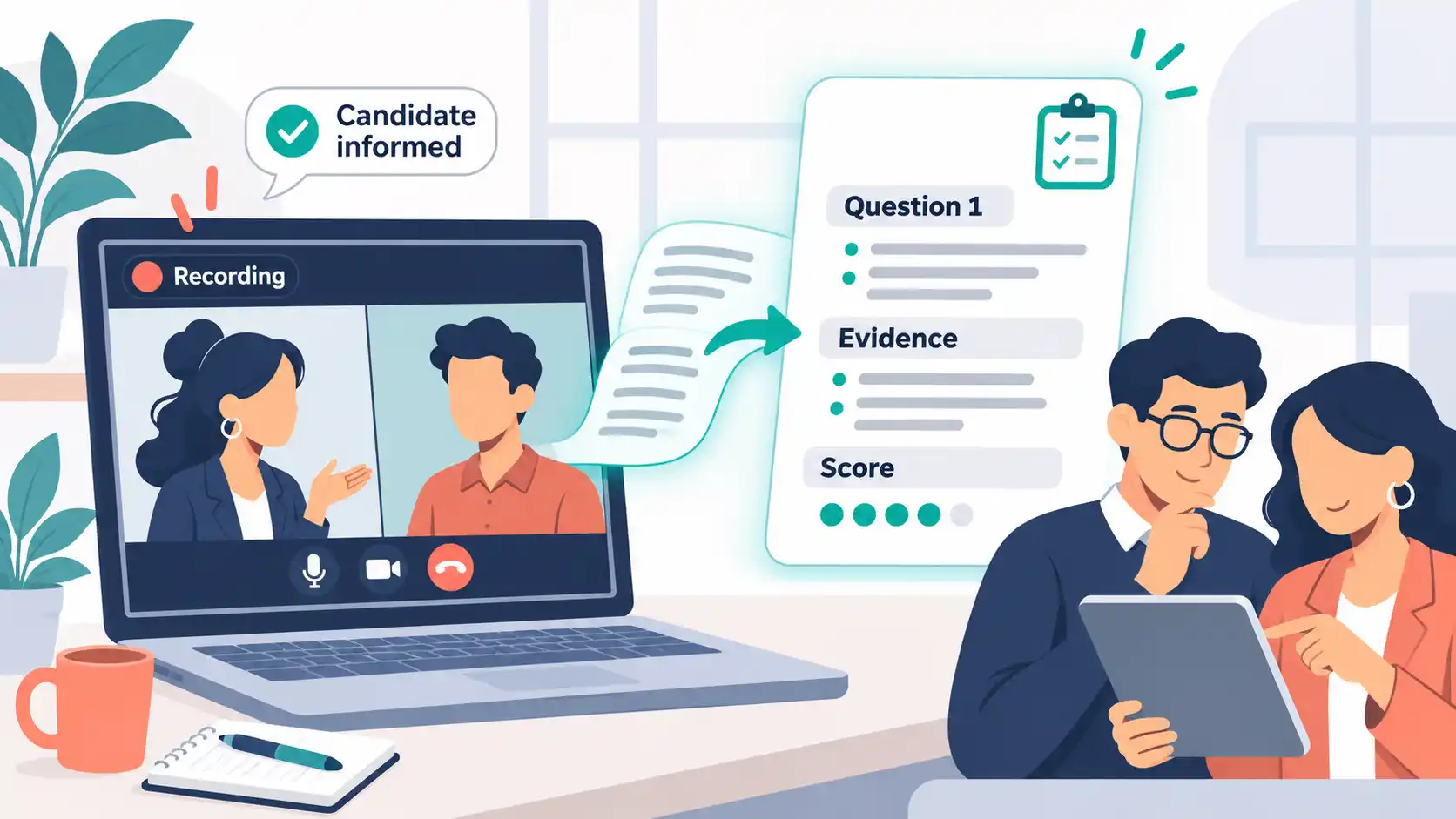
An AI notetaker joins the call, records and transcribes it, and produces structured notes organized around your interview questions. The interviewer gets to focus on the candidate instead of typing. The hiring team gets a record they can actually compare.
Metaview
Metaview is built specifically for recruiting conversations, which is why it beats general meeting notetakers for this job. It understands intake calls, phone screens and structured interviews, and it syncs notes into your ATS.
The pricing is friendly for testing:
Free: 25 calls per month with basic transcription.
Pro: $60 per user per month, with unlimited calls and priority processing.
Enterprise: custom pricing.
Metaview also sells AI Sourcing as a separate product. Its Pro tier is $60 per user per month as an introductory price for the first 12 months, for new customers only, then $100. Unlimited sourcing on Max is $300 per user per month.
The catch: recording interviews has legal and consent rules that vary by country and state. Always tell candidates the call is being recorded and why, and give them a way to say no. Check your local recording-consent laws before you switch it on.
Why notes matter for fairness, too
There is a quieter benefit here. Structured, written notes make it easier to show that every candidate was judged on the same criteria. If a hiring decision is ever challenged, a clean record of what was asked and answered is far more useful than one interviewer's memory. Good notes are a compliance asset, not just a time-saver.
AI for spotting fake candidates
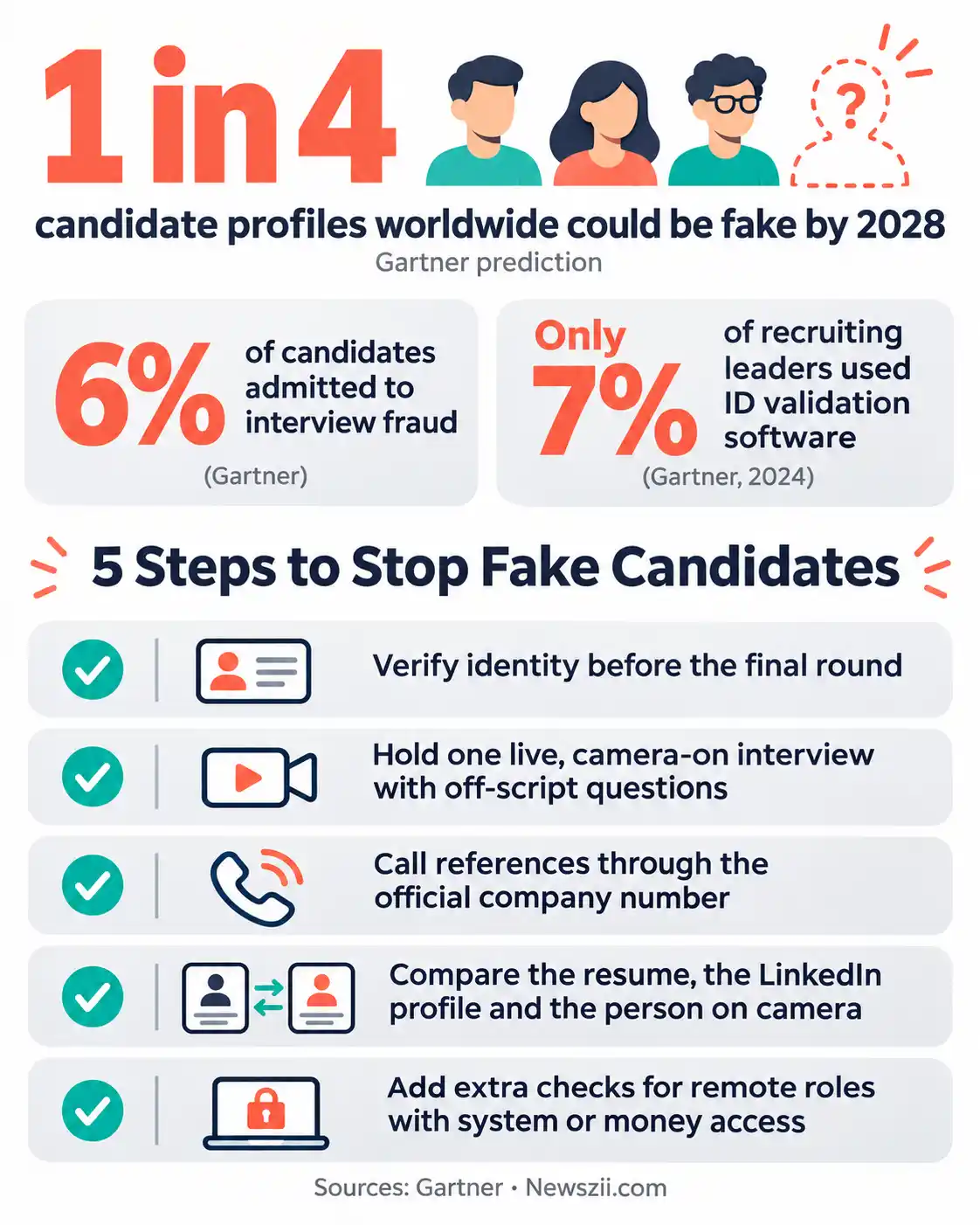
Two years ago, this section would not have existed. Today it might be the most important one. Gartner predicts that by 2028, one in four candidate profiles worldwide will be fake. In a Gartner survey of 3,000 job candidates, 6% admitted to interview fraud, either posing as someone else or having someone else pose as them.
The fraud comes in a few common forms:
Fabricated profiles: AI-generated resumes, photos and work histories for people who do not exist.
Proxy interviews: a skilled stand-in does the video interview, and someone else shows up for the job.
Live AI coaching: a candidate reads answers generated in real time during the interview.
Hidden prompts: instructions buried in a resume to trick AI screeners into ranking it higher.
That last one is not hypothetical. Greenhouse's 2025 AI in Hiring Report found that 65% of U.S. hiring managers have caught applicants using AI deceptively, including reading from AI-generated scripts and hiding prompts in resumes.
Tools that help
Greenhouse now sells Real Talent, its candidate fraud detection tool. Ashby includes candidate fraud detection that runs on its AI credits. Other ATS platforms are adding similar checks, so ask your current vendor before you buy anything new.
The gap is still wide. According to a Gartner 2024 survey, only 7% of recruiting leaders were using identity document validation software.
A practical fraud checklist
You do not need expensive software to cut most fraud. These steps catch a lot:
Verify identity before the final round, not after the offer.
Hold at least one live interview with cameras on, and ask follow-up questions that go off-script.
Check references by calling the company directly, not the number the candidate gives you.
Watch for mismatches between the resume, the LinkedIn profile and the person on camera.
Be extra careful with fully remote roles that grant access to systems, money or customer data.
Fraud checks protect more than your hiring budget. A fake hire with system access is a security problem, not just a bad hire.
What AI recruiting tools cost
AI recruiting software is priced in four different ways, and comparing them is harder than it should be:
Per user (seat): Manatal, Juicebox and Metaview charge for each recruiter.
Per company headcount: Workable and Ashby charge based on how many employees your company has.
Per AI credit or agent: Workable's agents, Ashby's AI features and Juicebox's agents add usage costs on top.
Quote only: LinkedIn Hiring Assistant, Paradox and enterprise tiers everywhere.
The headline price is rarely the real price. Always ask what the AI features cost once the free credits run out.
Don't forget the general AI assistants
A lot of daily recruiting work is writing: job descriptions, outreach messages, interview questions, rejection emails, offer letters. A general AI assistant handles all of it well, and it is the cheapest tool on this list.
| Assistant | Price | Good at |
|---|---|---|
| ChatGPT Plus | $20/month | All-round drafting and research |
| Claude Pro | $20/month | Long documents, careful writing, reviewing JDs for biased language |
| Google AI Pro | $19.99/month | Teams working in Gmail and Google Docs |
| ChatGPT Go | $8/month | Light, occasional use |
| Google AI Plus | $4.99/month | Basic help inside Google apps |
One rule: do not paste candidate resumes or personal data into a consumer AI account unless your company's data policy allows it. Use a business plan with proper data controls for anything involving candidate information.
Three sample budget stacks
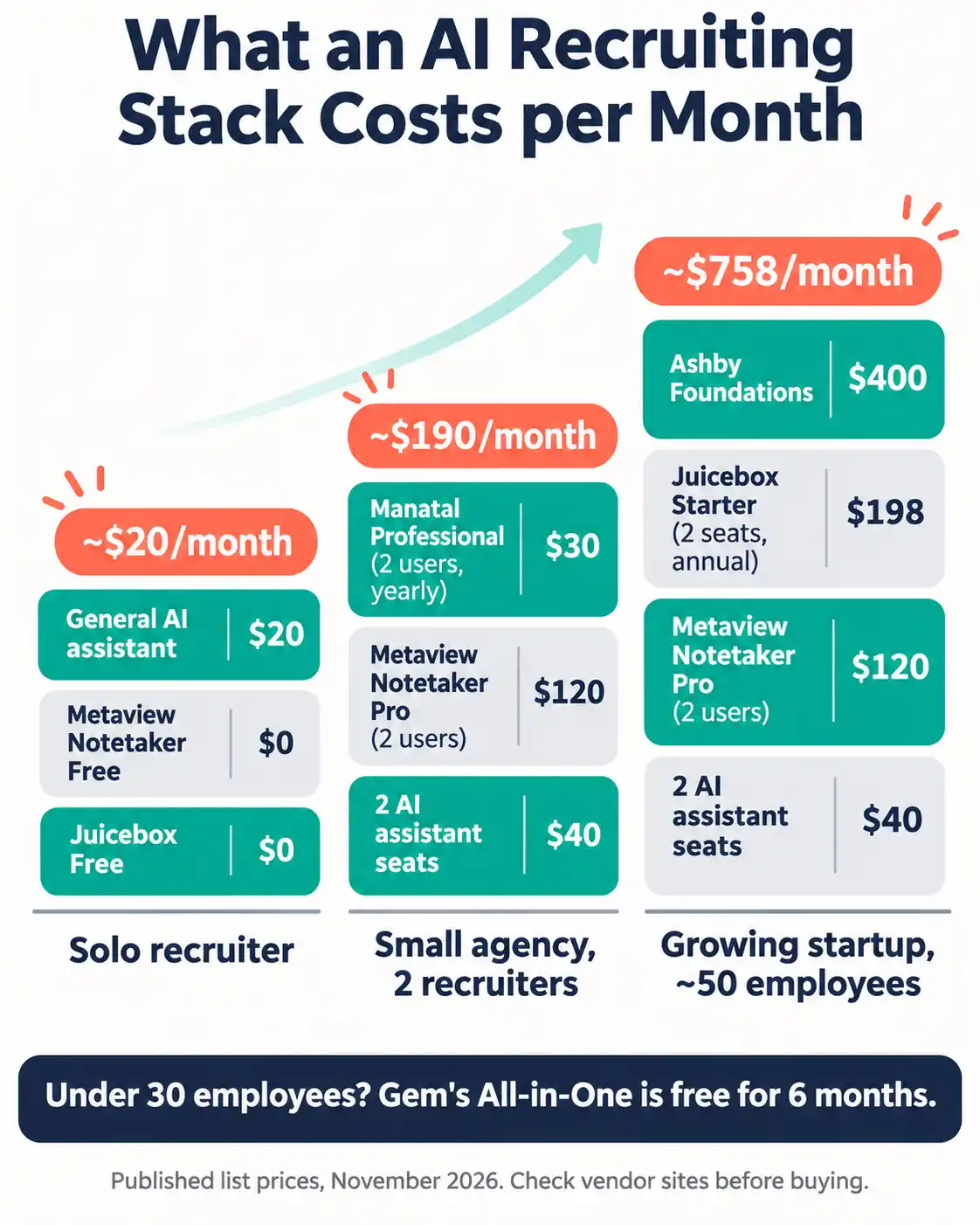
Here is what a realistic setup might cost per month, using the published prices above.
1. The solo recruiter or very small team (about $20/month)
One general AI assistant: $20
Metaview Notetaker Free: $0 (25 calls a month)
Juicebox Free plan for occasional searches: $0
2. The small agency, two recruiters (about $190/month)
Manatal Professional, 2 users billed yearly: $30
Metaview Notetaker Pro, 2 users: $120
Two general AI assistant seats: $40
3. The growing startup, around 50 employees, two recruiters (about $758/month)
Ashby Foundations: $400
Juicebox Starter, 2 seats billed annually: $198
Metaview Notetaker Pro, 2 users: $120
Two general AI assistant seats: $40
If that startup has fewer than 30 employees, Gem's free six months could replace much of the ATS and sourcing spend for half a year. That is worth checking before you commit to anything else.
Rules to know before you use AI in hiring (2026-2027)
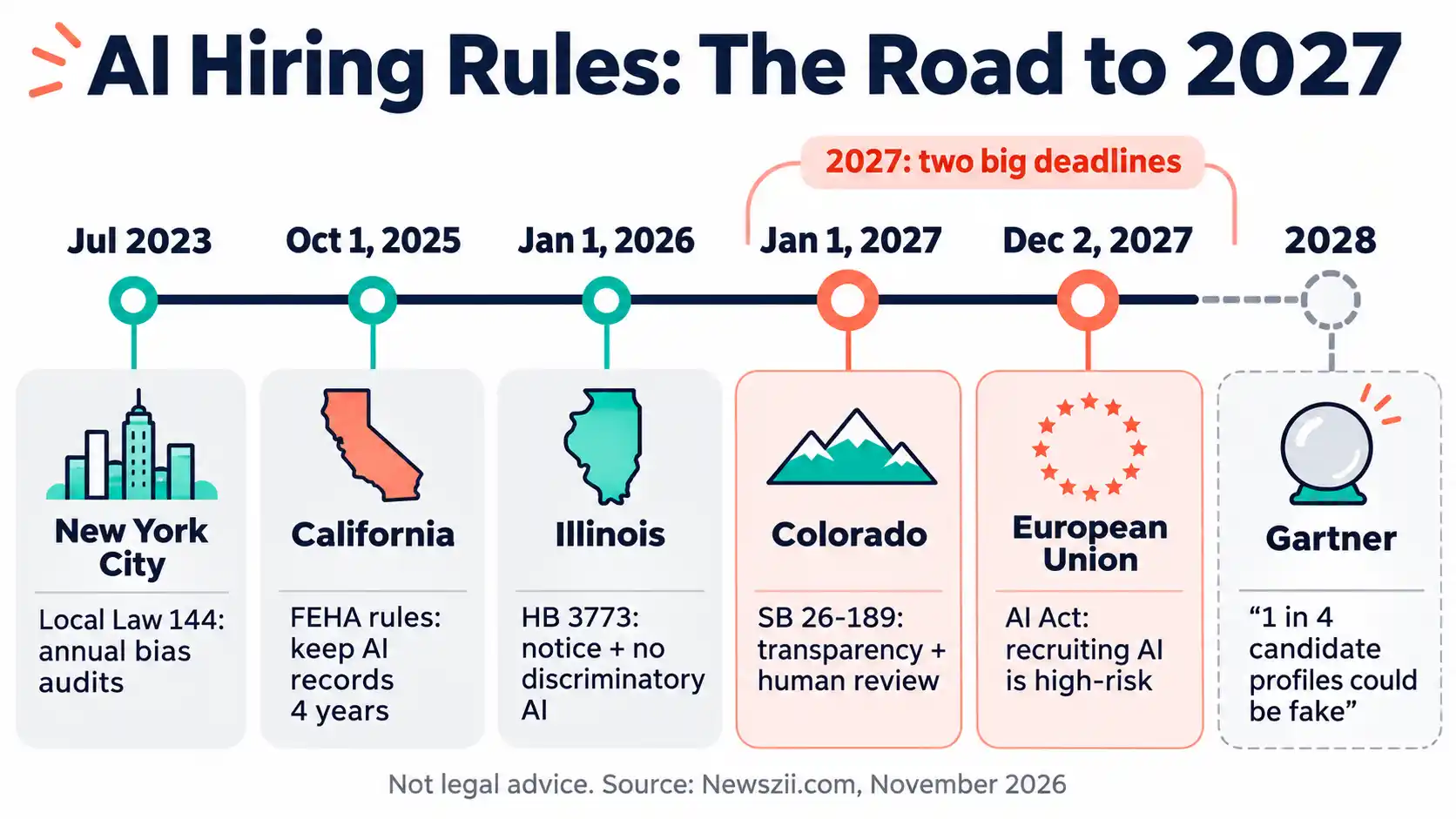
Hiring is one of the most regulated places to use AI, and the rules are multiplying. This is not legal advice, and you should talk to an employment lawyer about your own situation. But every recruiter should know these five rules and one lawsuit.
| Jurisdiction | Rule | In effect | What it asks of employers |
|---|---|---|---|
| New York City | Local Law 144 | Since July 2023 | Annual independent bias audits of automated hiring tools, plus candidate notices |
| California | Civil Rights Council rules under FEHA | October 1, 2025 | Anti-discrimination law applies to automated decision systems; keep AI records for four years |
| Illinois | HB 3773 (Human Rights Act amendment) | January 1, 2026 | Notify people when AI is used; no AI with a discriminatory effect; no zip codes as a proxy for protected groups |
| Colorado | SB 26-189 | January 1, 2027 | Transparency, notice, disclosure, recordkeeping, and human review of automated decisions |
| European Union | AI Act, as amended by Regulation (EU) 2026/1744 | December 2, 2027 (high-risk rules) | Recruiting AI is high-risk: risk management, human oversight, transparency |
New York City: bias audits
NYC's Local Law 144 has been in force since July 2023. If you use an automated employment decision tool to hire or promote people for NYC roles, you need an annual independent bias audit, a public summary of the results, and proper notice to candidates. A December 2025 audit by the New York State Comptroller found that the city had not built an effective enforcement system. Don't read that as permission to ignore the law. Enforcement gaps get closed.
Illinois: tell people, and don't discriminate
Illinois's HB 3773 took effect on January 1, 2026. It makes it a civil-rights violation to use AI that has the effect of discriminating against protected groups, to use zip codes as a stand-in for those groups, or to fail to tell employees and applicants that AI is being used. It applies to employers with even one employee in Illinois. Detailed rules from the state's Department of Human Rights were still postponed as of mid-2026.
California: keep your records
Since October 1, 2025, California's anti-discrimination law, FEHA, explicitly covers automated decision systems. Employers must keep AI-related records for four years. If your AI screens California applicants, your vendor contract should guarantee you can get that data.
Colorado: a rewritten law for 2027
Colorado passed the country's most ambitious AI law in 2024, then rewrote it before it ever took effect. On May 14, 2026, the governor signed SB 26-189, which repeals the old law and replaces it with a narrower one focused on transparency, notice, disclosure, recordkeeping, and human review. It takes effect on January 1, 2027.
The European Union: recruiting AI is high-risk
Under the EU AI Act, AI used for recruitment, candidate selection, promotion, termination, task allocation and performance monitoring counts as high-risk. In July 2026 the EU passed the Digital Omnibus, published as Regulation (EU) 2026/1744, which delayed the high-risk rules. They now apply from December 2, 2027, instead of August 2026. That is a delay, not a repeal. If you hire in Europe, use 2027 to get ready.
The lawsuit everyone in HR is watching: Mobley v. Workday
In this case, a job applicant named Derek Mobley alleges that Workday's AI screening tools discriminated against him and others based on age, race and disability. In June 2026, a federal judge let the plaintiffs add claims under California law. In September 2026, they asked the court for class certification. Workday denies the allegations and says its tools do not make hiring decisions, and that its customers keep full control of their hiring.
Whatever the outcome, the case has made one thing clear. Vendors and employers can both face questions about how AI screening works, so "the software decided" is not a defense anyone should plan on.
What changes for AI recruiting in 2027
If 2025 was the year recruiters experimented with AI, and 2026 was the year it became standard, 2027 looks like the year it gets held to account. Here is what to plan for.
1. AI agents move from pilot to the team roster
Korn Ferry's 12th annual Talent Acquisition Trends report, based on a survey of more than 1,600 talent leaders, found that 84% planned to use AI in 2026 and 52% planned to add autonomous AI agents to their teams. The tools in this guide are already shipping those agents: LinkedIn's Hiring Assistant 2, Workable's sourcing and screening agents, Juicebox's agents, and Metaview's sourcing agents. In 2027, the question shifts from "should we try an agent?" to "who on the team is responsible for what the agent does?"
2. Two big compliance dates arrive
Colorado's new AI law takes effect on January 1, 2027. The EU AI Act's high-risk rules for recruiting apply from December 2, 2027. Together they bookend the year. Expect more vendors to market "compliance-ready" features, and expect buyers to ask harder questions about audit trails and explainability.
3. Transparency becomes a hiring advantage
Candidates are not anti-AI. They are anti-secrecy. The companies that clearly explain where AI is used, what it scores, and how a human reviews the result will have an easier time hiring. The ones that hide it will keep losing candidates halfway through the process.
4. Fraud checks become a normal hiring step
With Gartner forecasting that one in four candidate profiles will be fake by 2028, identity checks are likely to become as routine as background checks. If your process has no identity step today, 2027 is the year to add one.
5. Humans keep the final say
This one is not a prediction so much as a constant. Aptitude Research found that 85% of recruiters insist on keeping final decision-making authority over AI recommendations. The laws above point the same way. The winning setup for 2027 is AI doing the heavy lifting and a person making the call.
7 mistakes to avoid with AI recruiting tools
Most AI recruiting failures are not technology failures. They are process failures that the technology makes faster. These are the ones I see most often.
1. Buying a platform before fixing the process. If your job descriptions are vague and your interview stages are messy, AI will simply produce vague shortlists faster. Write a clear scorecard for the role first, then let the tool work from it.
2. Letting AI reject people without a human check. Auto-rejecting at scale is tempting when you have 800 applicants. It is also where most legal and fairness risk lives. Keep a human in the loop for rejections, at least until you have tested how the tool behaves.
3. Hiding AI from candidates. This is now a legal issue in places like Illinois and NYC, not just a courtesy. It also costs you candidates. Greenhouse found that 38% of job seekers have walked away from a hiring process because it included an AI interview.
4. Ignoring the trust gap. Hiring teams and candidates see AI very differently. In Greenhouse's 2025 research, 70% of U.S. hiring managers said AI helps them make faster, better hiring decisions, but only 8% of job seekers believe AI screening makes hiring fairer. Gartner found only 26% of applicants trust AI to evaluate them fairly. Design your process for the candidate's view, not just yours.
5. Not asking vendors how the AI decides. If a vendor cannot explain in plain language why a candidate scored high or low, you will not be able to explain it to a regulator or a court either. Ask for documentation, audit support and bias-testing results in writing.
6. Underestimating usage costs. Credits, agents and add-ons can double a bill. Model your real volume, how many candidates screened and sourced per month, before you sign an annual contract.
7. Measuring nothing. Pick two or three numbers before you start, such as time-to-shortlist, response rate to outreach, and hiring manager satisfaction. Check them after 90 days. Keep what works and cancel what doesn't.
Frequently asked questions about AI tools for recruiting
What is the best AI tool for recruiting?
There is no single best tool, because recruiting is several jobs. For sourcing on LinkedIn, Hiring Assistant is the strongest fit. For open-web sourcing on a budget, try Juicebox. For an affordable ATS, Manatal is hard to beat, while Workable and Ashby suit teams wanting more built in. For interview notes, Metaview is the specialist pick.
Is there a free AI recruiting tool?
Yes, with limits. Metaview's Notetaker has a free plan with 25 calls a month. Juicebox offers a free plan with limited searches. Gem gives companies under 30 employees its All-in-One platform free for six months. General AI assistants like ChatGPT and Claude also have free tiers that help with job descriptions and outreach drafts.
How many companies use AI in recruiting?
It depends on how you measure it. SHRM's State of AI in HR 2026, based on 1,908 HR professionals, found recruiting is the top AI use case in HR at 27% of organizations. Resume Genius's 2026 survey of 1,000 U.S. hiring managers found 79% say their companies use AI somewhere in hiring. Either way, recruiting is where most HR teams start with AI.
Can AI replace recruiters?
No. AI is very good at volume tasks like searching, sorting, scheduling and note-taking. It is not good at judging motivation, selling a role to a hesitant candidate, or reading a hiring manager's real priorities. Most recruiters want to keep the final call, and laws in places like Colorado and the EU are built around human review.
Is it legal to use AI to screen resumes?
Generally yes, but with conditions that depend on where you hire. NYC requires annual bias audits. Illinois requires notice and bans discriminatory AI use. California requires four years of AI-related records. The EU treats recruiting AI as high-risk from December 2, 2027. Talk to an employment lawyer before you automate any rejection step.
How do recruiters spot fake or AI-generated applicants?
Use a mix of software and process. Fraud detection tools such as Greenhouse Real Talent help, but the basics matter most: verify identity before the final round, hold at least one live interview with cameras on, call references through official company numbers, and watch for mismatches between the resume, profile and person.
How much do AI recruiting tools cost?
Anywhere from free to enterprise contracts. Published starting prices include Manatal at $15 per user per month billed yearly, Metaview Pro at $60 per user per month, Juicebox at $99 per seat per month billed annually, Workable at $299 per month and Ashby at $400 per month. LinkedIn Hiring Assistant and Paradox are quote-only.
Final thoughts
The best AI recruiting setup is rarely the most expensive one. It is the one that removes the slowest step in your hiring without removing the human judgment that makes hiring work.
Start small. Pick the single task that eats the most of your team's week, whether that is sourcing, scheduling or writing up interviews, and trial one tool for it for 90 days. Measure the result. Tell candidates where AI is involved. Keep a person making the final decision. Do those things, and you will be well ahead of most teams heading into 2027.

Founder, Newszii.com | CEO, NICHE Digital Media
Praveen Panjiar brings nearly two decades of experience in digital media, web & mobile asset development, and growth strategies.
He built Newszii from the ground up into a global platform spanning tech, business, finance, and lifestyle, and has since developed a strong track record of building, scaling, and optimizing digital properties with a sharp focus on user growth, content strategy, and emerging technology trends.