Published on August 10th, 2026
AI video tools can generate impressive clips, but describing a visual idea in a way that produces consistent results is still difficult. A reference video helps because it shows the desired look directly.
The challenge is converting that reference into instructions a generation model can understand without merely writing a vague sentence such as “make it cinematic.”
A useful video prompt is closer to a compact production brief. It separates what happens in the scene from how the scene is photographed, paced, lit, and edited.
This same structured approach can also be applied to broader AI creative workflows. This approach makes the prompt easier to reuse across different models and easier to refine when the first result misses the target.
Start With The Subject And Action
Begin with the most literal description possible. Identify the main subject, the action, and the environment. Avoid style words during this first pass.
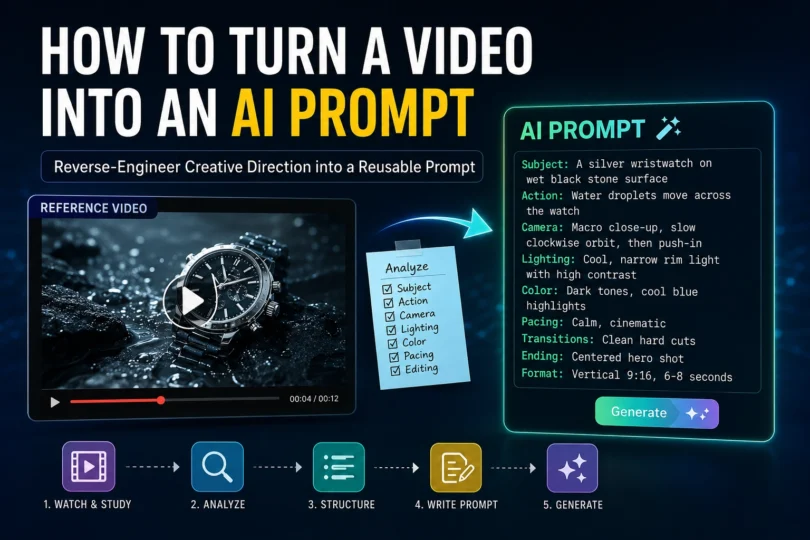
For example, instead of starting with “a dramatic luxury commercial,” write: “A silver wristwatch rests on a dark stone surface while drops of water slide across the case.” This sentence establishes the elements that must remain recognizable even if the camera style changes later.
When several actions occur, write them in chronological order. A prompt that says a chef slices bread, adds sauce, and presents the finished dish gives the model a clearer sequence than a list of disconnected objects.
Describe The Shot, Not Just The Scene
The same subject can feel completely different in a wide shot, a macro close-up, or an overhead view. Record the framing used in the reference and note when it changes.
Useful shot descriptions include extreme close-up, medium shot, wide establishing shot, over-the-shoulder view, top-down view, and low-angle shot. If the reference changes framing, describe the progression: “The clip opens with a wide shot, cuts to a close-up of the hands, then ends on a centered product hero shot.”
This information often has more influence on the result than broad adjectives such as professional or beautiful.
Translate Camera Movement Into Plain Language
Camera motion should explain both direction and purpose. “Camera moves” is too general. Specify whether it slowly pushes toward the subject, tracks alongside it, circles around it, tilts upward, or remains locked off.
Speed matters as well. A slow push-in builds anticipation, while a fast handheld move creates urgency. If the movement follows an action, say so directly: “The camera tracks the cyclist from the side while maintaining the rider in the center of the frame.”
Some references use simulated movement created in editing rather than physical camera motion. A digital zoom, speed ramp, or rapid sequence of cuts should be identified as an editing choice instead of a camera instruction.
Capture Lighting And Color As Observable Details
It is tempting to describe lighting only with mood words. A more reliable prompt names the visible source, direction, contrast, and color.
For a warm indoor scene, note that soft window light enters from the left, shadows remain gentle, and amber practical lights appear in the background. For a product shot, describe the narrow rim light around the object, the dark background, and the controlled reflections on the surface.
Color should be equally concrete. “Muted green and brown palette with low saturation” gives clearer guidance than “natural colors.” If the reference changes color across scenes, mention the transition.
Map Pacing And Editing
A video prompt should indicate how the clip unfolds over time. Count the main beats and estimate their order. You do not need frame-accurate timestamps, but a simple structure helps: opening detail, reveal, action, and final hold.
Understanding these editing choices is particularly useful when turning an existing reference into an AI video prompt. For creators who also want to refine the generated footage manually, video editing software can be used to adjust timing, transitions and pacing.
If you’re still learning how pacing, transitions and visual storytelling work, video editing courses can help build the underlying skills needed to analyze reference footage. For short social clips, the first second often contains the strongest visual hook, so include it explicitly.
Build The Prompt In Layers
This layered approach can also be useful when developing AI prompts for creative concepts, because it separates the visual idea from the execution details. After analyzing the reference, combine the observations in a consistent order:
- Subject and environment.
- Main action or chronological sequence.
- Framing and camera movement.
- Lighting and color palette.
- Pacing, transitions, and ending.
- Technical preferences such as aspect ratio or duration.
A resulting prompt might read: “A silver wristwatch on wet black stone, macro close-up as water droplets move across the polished case. The camera performs a slow clockwise orbit, then pushes toward the dial. Narrow cool rim lighting outlines the watch against a dark background, with crisp reflections and high contrast. Three measured shots connected by clean hard cuts, ending on a centered hero frame, vertical 9:16 composition.”
Test One Variable At A Time
The first generation is a diagnostic result, not a final answer. Compare it with the reference and identify the largest mismatch. If the framing is wrong, revise the shot instruction without rewriting the lighting. If the pace feels slow, adjust the beat structure without changing the subject.
Changing one variable at a time makes it easier to understand which words influence the model. The same principle applies when using ChatGPT for prompt-based workflows, where precise instructions can produce more consistent results.
It also produces a reusable prompt template rather than a one-off block of text, which is useful when building ChatGPT prompts for creative workflows and other repeatable AI-assisted processes.
Respect The Reference Without Copying It
Reference analysis should focus on transferable production choices: shot type, motion, light, rhythm, and composition. Avoid asking a model to recreate protected characters, logos, or a creator’s work shot for shot. The goal is to learn the visual grammar and apply it to an original subject.
With a structured process, the same approach can be extended to AI image prompts, where composition, lighting, subject placement and visual style also need to be described precisely.
Frequently Asked Questions
What is a video-to-prompt workflow?
A video-to-prompt workflow is a process for analyzing a reference video and converting its visual characteristics into structured instructions for an AI video generation model. It typically covers the subject, action, camera, lighting, composition, pacing, transitions, and technical settings.
How do you turn a video into an AI prompt?
Start by identifying the video’s subject, action, environment, framing, camera movement, lighting, color palette, pacing and editing. Organize these observations into a structured prompt that describes what happens and how the scene is filmed.
What information should an AI video prompt include?
A useful AI video prompt can include the subject and environment, chronological action, shot type, camera movement, lighting, color palette, pacing, transitions, ending, aspect ratio and desired duration.
Can you create an AI prompt from a reference video?
Yes. A reference video can be analyzed for transferable creative elements such as composition, camera movement, lighting, shot progression and editing rhythm. These observations can then be converted into a reusable AI video prompt.
What is the best way to analyze a reference video for prompting?
Break the video into individual visual components rather than describing it with broad words such as “cinematic” or “professional.” Identify the subject, action, framing, camera movement, lighting, colors, pacing and transitions separately.
How can I make AI video prompts more consistent?
Use a repeatable prompt structure and change one variable at a time when refining the result. Keeping the subject and action consistent while adjusting camera movement, lighting or pacing makes it easier to determine which instructions affect the generated video.
Can a video-to-prompt tool recreate a video exactly?
A video-to-prompt workflow is better used to extract visual direction rather than reproduce a reference video shot for shot. The goal is to identify transferable creative choices and apply them to an original subject or concept.
What is the difference between a video prompt and a text-to-video prompt?
A text-to-video prompt describes a scene directly for a video-generation model. A video-to-prompt workflow starts with an existing reference video and converts its visual characteristics into structured text instructions that can then be adapted for video generation.
What camera details should be included in an AI video prompt?
Describe the shot type and movement specifically. For example, you can use terms such as macro close-up, wide shot, overhead view, slow push-in, tracking shot, orbit, tilt or locked-off camera. Also explain how the camera movement relates to the subject.
How can I convert a reference video into a reusable AI prompt?
Analyze the reference in layers: subject and environment, action, framing, camera movement, lighting, color, pacing, transitions and technical settings. Combine those observations into a consistent prompt template that can be adapted to different subjects and AI video models.

PixMind Team creates practical AI creative workflows that help creators turn ideas into production-ready content. Its Video to Prompt tool analyzes reference footage and transforms visual direction—including subject, camera movement, lighting, composition, and pacing—into structured, reusable AI prompts. Try the PixMind Video to Prompt tool